FlowRunner vs Make
FlowRunner vs Make: FlowRunner does everything Make does and adds native AI-agent orchestration with human oversight. Where FlowRunner wins, where Make still helps, how to choose.
TL;DR
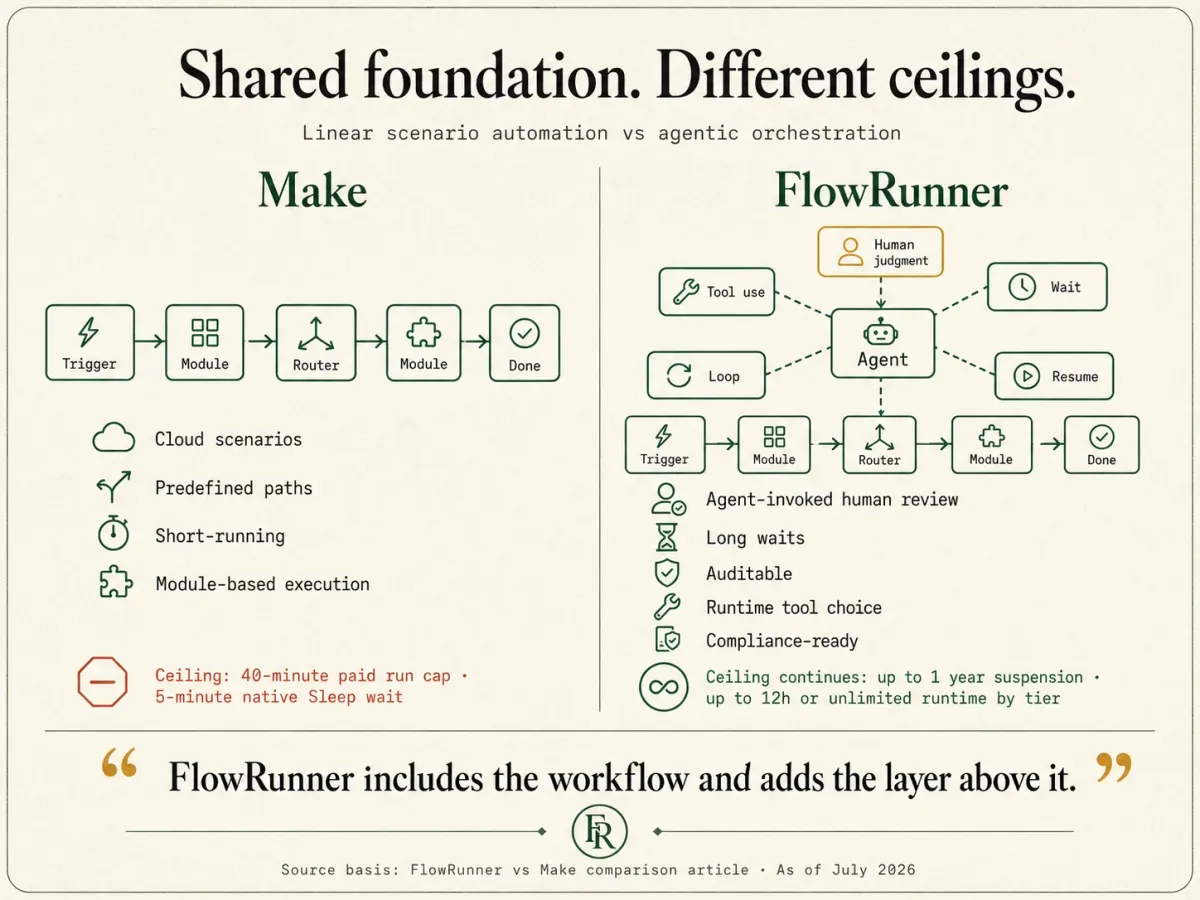
- Start with what these two share: the cloud, connector-based scenarios Make is known for, connecting apps, chaining modules from a trigger through a set of actions. FlowRunner builds all of that. FlowRunner is Orchestration as a Service, so it also runs the layer above: coordinating AI agents, governing multi-agent work, and keeping a human in control of the decisions that need judgment. Read them side by side and the shape is plain: Make does the linear scenario; FlowRunner does that and the agentic orchestration on top.
- This page is about AI-agent automation with human oversight. For that specific work the fit is not 50/50: FlowRunner is built for it, and Make is being stretched to reach it. We will still show you exactly where Make is the better call, because sometimes it is.
- FlowRunner is stronger where this reader lives: human-in-the-loop as a native agent tool on every tier, run-based billing that does not multiply with steps, waits up to a year, HIPAA with a BAA at mid-tier prices, and agent-tool metadata on the whole catalog.
- Make is stronger on raw connector count, low nominal AI entry price, per-module error handling, and community depth.
Who this comparison is for
You are building AI-agent automation where the agent has to do more than fire a linear scenario and finish. It needs to stop and pull in a person when the rules do not cleanly apply. It may run for a while. It may touch data an auditor will ask about later. You might be coming from Make or starting fresh; either way you are deciding which platform is built for that work.
The overlap is large: the linear, cloud scenario building Make is known for, FlowRunner does too. What FlowRunner adds on top is the agentic layer, agents that pause for a human, long-running orchestration, and built-in compliance. Where that added layer matters, FlowRunner is not merely also an option; it is the platform built for it. This page is about exactly where Make’s ceiling is and where FlowRunner keeps going: the agent that hits an automation exception it should not decide alone and has to hold the run open until a human answers.
What FlowRunner is good at
FlowRunner is built around one commitment: agents that know when to stop and ask a human for help. Everything else in the platform exists to make that commitment reliable at production scale.
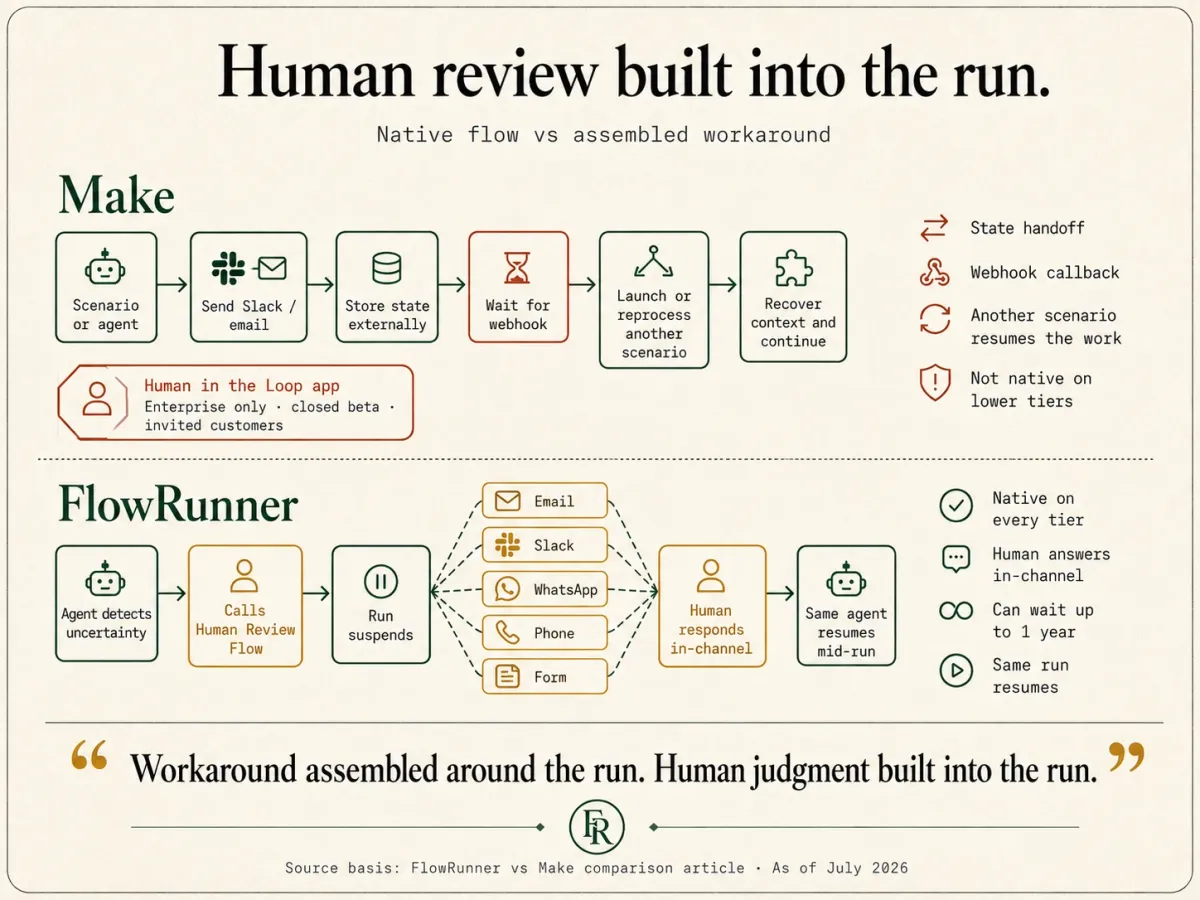
The mechanism is the part that linear tools do not have. In FlowRunner, an AI agent invokes one of your own Flows as a callable tool. When the agent calls that flow-tool, it suspends while the flow runs, and the flow can hold on an external callback until a human replies through email, Slack, WhatsApp, phone, or a Form, then resume mid-run. This is human-in-the-loop as an execution pattern: the agent pauses on its own judgment, assembles the context and the choices available, routes to a human on their preferred channel, and resumes the moment they answer. Some teams call it a digital andon cord, after the Toyota factory pull cord any worker can pull to stop the line when something needs a human eye.
FlowRunner is strong on:
- Human-in-the-loop as an agent tool, native on every tier. The agent decides at runtime to pull in a person, calls a human-review flow as a tool, and suspends until they reply in their own channel: email, Slack, WhatsApp, phone, or a Form. It can loop over a batch, ask a follow-up question, and escalate if no one answers. This is native starting at Growth ($45/month), not gated behind an Enterprise plan.
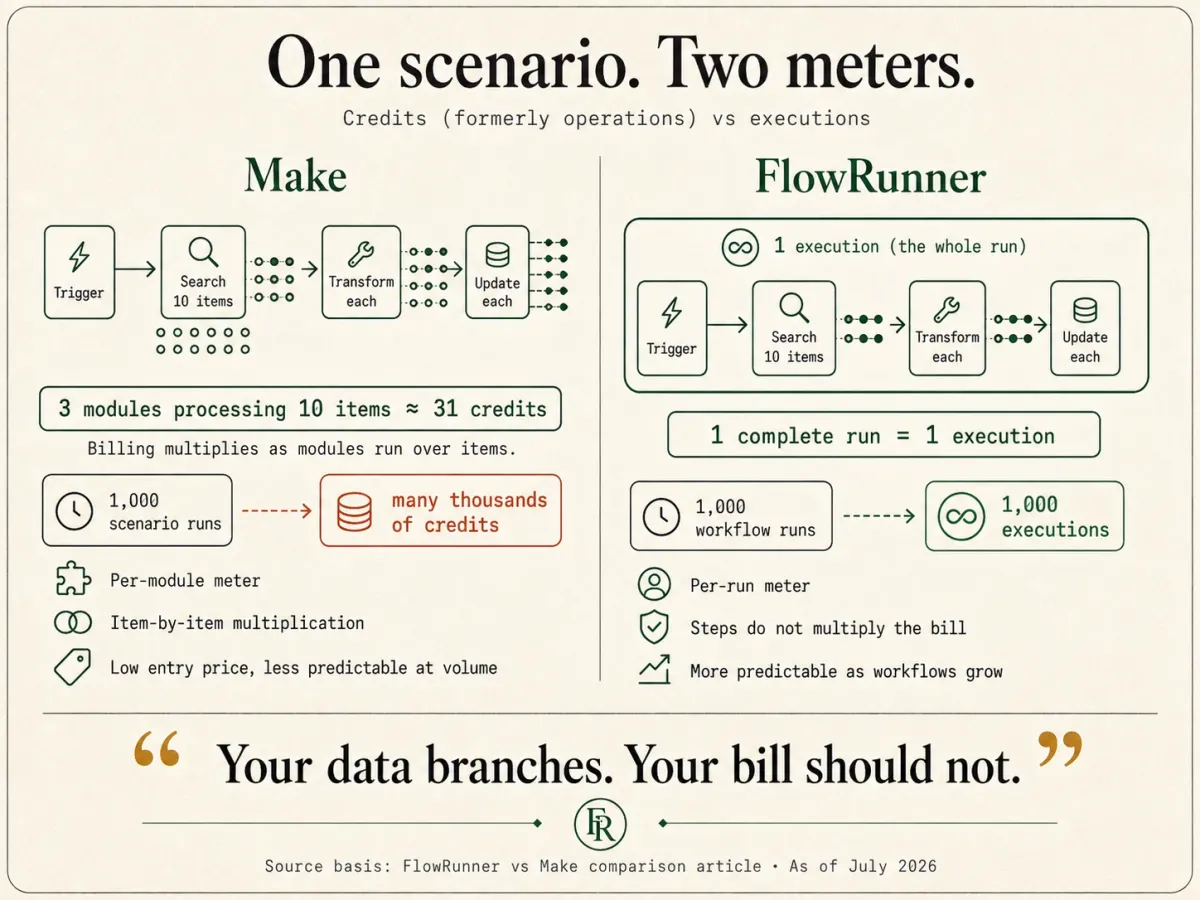
- Run-based billing. One complete workflow run, start to finish, is one execution. A 10-step run is one execution, not ten, and there is no per-step or per-operation multiplier. That removes the step-multiplication math that per-operation billing forces on builders.
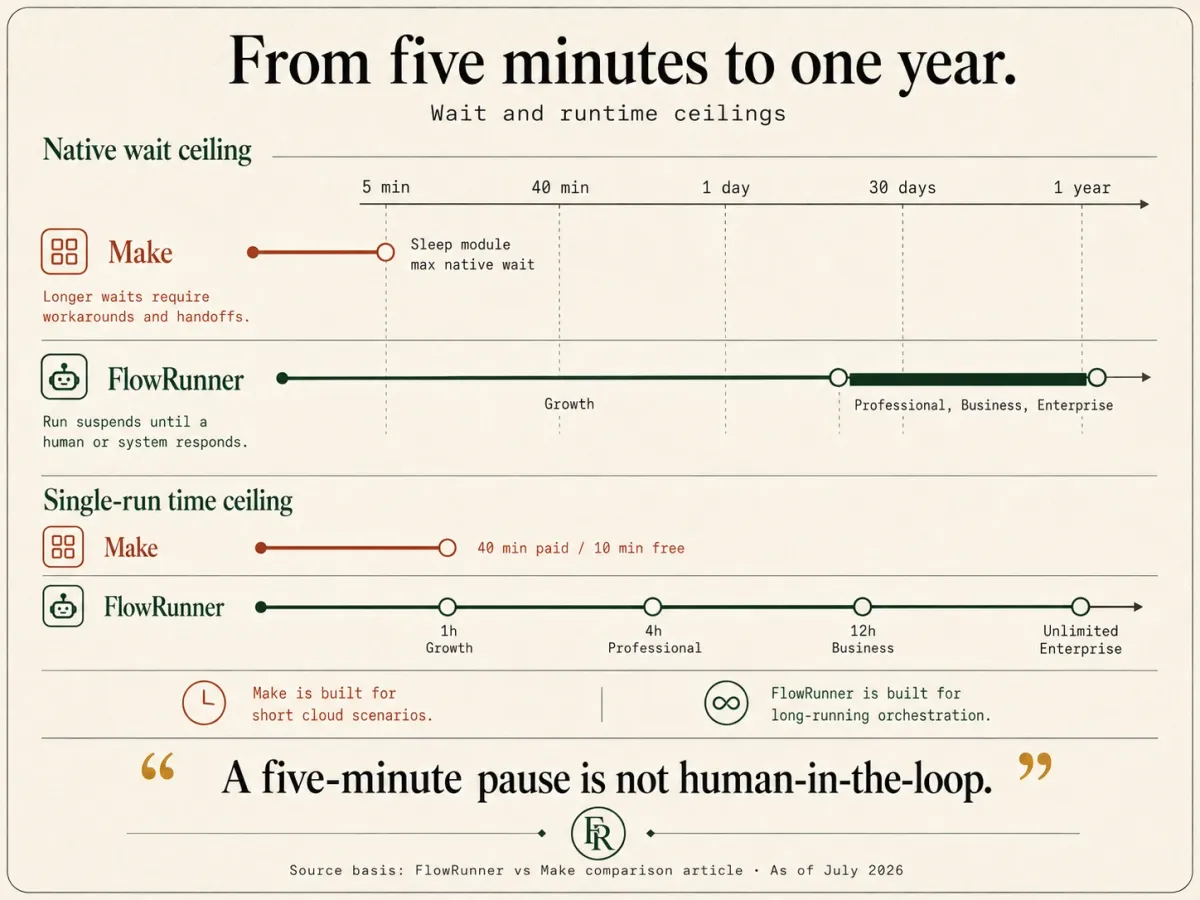
- Long waits and long runtimes. A run can suspend for up to 30 days on Growth and up to a year on Professional, Business, and Enterprise. Cumulative runtime runs to 1 hour on Growth, 4 hours on Professional, 12 hours on Business, and unlimited on Enterprise.
- Compliance at mid-tier prices. Audit trails, SLA tracking, and RBAC start at the Professional tier ($299/month). HIPAA support with a BAA is available. SSO/SAML and 90-day audit retention arrive at Business ($999/month).
- A verified, agent-ready catalog with depth. 400+ verified integrations and 8,000+ callable actions, each carrying the structured metadata an LLM needs to call it as a tool, all built and verified against each vendor’s official API. The catalog includes full-CRUD databases, vector stores, and deep ERPs, plus 75 integrations with no first-party Make equivalent, including X, Redis, Oracle, DynamoDB, and the major vector stores.
- BYOK with no markup. BYOK is a model where the customer supplies their own AI provider API credentials, pays providers directly for usage, and FlowRunner orchestrates calls across providers without taking a markup on inference. For a buyer who already has an Anthropic, Google, or Azure agreement, that means your own rates, your own data-processing terms, and a provider your security team already approved, rather than a new bundled inference vendor to review.
That pause-for-a-human moment is the load-bearing part of FlowRunner’s architecture. It is why agentic work that needs human judgment is native here rather than assembled from workarounds.
What Make is good at
Make (formerly Integromat) is a cloud scenario builder with a large connector directory. Make advertises 3,000+ integration apps, with roughly 3,543 listings live today.
Make is strong on:
- Connector directory size. The 3,000+ figure is real as a directory count. If you need to touch a long tail of services, Make probably lists something for it.
- Low nominal AI entry price. Make’s Core plan starts at $12/month (as of July 2026), and AI features reach down to the low paid tiers, with an effective AI entry point around $9 to $12/month on annual billing. That is a low bar to start building agents.
- Mature error directives. Make gives each module explicit error handling: Ignore, Resume, Commit, Rollback, and Break, plus an Incomplete Executions retry queue that parks a failed run for later reprocessing.
- Community and templates. A large community, an active forum, and a broad template gallery mean most problems have a documented answer.
- Track record. Make has been in market for years under two names and has handled a lot of production traffic. It is a known quantity.
Make is built for linear, cloud-based scenario work.
Where FlowRunner is stronger
For the agentic, human-oversight work this page is about, these are the differences that decide the platform:
- Wait and runtime ceilings. This is the single largest architectural gap. A Make scenario run is capped at 40 minutes on paid plans and 10 minutes on the free plan, and the Sleep module tops out at 300 seconds, which is 5 minutes. If a human does not answer within 5 minutes, a native Make wait cannot hold the run, and you fall back to webhooks and reprocessing scenarios. FlowRunner suspends a run for up to a year and runs for up to 12 hours or unlimited. For any workflow that waits on a person, this difference decides the platform.
- Human-in-the-loop native on every tier, as an agent tool. Make’s Human in the Loop app is available on the Enterprise plan only and is currently in closed beta, available only to invited customers. FlowRunner’s human-in-the-loop is native starting at Growth ($45/month), and it is architecturally different: the agent invokes a Flow as a callable tool and suspends until a human replies, rather than routing through a linear approval step. The pause condition is decided at runtime based on what the agent sees, and the context delivered to the human is assembled, not pasted.
- Run-based billing. Make bills per credit (formerly operations), where one module run over a batch of items burns many credits. A 3-module scenario over 10 items is roughly 31 operations. FlowRunner bills per execution, where the whole run is one unit. At volume, the difference between per-step and per-run billing is large and, more importantly, predictable. You are not re-budgeting every time you add a step to an agent.
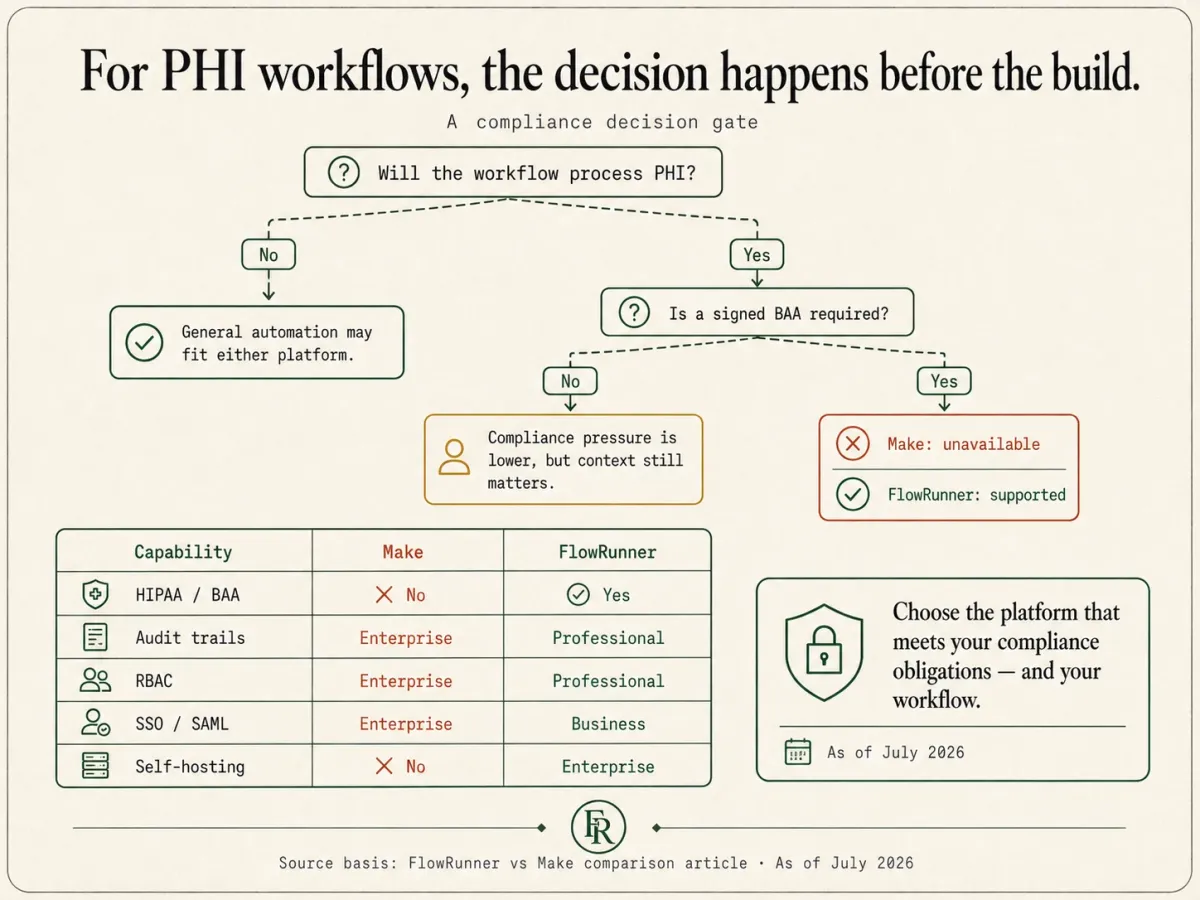
- Compliance at mid-tier prices. As of July 2026, Make does not sign a BAA on any plan, and its SSO, audit, and RBAC controls live on the Enterprise plan. FlowRunner ships HIPAA support with a BAA, plus audit trails, SLA tracking, and RBAC, starting at Professional ($299/month). For a regulated builder, this moves the compliant configuration down from Enterprise pricing to mid-tier.
- Agent-tool metadata on the whole catalog. Every one of FlowRunner’s 8,000+ actions carries typed parameters, descriptions, and sample output, so an agent can call it as a tool directly. Make and other workflow-first tools treat apps as steps first; FlowRunner treats every action as a tool an agent can reach for. FlowRunner also has 75 integrations with no first-party Make equivalent, including X, Redis, Oracle, DynamoDB, and the major vector stores.
- BYOK with no markup on inference. You supply your own AI provider keys and pay providers directly. FlowRunner does not resell inference. Your orchestration fee stays separate from your model spend.
Where Make is stronger
This is the section most comparison pages skip. Make wins on several dimensions that matter, and if these are your priorities, Make is the right call.
- Raw connector directory. Make advertises 3,000+ apps against FlowRunner’s 400+ verified integrations, and even after discounting the community-built, internal, discontinued, and long-tail regional connectors, Make’s verified first-party count (roughly 2,534 by an independent audit) is far larger. But the few hundred mainstream apps that most teams actually build on are the ones FlowRunner already covers, in depth (roughly 23 callable actions each). Where Make still wins outright is the long tail: if a specific regional or niche service is your single deciding factor, Make probably lists it and FlowRunner may not.
- Lower nominal AI entry price. Make’s Core plan at $12/month and its roughly $9 to $12/month annual AI entry point sit below FlowRunner Growth at $45/month, so on day one Make is cheaper to get into. The gap narrows with use: Make bills per operation, so a multi-step scenario multiplies the meter as it runs, while FlowRunner’s per-execution price stays flat as flows grow. Make is cheaper to start; the crossover arrives with volume.
- Per-module error directives. Make’s Ignore, Resume, Commit, Rollback, and Break directives, plus the Incomplete Executions retry queue, are more granular out of the box than FlowRunner’s Handle Error block and Repeat plus Wait pattern, which cover the common retry and rollback cases with less per-module wiring.
- Community size and templates. Make’s community, forum, and template gallery are larger than FlowRunner’s today, a real head start for self-service problem-solving. FlowRunner’s answer is a growing catalog of install-and-configure packages, but Make’s ecosystem is larger right now.
- Longer track record. Make has been in production for years under two names, and for a buyer who weights operational maturity heavily, that road matters. The tradeoff is that Make’s design center was set before agentic, human-in-the-loop work existed, which is the shape FlowRunner was built for.
If any of those outweigh the differences above, Make is the right call, and choosing it is defensible.
Feature comparison
| Dimension | FlowRunner | Make |
|---|---|---|
| Primary buyer | Builder plus operations team | Builder, cloud scenario author |
| Billing unit | Execution (one whole run) | Credit / operation (per module run) |
| Cost of a 10-step run x 1,000/mo | 1,000 executions | Many thousands of credits |
| Entry price | $45/mo Growth | $12/mo Core (as of Jul 2026) |
| AI entry point | $45/mo Growth (BYOK, no markup) | ~$9 to $12/mo (annual) |
| Unlimited users | Yes | Yes |
| Max single-run time | 1h Growth, 4h Pro, 12h Business, unlimited Enterprise | 40 min paid / 10 min free |
| Max native wait | 30 days Growth, up to 1 year other tiers | Sleep module 300s (5 min) |
| Human-in-the-loop | Native on every tier, agent-invoked callable tool | Enterprise-only, closed beta |
| HITL channels | Email, Slack, WhatsApp, phone, Form | Webhook / Slack workarounds; beta app |
| AI agents | Native (Agent Factory) | Yes (paid plans) |
| MCP | Consumes external MCP servers; exposes catalog as MCP server (shipping ~Aug 2026) | Native server and client |
| Integration directory | 400+ verified integrations, 8,000+ actions | 3,000+ listed apps (~3,543 live) |
| Agent-tool metadata on actions | On every action | Not the model |
| Error handling | Handle Error block + Repeat/Wait retry | Per-module directives + retry queue |
| HIPAA / BAA | HIPAA with BAA | No BAA on any plan (as of Jul 2026) |
| Audit trails / RBAC | Professional ($299) | Enterprise |
| SSO/SAML | Business ($999) | Enterprise |
| SOC 2 | Security program designed to meet common audit requirements | Type II |
| Self-hosting | Enterprise on-prem; Community Edition coming | No (cloud-only) |
| BYOK for AI | Yes, no markup on inference | Model-provider connectors |
Decision framework
Pick FlowRunner if:
- Your agents need to stop and pull in a human mid-run, and the human might take hours or days to answer.
- You are building AI agents where human-in-the-loop is the point, and you do not want it gated to an Enterprise closed beta.
- Predictable run-based billing matters more than a low sticker price, because your workflows run many times a month at many steps each.
- You handle regulated data and need HIPAA with a BAA, audit trails, and RBAC without paying Enterprise prices for them.
- You want every action in the catalog to be callable by an agent as a tool, with the metadata to make that reliable.
Pick Make if:
- Your scenarios are short, run in the cloud, and finish in well under 40 minutes with no mid-run human wait longer than 5 minutes.
- Raw connector directory breadth is your single most important criterion and you need a listing for a long tail of services today.
- You are price-sensitive on day one and the low Core entry price is the deciding factor.
- You want the granular per-module error directives (Ignore, Resume, Commit, Rollback, Break) and the Incomplete Executions retry queue as your reliability model.
- You do not handle protected health information and do not need a signed BAA.
If the answer is honestly mixed, run a real workflow on both before committing. The right platform is the one that fits the shape of your work, not the one with the larger directory.
Migration considerations
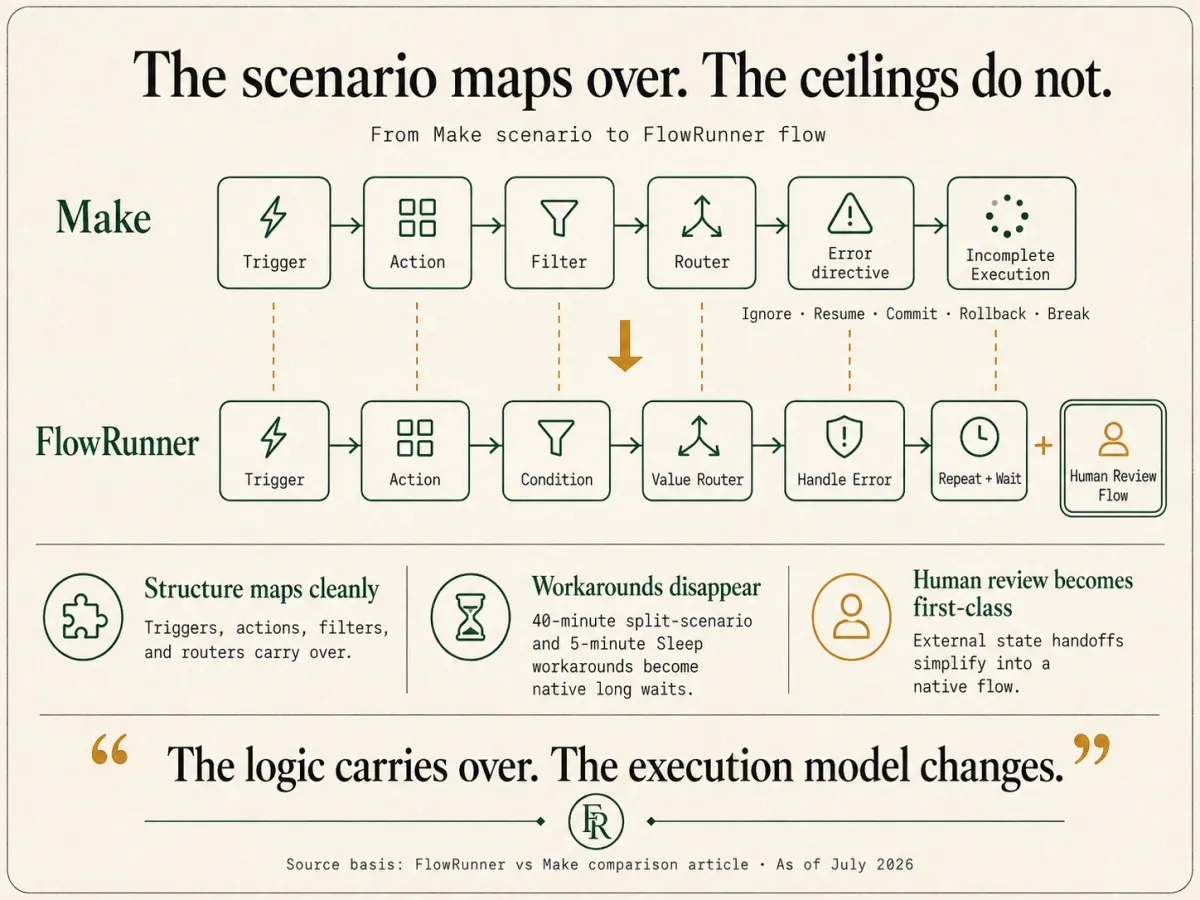
For builders already on Make and weighing a switch, the practical questions:
- What maps mechanically? Triggers, actions, and basic scenario structure map directly. A Make module usually has a FlowRunner action equivalent, and Make’s router and filter logic maps to FlowRunner’s Condition and Value Router blocks.
- What gets re-expressed? Make’s per-module error directives (Ignore, Resume, Commit, Rollback, Break) become FlowRunner’s Handle Error block and the Repeat plus Wait retry pattern. The Incomplete Executions retry queue maps to that same retry pattern. The logic carries over; the shape changes.
- What gets better in the process? Any scenario that fought the 40-minute run cap or the 5-minute Sleep ceiling stops being a workaround. Long waits and long runtimes become native, so the “split it into two scenarios that hand off” pattern disappears.
- Who runs the migration? The Midnight Flow consulting team runs migrations as part of FlowRunner Enterprise onboarding. Other tiers self-migrate with the platform’s import tools.
- How long does it take? A typical mid-market deployment with 20 to 50 scenarios migrates over 4 to 8 weeks with consulting support, or longer self-served, depending on how many scenarios relied on Make-specific error directives.
If you would like a free migration consultation, reach out via the Contact page and we will scope the engagement before any commitment.
Ready to automate this?
Start building your first workflow free. $100 in credits, no card required.