FlowRunner vs Zapier
FlowRunner vs Zapier: FlowRunner does everything Zapier does and adds native AI-agent orchestration with human oversight. Where FlowRunner wins, where Zapier still helps, how to choose.
TL;DR
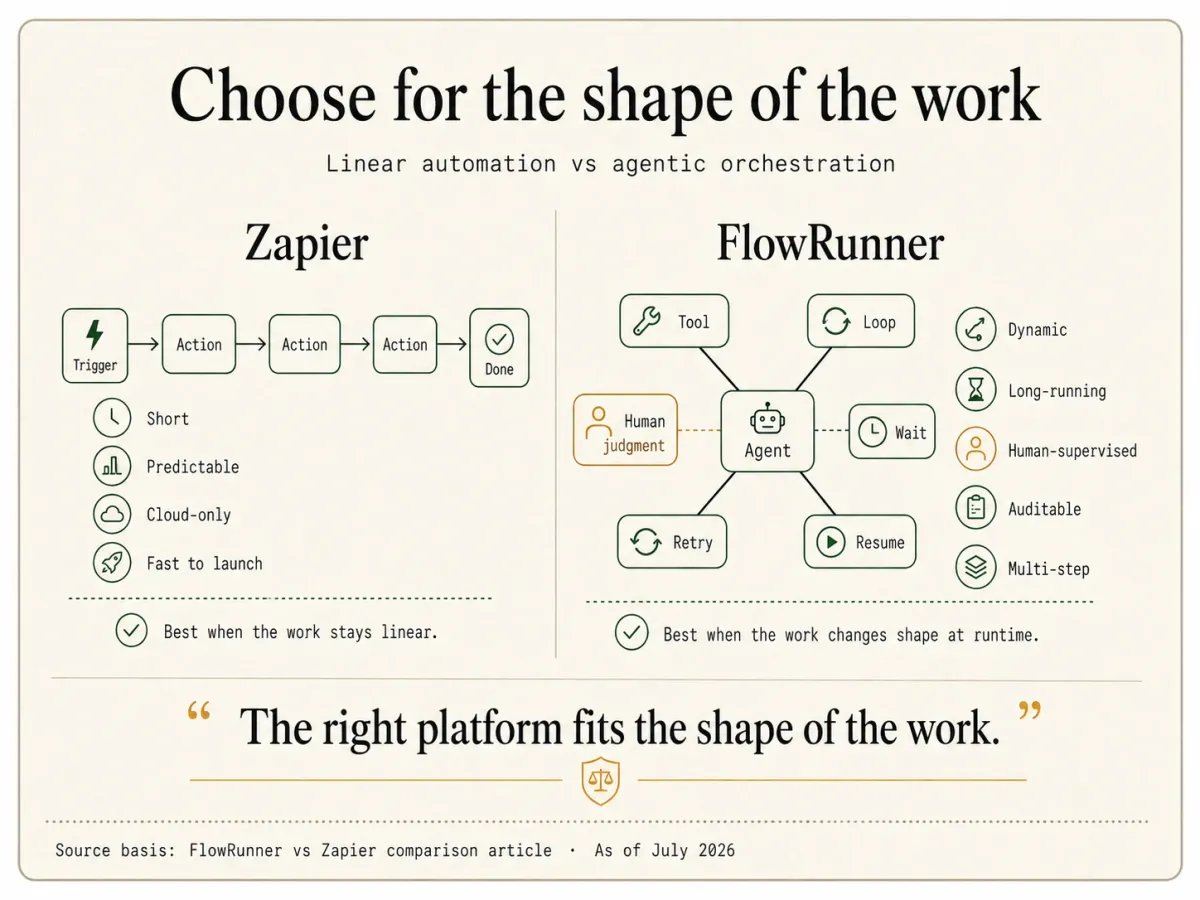
- Start with what these two share: the linear, app-to-app automation Zapier is known for, connecting apps, moving data from a trigger through a chain of actions, ready-made building blocks. FlowRunner does all of that. FlowRunner is Orchestration as a Service, so it also runs the layer above the linear flow: coordinating AI agents, governing multi-agent work, and keeping a human in control of the decisions that need judgment. Read them side by side and the shape is plain: Zapier does the linear slice; FlowRunner does that slice and the agentic orchestration on top.
- This page is about AI-agent automation with human oversight. For that specific work the fit is not 50/50: FlowRunner is built for it, and Zapier is being stretched to reach it. We will still show you exactly where Zapier is the better call, because sometimes it is.
- FlowRunner is stronger where this reader lives: human-in-the-loop as a native agent tool on every tier, run-based billing that does not multiply with steps, waits up to a year, HIPAA with a BAA at mid-tier prices, and real depth per integration.
- Zapier is stronger on raw connector breadth, its ready-made recipe ecosystem, a permanent free tier for tiny workloads, and market familiarity.
Who this comparison is for
You are building AI-agent automation where the agent has to do more than fire a linear sequence and finish. It needs to stop and pull in a person when the rules do not cleanly apply. It may run many steps thousands of times a month. It may touch data an auditor will ask about later. You might be coming from Zapier or starting fresh; either way you are deciding which platform is built for that work.
The overlap is large: the linear, app-to-app automation Zapier is known for, FlowRunner does too. What FlowRunner adds on top is the agentic layer, agents that pause for a human, long-running orchestration, and built-in compliance. Where that added layer matters, FlowRunner is not merely also an option; it is the platform built for it. This page is about exactly where Zapier’s ceiling is and where FlowRunner keeps going: the agent that hits an automation exception it should not decide alone and has to hold the run open until a human answers.
What FlowRunner is good at
FlowRunner is built around one commitment: agents that know when to stop and ask a human for help. Everything else in the platform exists to make that commitment reliable at production scale.
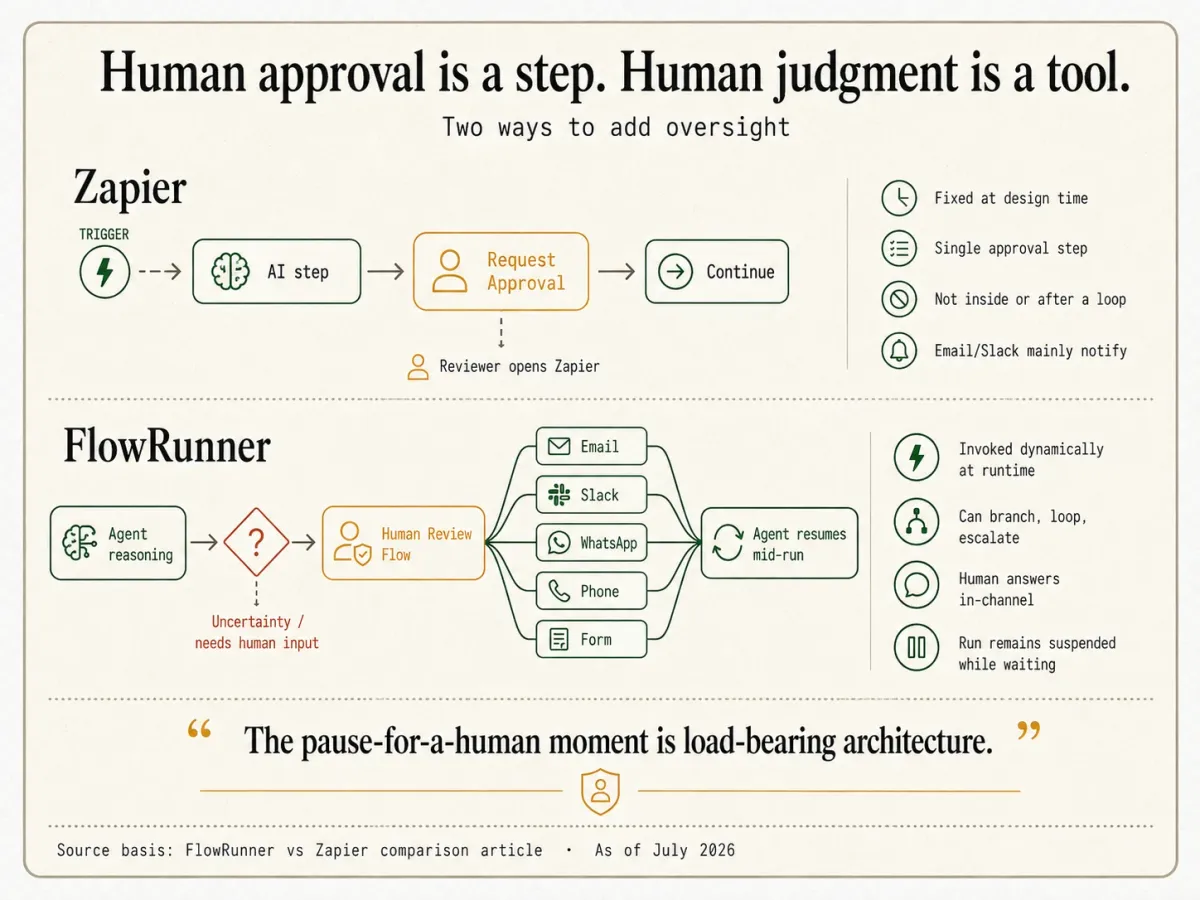
The mechanism is the part that linear tools do not have. In FlowRunner, an AI agent invokes one of your own Flows as a callable tool. When the agent calls that flow-tool, it suspends while the flow runs, and the flow can hold on an external callback until a human replies through email, Slack, WhatsApp, phone, or a Form, then resume mid-run. This is human-in-the-loop as an execution pattern: the agent pauses on its own judgment, assembles the context and the choices available, routes to a human on their preferred channel, and resumes the moment they answer. Some teams call it a digital andon cord, after the Toyota factory pull cord any worker can pull to stop the line when something needs a human eye.
FlowRunner is strong on:
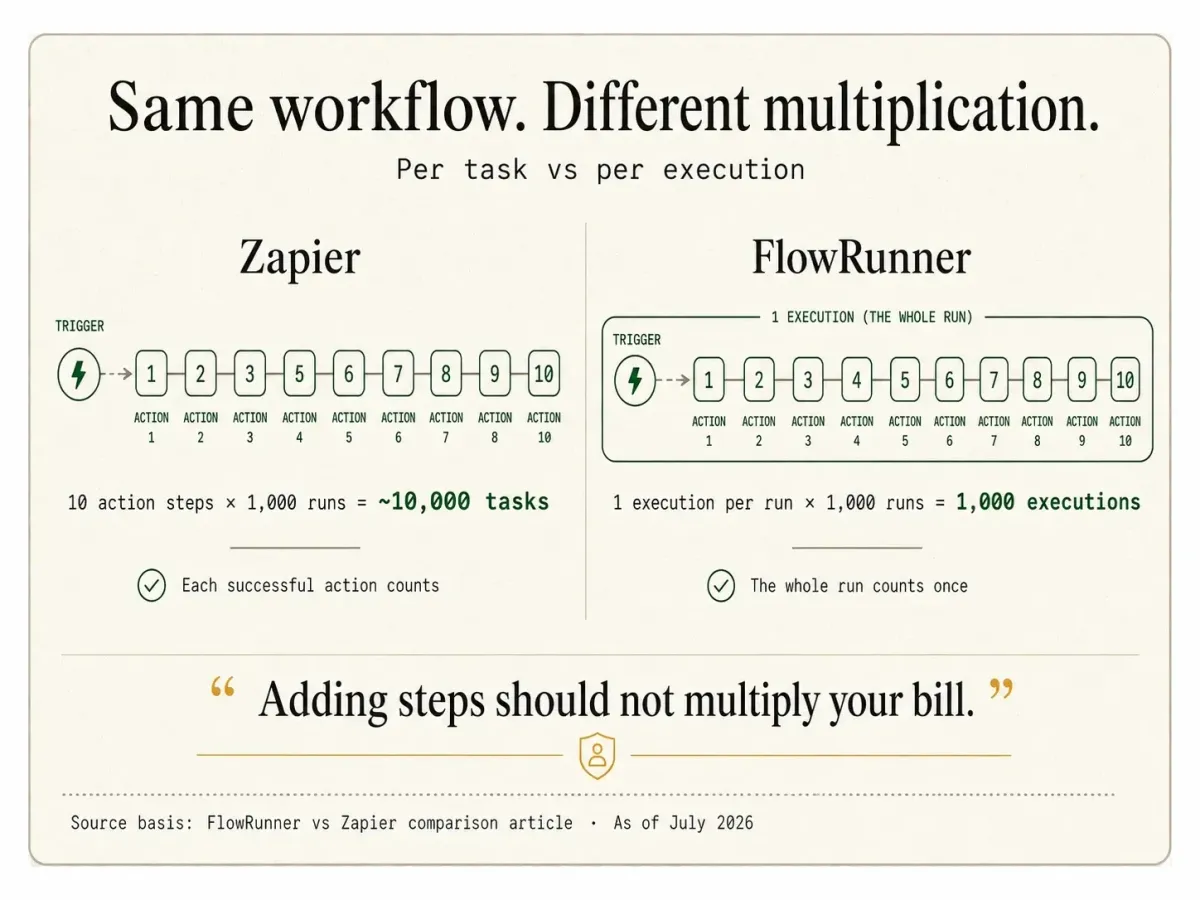
- Run-based billing. One complete workflow run, start to finish, is one execution. A 10-step run is one execution, not ten, and there is no per-step or per-tool-call multiplier. That removes the task math that per-task billing forces on builders.
- Long waits and long runtimes. A run can suspend for up to 30 days on Growth and up to a year on Professional, Business, and Enterprise. Cumulative runtime runs to 1 hour on Growth, 4 hours on Professional, 12 hours on Business, and unlimited on Enterprise.
- Compliance at mid-tier prices. Audit trails, SLA tracking, and RBAC start at the Professional tier ($299/month). HIPAA support with a BAA is available. SSO/SAML and 90-day audit retention arrive at Business ($999/month).
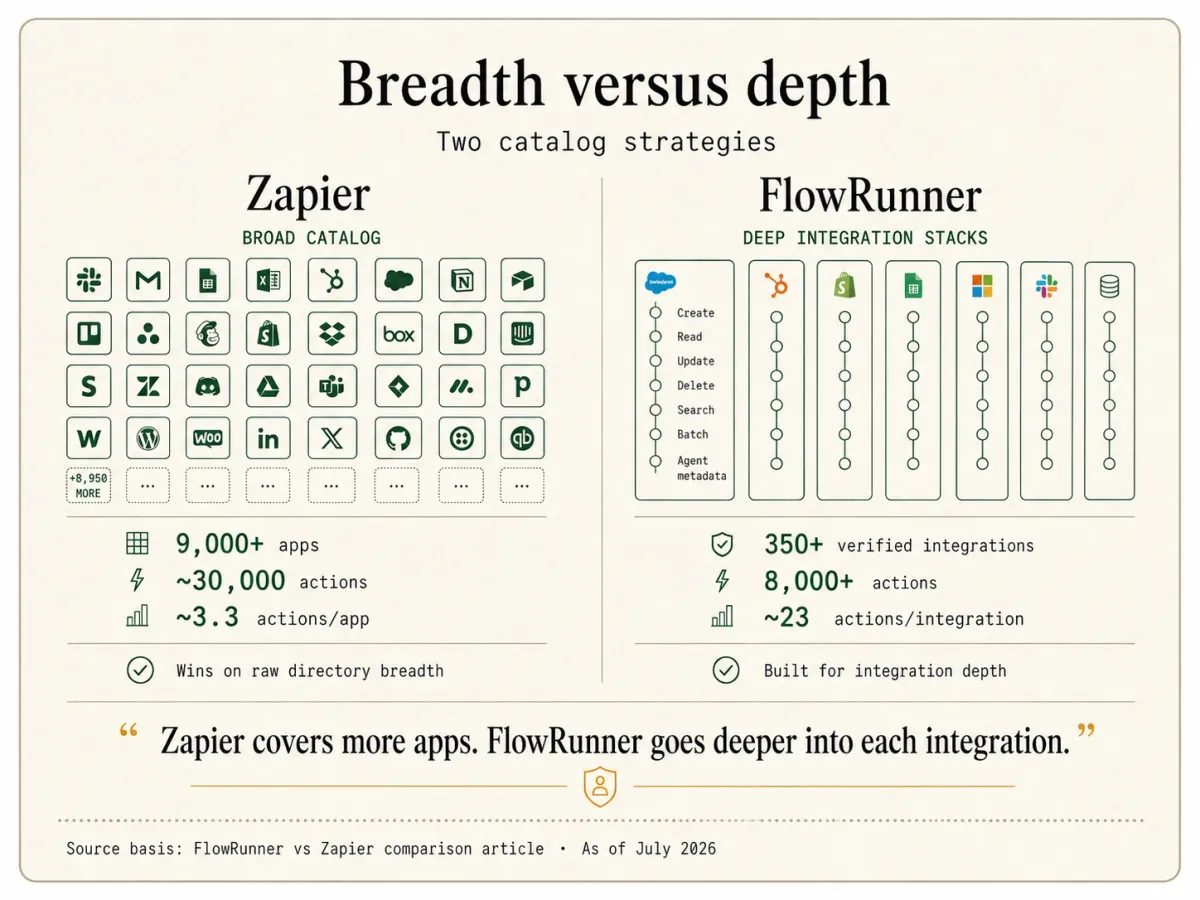
- A verified, agent-ready catalog with depth. 400+ verified integrations and 8,000+ callable actions (as of July 2026, and growing), roughly 23 actions per integration, each carrying the structured metadata an LLM needs to call it as a tool, all built and verified against each vendor’s official API.
- BYOK with no markup. BYOK is a model where the customer supplies their own AI provider API credentials, pays providers directly for usage, and FlowRunner orchestrates calls across providers without taking a markup on inference. For a buyer who already has an Anthropic, Google, or Azure agreement, that means your own rates, your own data-processing terms, and a provider your security team already approved, rather than a new bundled inference vendor to review.
That pause-for-a-human moment is the load-bearing part of FlowRunner’s architecture. It is why agentic work that needs human judgment is native here rather than assembled from workarounds.
What Zapier is good at
Zapier is the most widely used tool in the automation category. The step-by-step Zap editor, the largest connector directory anywhere, and the surrounding ecosystem mean almost any two apps you want to connect already have a documented recipe.
Zapier is strong on:
- Connector breadth, decisively. Zapier advertises 9,000+ apps, far more than FlowRunner or any direct competitor lists. If your deciding factor is whether a specific long-tail service is supported, Zapier almost certainly has it.
- The getting-started ecosystem. Thousands of pre-built recipes, a tutorial for practically every app pairing, and the Copilot natural-language builder give a newcomer a large library to start from.
- A permanent free tier for light use, and low entry. Zapier’s free plan runs 100 tasks a month with no time limit, which suits a small, steady automation but is used up quickly by a real recurring flow, and its paid Professional plan starts at $29.99/month monthly (around $19.99 on annual billing, as of July 2026, 750 tasks base).
- Market familiarity. Zapier is SOC 2 Type II certified, supports GDPR and CCPA, and is a known quantity in most procurement conversations. That is not a product capability, but it is real, and it lowers buying friction.
For linear automation that fits that shape, few tools match Zapier’s breadth and on-ramp.
Where FlowRunner is stronger
For the agentic, human-oversight work this page is about, these are the differences that decide the platform:
- Run-based billing. Zapier bills per task, where each successful action step is one task and an MCP tool call is two. A 10-step Zap run 1,000 times a month is roughly 10,000 tasks. FlowRunner bills per execution, where the whole run is one unit regardless of step count. At volume, the difference between per-step and per-run billing is large and, more importantly, predictable. You are not re-budgeting every time you add a step to an agent.
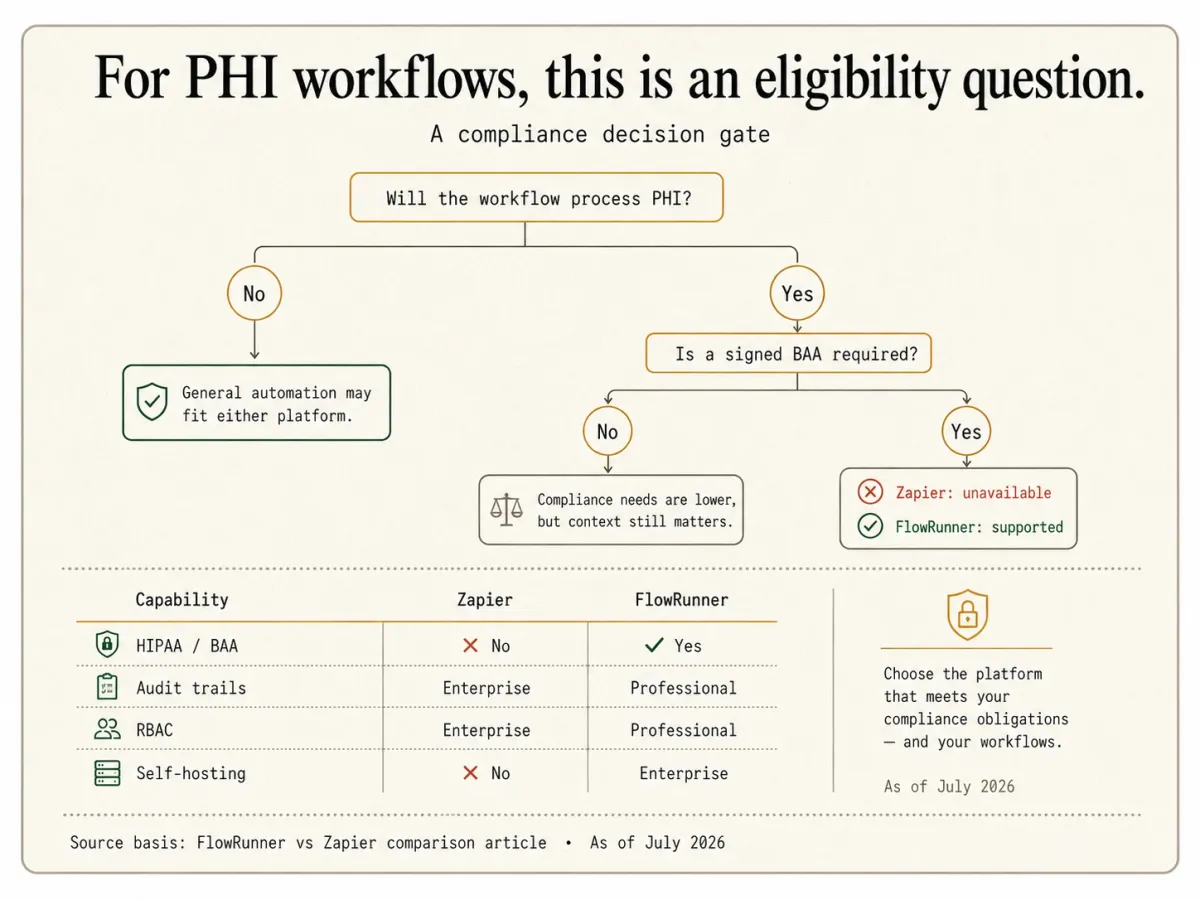
- Compliance at mid-tier prices. As of July 2026, Zapier signs no BAA on any plan and states that PHI is not supported on the platform, which is a hard blocker for healthcare work. FlowRunner ships HIPAA support with a BAA, plus audit trails, SLA tracking, and RBAC, starting at Professional ($299/month). For a regulated builder, this moves the compliant configuration down to mid-tier instead of ruling the platform out entirely.
- Wait and runtime ceilings. Zapier’s Delay action holds a run for a maximum of 30 days, and every Zap must start with a trigger. FlowRunner suspends a run for up to a year, runs for up to 12 hours or unlimited depending on tier, and a flow can begin with any block, not only a trigger. For work that waits on a person who might take days to answer, that ceiling difference decides the platform.
- Depth per integration, with agent-tool metadata. Zapier’s 9,000+ apps span roughly 30,000 actions, about 3.3 actions per app. FlowRunner’s 400+ integrations span 8,000+ actions, roughly 23 per integration, and every action carries typed parameters, descriptions, and sample output so an agent can call it as a tool directly. The catalog includes full-CRUD databases, vector stores, and deep ERPs where Zapier’s per-app depth is shallow. Zapier lists more apps; FlowRunner reaches deeper into each one and ships every action agent-ready.
- Unlimited users and self-hosting. FlowRunner includes unlimited users on every tier, where Zapier’s lower tiers are seat-limited (its Team plan is commonly cited at 25 seats). FlowRunner also offers an Enterprise on-prem deployment with a Community Edition coming, where Zapier is cloud-only with a US-based data path.
- Human-in-the-loop as an agent tool. Zapier’s Request Approval is a capable feature: the reviewer can approve, decline, or edit the submitted data, with reminders and an audit trail. But it is a fixed step you place after the agent, single-shot, unable to sit inside a loop, and the reviewer has to log into Zapier to answer. FlowRunner works differently. The agent itself decides at runtime to pull in a person, calls a human-review flow as a tool, and suspends until they reply in their own channel: email, Slack, WhatsApp, phone, or a Form. It can loop over a batch, ask a follow-up question, and escalate if no one answers. That is the difference between an approval step you place in advance and a human the agent decides to call at runtime.
Where Zapier is stronger
This is the section most comparison pages skip. Zapier wins on real dimensions, and if these are your priorities, Zapier is the right call.
- Raw connector breadth. Zapier advertises 9,000+ apps against FlowRunner’s 400+ verified integrations. But that headline number is mostly long tail: the few hundred apps the vast majority of teams actually use are the ones FlowRunner already covers, in depth (roughly 23 callable actions each versus Zapier’s ~3.3). Where Zapier still wins outright is the genuinely obscure or niche service; if a specific long-tail app is your single deciding factor, Zapier probably lists it and FlowRunner may not.
- The getting-started ecosystem. Zapier’s library of pre-built recipes, its tutorial for nearly every app pairing, and its Copilot builder get a builder starting cold to a first automation quickly, faster than FlowRunner does today. FlowRunner’s answer is a growing catalog of install-and-configure packages, but Zapier’s recipe ecosystem is larger right now, and for a newcomer that head start is real.
- A permanent free tier for tiny workloads. Zapier’s free plan runs 100 tasks a month with no time limit, so a tiny, steady automation can live at $0 forever, which FlowRunner does not match (its always-free Community Edition is still coming). For trialing real work, FlowRunner’s $100 signup credit goes further, about two months at full Growth volume (12,000 executions a month, no card required), where Zapier’s 100 free tasks are used up by a single small flow. So Zapier wins the permanent-tiny-free case; FlowRunner wins the real evaluation.
- Market familiarity. Zapier is one of the most recognized names in automation and clears procurement conversations easily. For a buyer who weights that familiarity and the broad surrounding surface (Interfaces, Tables, Chatbots), that recognition can matter.
- SSO from a mid-tier plan. Zapier includes SAML SSO on its Team plan ($103.50/month monthly, around $69 annual). If SSO is a hard requirement, you reach it without an Enterprise negotiation, whereas FlowRunner’s SSO/SAML arrives at Business ($999/month).
If any of those outweigh the differences above, Zapier is the right call, and choosing it is defensible.
Feature comparison
| Dimension | FlowRunner | Zapier |
|---|---|---|
| Primary buyer | Builder plus operations team | Builder, linear automation author |
| Billing unit | Execution (one whole run) | Task (per successful action step; MCP call = 2 tasks) |
| Cost of a 10-step run x 1,000/mo | 1,000 executions | ~10,000 tasks |
| Free to start | $100 credit, ~2 months at full Growth (no card) | 100 tasks/mo, permanent |
| Paid entry price | $45/mo Growth (12,000 executions) | $29.99/mo Professional (~$19.99 annual, 750 tasks) |
| AI entry point | $45/mo Growth (BYOK, no markup) | AI Agents (billed by activities) + Copilot |
| Unlimited users | Yes, every tier | Seat-limited on lower tiers (Team commonly cited at 25) |
| Max native wait | 30 days Growth, up to 1 year other tiers | Delay action 30 days |
| Max single-run time | 1h Growth, 4h Pro, 12h Business, unlimited Enterprise | Not a fixed run cap; per-Zap 100-step limit |
| Human-in-the-loop | Native every tier; agent-invoked callable tool; can loop, branch, escalate | Request Approval (Pro+); self-approve on Pro; single-shot; first responder only; not in loops |
| HITL reviewer experience | Reply in-channel: email, Slack, WhatsApp, phone, Form | Email/Slack notify only; reviewer logs into Zapier to answer |
| Start block | Any block (trigger, action, condition, loop) | Trigger required |
| AI agents | Native (Agent Factory) | Yes (native Agents + Copilot builder) |
| MCP | Consumes external MCP servers; exposes catalog as MCP server (shipping ~Aug 2026) | Native server (~30,000 actions; 2 tasks/call) |
| Integration directory | 400+ verified integrations, 8,000+ actions (~23/integration) | 9,000+ apps (~30,000 actions, ~3.3/app) |
| Agent-tool metadata on actions | On every action | Not the model |
| Retry | Handle Error block + Repeat/Wait retry | Autoreplay, Pro+, up to 5 tries (5m/30m/1h/3h/6h) |
| HIPAA / BAA | HIPAA with BAA | No BAA on any plan; not HIPAA-eligible (as of Jul 2026) |
| Audit trails / RBAC | Professional ($299) | Enterprise |
| SSO/SAML | Business ($999) | Team plan |
| SOC 2 | Security program designed to meet common audit requirements | Type II |
| Self-hosting | Enterprise on-prem; Community Edition coming | No (cloud-only, US data path) |
| BYOK for AI | Yes, no markup on inference | Bundled inference (AI by Zapier) |
Decision framework
Pick FlowRunner if:
- Your agents need to stop and pull in a human mid-run, and the human might take hours or days to answer, not seconds.
- You are building AI agents where human-in-the-loop is the point, and you do not want it limited to a self-approve-only step that cannot run inside a loop.
- Predictable run-based billing matters more than a low sticker price, because your workflows run many steps many times a month and per-task math is hard to budget.
- You handle regulated data and need HIPAA with a BAA, audit trails, and RBAC, which Zapier cannot provide at any price.
- You want every action in the catalog callable by an agent as a tool, with the depth (full-CRUD databases, vector stores, deep ERPs) and the metadata to make that reliable.
Pick Zapier if:
- Your automations are short, linear, run in the cloud, and never need a human to weigh in mid-run for longer than a quick self-approval.
- Raw connector breadth is your single most important criterion, and you need a listing for a specific long-tail service today.
- You want a fast first build, and Zapier’s library of pre-built recipes and per-pairing tutorials is the on-ramp you value.
- Your workload is tiny and permanent, under 100 tasks a month, so Zapier’s always-free tier covers it indefinitely.
- You need SAML SSO from a mid-tier plan and do not handle protected health information.
If the answer is honestly mixed, run a real workflow on both before committing. The right platform is the one that fits the shape of your work, not the one with the larger app directory.
Migration considerations
For builders already on Zapier and weighing a switch, the practical questions:
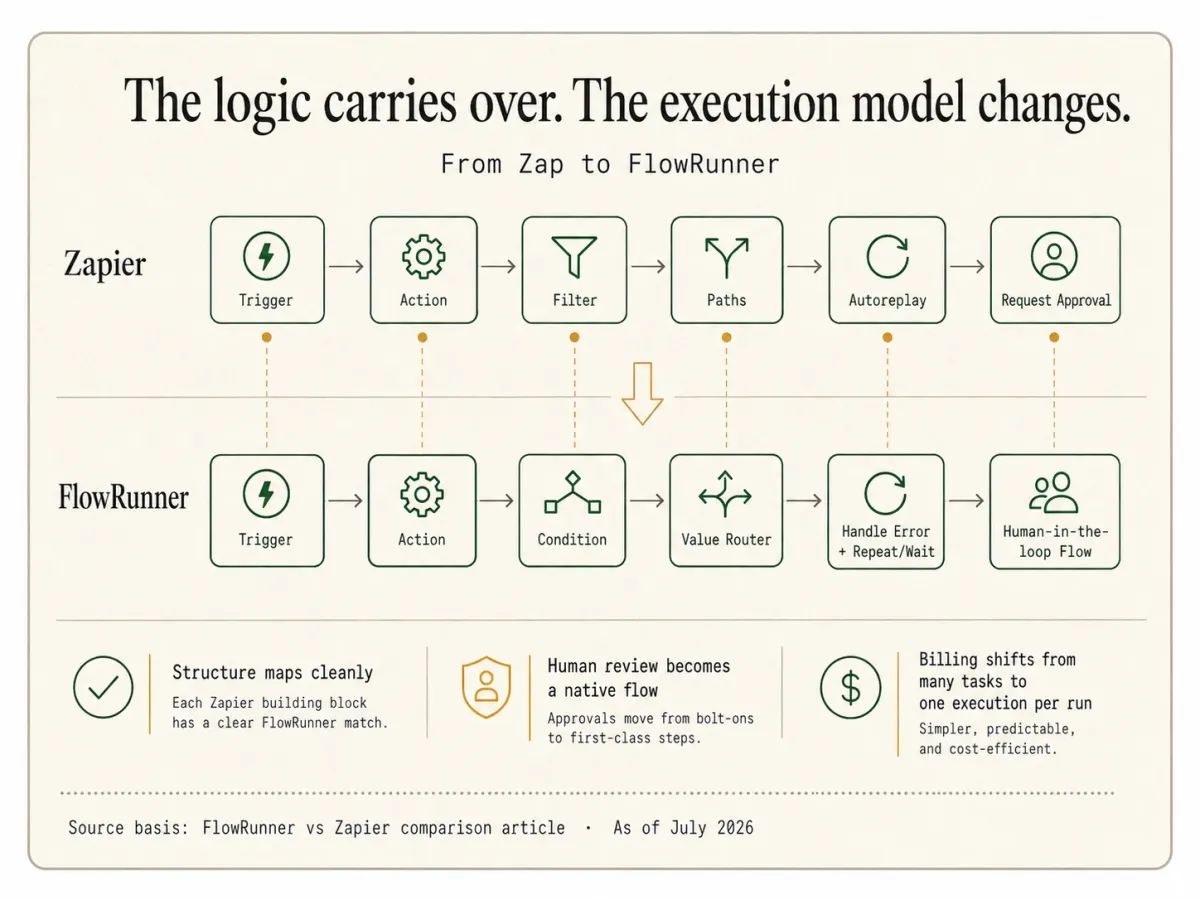
- What maps mechanically? A Zap’s trigger becomes a FlowRunner trigger, and each action step becomes a FlowRunner action. Most Zapier app actions have a FlowRunner action equivalent, and the linear step structure carries over directly.
- What gets re-expressed? Zapier’s Filters and Paths map to FlowRunner’s Condition and Value Router blocks. Autoreplay-style retries map to FlowRunner’s Handle Error block plus a Repeat and Wait retry pattern. The Request Approval step becomes an agent-invoked human-in-the-loop Flow that can wait far longer and reach more channels. The logic carries over; the shape gets more capable.
- What gets better in the process? Any automation that fought the per-task budget stops multiplying cost by step count, because the whole run bills as one execution. Any approval that was stuck as a self-approve-only step, or that could not live inside a loop, becomes a native agent-invoked pause that reaches the right person on their channel.
- Who runs the migration? The Midnight Flow consulting team runs migrations as part of FlowRunner Enterprise onboarding. Other tiers self-migrate with the platform’s import tools.
- How long does it take? A typical mid-market deployment with 20 to 50 Zaps migrates over 4 to 8 weeks with consulting support, or longer self-served, depending on how many Zaps relied on Zapier-specific behaviors.
If you would like a free migration consultation, reach out via the Contact page and we will scope the engagement before any commitment.
Ready to automate this?
Start building your first workflow free. $100 in credits, no card required.