How to Connect BambooHR with Slack (With or Without an AI Agent)
Connect BambooHR to Slack so every employee lifecycle event fires an automated Slack update, optionally with an AI agent that reasons over the change and pauses for a person before writing to compensation or employment status.
How do you connect BambooHR to Slack?
The On Employee Changed trigger in BambooHR fires when any employee record moves, and a FlowRunner flow maps that event to Send Message to Channel in Slack, posting the change details to your HR or ops channel automatically. FlowRunner is a visual AI-agent orchestration platform where automations run autonomously and pause for human judgment on the steps that carry real consequence. The same connection runs as an AI agent that reads the changed record, decides whether the update is routine or sensitive, and routes compensation or employment-status writes to a human in Slack before they post.
The problem with manual HR notifications
Every time a new hire starts, a salary changes, or someone leaves, information moves slowly. The HR team knows first. Everyone else finds out later, if they find out at all. The hiring manager checks in to ask whether IT provisioned the laptop. Payroll asks whether the compensation update made it to the system. The office manager re-keys the same new hire into five separate tools. Routine changes fall through the cracks because there is no structured channel for them, and sensitive changes go through with no structured second look because checking takes time nobody has.
The cost is not just wasted hours. It is missed onboarding steps, access that lingers after someone leaves, and pay changes that go in unreviewed. The roster sits in BambooHR, and everything downstream depends on someone remembering to check it, export it, or pass it along. That dependency on memory is where exceptions accumulate.
How it works: the BambooHR to Slack connection
The On Employee Changed trigger fires when any employee record moves in BambooHR: a new hire, a field update, a status change, or a termination. FlowRunner receives the changed employee IDs and the flow begins.
The flow calls Get Employee By ID to pull the full record, then Get Employee Table Data to read the specific table that changed, whether that is jobInfo, compensation, or employmentStatus. With the record in hand, the flow maps the relevant fields to a Slack message and calls Send Message to Channel to post the update to your designated channel.
For routine changes, the message is straightforward: employee name, what changed, effective date, and a link to the BambooHR record. Your HR and ops teams see it immediately without anyone having to forward an email or paste data from one system into another.
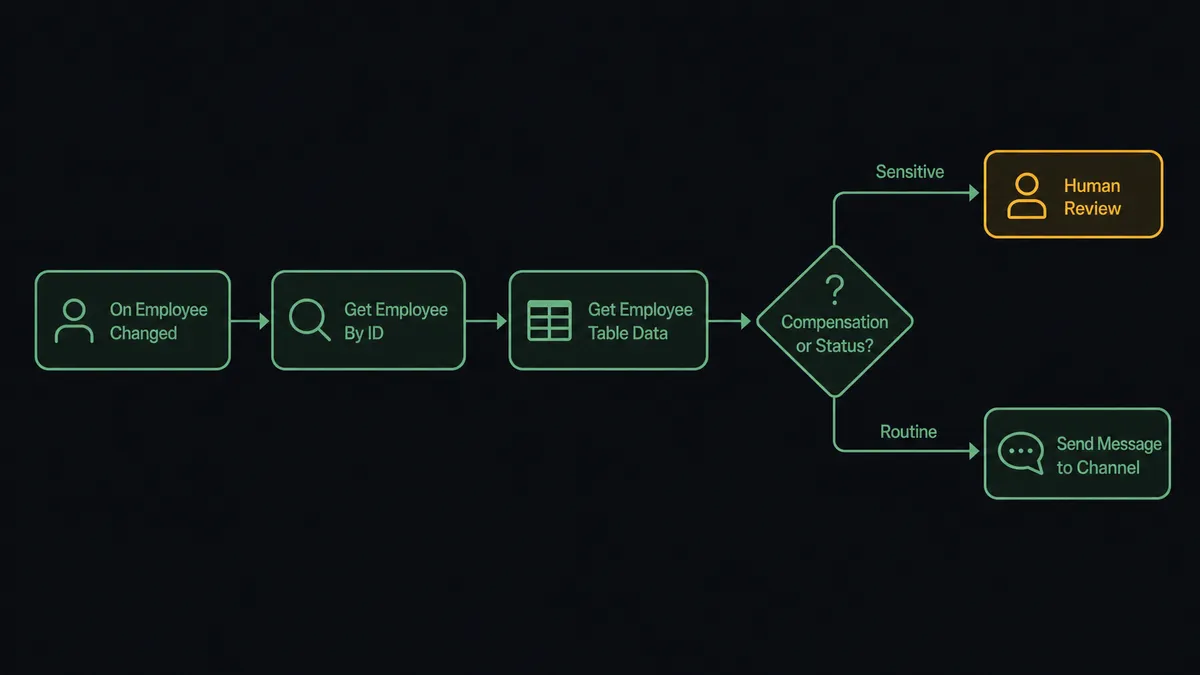
For onboarding, the flow fans out further. After reading the new employee, it calls Upload Employee File to file signed documents, calls Invite User to Channel in Slack to add the new hire to the right channels, and posts a first-day checklist to the team channel. The office manager stops re-keying data and starts the week with onboarding already in motion.
Can an AI agent run it? (and why a human stays in the loop)
A plain trigger-to-action connection covers most of what HR teams need day to day. The agent layer is for the decisions that cannot follow a fixed rule.
An AI agent in FlowRunner reads its instructions, evaluates the data in front of it, and picks tools from its toolbox based on the situation. For BambooHR, the toolbox includes Get Employee By ID, Get Employee Table Data, Create Table Row, Update Employee, List Who’s Out, Send Message to Channel, and Send Direct Message. The agent chooses which to call and in what order based on what the record shows.
The moment that needs a human is a compensation or employment-status write. This is not a hardcoded threshold like “if salary change exceeds 10%, ask a person.” The agent reads context: is this vendor familiar, or is this the employee’s first compensation row? Is the effective date next pay period, or does it back-date? Does the proposed value match what the manager submitted in the request flow, or is there a discrepancy?
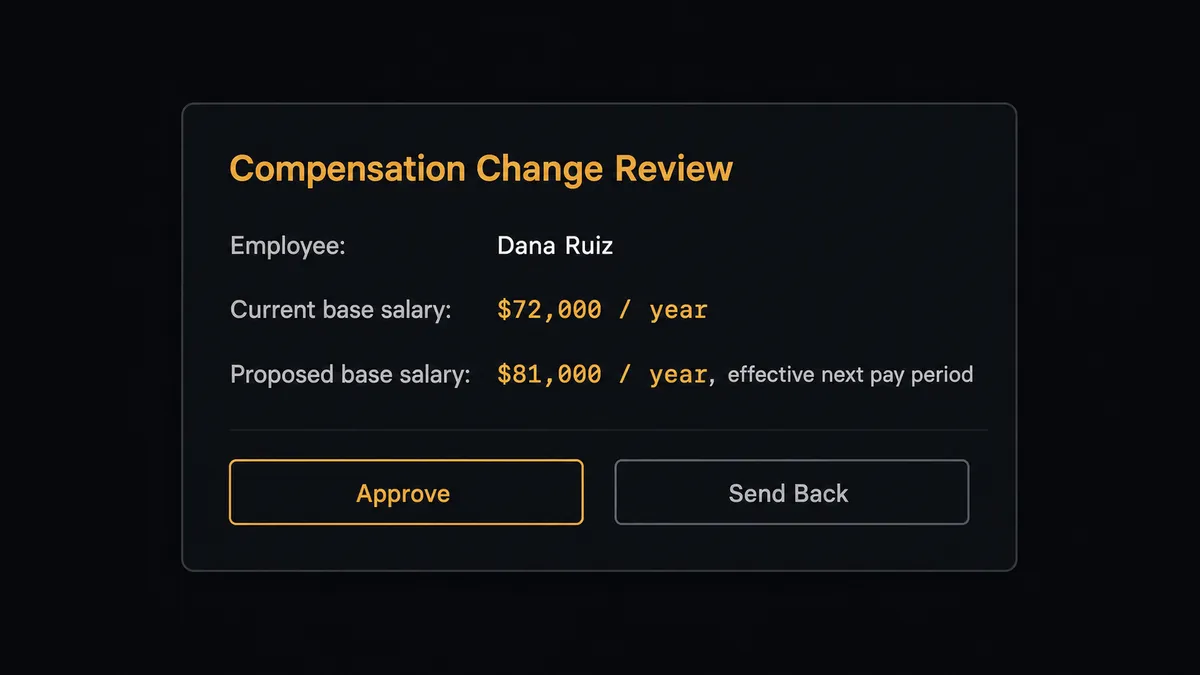
When the agent decides a human should own this write, it invokes the human-in-loop subflow as a callable tool. The subflow sends a Slack direct message to the relevant approver with the full context: employee name, current value, proposed value, effective date, and two buttons: Approve and Send Back. The workflow pauses. The approver reads the message and clicks. The On Block Action trigger in Slack fires, the agent resumes with the decision, and if approved, it calls Create Table Row against the compensation table to write the change.
The decision, the approver’s identity, and the timestamp all go into the audit trail automatically. No email chain. No meeting. No post-hoc reconstruction of who approved what.
This is the digital andon cord. The agent runs everything it can without interruption. When it hits a write that changes someone’s pay or standing, it stops the line and asks.
FlowRunner vs Zapier for BambooHR and Slack workflows
Zapier is the right comparison for most HR and ops teams shopping for BambooHR-to-Slack automation. It has a large template library, a familiar no-code interface, and genuine strength for simple trigger-to-action connections. For “new hire in BambooHR, send a Slack message,” Zapier works.
The differences emerge when the workflow needs to reason, not just route.
| Feature | Zapier | FlowRunner |
|---|---|---|
| Simple trigger-to-action | Strong. Large template library, fast setup. | Supported. Same no-code builder. |
| AI agent with decision-making | No native AI agent that reasons over data and picks tools. | Native. The agent reads the record and chooses actions based on context. |
| Human-in-loop as a callable tool | Not available. Requires manual workarounds outside the workflow. | Built in. The agent invokes a human subflow as a tool, pauses, and resumes on decision. |
| Compensation and status writes with approval gate | No conditional human review at the write step. | Agent routes sensitive writes through Slack approval before posting. |
| Unlimited users on all tiers | Per-user pricing applies at higher tiers. | Every FlowRunner tier includes unlimited users. |
| BYOK for AI model | No. Zapier’s AI features use Zapier’s own model infrastructure. | Yes. Connect your own Claude, OpenAI, or other provider key. |
If you need a simple BambooHR-to-Slack notification and nothing more, Zapier is a reasonable choice. If the workflow involves conditional logic, exception routing, or any write that should not go through without a sign-off, FlowRunner adds the layer Zapier does not have.
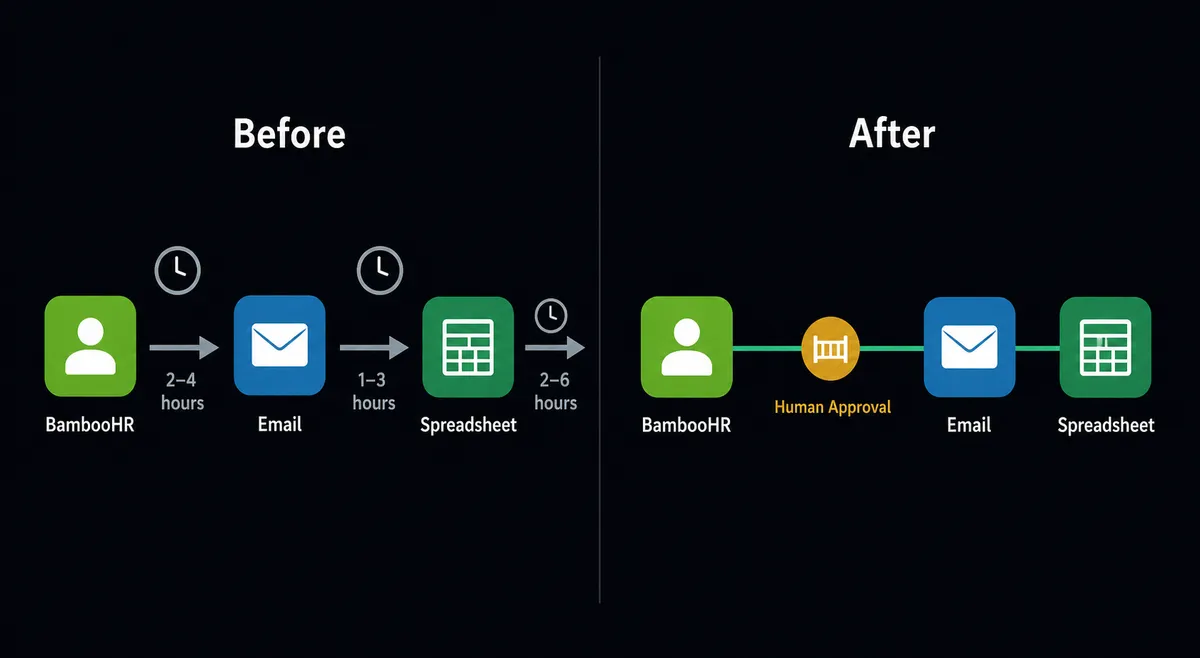
Before and after
| Category | Before | After |
|---|---|---|
| Lifecycle notification | HR announces new hires and departures manually, often after a delay | On Employee Changed fires immediately; Slack message posts before the team has to ask |
| Onboarding steps | Office manager re-keys new hire data into provisioning systems and welcome tools | Agent fans out to downstream systems and channels from the same event |
| Out-of-office visibility | Someone pulls BambooHR each morning and pastes the list into Slack | Agent calls List Who’s Out on a schedule and posts a clean digest automatically |
| Compensation review | Pay changes go in with no structured second look | Agent routes every compensation write through Slack approval before posting |
| Status change audit | Employment-status changes tracked by memory or email | Every sensitive write captured with approver identity and timestamp in the audit trail |
What you can build
New hire onboarding kickoff When On Employee Changed fires for a new hire, the agent calls Get Employee By ID, fans out to Invite User to Channel in Slack for each relevant workspace, Upload Employee File to file signed documents in BambooHR, and Send Message to Channel to post the first-day checklist to the team. The office manager’s morning to-do list shrinks to exceptions only.
Morning out-of-office digest On a schedule, the agent calls List Who’s Out to pull employees who are out and company holidays for the next stretch, then formats and posts a clean digest to your ops channel via Send Message to Channel. Coverage planning happens from current data every morning without anyone assembling the list by hand.
Compensation change with Slack approval A manager submits a pay adjustment. The agent reads the employee and current compensation row with Get Employee Table Data, assembles the context, and invokes the human subflow that sends a Send Direct Message in Slack with Approve and Send Back buttons. On approval, it calls Create Table Row to record the change. On rejection, it posts a summary of the reason back to the requesting manager.
Candidate pipeline updates When a recruiter updates an applicant status with Update Applicant Status, the agent posts a summary to the hiring channel with Send Message to Channel: candidate name, role, new status, and next step. The hiring team stays current without checking BambooHR directly.
Offboarding access removal On a termination event, the agent reads the departing employee, then calls Kick User from Channel in Slack to remove access from workspace channels and Delete Employee File to clean up any sensitive documents that should not persist. A summary goes to the HR channel confirming what was removed.
Common questions
Is it free to connect BambooHR and Slack on FlowRunner? FlowRunner gives every new account $100 in credit, which covers roughly 67 days of real workflows on the Growth tier at $45 per month. No credit card is required to start. After the credit runs out, Growth is $45 per month with 12,000 executions, unlimited users, and unlimited workflows included.
Can I self-host the BambooHR and Slack integration? Yes. FlowRunner offers a self-hosted Community Edition at no cost for single-instance deployments and an Enterprise tier with multi-instance clustering and the full compliance suite. Your BambooHR OAuth credentials and Slack app tokens stay inside your own infrastructure.
Does the agent need my own OpenAI or AI provider key? FlowRunner uses a BYOK model. You connect your own key from Claude, OpenAI, or any other supported provider. The platform orchestrates the agent; you supply the model credentials and pay the provider directly.
What happens when the agent isn’t sure about a BambooHR change? The agent pauses the workflow and sends a Slack message with full context: what changed, the current value, the proposed value, and the employee record. A person approves or rejects from Slack, and the agent resumes with that decision captured in the audit trail.
Can I connect BambooHR and Slack without an AI agent? Yes. The plain connection triggers on the On Employee Changed event in BambooHR and runs a Send Message to Channel action in Slack. No AI agent is required. You can add the agent layer later when you want conditional routing and human-in-loop decisions.
What BambooHR write actions require human approval in FlowRunner? The agent routes compensation and employment-status writes through human review before posting. Routine actions like syncing the directory, posting out-of-office digests, or uploading files run automatically.
Getting started
FlowRunner gives every new account $100 in credit with no credit card required. That covers roughly 67 days of real BambooHR and Slack workflows on the Growth tier.
Start with the plain connection: trigger on On Employee Changed, notify via Send Message to Channel. Add the AI agent and the human-in-loop subflow when you’re ready to handle compensation writes and exception routing.
Both integrations are documented at /integrations/bamboohr and /integrations/slack.
Start your free trial at flowrunner.ai or book a 30-minute intro at calendly.com/flowrunner/intro.