How to Connect BILL with NetSuite (With or Without an AI Agent)
Connect BILL and NetSuite so every vendor invoice, payment, and failed charge moves between your AP system and ERP automatically, with a human on the consequential step.
How do you connect BILL to NetSuite?
When a bill is created or a payment is processed in BILL, a FlowRunner trigger fires and the agent runs the corresponding action in NetSuite, such as Create Payment or Run SuiteQL Query to match the vendor record and log the transaction. FlowRunner is a visual AI-agent orchestration platform where automations run autonomously and pause for human judgment on the steps that carry real consequence. The same connection that syncs routine transactions can run as an AI agent that reads vendor history, evaluates risk, and calls your AP manager before it moves money.
The problem: your AP and ERP are two separate worlds
Ask any AP clerk how they reconcile BILL transactions with NetSuite and the answer is the same: they log into both, copy fields manually, check for duplicates, and hope nothing falls through the cracks. The process works when everything is expected. It breaks when a vendor changes their banking details, a payment fails at 4 PM on a Friday, or a new supplier submits a bill before the PO is fully received.
The manual process does not scale. A team of two can handle 200 bills a month by hand. At 600 bills, they are doing nothing but data entry. At 1,200, they are making mistakes. Exceptions pile up in inboxes. Failed payments go unnoticed until reconciliation surfaces them days later. New vendor onboarding requires back-and-forth emails to collect W-9 and ACH information that could be automated from the moment the vendor record is created.
NetSuite holds your most critical financial data: vendor records, purchase orders, invoice history, payment applications. BILL manages the actual movement of money. Neither system knows what the other is doing unless a human manually bridges them.
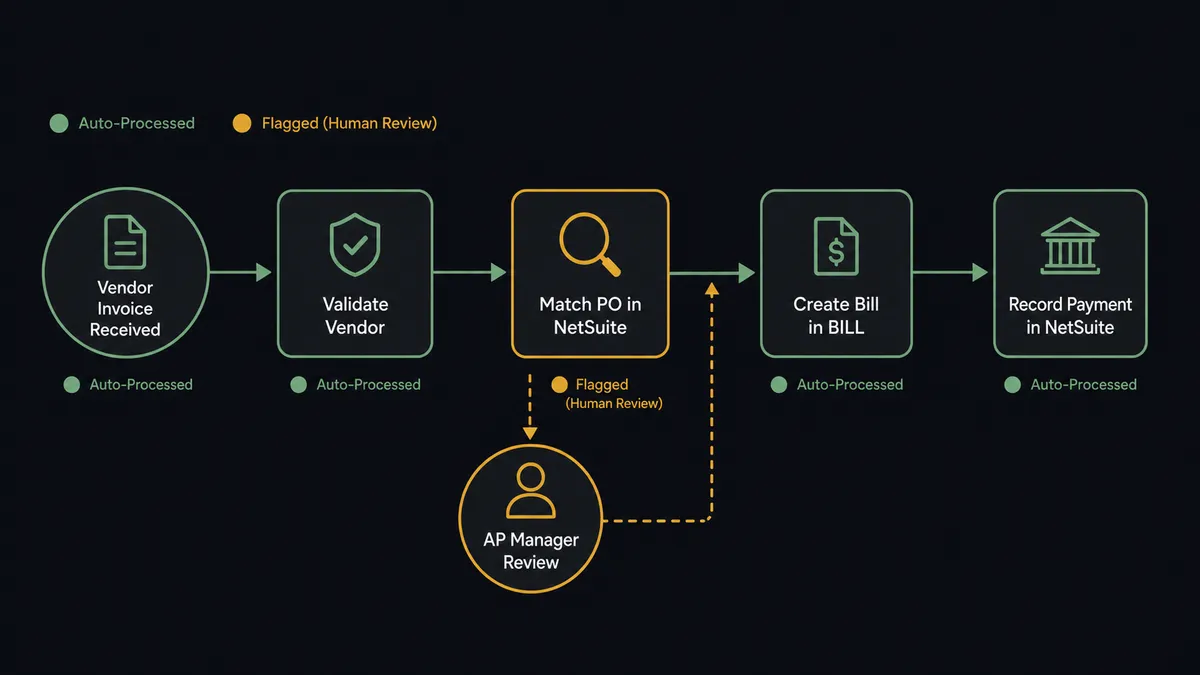
How it works: the BILL to NetSuite connection
The core connection uses BILL’s real-time triggers to fire NetSuite actions without manual intervention.
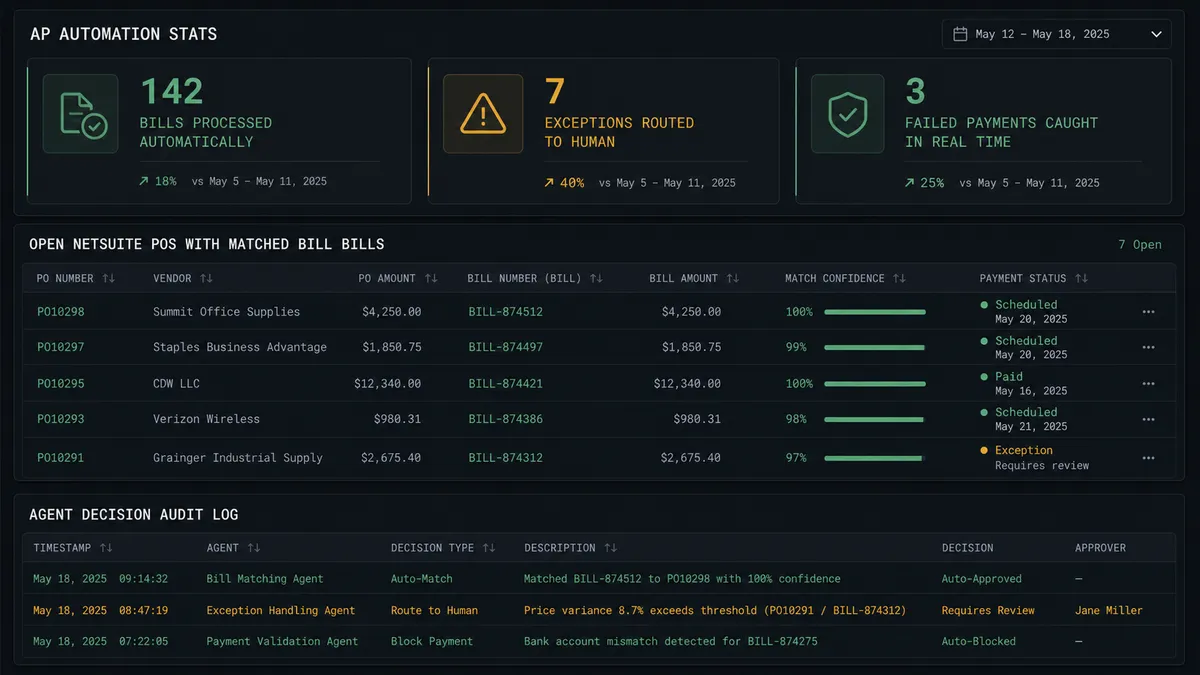
For accounts payable: When a vendor invoice is parsed and a bill is created, the On Bill Created trigger fires. The agent runs Get Vendor in BILL to confirm the supplier record exists and is payment-ready. It then runs Run SuiteQL Query in NetSuite to find the matching purchase order and confirm it has been marked received. When both checks pass, the agent runs Create Bill in BILL with the full invoice details already mapped. When BILL processes the payment, On Payment Updated fires and the agent runs Create Payment in NetSuite to log the transaction against the open vendor bill.
For payment failures: The On Payment Failed trigger is the exception handler that changes how teams work. The moment a payment attempt fails, the agent retrieves the vendor details and the failure reason from BILL, then immediately surfaces the exception to the AP manager. No waiting. No discovering the failure during month-end reconciliation.
For accounts receivable: When a NetSuite invoice is fulfilled and payment is expected, the agent can Create Invoice in BILL, Send Invoice to the customer, and log the confirmed payment using Record Bill Payment when funds arrive. The On Invoice Updated trigger fires when invoice status changes in BILL, allowing the agent to update the NetSuite record in real time.
Every field mapping is configured once: vendor ID, bill amount, due date, PO number, payment reference. After that, the connection runs on every transaction without manual entry.
Can an AI agent run it? And why a human stays in the loop
A standard integration syncs records. An AI agent reads them.
Here is the difference. A sync tool moves the bill amount from BILL to NetSuite. An agent runs Get Vendor, checks the payment history, looks at the bill amount relative to that vendor’s usual range, queries the PO in NetSuite to confirm it is fully received, and then decides whether to proceed or escalate.
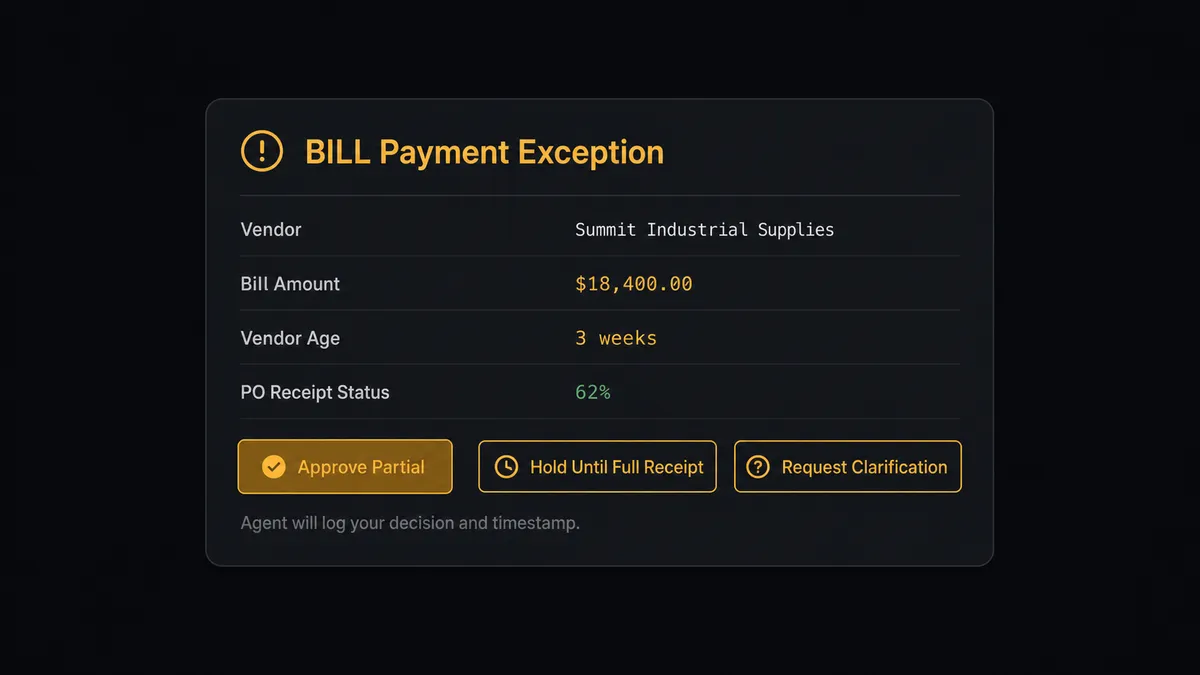
Consider a real scenario. A vendor submits a bill for $18,400. The agent retrieves their record: the vendor was added to BILL three weeks ago, has no payment history with your company, and the corresponding PO in NetSuite shows only partial receipt. The agent does not approve the bill automatically. It pauses and invokes the human-in-loop flow as a tool.
The AP manager receives a Slack message: “Bill from [Vendor] for $18,400. This is a new vendor with no prior payment history. The PO is partially received (62%). Approve for partial payment, hold until PO is fully received, or request vendor clarification?” The manager selects hold. The agent logs the decision with the manager’s identity and timestamp, updates the bill status, and continues monitoring for the PO receipt trigger.
A vendor with ten years of clean history submitting a bill within their usual range moves automatically. The agent saves the human’s attention for the decisions that actually carry weight.
This is what prospects in operations call the digital andon cord: the AI stops the line when it hits something a human should see, and lets everything else run.
FlowRunner vs the tool you are probably comparing
If your team is non-technical, you have probably evaluated Zapier. If your team has developers, you have looked at n8n. If your finance team is serious about ERP integrations, Celigo may have come up.
Zapier connects BILL and NetSuite for straightforward one-to-one syncs and works well for simple trigger-action pairs. It is the fastest path to a basic connection. It does not have native AI agents, and its human-in-loop capability is limited to basic approval steps, not context-aware agent decisions.
n8n is developer-friendly and has strong connector coverage. Its AI agent nodes are built on LangChain and work for technical teams who can configure them in code. Human-in-loop requires custom implementation. Compliance features are not included at the mid-tier.
| FlowRunner | Zapier | n8n | |
|---|---|---|---|
| Human-in-loop | Native agent tool. Agent decides when to escalate based on vendor context and history | Basic approval step, not context-aware | Custom implementation required |
| AI agent | Built-in. Agent reads vendor data, reasons about risk, picks tools autonomously | Not available | Available, developer configuration required |
| Users and workflows | Unlimited on every tier | Per-seat pricing on most tiers | Workflow limits on lower tiers |
| Audit trail | Captured automatically: decision, decider identity, timestamp | Not included | Not included at mid-tier |
| Self-host option | Yes, Community Edition free | No | Yes, with infrastructure costs |
| BYOK | Yes, bring your own AI provider key | No | Partial |
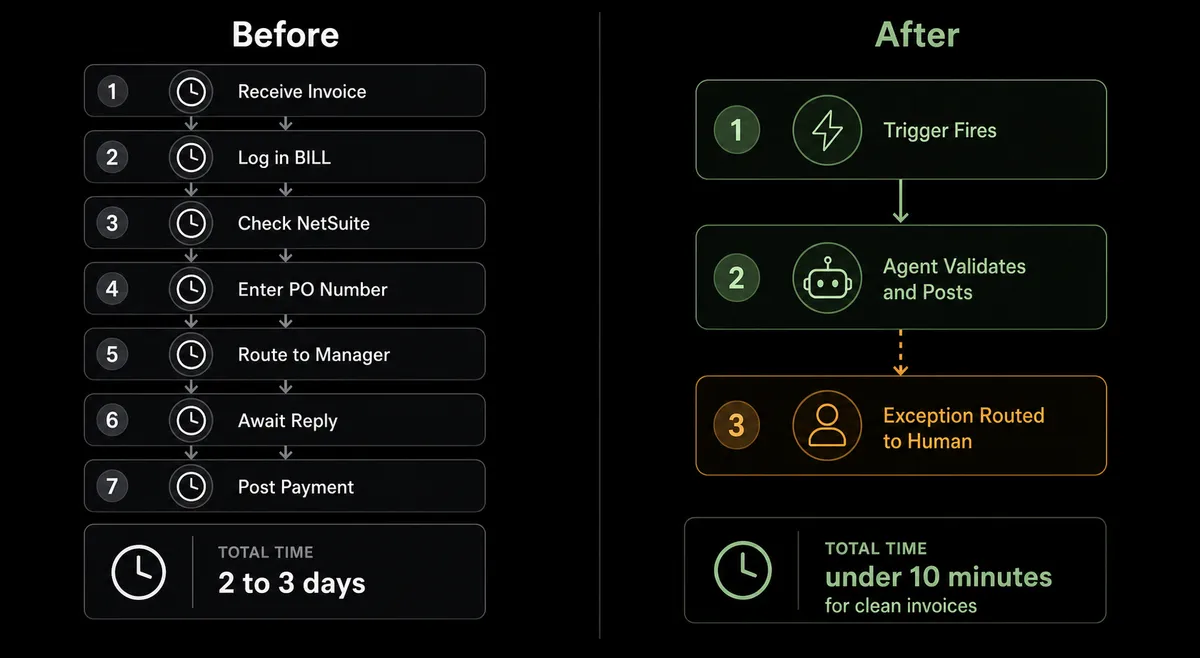
Before and after
| Before | After | |
|---|---|---|
| AP cycle time | Manual entry at each stage: validate vendor, create bill, route approval, log payment | Invoice to logged payment runs without manual entry when vendor and PO check out |
| Payment failure response | Discovered during reconciliation, often days after the failed attempt | On Payment Failed fires immediately; AP manager has context and resolution options within minutes |
| New vendor onboarding | Manual email back-and-forth to collect W-9 and ACH details | On Vendor Created fires; agent sends standardized requests automatically and updates BILL when forms return |
| AP exceptions | AP clerks review every bill looking for anomalies | Routine bills process automatically; agent surfaces only the exceptions that need human judgment |
| Audit trail | Approvals tracked in email threads and shared spreadsheets | Every agent decision, human approval, and timestamp captured in the FlowRunner audit log |
What you can build
End-to-end AP automation. On Bill Created fires when a vendor invoice arrives. The agent runs Get Vendor in BILL to confirm the supplier, runs Run SuiteQL Query to match the PO in NetSuite, creates the bill with Create Bill, routes approval via Slack, and logs the payment in NetSuite with Create Payment when On Payment Updated fires. The entire AP cycle runs without a manual entry.
Instant failed payment recovery. On Payment Failed fires the moment a payment attempt fails. The agent retrieves the vendor record and failure reason using Get Vendor and Get Bill Payment, then sends the AP manager a Slack message with the vendor name, amount, failure reason, and resolution options. The manager acts within minutes, not days.
New vendor onboarding with ERP sync. On Vendor Created fires when accounting adds a new supplier to BILL. The agent sends the vendor a standardized W-9 and ACH request. When the forms are returned, the agent updates the BILL vendor record using Update Vendor and creates or updates the corresponding vendor in NetSuite using Create Vendor or Update Vendor, so both systems stay in sync from the start.
AR cash application. When a NetSuite invoice is fulfilled, the agent creates the BILL invoice using Create Invoice and sends it to the customer with Send Invoice. When payment is confirmed, On Invoice Updated fires and the agent records the payment with Record Bill Payment and logs the application in NetSuite with Create Payment. Your AR record in NetSuite reflects real-time cash without manual entry.
Weekly AP reconciliation alerts. The agent runs Run SuiteQL Query on a schedule to identify open vendor bills in NetSuite where the PO has been marked received but no payment is scheduled in BILL. It generates a summary and posts it to your AP channel. AP managers see exactly what needs attention without pulling manual reports.
Common questions
Is it free to connect BILL and NetSuite on FlowRunner?
FlowRunner offers a $100 credit on the Growth tier, which covers roughly 67 days of real use with no credit card required. After that, the Growth plan is $45 per month with 12,000 workflow executions included. All tiers include unlimited users and unlimited workflows.
Does the FlowRunner agent need my own AI API key?
Yes. FlowRunner uses a Bring Your Own Keys model. You supply the API key for whichever AI provider you prefer. FlowRunner orchestrates the agent; your key controls the AI calls and keeps your data out of shared pools.
Can I self-host FlowRunner if my finance team requires it?
Yes. FlowRunner offers a self-hosted Community Edition at no cost and an Enterprise self-hosted tier for organizations that need multi-instance clustering and the full compliance suite. Contact FlowRunner for Enterprise pricing.
What happens when the agent is not sure about a bill or payment?
The agent pauses and routes to a human via Slack, email, or WhatsApp. It packages the vendor details, the bill amount, the reason for uncertainty, and the options available. The human decides. The decision, the decider’s identity, and the timestamp go into the audit trail.
Can the integration handle failed payments automatically?
Yes. The On Payment Failed trigger in BILL fires the moment a payment attempt fails. The agent retrieves the vendor details and failure reason, then immediately surfaces the exception to your AP manager with context and resolution options. No waiting until reconciliation to find out.
Do I need a developer to set this up?
No. FlowRunner is a visual, no-code builder. You connect your BILL and NetSuite accounts, choose the trigger and actions, map the fields, and add the human-in-loop step if you want one. No code required.
Getting started
FlowRunner’s $100 credit on the Growth tier gives you roughly 67 days to build and test the connection at no cost. No credit card required.
Start with the integration pages for both connectors:
- BILL integration: 7 real-time triggers and 24 actions covering the full AP and AR cycle
- NetSuite integration: 27 actions for customers, vendors, invoices, sales orders, payments, and SuiteQL queries
Build your first flow at flowrunner.ai, or book a 30-minute walkthrough at calendly.com/flowrunner/intro to see the BILL and NetSuite agent running on a real transaction.