How to Connect Cal.com with HubSpot (With or Without an AI Agent)
Connect Cal.com and HubSpot so every new booking request creates or updates a HubSpot contact and deal automatically, with an AI agent that pauses for human judgment when a request scores borderline.
How do you connect Cal.com to HubSpot?
When a Cal.com Booking Requested event fires, a FlowRunner workflow uses Get Contact by Email to find or create the requester’s HubSpot contact record, then opens or updates a deal in the right pipeline stage automatically. FlowRunner is a visual AI-agent orchestration platform where automations run autonomously and pause for human judgment on the steps that carry real consequence. That same connection can run as an AI agent that scores each booking request against your qualification rules, confirms or declines the clear cases, and stops to ask a person only when the request is borderline.
The problem it solves
Every sales team has a version of this process: a prospect books a meeting on Cal.com, someone on the team reviews the request, manually looks the person up in HubSpot, creates a contact if one does not exist, opens a deal, and eventually confirms or declines the booking. When the team is small, the process works. When inbound volume picks up, it falls through the cracks. Requests sit in the queue while prospects wait. Some confirmations go out inconsistently. Some contacts never make it into HubSpot at all.
The downstream cost is quiet. Deals are created without the right contact associations. Rep assignment happens over Slack instead of by territory rules. Stale records pile up because nobody had time to update them. Operations leads know the problem. They have probably tried solving it with manual checklists or with a basic Zap that fires when a booking is created. Neither solves the qualification layer. Neither writes back to HubSpot with the context the sales team actually needs.
How it works: the connection
The Cal.com connector in FlowRunner listens for the On Cal.com Event trigger. Set it to Booking Requested and the flow activates the moment a prospect asks for a slot on your event type.
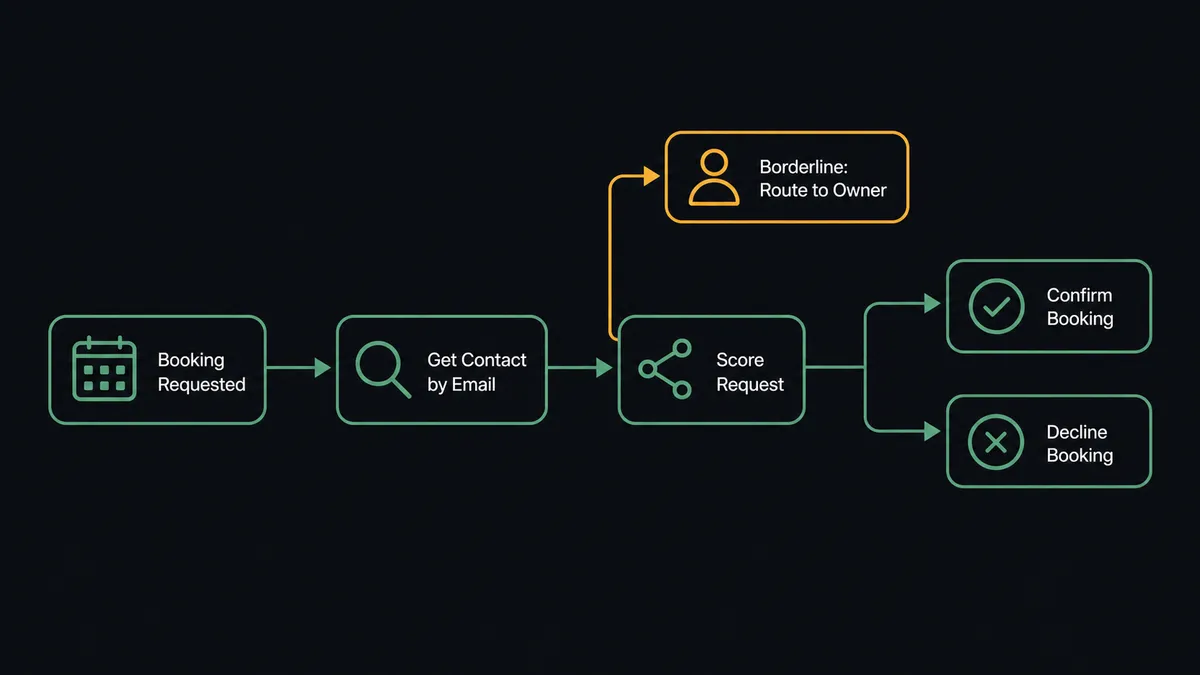
The workflow runs these steps in sequence:
- The trigger delivers the booking request: requester name, email, company, event type, requested date, and their form answers.
- Get Contact by Email checks HubSpot for an existing record. If one exists, the agent retrieves it. If none exists, the agent calls Create Contact, sets the lifecycle stage, and calls Associate Objects to link the contact to their company.
- The agent calls Get Event Type to confirm which qualification rules apply to the requested event.
- Based on the rules and the requester’s form answers, the agent calls Confirm Booking for requests that clearly qualify or Decline Booking for requests that clearly do not.
- The agent calls Update Deal to move the pipeline stage and logs the booking UID against the deal record.
The prospect receives the confirmation or decline immediately. The HubSpot record is current before any rep opens the CRM.
Can an AI agent run it? (and why a human stays in the loop)
Yes, and the agent adds something that a basic Zap or n8n workflow cannot. A simple connection sends every booking to HubSpot regardless of fit. The agent reads the booking data and reasons about it.
The agent has the Cal.com actions as tools: Confirm Booking, Decline Booking, Get Available Slots, Get Event Type, and more. It also has the HubSpot actions: Get Contact by Email, Create Contact, Create Deal, Update Deal, Associate Objects. It reads its instructions, evaluates the booking request against the qualification criteria for that event type, and decides what to do. It does not run a fixed sequence. It reasons.
Here is where the human-in-loop step matters. Not every booking request is a clear yes or a clear no. A prospect might score well on company size and industry but provide vague answers to the qualification questions. A returning contact might request a meeting type they have never booked before. The agent flags these cases. It does not guess.
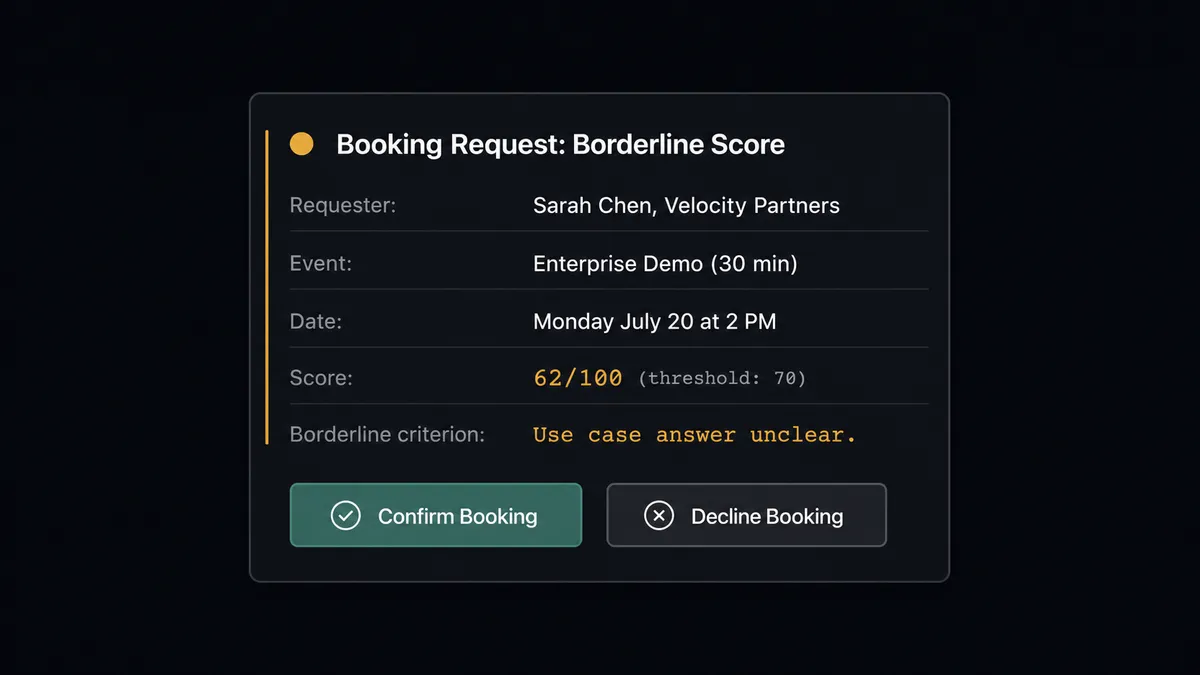
When the agent encounters a borderline request, it invokes the human-in-loop sub-flow as a callable tool. The flow sends the request owner a structured message through their preferred channel:
“[Requester] at [Company] has requested a [Event Type] slot on [date]. Their answers scored borderline on [specific criterion]. Their HubSpot contact is [link]. Confirm the booking or decline it?”
The owner responds with one click. The agent picks up the decision, runs Confirm Booking or Decline Booking, updates the HubSpot deal stage, and records who made the call and when in the audit trail. The judgment calls stay with a person. The routine cases never reach the queue.
This is not a sync tool. The agent knows when to stop and ask.
FlowRunner vs Zapier
Zapier is the tool most non-technical ops teams reach for first when they want to connect Cal.com and HubSpot. It is the right comparison here. Zapier is genuinely good at what it does: reliable two-step connections, a large library of apps, and a workflow builder most users can figure out in an afternoon. If you need a booking to create a contact and open a deal, Zapier handles that.
The gaps show up when the workflow needs to think.
| Feature | Zapier | FlowRunner |
|---|---|---|
| Basic booking-to-contact sync | Yes | Yes |
| AI agent with real reasoning | No | Yes. Agent reads booking data and decides |
| Human-in-loop as callable tool | No | Yes. Agent invokes human oversight when needed |
| Qualification scoring before confirm/decline | No | Yes. Agent scores against event-type rules |
| Unlimited users on every plan | No (user-based limits on some plans) | Yes. All tiers include unlimited users |
| BYOK for AI model | No | Yes. Connect your own AI provider key |
| Self-hosted option | No | Yes. Community Edition free, Enterprise custom |
| Audit trail of human decisions | No | Yes. Decider, decision, and timestamp captured |
Zapier wins on simplicity and breadth of app coverage. FlowRunner wins when the workflow involves judgment: qualification, exception handling, or any step where a wrong automated decision has a real cost.
Before and after
| Category | Before | After |
|---|---|---|
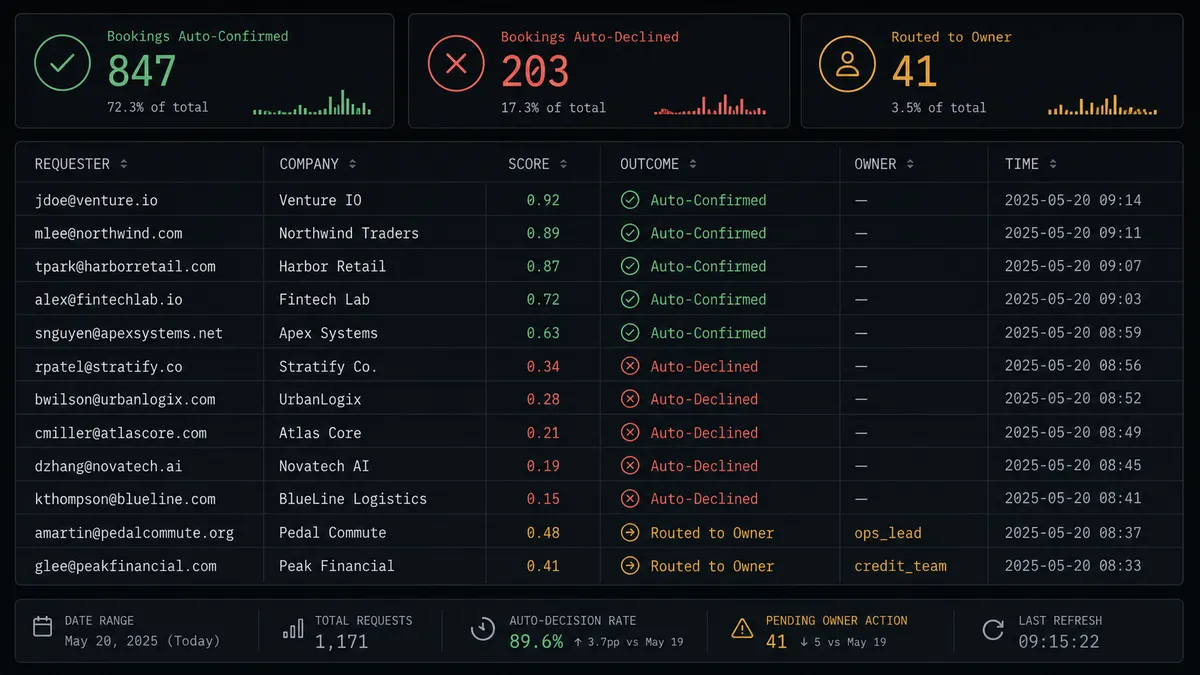
| Booking triage time | Someone reviews every request by hand before confirming or declining | Requests that meet the criteria are confirmed the moment they arrive |
| HubSpot contact creation | Reps create contacts manually from Cal.com notifications, or forget | Contact created, associated, and deal opened in under 30 seconds |
| Deduplication | No systematic check; duplicate records accumulate | Agent calls Get Contact by Email before creating any new contact |
| Borderline requests | Left in queue waiting for the owner to notice | Routed immediately to owner with full context and one-click response |
| Audit trail | No record of who confirmed what or when | Every confirmation, decline, and human decision logged with decider and timestamp |
| Deal stage accuracy | Updated when reps remember | Updated automatically as each booking event completes |
What you can build
Booking qualification and CRM creation. When On Cal.com Event fires with a Booking Requested event, the agent scores the request, calls Confirm Booking or Decline Booking for clear cases, and creates or updates the HubSpot contact and deal before the prospect finishes reading the confirmation email.
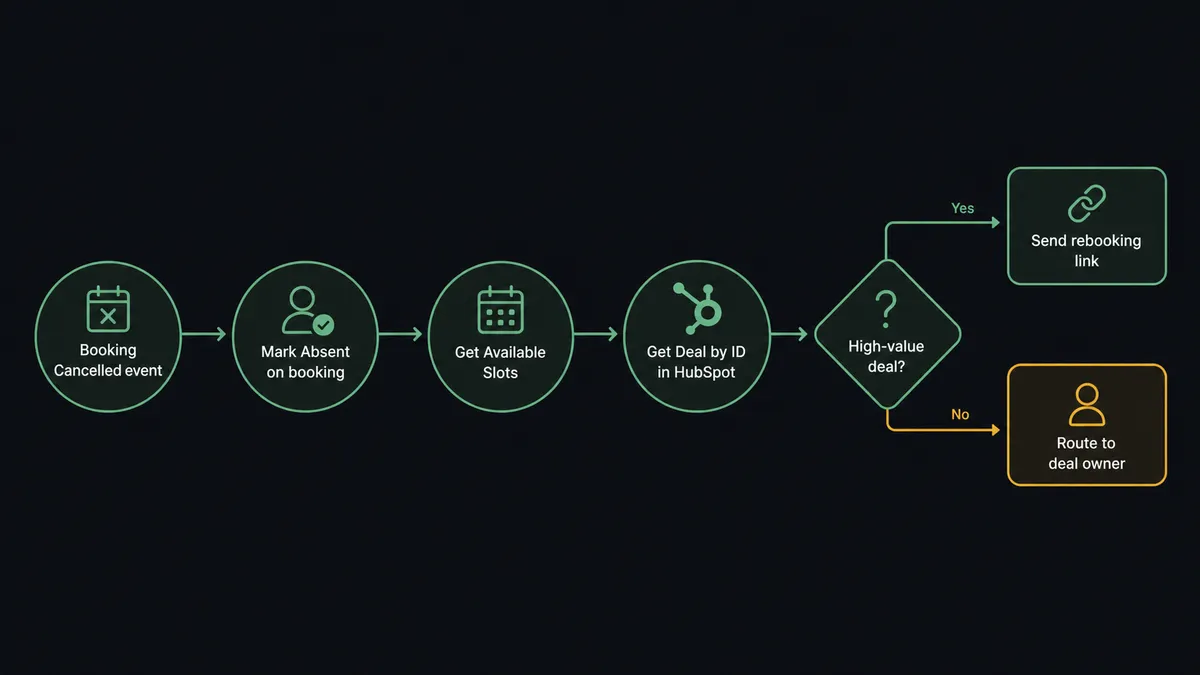
No-show recovery. When On Cal.com Event fires with a Booking Cancelled event, the agent calls Mark Absent on the original booking, logs the no-show against the HubSpot contact, calls Get Available Slots for the next open times, and sends the requester a rebooking link. If the missed meeting was attached to a high-value deal, the agent routes the situation to the deal owner rather than sending an automated link.
First-free-slot outreach. An outbound sequence surfaces a warm prospect in HubSpot. The agent calls Get Available Slots for the right event type, picks the first open time, calls Create Booking, and updates the HubSpot deal stage to Meeting Scheduled. The rep sees the meeting in their calendar and the CRM simultaneously.
Deal stall recovery. A scheduled agent queries Get All Deals in HubSpot for deals in a target stage that have not been updated in 14 days. For each stalled deal, it checks whether the associated contact has a pending Cal.com booking. If no meeting is on the books, the agent calls Get Available Slots and sends the deal owner a message: “This deal has been inactive for 14 days. Book a meeting or flag it for review.” Deals that go unresponded after 48 hours surface to the sales manager.
Rescheduling sync. When On Cal.com Event fires with a Booking Rescheduled event, the agent calls Reschedule Booking to confirm the new time, retrieves the associated HubSpot deal with Get Deal by ID, and updates the close date field to reflect the new meeting date. Both systems stay current without a rep touching either one.
Common questions
Is it free to connect Cal.com and HubSpot on FlowRunner? FlowRunner gives every new account a $100 credit applied to the Growth plan, which covers roughly 67 days of real usage with no credit card required. After that, Growth starts at $45 per month. All tiers include unlimited users and unlimited workflows.
Can I self-host FlowRunner? Yes. FlowRunner offers a free Community Edition for self-hosted single-instance deployments. Enterprise self-hosted plans include multi-instance clustering and the full compliance suite.
Does the AI agent need my own API key for the AI model? FlowRunner uses a bring-your-own-key (BYOK) model. You connect your own key from any supported AI provider. Your data stays under your control and never passes through a shared model endpoint.
What happens when the agent is not sure about a booking request? When a booking request scores between clear-yes and clear-no on your qualification criteria, the agent pauses and routes the request to the owner through their preferred channel. The owner sees the requester, the event type, the booking date, and the specific criterion that was borderline. They confirm or decline with one response, and the agent runs Confirm Booking or Decline Booking from there.
What Cal.com actions can the agent use? The agent has access to 17 Cal.com actions including Confirm Booking, Decline Booking, Create Booking, Reschedule Booking, Cancel Booking, Get Available Slots, and Get Booking. It chooses which to use based on the situation.
What happens to HubSpot data when a booking is cancelled? When a Cal.com Booking Cancelled event fires, the agent can log the cancellation against the HubSpot contact and deal record, update the deal stage, and offer the requester a rebooking link from the next available slots.
Getting started
FlowRunner gives every new account a $100 credit toward the Growth plan. That covers roughly 67 days of real usage. No credit card required. Corporate email only.
Connect both integrations from their respective pages: Cal.com and HubSpot. Both connectors are verified against the live Cal.com API v2 and HubSpot API.
Start your free account at flowrunner.ai or book a 30-minute walkthrough at calendly.com/flowrunner/intro. The walkthrough covers the qualification workflow end to end, including the human-in-loop step, so you leave with a working flow, not a slide deck.