How to Connect Calendly with HubSpot (With or Without an AI Agent)
Connect Calendly to HubSpot so every new booking, cancellation, or no-show automatically updates your CRM deals and contacts, with an AI agent that pauses for a human on high-value exceptions.
How do you connect Calendly to HubSpot?
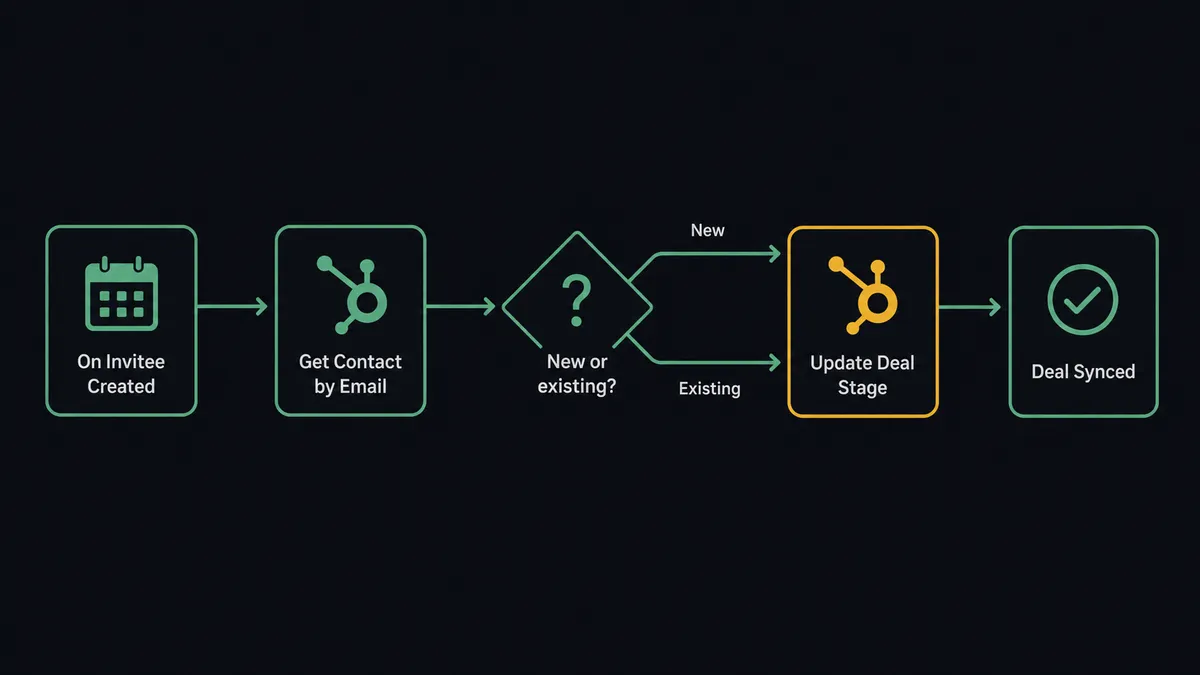
When a prospect books through a Calendly link, FlowRunner fires the On Invitee Created trigger, calls Get Contact by Email in HubSpot to find or create the contact, then updates the deal stage and logs the meeting details automatically. FlowRunner is a visual AI-agent orchestration platform where automations run autonomously and pause for human judgment on the steps that carry real consequence. The same connection runs as an AI agent that decides whether to create a new deal or update an existing one, and pauses for a sales manager before acting on a high-value cancellation.
The problem it solves
Right now, a sales rep gets a Calendly booking notification and opens HubSpot to update the deal stage manually. If they are in another meeting, the CRM sits stale for hours. If they forget, the deal stage never updates. When a manager pulls a pipeline report on Thursday, the data reflects what reps remembered to enter, not what actually happened. Exceptions, the no-show that needed a follow-up or the high-value prospect who rescheduled twice, fall through the cracks entirely because the follow-up sequence lived in someone’s head.
The same problem compounds on cancellations. A prospect cancels the morning of the demo. The rep gets a Calendly email and has to decide: send a rescheduling link immediately, reach out personally, or log the cancellation and move on. That judgment call happens manually, inconsistently, and without any record of what was decided or why. For a team running 20 or 30 demos a week, the cumulative gap between what happened and what the CRM shows is substantial.
How it works: the connection
FlowRunner connects Calendly events directly to HubSpot record operations. Here is the exact sequence for a new booking:
- On Invitee Created fires the moment a prospect books through any Calendly link.
- The agent calls Get Contact by Email with the invitee’s email address.
- If no contact exists, the agent creates a new contact and associates it with the prospect’s company using Associate Objects.
- If a contact exists, the agent moves to the deal.
- The agent checks for an open deal in HubSpot using Get Deal by ID or Search Contacts, then calls Update Deal to set the stage to Demo Scheduled and log the meeting date.
- If no deal exists, the agent calls Create Deal and places it in the correct pipeline stage automatically.
- The agent logs every action to the audit trail.
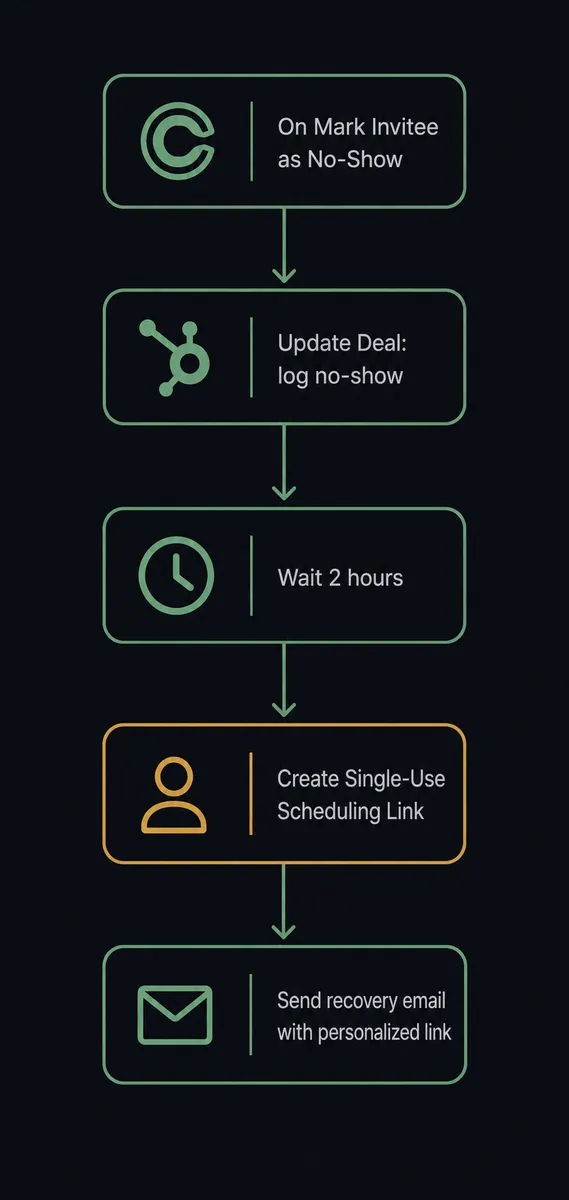
For cancellations, On Invitee Canceled fires instead. The agent logs the cancellation in HubSpot using Update Deal (adjusting stage or adding a note), then evaluates what to do next. For no-shows, On Mark Invitee as No-Show fires. The agent logs the event, waits two hours, then uses Create Single-Use Scheduling Link to generate a personalized recovery link and sends it via email. The rep sees a complete activity log without manually following up.
Can an AI agent run it? (and why a human stays in the loop)
A simple Calendly-to-HubSpot connection is a sync tool. It moves data from one place to another on a fixed rule. An AI agent running the same integration makes decisions: should this be a new deal or an update to an existing one, is this contact a duplicate, does this cancellation warrant a personal outreach or an automated rescheduling link?
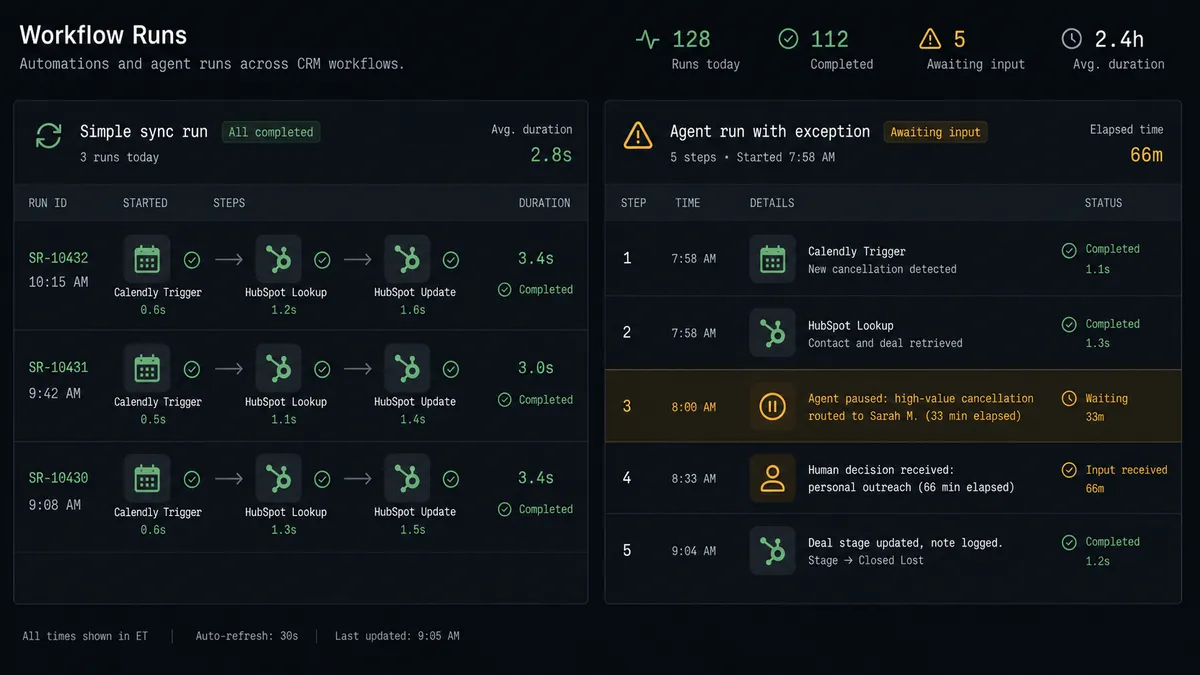
Here is a specific decision moment. A prospect who has been in the pipeline for six weeks books a demo. They have already had two calls and their deal is in the Negotiation stage. The agent sees the On Invitee Created event, retrieves the existing contact with Get Contact by Email, finds the deal at a late stage with a significant deal amount, and updates the stage to Demo Scheduled. So far, standard sync behavior.
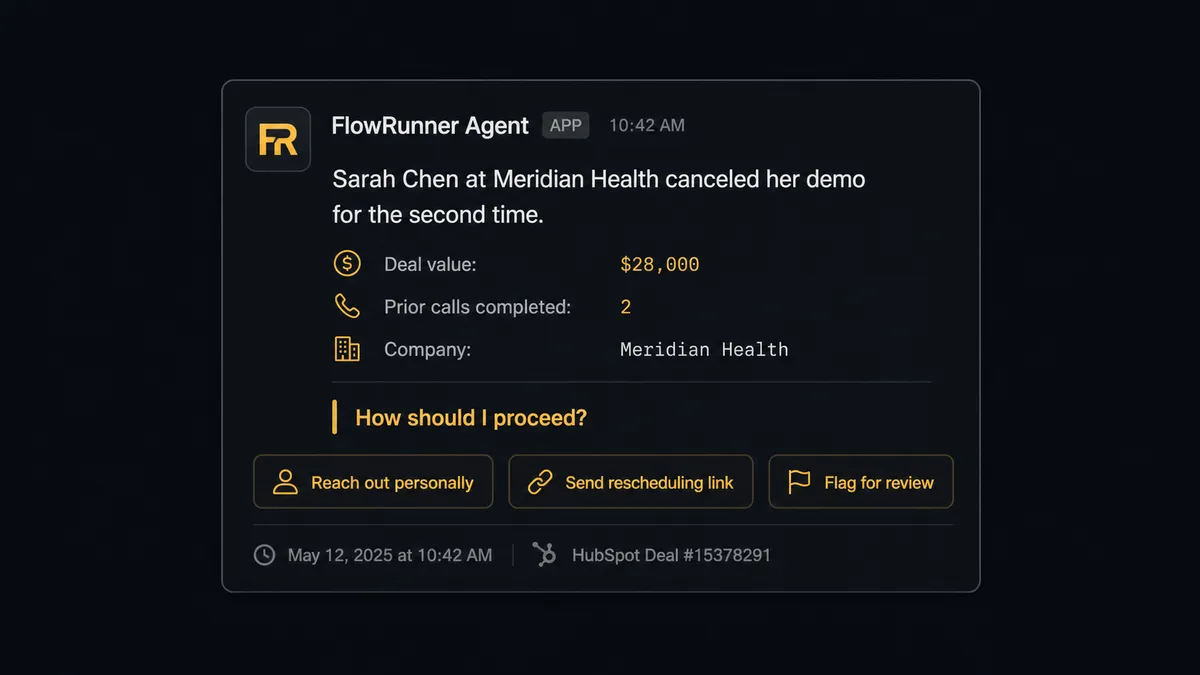
Two days later, On Invitee Canceled fires. The agent retrieves the deal context. It sees the deal value, the number of prior touchpoints, and the fact that this is the second cancellation in three weeks. The agent does not send an automated rescheduling link. It invokes the human-in-loop tool and sends a Slack message to the sales manager: “Sarah Chen at Meridian Health canceled her demo for the second time. Deal value: $28,000. Two prior calls completed. Do you want to reach out personally, have me send an automated rescheduling link, or flag this deal for review?” The manager responds with one click. The agent acts on the decision and logs the outcome, the manager’s name, and the timestamp to the audit trail.
This is not a hardcoded threshold. The agent evaluated the number of prior interactions, the deal stage, the deal value, and the cancellation count together. A $3,000 first-call cancellation from a prospect who booked yesterday gets an automated rescheduling link. A $28,000 late-stage second cancellation gets a human.
FlowRunner vs Zapier
Zapier is the right tool for a large portion of the market. It has a massive integration library, a no-code interface that most teams can operate without training, and a proven track record. If you need to move Calendly booking data into HubSpot fields on a fixed mapping with no exceptions, Zapier handles that well.
The differences emerge at the edges, which is where most of the real work happens.
| Capability | Zapier | FlowRunner |
|---|---|---|
| Basic Calendly trigger to HubSpot update | Yes | Yes |
| AI agent that decides create vs update | No | Yes |
| Human-in-loop on high-value exceptions | No (requires external tool) | Native, callable as agent tool |
| Unlimited users on every tier | No (seat-based pricing) | Yes |
| Bring-your-own AI key (BYOK) | No | Yes |
| Self-hosted option | No | Yes (Community and Enterprise) |
| Audit trail with decision accountability | No | Yes, including who decided and when |
The core gap is not features on a checklist. It is whether the workflow can reason. Zapier runs a fixed sequence. FlowRunner runs an agent that reads context and decides. For teams where most bookings are routine and exceptions are rare, Zapier is simpler. For teams where the exception handling is where the money is, FlowRunner handles that without requiring someone to build a separate system for it.
Before and after
| Metric | Before | After |
|---|---|---|
| CRM update speed | Hours or days, depending on rep availability | Under 30 seconds from booking confirmation |
| Duplicate contact risk | No deduplication before creating records | Agent checks Get Contact by Email on every inbound before writing |
| No-show follow-up | Reps follow up manually, often 1-3 days later or not at all | Personalized rescheduling link generated and sent within 2 hours |
| High-value cancellation handling | Rep decides alone, no record of reasoning | Agent routes to manager with full context; decision and decider logged |
| Pipeline accuracy | Deal stages reflect what reps remembered to enter | Deal stages updated automatically at every Calendly event |
What you can build
Booking-to-deal automation for inbound demos. On Invitee Created fires. The agent calls Get Contact by Email, creates the contact if none exists (using Create Contact and Associate Objects), then creates or advances a deal with Update Deal. The rep receives a Slack notification with the prospect name, company, and deal context. Zero manual CRM entry.
High-value cancellation escalation. On Invitee Canceled fires. The agent retrieves the deal with Get Deal by ID, evaluates the deal value and prior touchpoints, and decides whether to send an automated rescheduling link via Create Single-Use Scheduling Link or invoke the human-in-loop flow. Sales managers handle the accounts that deserve personal attention; the rest recover automatically.
No-show recovery with a personalized link. On Mark Invitee as No-Show fires. The agent logs the no-show in HubSpot with Update Deal, waits two hours, generates a dedicated link using Create Single-Use Scheduling Link, and sends a recovery email. The link is single-use and tied to this specific interaction. The CRM records the send automatically.
Routing form lead qualification. On New Routing Form Submitted fires when a prospect fills out a Calendly routing form. The agent scores the submission, then either creates a deal in HubSpot with Create Deal and generates a scheduling link with Create Single-Use Scheduling Link for qualified prospects, or routes borderline cases to the sales manager via Slack for a judgment call before any link is sent.
Stalled deal reactivation. A scheduled workflow queries HubSpot with Get All Deals for deals in the Demo Scheduled stage that have not been updated in 7 days. For each, the agent checks whether the meeting was completed or missed. If no activity, it uses Create Single-Use Scheduling Link to generate a re-engagement link and sends it to the prospect with Update Deal logging the outreach.
Common questions
Is it free to connect Calendly and HubSpot on FlowRunner?
FlowRunner offers a $100 credit on the Growth tier with no credit card required. That covers roughly 67 days of real usage. Both the Calendly and HubSpot connectors are included on every tier, including the trial.
Can I self-host FlowRunner?
Yes. FlowRunner offers a free Community Edition for self-hosting on a single instance. Enterprise self-hosting with multi-instance clustering and the full compliance suite is available at custom pricing.
Does the AI agent need my own OpenAI or Claude API key?
FlowRunner uses a bring-your-own-key (BYOK) model. You connect your own API key from whichever AI provider you prefer. FlowRunner orchestrates the agent; it does not consume your AI budget without your visibility.
What happens when the agent isn’t sure what to do?
The agent pauses and routes the ambiguity to a human through whatever channel you configure: Slack, email, or WhatsApp. It packages the full context it evaluated and presents the human with clear options. The workflow resumes after the human decides.
Does HubSpot need to be the trigger, or can Calendly trigger first?
In this integration, Calendly triggers fire first: On Invitee Created, On Invitee Canceled, or On Mark Invitee as No-Show. The agent then reads and writes HubSpot records as actions. You can also run scheduled HubSpot deal queries that generate Calendly scheduling links as outbound outreach.
What if the contact already exists in HubSpot when someone books?
The agent calls Get Contact by Email before creating anything. If a record exists, it updates the existing contact and deal. If two records match the same email, the agent pauses and routes the conflict to a CRM admin via Slack rather than silently overwriting data.
Getting started
FlowRunner’s Growth tier starts at $45 per month and includes every integration, unlimited users, and unlimited workflows. The trial gives you $100 in credit with no credit card required. That is roughly 67 days to run real workflows before you pay anything.
Connect both integrations from the FlowRunner integration panel:
Start a free trial at flowrunner.ai or book a 30-minute walkthrough at calendly.com/flowrunner/intro. The walkthrough shows the agent running a live Calendly booking through HubSpot with a real exception routed to a human.