How to Connect Calendly with Notion (With or Without an AI Agent)
Connect Calendly to Notion so every booking, no-show, and cancellation creates or updates a Notion page automatically, with a human on the step that carries real consequence.
How do you connect Calendly to Notion?
When a Calendly event fires (a new booking, a cancellation, or a no-show), FlowRunner’s On Invitee Created trigger picks it up and routes the data to Notion, where a Create Database Item or Create Page action logs the event as a structured record. FlowRunner is a visual AI-agent orchestration platform where automations run autonomously and pause for human judgment on the steps that carry real consequence. The same connection that logs a booking can run as an AI agent that reads the invitee’s context, decides how to document it, and pauses for a human before acting on the cases that matter.
The problem: scheduling data falls through the cracks
A prospect books a demo. The Calendly confirmation goes out. Then what? An ops lead or sales coordinator opens the CRM, finds the contact, updates the deal stage, creates a calendar entry, and maybe drops a note in Notion if they remember. They usually do not remember. Or they do it hours later. By then, the team meeting where someone asked “did we hear back from that company?” has already happened with incomplete information.
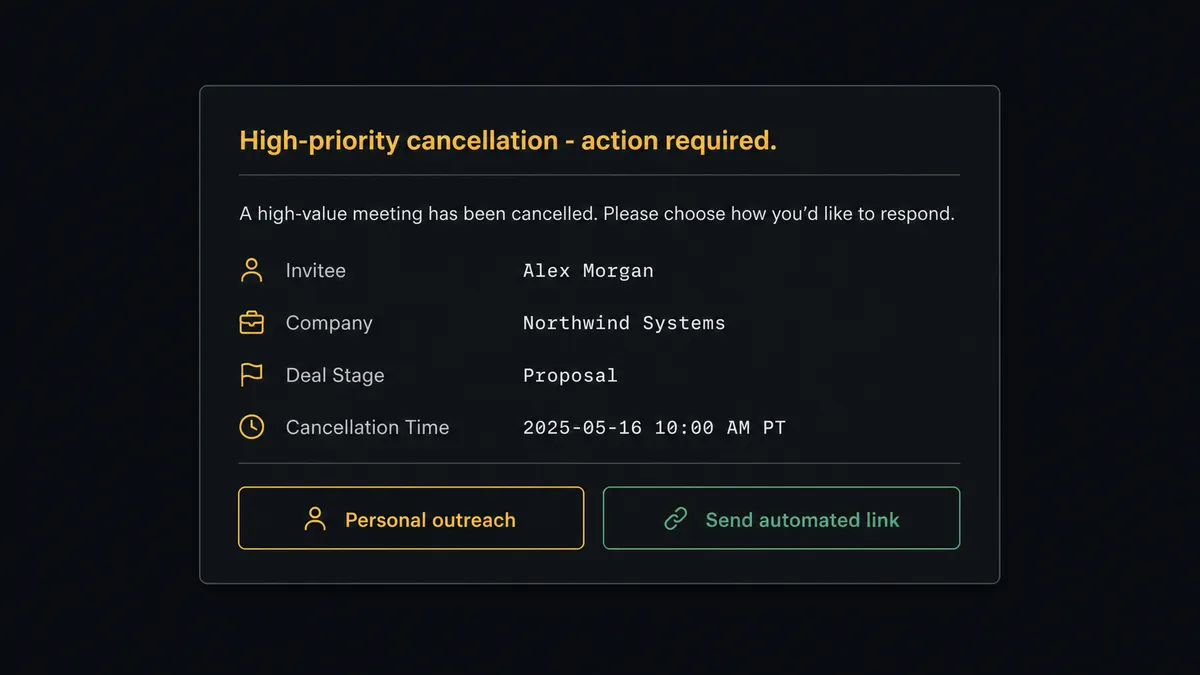
The same gap opens on the other side of the booking. When a high-priority account cancels, someone has to decide: send the automated rescheduling link, or have the account manager reach out personally? That decision sits in a Slack thread, disconnected from the Notion page where the deal context lives. The next person who opens the deal record sees no record of the cancellation, no record of the decision, and no record of what happened next.
How it works: the connection between Calendly and Notion
FlowRunner connects the two systems through a trigger-to-action flow. The trigger side uses Calendly’s five event types. The action side uses Notion’s full content model.
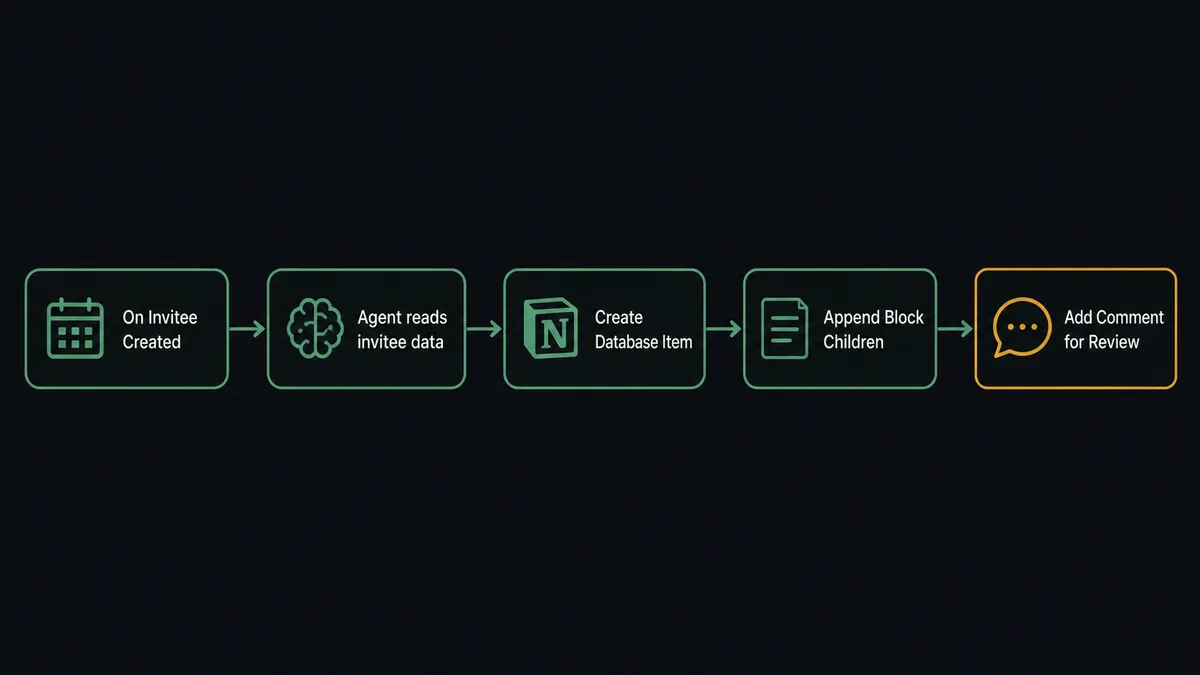
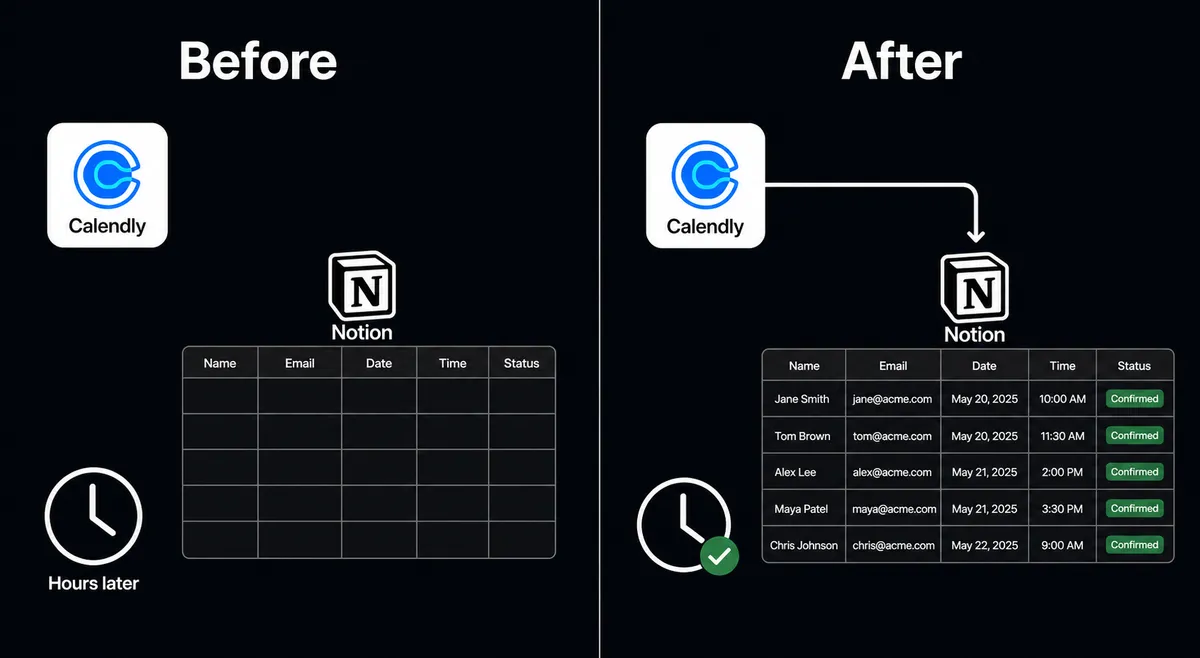
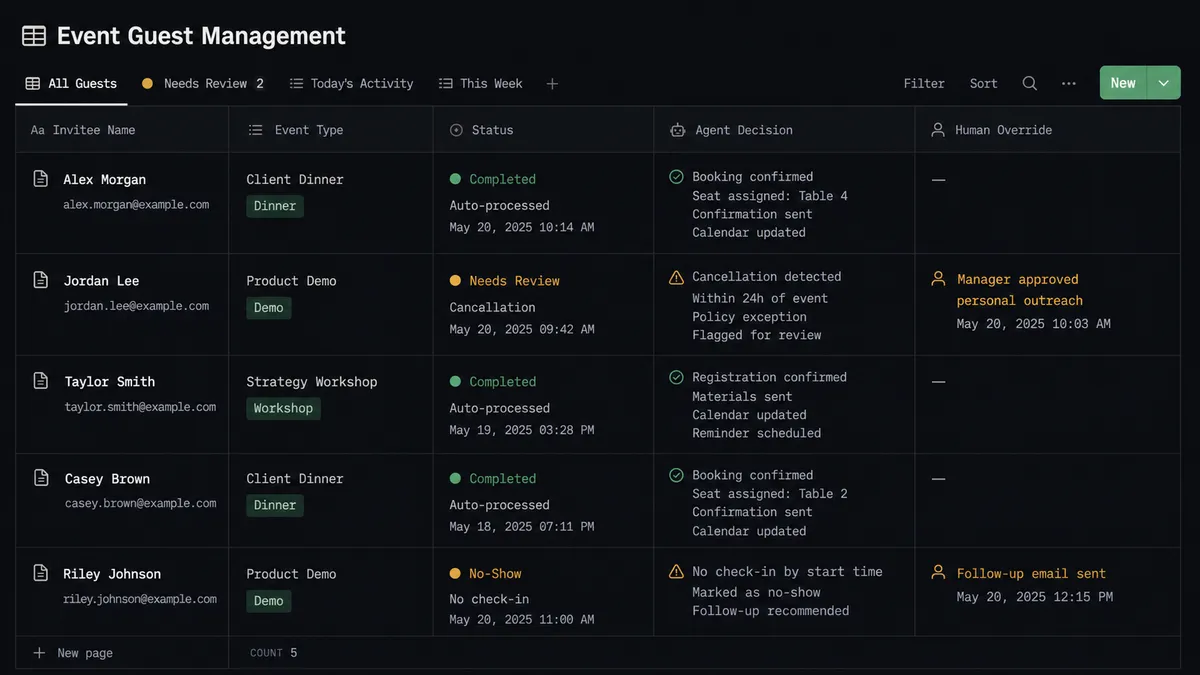
The most direct connection uses On Invitee Created as the trigger and Create Database Item as the action. When someone books a meeting, FlowRunner reads the booking payload (invitee name, email address, event type, scheduled start time, and any answers from a routing form) and creates a new row in a Notion database. The row is live before the sales rep checks their phone.
For teams that want richer documentation, the flow can chain Create Page and Append Block Children together. The agent creates a meeting page in the Deals database, then appends structured content blocks: the invitee’s details at the top, space for notes, a next-steps section, and a decision log at the bottom. Every meeting has a home in Notion before it happens.
Cancellations run through On Invitee Canceled. The agent updates the existing database item with the cancellation status and timestamp. No-shows trigger On Mark Invitee as No-Show and update the same record, then send a personalized follow-up link generated by Create Single-Use Scheduling Link.
Can an AI agent run it? (And why a human stays in the loop)
A direct trigger-to-action sync logs everything. An AI agent decides what to log and when to stop.
The difference matters when the booking is not routine. A prospect who has canceled twice before and just rescheduled again is not the same as a first-time booking. A routing form submission from a company with 500 employees in a target vertical is not the same as one from a two-person startup. A cancellation from a deal worth six figures is not the same as a cancellation from a standard prospect.
A FlowRunner AI agent receives the booking data as input and reasons about it before writing to Notion. It has access to Create Database Item, Create Page, Append Block Children, Update Database Item, and Create Comment as tools. It also has access to Update Page Properties to keep the Notion record synchronized as the deal progresses.
The agent’s instructions tell it: log every booking, but flag anything unusual. “Unusual” is not a hardcoded threshold. The agent evaluates the event type, the invitee’s routing form answers, and the pattern of prior events. A $40,000 deal contact canceling 24 hours before the call is unusual. The agent does not send the automated rescheduling link. It invokes the human-in-loop tool instead.
When the agent invokes that tool, the workflow pauses. The sales manager receives a Slack message: “[Contact name] at [Company] canceled their demo scheduled for tomorrow. This is a high-priority account. Do you want to reach out personally, or should I send the automated rescheduling link?” The manager picks an option. The agent resumes with the decision as input, logs the decision in the Notion page using Create Comment, and acts accordingly.
This is not a sync tool. The agent knows when to stop and ask.
FlowRunner vs Zapier
Zapier is the most common tool non-technical teams reach for when they want to connect Calendly and Notion. It is easy to set up, well-documented, and has both connectors ready to use. If your use case is “log every booking to a Notion database,” Zapier gets the job done in fifteen minutes.
The differences appear when the use case grows.
| What you’re comparing | Zapier | FlowRunner |
|---|---|---|
| AI agent with reasoning | No. Zapier runs fixed trigger-to-action sequences. No decision layer. | Yes. The agent reads data, reasons about it, and decides what to do. |
| Human-in-loop as a native tool | No. Zapier has no native concept of pausing for a human decision mid-flow. | Yes. The agent invokes a human approval flow as a callable tool, on its own judgment. |
| Unlimited users on every tier | No. Zapier charges per user at higher tiers. | Yes. All FlowRunner tiers include unlimited users. |
| Bring-your-own AI key | No. Zapier’s AI features use Zapier’s own models with opaque pricing. | Yes. BYOK model. You connect your own provider and pay your own API costs. |
| Self-hosting option | No. Zapier is cloud-only. | Yes. Community Edition is free and self-hosted. |
| Execution pricing model | Per-task, per-Zap. Complex flows with multiple steps count multiple tasks. | Per-workflow-run, regardless of steps. Predictable at scale. |
Zapier’s strength is speed to first automation. For teams that need AI reasoning, human oversight, and predictable pricing as the workflow grows, the model runs out of headroom.
Before and after
| What changes | Before | After |
|---|---|---|
| Booking documentation | Sales reps update deal stage and log meeting details by hand after each booking, hours after it happens. | Every booking creates a Notion database item within seconds of the Calendly event firing. |
| Meeting pages | Notes scattered in personal apps or not captured at all. | A structured Notion page with invitee details, context, and next-steps section exists before the meeting starts. |
| Cancellation handling | Cancellation sits in email. Someone manually decides whether to send a rescheduling link. High-priority accounts get the same response as standard ones. | Agent flags high-priority cancellations for a human decision. Routine cancellations get the automated rescheduling link via Create Single-Use Scheduling Link. |
| Decision audit trail | Escalation decisions made over Slack leave no searchable record tied to the deal. | Every human decision is logged in the Notion page via Create Comment, with context, decider, and timestamp. |
| No-show recovery | Reps follow up manually, days later, with generic messages. | Agent sends a personalized follow-up within 2 hours of On Mark Invitee as No-Show firing, using a single-use link. |
What you can build
Booking-to-deal-page automation. On Invitee Created fires. The agent creates a Notion page in the Deals database using Create Page, appends the invitee’s details and routing form answers as content blocks with Append Block Children, and updates the page status field with Update Page Properties. The deal team has a documentation home before the meeting happens.
Qualification-based routing from routing forms. On New Routing Form Submitted fires. The agent scores the submission. High-score prospects get a Create Single-Use Scheduling Link generated and emailed immediately. Borderline scores trigger a human-in-loop review. The outcome of the review is logged in Notion using Create Database Item, so qualification decisions have a searchable audit trail.
No-show recovery with a logged outcome. On Mark Invitee as No-Show fires. The agent updates the Notion database item with the no-show status, sends a personalized follow-up email with a fresh scheduling link, and adds a Create Comment to the Notion page noting what it did and when. If the prospect reschedules, On Invitee Created fires again and the page updates automatically.
Cancellation decision log. On Invitee Canceled fires for a high-value account. The agent pauses and routes to the account manager via the human-in-loop flow. The manager responds. The agent logs the cancellation, the decision, and the manager’s identity in the Notion record using Create Comment and Update Database Item. Nothing falls through the cracks.
Routing form knowledge base. Every routing form submission creates a Notion database item with the prospect’s answers, the agent’s qualification score, and the routing outcome. Over time this becomes a searchable database of inbound interest. Find Database Item lets the agent check for prior submissions from the same company before creating a duplicate.
Common questions
Is it free to connect Calendly and Notion on FlowRunner?
FlowRunner provides a $100 credit on the Growth tier with no credit card required, which covers roughly 67 days of real work. After the credit, Growth starts at $45 per month. All tiers include unlimited users and workflows.
Does the agent need my own AI provider key?
Yes. FlowRunner uses a bring-your-own-key model. You connect your OpenAI, Anthropic, or other provider key and the agent uses your account directly. FlowRunner never marks up API costs.
Can I self-host FlowRunner?
Yes. FlowRunner offers a self-hosted Community Edition at no cost, and an Enterprise self-hosted option with multi-instance clustering, SSO, and full audit retention. Cloud tiers are also available if you prefer managed infrastructure.
What happens when the agent is not sure what to do?
The agent invokes a human-in-loop flow as a callable tool. It packages the full context, what it found and why it is uncertain, and sends it to a team member via Slack, email, or WhatsApp. The workflow pauses until a decision comes back, then resumes.
Does Notion have triggers I can use as the starting point?
Notion currently has no outbound triggers in FlowRunner. Calendly is the trigger source in this pair. The flow starts on a Calendly event and writes to Notion as the action side.
Can I add other integrations to this workflow later?
Yes. FlowRunner workflows are not locked to a pair. You can add a HubSpot update, a Slack notification, or a Google Calendar event to the same flow. The Calendly-to-Notion connection is one part of a larger orchestration.
Getting started
FlowRunner’s $100 credit covers roughly 67 days of Growth-tier usage. No credit card required.
Connect both integrations from the FlowRunner connections panel:
- Calendly integration via OAuth2
- Notion integration via integration token
Start with the direct connection (On Invitee Created to Create Database Item) and confirm the data flows correctly. Then add the AI Agent node and the human-in-loop subflow when you’re ready to move beyond a basic sync.
Start at flowrunner.ai or book a 30-minute walkthrough at calendly.com/flowrunner/intro to see the agent-with-human-oversight pattern live.