How to Connect CircleCI with Slack (With or Without an AI Agent)
Connect CircleCI and Slack so build results, failures, and deploy gates land in the right Slack channel automatically, with an AI agent that pauses for an engineer before shipping to production.
How do you connect CircleCI to Slack?
You connect CircleCI to Slack by using a FlowRunner flow that calls Get Pipeline Workflows to poll a build result and then calls Send Message to Channel to post the outcome to a Slack channel. FlowRunner is a visual AI-agent orchestration platform where automations run autonomously and pause for human judgment on the steps that carry real consequence. The same connection can run as an AI agent that triggers and inspects pipelines on its own, then stops and asks an engineer before touching a production deploy.
What breaks when CircleCI and Slack are not connected
Engineering teams spend more time watching dashboards than writing code. A build finishes in CircleCI and someone has to open the tab, read the result, and decide whether to post something to the team. When the build fails, that someone has to remember which channel to notify, find the right engineer, and write up the context. When it passes and a deploy is on the table, the same person has to track down whoever owns the release.
Nothing here is technically difficult. It is just manual, and manual steps fall through the cracks under pressure. A deploy goes out without an explicit approval because the pipeline looked green and the engineer assumed someone else had checked it. A failing build sits unreported for an hour because the person watching the dashboard was in a meeting. These are not process failures. They are predictable consequences of keeping CI results inside one tool and team communication inside another.
How it works: the connection
The basic connection between CircleCI and Slack routes build events into the channel where your team already works.
A flow activates when code merges to a monitored branch. The flow calls Trigger Pipeline to start the test pipeline in CircleCI. It then polls Get Pipeline Workflows at a regular interval until the build reaches a terminal state, either succeeded or failed. Once the build finishes, the flow calls Get Test Metadata and Get Job Artifacts to pull the test results and any build output. It then calls Send Message to Channel in Slack, posting the pipeline result, the count of failing tests, and a direct link to the run.
For failure scenarios, the same flow can call Send Direct Message to route the alert to a specific engineer rather than broadcasting to the full channel. The message includes the workflow ID, the failing job name, and whatever the test metadata surfaced, so the engineer has the context they need without opening CircleCI.
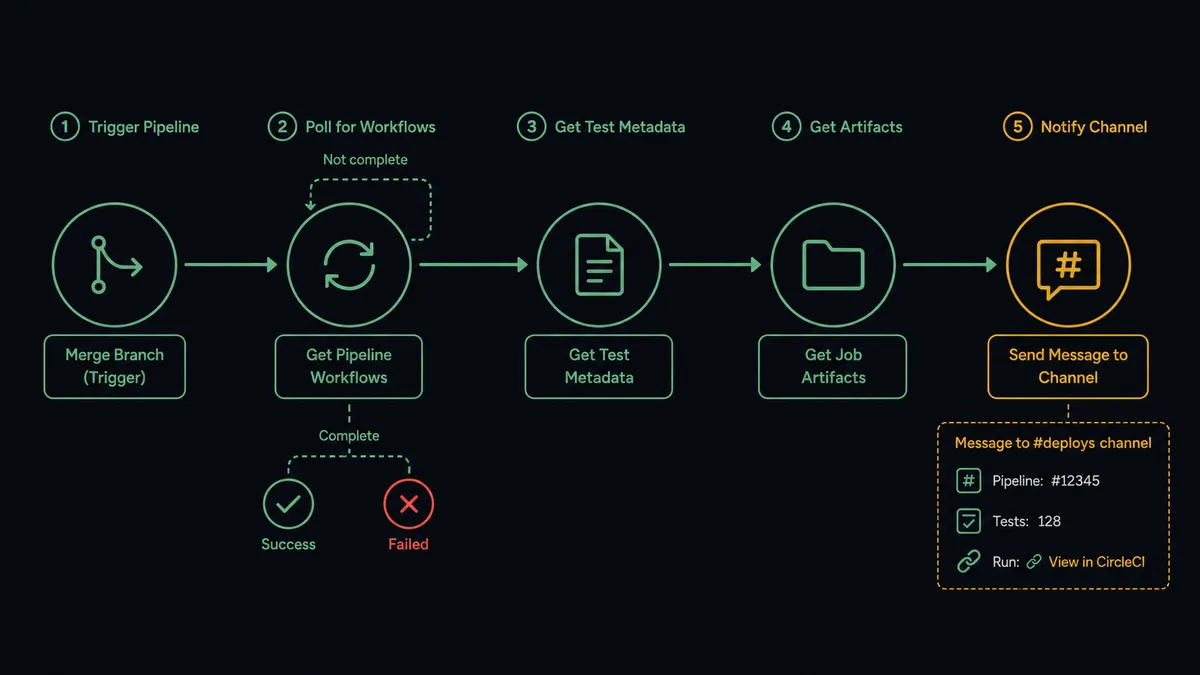
For teams running on a fixed schedule, you can trigger the same flow from a cron rather than a branch event. An agent compiles pipeline status across multiple projects, calls Get Pipeline Workflows for each, and posts a structured digest to a #deploys or #platform-status channel every morning.
Can an AI agent run it? (and why a human stays in the loop)
A plain connection routes results to Slack. An AI agent reads those results, reasons about them, and decides what to do next.
The agent’s toolbox for this pair includes Trigger Pipeline, Get Pipeline Workflows, Get Job Artifacts, Get Test Metadata, Cancel Workflow, and Rerun Workflow on the CircleCI side. On the Slack side it has Send Message to Channel, Send Direct Message, Update Message in Channel, and the ability to surface interactive buttons that collect a human decision via On Block Action.
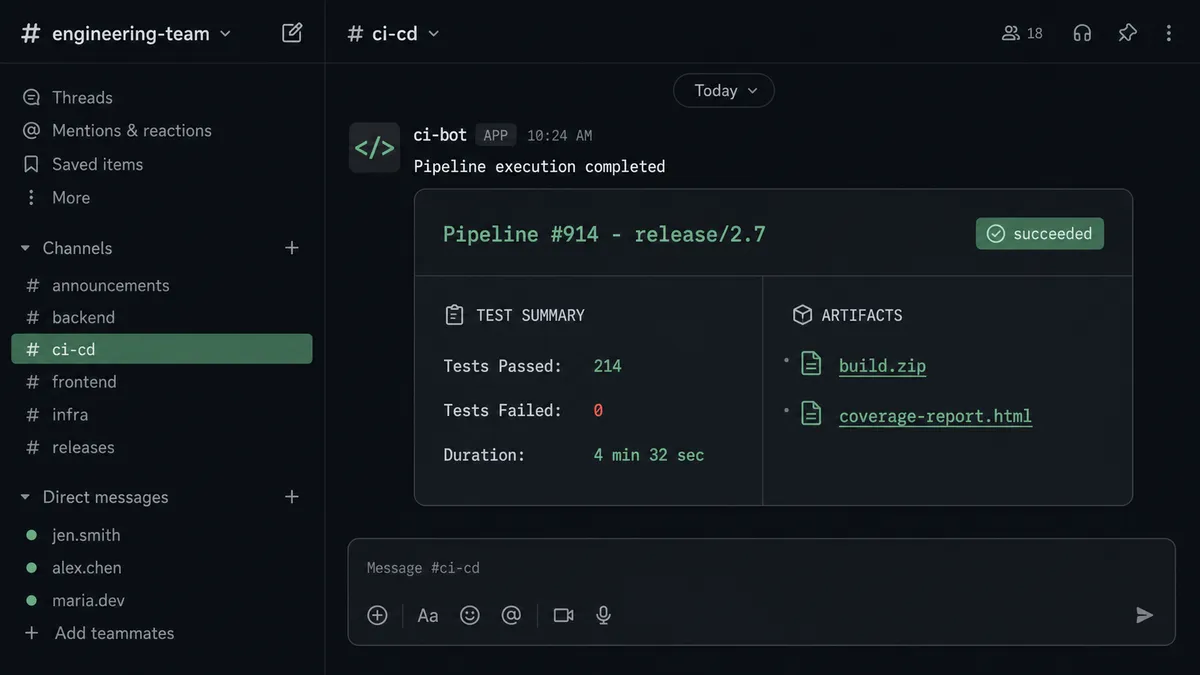
Here is what the agent does that a plain automation cannot. A build finishes green on a release branch. The agent calls Get Pipeline Workflows and reads the result. It knows this branch is release/2.7 and that the project has a deploy pipeline waiting. It does not trigger the deploy. It posts a message to #deploys: “pipeline #914 is green on release/2.7. Ready to trigger the production deploy. Approve or cancel.” It waits.
An engineer opens Slack, reads the summary the agent attached (test count, artifact links, the commit that triggered it), and clicks Approve. The On Block Action trigger fires. The agent resumes with that input and calls Trigger Pipeline against the deploy workflow. The whole sequence is recorded: which pipeline ran, who approved, when the decision was made.
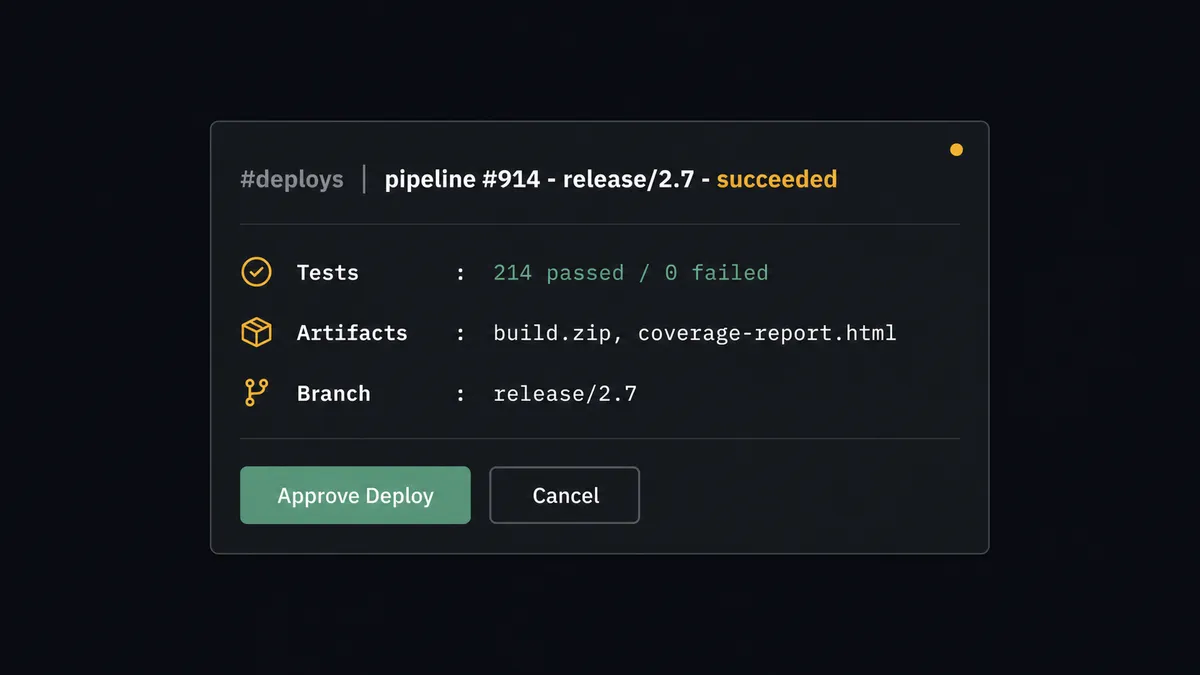
This is not a hardcoded threshold. The agent does not deploy automatically when tests pass. It stops because deploying to production is a step that carries real consequence, and that is the category of step where the agent involves a person. The engineer’s judgment, not an arbitrary rule, is what the agent is waiting for. Prospects call this a “digital andon cord.” The agent stops the line when it hits something a human should own.
FlowRunner vs the tool you are probably comparing
If your team already uses Zapier, you can connect CircleCI events to Slack. Zapier does that reliably for simple event-to-notification flows, and its trigger library is broad. If your team is technical and leans toward n8n, n8n can run multi-step flows and has solid node coverage for both integrations.
Where those tools stop is where this use case starts to matter most. The production deploy gate requires an agent that can reason about what it found, invoke a human-in-loop step as a tool rather than a hardcoded branch, and preserve the decision in an audit trail that records who approved what and when. That is not a feature Zapier or n8n’s current toolset covers natively.
| Capability | Zapier / n8n | FlowRunner |
|---|---|---|
| Route CircleCI results to Slack | Yes, both support this | Yes, with real action names verified against CircleCI API v2 |
| AI agent reasoning about build results | No | Agent reads pipeline data and decides next steps |
| Human-in-loop as a callable tool | No | Agent invokes approval flow as a tool; human responds via Slack buttons |
| Decision audit trail with approver identity | No | Every decision captured with identity and timestamp automatically |
| Unlimited users on entry tier | Zapier limits seats; n8n varies | Yes, all FlowRunner tiers include unlimited users |
| BYOK for AI model | No | Yes, bring your own key for any supported AI provider |
Before and after
| Category | Before | After |
|---|---|---|
| Build triggering | An engineer opens CircleCI and starts each build by hand | The agent calls Trigger Pipeline automatically when code merges |
| Status monitoring | Someone refreshes the pipeline page waiting for it to go green | Agent polls Get Pipeline Workflows and posts the result to Slack when it finishes |
| Test visibility | Team opens CircleCI to read test output after a build | Agent posts failing test count and artifact links directly to the deploys channel |
| Deploy approval | Production deploys fire based on habit or informal agreement | Every production deploy requires an explicit engineer approval captured with identity and timestamp |
| Failure routing | Failing builds surface only to the person watching the dashboard | Agent sends a direct Slack message to the responsible engineer with workflow ID and failing job details |
What you can build
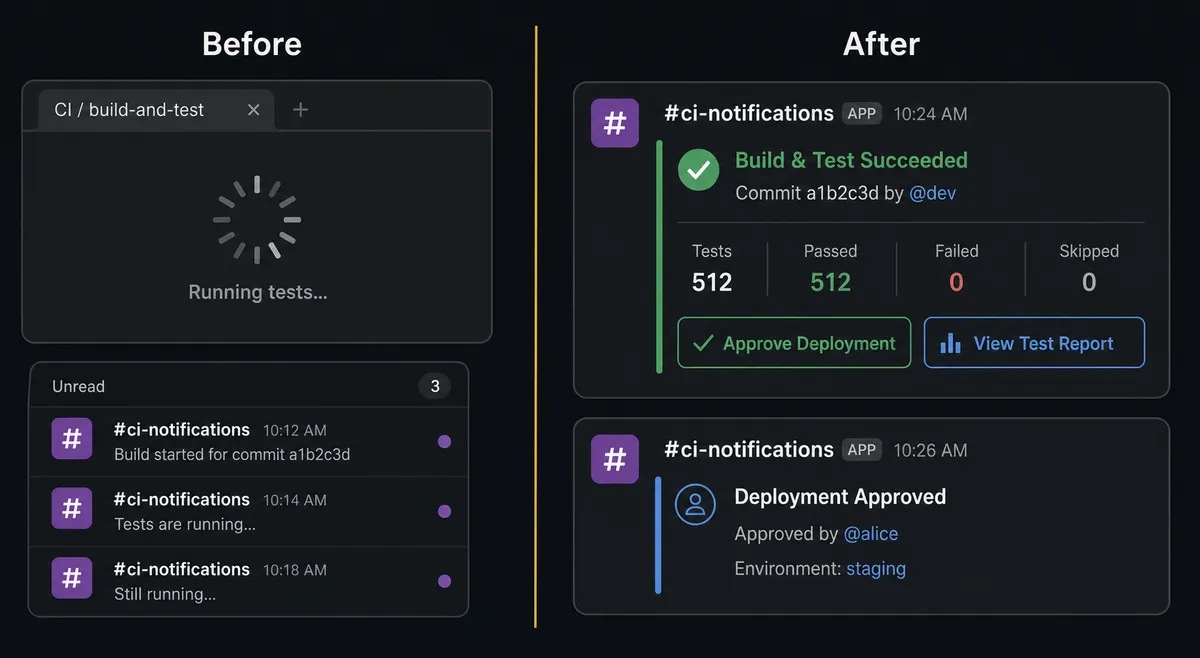
Merge-to-build with a production deploy gate. When code merges to a release branch, the agent triggers the test pipeline, waits for a green build using Get Pipeline Workflows, posts the result to #deploys via Send Message to Channel, and asks an engineer to approve before triggering the production deploy pipeline. Tests are automatic. The ship is a decision.
Failure-to-alert with context. The agent monitors running pipelines using Get Pipeline Workflows. When a workflow fails, it calls Get Test Metadata to pull the failing test names, then sends a Direct Message to the engineer who owns that pipeline, including the workflow ID, the failing job, and a direct link to the run. The right person gets the right context without the team having to triage.
Test summary digest after every run. After any pipeline finishes, the agent calls Get Job Artifacts and Get Test Metadata, then posts a formatted summary to the team channel with artifact download links and a count of failures. The team sees what changed without opening the dashboard.
Environment variable rotation alert. The agent calls List Env Vars against a project and checks whether any variables match a naming pattern associated with expiring credentials. When it finds a match, it posts a Send Message to Channel alert to the platform team with the variable name (value is masked to the last four characters by the CircleCI API). The team knows what to rotate before the build breaks.
Selective rerun on flaky tests. The agent watches for workflows that fail on known-flaky test suites. When it sees a failure from that suite and only that suite, it calls Rerun Workflow from failed jobs automatically and posts an Update Message in Channel to the original alert, noting the rerun was triggered. Engineering sees fewer noise pages from intermittent failures without giving up visibility into real failures.
Common questions
Is it free to connect CircleCI and Slack on FlowRunner? FlowRunner offers a $100 credit on the Growth tier, which covers roughly 67 days of real use with no credit card required. After the credit, Growth starts at $45 per month with 12,000 executions and unlimited users and workflows.
Can I self-host this connection? Yes. FlowRunner offers a self-hosted Community Edition at no cost for teams that need to run the orchestration engine on their own infrastructure. Enterprise self-hosted adds clustering and a full compliance suite.
Does the AI agent need my own API key for the AI model? FlowRunner uses a bring-your-own-key model. You connect your preferred AI provider, whether that is Anthropic, OpenAI, or another, using your own key. You control the model and the cost.
What happens when the agent is not sure about a step? The agent invokes a human-in-loop flow as a callable tool. It posts a Slack message with full context about what it found and why it is pausing, presents the engineer with options, and waits. The workflow resumes only after a human responds. The decision, the responder’s identity, and the timestamp all go into the audit trail.
Can I run this without the AI agent, just as a plain automation? Yes. The plain connection, CircleCI build results routed to a Slack channel, works without any AI layer. You add the agent and human-in-loop step only when you want the system to reason about results and gate consequential actions like a production deploy.
What CircleCI and Slack actions does the agent use? The CircleCI side gives the agent Trigger Pipeline, Get Pipeline Workflows, Get Job Artifacts, and Get Test Metadata as tools. On the Slack side the agent uses Send Message to Channel, Send Direct Message, and Update Message in Channel to surface results and collect decisions via the On Block Action trigger.
Getting started
FlowRunner gives you a $100 credit on the Growth tier when you sign up. That covers roughly 67 days of real work on a team of any size, unlimited users and workflows included. No credit card required to start.
Connect both integrations, build the flow, and activate it against a test branch before you point it at a release branch. The CircleCI and Slack connectors are built and verified against the live APIs, so the actions you configure here are the actions that run in production.