How to Connect Close CRM with Slack (With or Without an AI Agent)
Connect Close CRM and Slack so lead status changes, replied emails, and bulk CRM actions surface immediately in Slack, optionally as an AI agent that pauses for human judgment on bulk edits and late-stage deal routing.
How do you connect Close CRM to Slack?
You connect Close CRM to Slack by setting an On Lead Status Changed (or On Email Received, On Call Completed, or any of Close’s twenty webhook triggers) as the flow’s starting point, then routing the lead data to Slack using Send Message to Channel or Send Direct Message. FlowRunner is a visual AI-agent orchestration platform where automations run autonomously and pause for human judgment on the steps that carry real consequence. The same connection can run as an AI agent that reads the lead, reasons about the deal context, and invokes a human-in-loop Slack approval before touching a sequence or a bulk operation.
The problem it solves
Sales teams use Close CRM as the record of truth for their pipeline. But the pipeline only stays accurate when reps remember to update it, and the downstream actions that a status change should trigger (enrolling a contact in a sequence, creating a follow-up task, alerting a manager) only happen if someone manually reads the status and acts. When the team is working 40 open leads, that does not happen consistently. Contacts miss sequences. Tasks get created two days late or not at all. Inbound replies land on leads that are still running automated outbound, and the sequence keeps firing into a live conversation the rep is already handling.
The ops lead trying to understand pipeline health has to pull the activity timeline manually, ask the rep directly, or wait for the Friday standup. Exceptions, the lead that needs a human call right now, the deal that moved to late-stage overnight, the inbound from a prospect who was three touches into a sequence, fall through the cracks because no system was watching the pipeline in real time and routing the right signal to the right person.
How it works: the connection
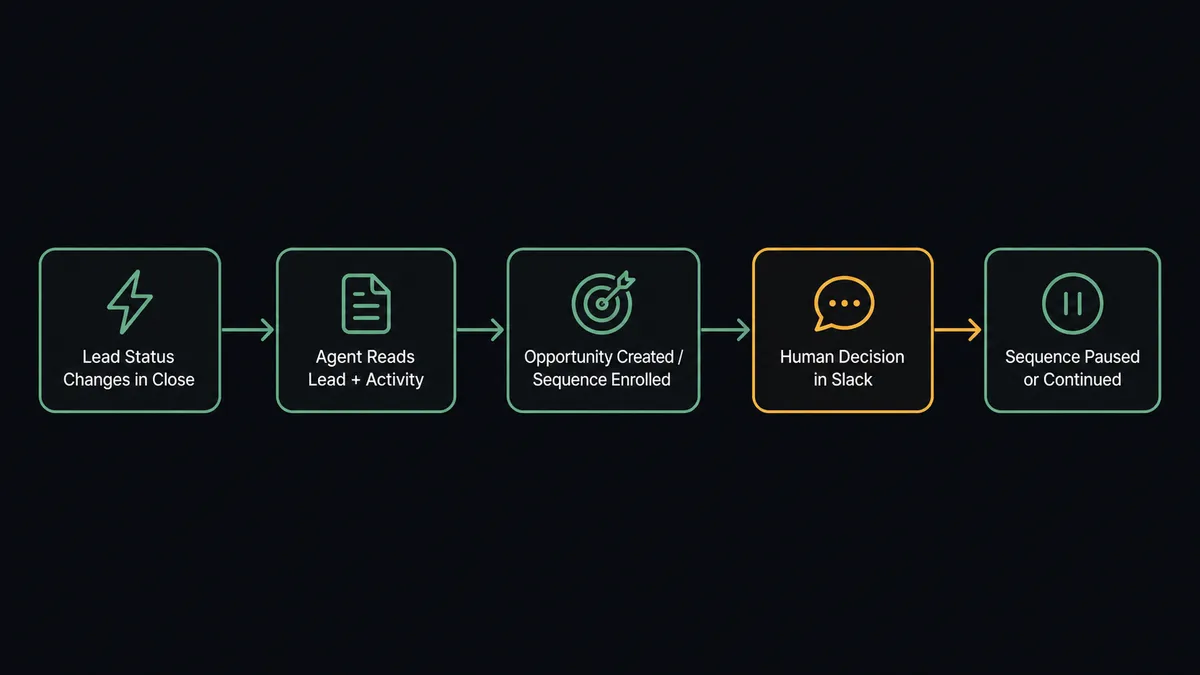
The flow starts with an On Lead Status Changed trigger in Close CRM. When a lead moves from “New” to “Qualified” (or any status transition you configure), the event fires and the flow begins. The agent calls Get Lead to pull the full record: the lead’s data, the assigned rep, and the custom fields relevant to the pipeline. It calls List Activities to read the most recent interaction history.
With that context in hand, the flow checks for an open opportunity using List Opportunities. If none exists, it calls Create Opportunity and places the deal in the right pipeline using the list returned by List Pipelines. It then calls Subscribe Contact to Sequence to enroll the primary contact in the qualified-lead outreach sequence, and Create Task to assign a follow-up action to the rep.
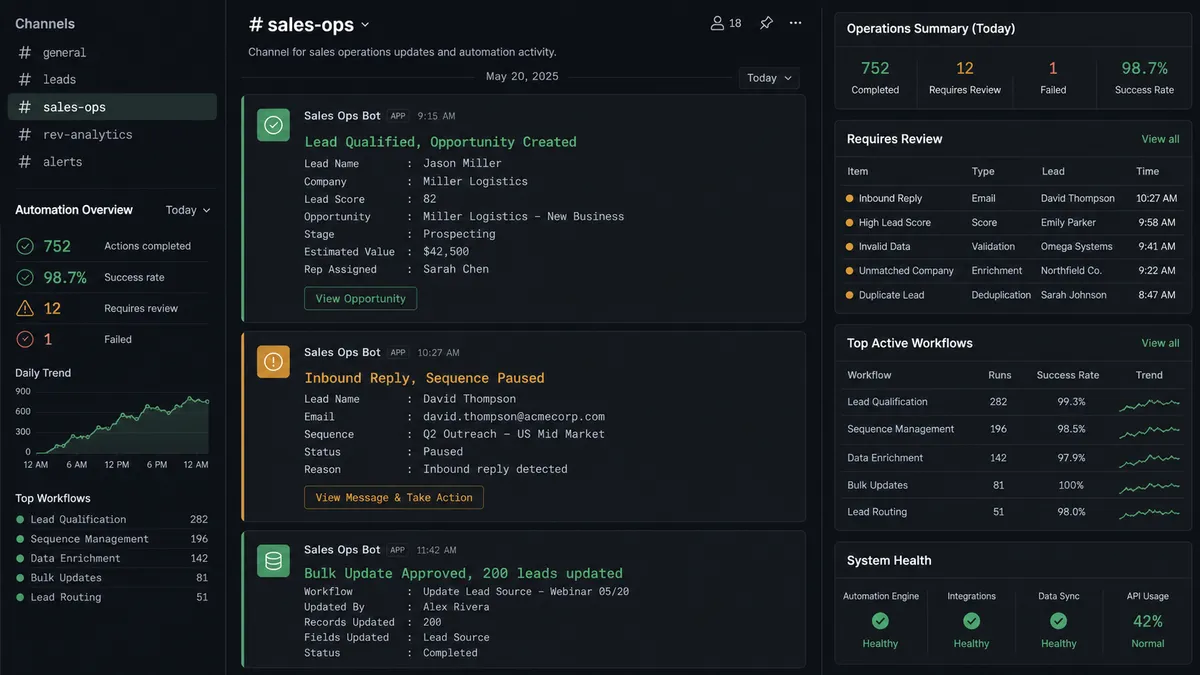
The Slack notification goes out via Send Direct Message to the assigned rep: the lead name, the new status, the opportunity created, and the task assigned. The rep knows exactly what changed and what the next action is, without logging into Close to find out.
For inbound reply triage, On Email Received fires when a reply lands. The agent reads the email body, calls Get Lead, and runs Run Smart View to check whether the lead is in a late-stage opportunity. If the lead is in late-stage, the agent calls Pause Sequence Subscription and sends a Send Message to Channel to the sales channel asking the rep to take the conversation manually. If the lead is early-stage, the sequence continues and the agent logs the reply context with Create Note.
Can an AI agent run it? (and why a human stays in the loop)
A plain trigger-action connection moves the data. An AI agent reads it, reasons about it, and decides what to do next. Those are different things.
The Close CRM agent has access to Get Lead, List Activities, Create Opportunity, Subscribe Contact to Sequence, Pause Sequence Subscription, Create Task, Bulk Edit Leads, and every other action in the connector as its toolbox. The agent does not follow a fixed sequence. It reads the lead record, evaluates the current state of the pipeline, and picks the right combination of tools for the situation in front of it.
The consequential moments are where the agent earns its keep. Consider a sales lead asking to bulk update 200 leads to a new status before a campaign. A plain connection would execute it. The agent stages the change, calls an internal count, and decides this is not a routine single-record update. It invokes the human-in-loop tool: a Slack message lands in the sales channel with the filter, the number of records affected, and the proposed change. “Bulk update will modify 200 leads matching [filter] with [change]. Approve, modify the filter, or cancel?” The sales lead responds with the interactive button. On approval, the agent calls Bulk Edit Leads and confirms completion with Get Bulk Action Status. The decision, the approver’s identity, and the timestamp go into the audit trail.
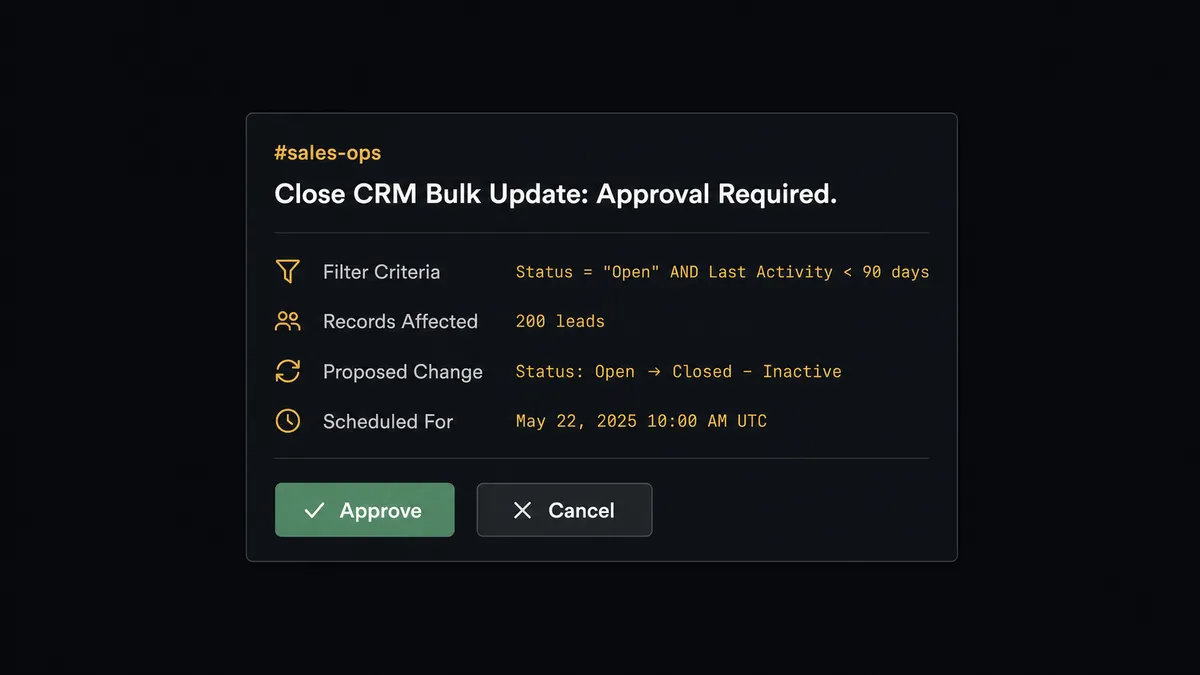
This is what the “digital andon cord” framing describes. The agent stops the line when it hits something that should not be automated. Not because a threshold fired. Because the agent evaluated the scope and decided a human should own this call. Routine single-record updates flow through without a prompt. Anything touching a chunk of the pipeline gets a human in the loop.
An inbound reply from a prospect three touches into a sequence is another case where the agent reasons rather than routes mechanically. If the lead is late-stage, the agent does not check a rule. It evaluates the activity history, sees the deal value and the conversation stage, and decides the rep should take it live. Pause Sequence Subscription fires. The Slack message goes to the right rep with the email content and the lead’s full context. The rep replies in Close. The agent logs the outcome.
FlowRunner vs the tool you’re probably comparing
If your team is non-technical, you are likely using Zapier for automation. If you have developers involved, you may be evaluating n8n. Both are legitimate choices for specific use cases, and acknowledging that matters before comparing.
Zapier is the easiest automation tool to start with. The interface is approachable, the connector library is extensive, and most simple trigger-action connections take minutes to configure. n8n offers more technical depth, a fair-code self-hosting model, and a large community of workflow templates. Both tools connect Close CRM and Slack for basic notification workflows.
The differences surface when the workflow requires reasoning, not just routing.
| Feature | Zapier / n8n | FlowRunner |
|---|---|---|
| Human-in-loop | Not native; requires workarounds or external tools | Native agent tool; agent decides when to invoke it |
| Agent reasoning | Static trigger-action sequence | Agent reads data, evaluates context, picks tools |
| Bulk action approval | Not supported as a built-in pattern | Agent stages change, routes Slack approval, then acts |
| Users per tier | Per-seat or task-based pricing tiers | Unlimited users on every tier |
| AI provider | Vendor-specific or limited integrations | BYOK; connect your own Claude, OpenAI, or other key |
| Audit trail | Limited or Enterprise-only | Built-in on every paid tier |
The core difference is not the list of connectors. It is whether the system can reason about what it found and involve a human at the right moment without a hardcoded rule telling it to.
Before and after
| Category | Before | After |
|---|---|---|
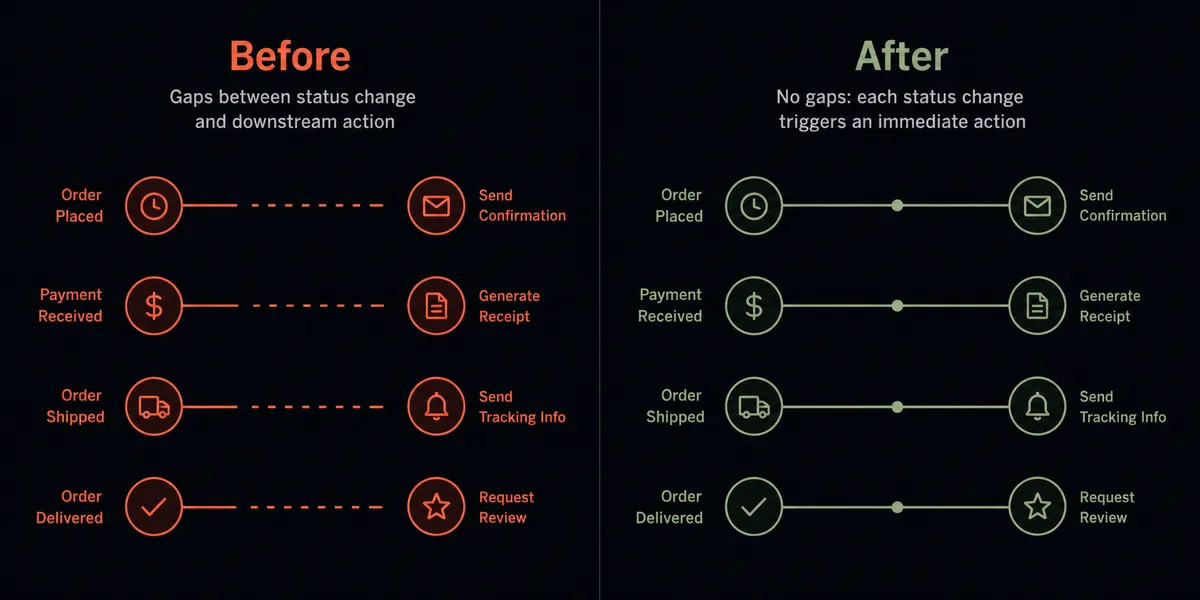
| Lead status actions | Reps manually trigger downstream steps when they remember; sequences and tasks created inconsistently | On Lead Status Changed drives every downstream action automatically at the moment status changes |
| Sequence enrollment | Contacts added to sequences one at a time after a rep notices the status | Subscribe Contact to Sequence fires at the moment of qualification with no manual step |
| Inbound reply handling | Sequences keep firing into live conversations; reps catch it only when the prospect complains | On Email Received triggers a smart view check; sequences paused automatically when a reply lands on a late-stage lead |
| Bulk CRM operations | Sales ops runs bulk updates without a review step; changes are difficult to trace or reverse | Agent stages the bulk action and routes a Slack approval before executing; every decision recorded |
| Pipeline visibility | Managers pull the activity timeline manually or wait for the standup | Send Message to Channel posts real-time alerts for qualified leads, exceptions, and completed tasks |
What you can build
Qualified lead to opportunity and sequence in one motion. On Lead Status Changed fires when a lead moves to Qualified. The agent calls Create Opportunity, Subscribe Contact to Sequence, and Create Task for the rep. A Send Direct Message lands in Slack with the lead name and next action. The rep opens Close already knowing what to do.
Inbound reply triage with sequence control. On Email Received fires for an inbound reply on an outbound sequence. The agent calls Run Smart View to check deal stage. If late-stage, it calls Pause Sequence Subscription and notifies the rep via Send Direct Message with the email content. If early-stage, it logs the reply with Create Note and lets the sequence continue.
Bulk edit approval gate. A sales ops manager requests a bulk status update before a campaign. The agent stages the Bulk Edit Leads change, counts affected records, and routes a Slack message to the sales lead with Approve and Cancel buttons powered by On Block Action. On approval, Bulk Edit Leads executes and Get Bulk Action Status confirms completion.
Call outcome routing. On Call Completed fires after a sales call is logged. The agent reads the call record, checks the opportunity stage using Get Opportunity, and decides: if the call is a successful late-stage call, it creates a follow-up task and notifies the manager via Send Message to Channel. If the call had no answer, it logs a Create Note and schedules a retry task.
Post-meeting follow-up sequence. On Meeting Completed fires after a demo or discovery call is logged in Close. The agent reads the meeting record, updates the opportunity stage with Update Opportunity, subscribes the contact to the post-demo sequence via Subscribe Contact to Sequence, and sends the rep a Send Direct Message with a suggested follow-up note. Nothing falls through after a call.
Common questions
Is it free to connect Close CRM and Slack on FlowRunner? FlowRunner gives you $100 in credit on the Growth tier when you sign up, which covers roughly 67 days of real workflow usage with no credit card required. Corporate email required. After the credit runs out, Growth starts at $45 per month.
Can I self-host FlowRunner? Yes. FlowRunner offers a free Community Edition for single-instance self-hosting and an Enterprise tier for multi-instance clustering with the full compliance suite. Both connect to Close CRM and Slack with the same connector library.
Does the AI agent need my own API key? FlowRunner uses a bring-your-own-keys model for AI providers. You supply the key for whichever model you want the agent to use. The platform orchestrates the rest. No AI vendor lock-in.
What happens when the agent is not sure what to do? The agent invokes a human-in-loop subflow as a tool. It pauses, packages the full context of what it found and why it is uncertain, and sends a Slack message to the right person with structured options. When the human responds, the workflow resumes with the decision recorded in the audit trail.
Can the agent handle bulk Close CRM actions safely? Yes. Before running Bulk Edit Leads or Bulk Delete Leads, the agent stages the change, counts the affected records, and routes a Slack approval to the sales lead showing the filter and the proposed change. The bulk action only fires on explicit approval. Routine single-record updates pass through without a prompt.
Do I need to know how to code to set this up? No. FlowRunner is a visual, no-code platform. You connect your Close CRM and Slack accounts, select the trigger, map the data fields, and activate. No developer required.
Getting started
FlowRunner’s $100 credit trial gives you roughly 67 days on the Growth tier with no credit card required. Corporate email required to sign up.
Start at flowrunner.ai and connect both integrations: Close CRM and Slack. The setup wizard walks you through OAuth2 authentication for both, trigger selection, data mapping, and the optional human-in-loop step.
If you want to see the Close CRM and Slack agent running against your own pipeline before you configure anything, book a 30-minute walkthrough at calendly.com/flowrunner/intro. The session covers a live agent demo, the bulk approval flow, and your specific use case.
Every FlowRunner tier includes unlimited users and unlimited workflows. Your whole sales and ops team works from the same setup from day one.