How to Connect Discord with Notion (With or Without an AI Agent)
Connect Discord and Notion so messages, threads, and moderation decisions flow automatically into your team's knowledge base, with an AI agent that pauses for a human before any consequential action.
How do you connect Discord to Notion?
You connect Discord to Notion by setting a scheduled trigger in FlowRunner that polls a Discord channel with Get Messages, then writes the results to Notion using Create Database Item or Create Page. FlowRunner is a visual AI-agent orchestration platform where automations run autonomously and pause for human judgment on the steps that carry real consequence. The same connection that logs routine messages can run as an AI agent, reading Discord activity, reasoning about what each item means, and calling a human into the loop before any deletion, role change, or external publish.
The problem that builds up silently
Community managers, ops leads, and team coordinators live in Discord. The problem is not that Discord lacks information. The problem is that the information in Discord stays in Discord. Moderation calls happen in threads. Decisions get made in replies that disappear into scroll history. Role changes are applied by hand without a record of who did it or why. The knowledge that should live in Notion, where the team’s operational record is kept, never gets there.
The manual version looks like this: a moderator spots a policy violation, posts a note in a separate channel, someone remembers to log it, and maybe it ends up in a Notion row a day later with half the context stripped out. Exceptions fall through the cracks. The same kind of post gets handled differently depending on who was online. There is no audit trail. There is no way to search last month’s moderation decisions, and no way to hand off a community to a new hire without starting from scratch.
The same pattern shows up in internal ops channels: standup notes, incident updates, support escalations. The work is done in Discord. The record is nowhere.
How it works: the connection
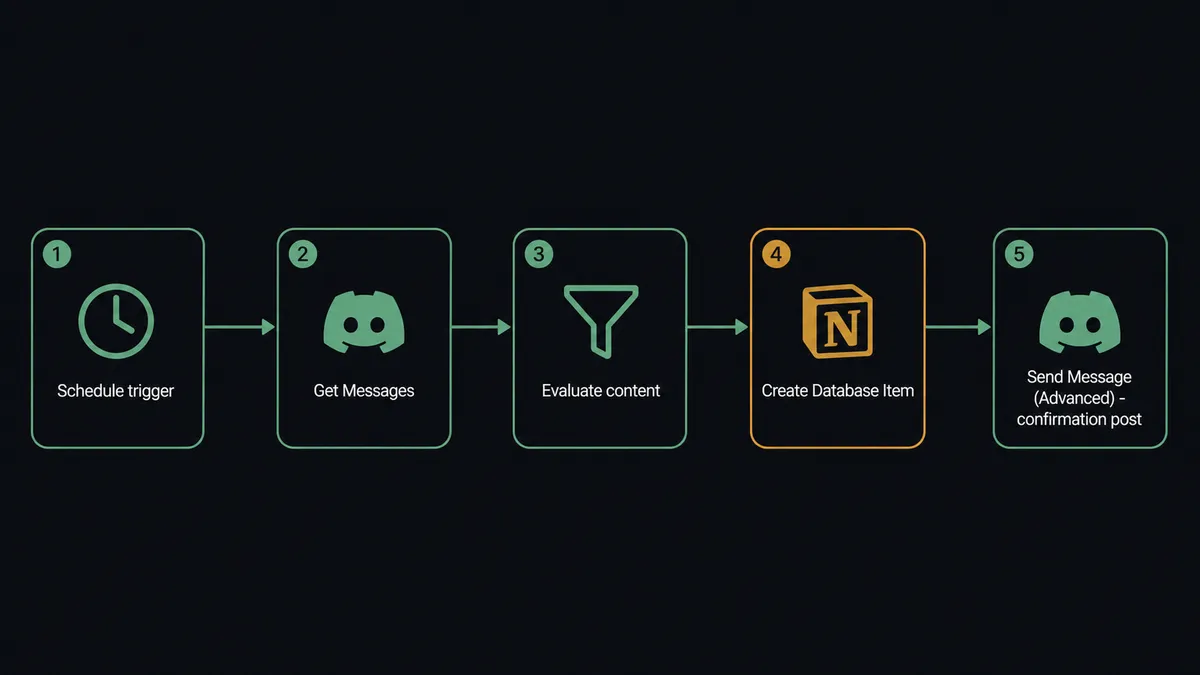
FlowRunner connects Discord and Notion through a scheduled workflow. Discord does not emit HTTP webhooks for new messages, so agents detect activity by polling. The flow works like this:
- A Schedule trigger fires at an interval you set: every 5 minutes, every 15 minutes, or whatever matches your channel volume.
- The agent calls Get Messages on the target channel and reads the most recent activity.
- The agent evaluates the messages against your criteria: policy keywords, escalation phrases, support request patterns, standup format.
- For each message that matches, the agent calls Create Database Item in Notion, writing the message content, author, channel, and timestamp to your ops database.
- The agent posts a confirmation to a specified Discord channel using Send Message to close the loop with the team.
Field mapping is straightforward. Message content maps to the Notion page body or database text field. The author’s username maps to an owner or submitter field. The channel name maps to a category column. The timestamp maps to a date property. Nothing is invented. The agent copies what Discord recorded into the format Notion expects.
For richer content, the agent uses Append Block Children to add structured blocks to an existing Notion page. A weekly standup summary becomes a set of formatted text blocks appended to the current sprint page, without overwriting the notes already there.
Can an AI agent run it? (And why a human stays in the loop)
A basic Discord-to-Notion sync copies messages into rows. An AI agent reads those messages and decides what to do with each one. That distinction matters most on the steps that carry consequence: deleting a post, removing a member’s role, publishing a summary externally, or escalating an incident.
Here is a concrete decision moment. A moderation agent is polling the community channel. It reads a message that matches three of your policy keywords and is from an account created 4 hours ago. The agent does not delete the post. It recognizes that a new account with a keyword match is suspicious but not conclusive. It calls Send Message (Advanced) to post the flagged content to the moderator channel, adds a check-mark and cross-mark reaction to its own summary, and creates a Notion database item flagging the post for review. Then it waits.
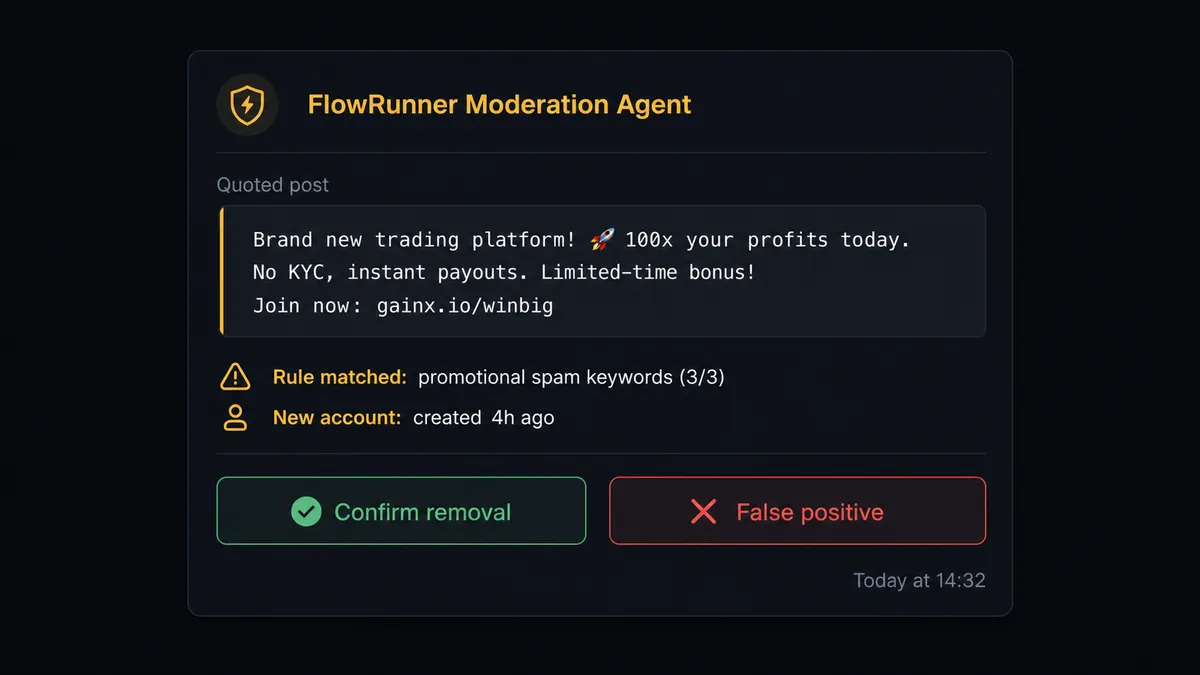
That is not a hardcoded threshold. The agent escalated because the combination of signals crossed a judgment line, not because a single number exceeded a limit. A seasoned moderator might auto-process the same post. The agent, lacking that certainty, pulled a human in.
On its next polling pass, the agent reads the reactions on its summary post using Get Messages. A confirmed check mark leads it to call Delete Message on the original post and Remove Role From Member if a role change was indicated. A cross mark leaves everything unchanged. The moderator’s identity, the timestamp, and the decision are written to Notion via Create Database Item. The audit trail is in the tool the team already uses.
This is what FlowRunner calls a human-in-loop flow: a separate flow that contacts a specific person, presents full context, and returns their decision as input to the agent. The agent treats it as a callable tool, invoking it when its own confidence is not sufficient. Prospects sometimes call this a “digital andon cord.” The agent stops the line when it hits uncertainty. A person clears it.
FlowRunner vs Zapier: which one handles the agent layer?
Zapier is the right comparison for most non-technical teams looking at Discord-to-Notion connections. It is a proven tool with a large integration library, a straightforward interface, and a low learning curve. If you need a simple message-to-row sync with no decision logic, Zapier delivers that quickly.
The differences show up when the workflow needs judgment.
| Feature | Zapier | FlowRunner |
|---|---|---|
| Basic Discord-to-Notion sync | Yes, straightforward setup | Yes, same capability |
| AI agent that reasons over message content | No native agent layer | Yes, agent reads and decides |
| Human-in-loop as a callable tool | Approval step available, but hardcoded rules only | Agent invokes human oversight based on its own judgment |
| Audit trail of who decided what | Not built in | Every human decision logged with identity and timestamp |
| Unlimited users on every plan | No (seat-based pricing on most plans) | Yes, all tiers include unlimited users |
| Self-host option | No | Yes, Community Edition free |
| BYOK for AI provider | No | Yes, bring your own key |
Zapier’s approval steps work from conditions you define before the workflow runs. FlowRunner’s human-in-loop works from what the agent decides at runtime. For a moderation queue, an incident escalation, or any workflow where the right call depends on context, that difference is the whole value proposition.
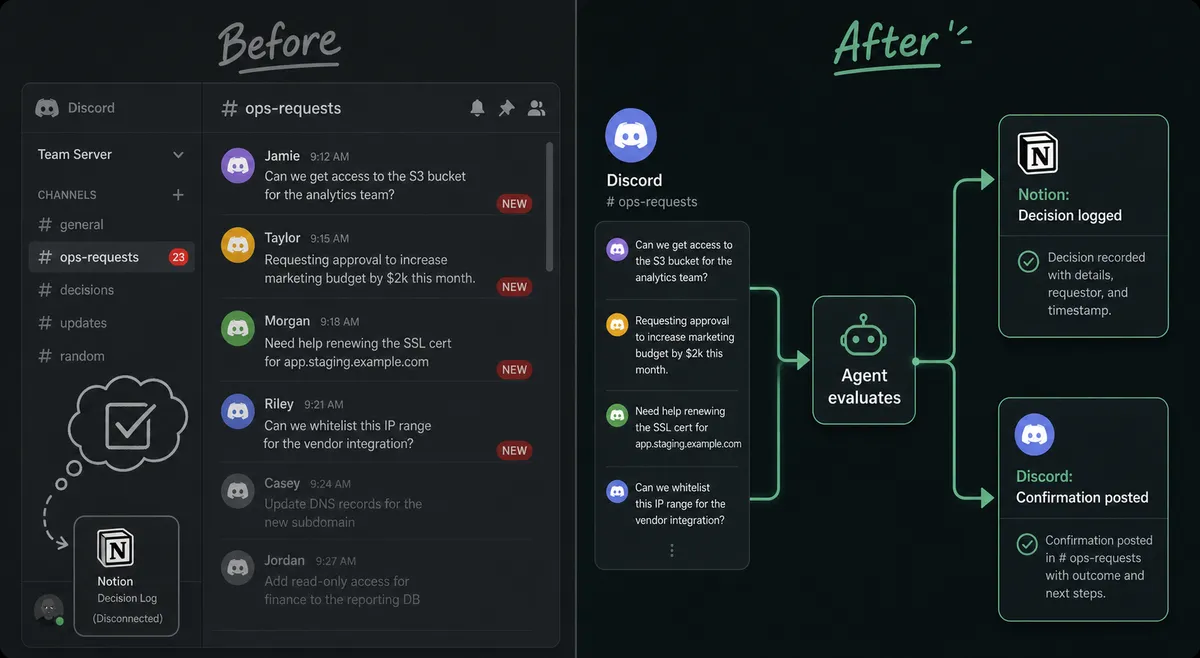
Before and after
| Metric | Before | After |
|---|---|---|
| Moderation record | Removals happen in Discord with no log of who decided | Every decision written to Notion with decider identity and timestamp |
| Response consistency | The same kind of post handled differently depending on who is online | Agent applies the same criteria every time; humans confirm the calls that need judgment |
| Documentation lag | Meeting notes and ops decisions sit in Discord threads, never reaching Notion | Agent writes summaries to Notion within minutes of the event |
| Moderator workload | Manual channel patrol, every post reviewed by a human | Agent surfaces only the flags that need a human; routine posts handled automatically |
| Audit and handoff | No searchable record; onboarding a new moderator means starting from scratch | Notion database is the searchable history; new team members have context from day one |
What you can build
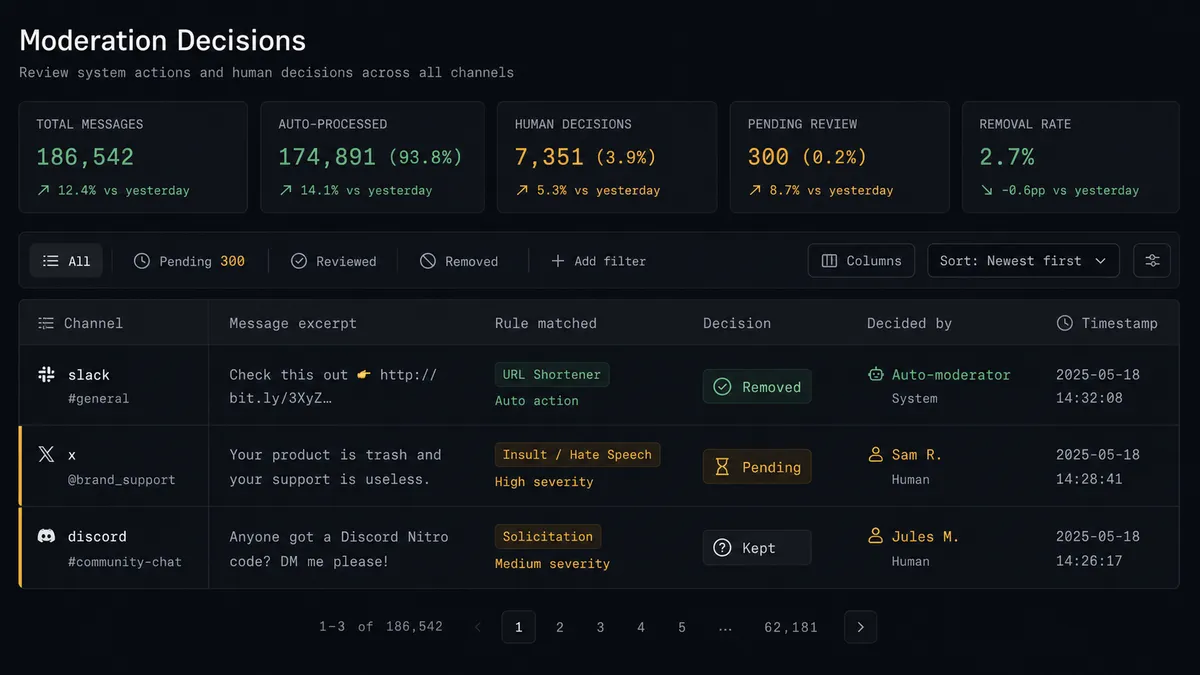
Community moderation queue. The agent polls community channels with Get Messages, matches posts against policy rules, and routes each flag to the moderator channel with a reaction gate. A confirmed check mark triggers Delete Message and optionally Remove Role From Member. Every decision is logged to a Notion moderation database via Create Database Item.
Incident log from Discord ops channels. When your team posts incident updates in a dedicated Discord channel, the agent reads each update with Get Messages, creates a Notion page with Create Page for the incident, and appends each subsequent update using Append Block Children. The incident timeline builds itself in Notion as the team works through it in Discord.
Onboarding role assignment with documentation. A new-member workflow reads a list of signups, calls Get Guild Member to resolve each member, assigns the correct server role with Add Role To Member, and creates a Notion database item via Create Database Item to log that the onboarding completed. Offboarding runs the reverse with Remove Role From Member and Update Database Item to mark the record closed.
Decision log for escalated exceptions. For any workflow that escalates an exception to a human, the agent creates a Notion database item with the full context: what it found, what options it presented, what the human decided, and when. The log uses Create Comment on the Notion page to surface the agent’s reasoning alongside the decision record.
Standup summary publisher. The agent polls your standup channel with Get Messages at the end of each day, formats the updates, and appends them to the current sprint’s Notion page using Append Block Children. The standup record is always current without anyone manually copying from Discord.
Common questions
Is it free to connect Discord and Notion on FlowRunner? FlowRunner starts with a $100 credit on the Growth tier, which covers roughly 67 days of real workflows at no cost. No credit card is required. After the credit, Growth is $45 per month. All tiers include unlimited users and unlimited workflows.
Can I self-host FlowRunner for this Discord and Notion connection? Yes. FlowRunner offers a free Community Edition for self-hosted single-instance deployments. The Enterprise tier adds multi-instance clustering and the full compliance suite.
Does the agent need my own OpenAI or AI provider key? Yes. FlowRunner uses a Bring Your Own Key model. You connect your own key from any supported AI provider. The platform orchestrates the agent; you control the AI costs directly.
What happens when the agent is not sure what to do? The agent invokes a human-in-loop flow as a callable tool. It packages the full context, sends it to a person on Slack, email, or another channel, and pauses until it gets a decision. The decision and the decider’s identity are captured in the audit trail.
Does FlowRunner require a developer to set this up? No. The visual builder lets non-technical team members connect Discord and Notion, map fields, and configure agent logic without writing code.
What Discord triggers are available? Discord does not offer HTTP webhooks for inbound events. FlowRunner agents detect new Discord activity by polling recent messages with the Get Messages action on a schedule you control.
Getting started
FlowRunner’s $100 trial credit runs on the Growth tier with no credit card required. At Growth’s execution rate, that covers roughly 67 days of real workflow runs before a cent is charged. Corporate email required; no @gmail or @yahoo sign-ups.
Connect both integrations from the FlowRunner integration library:
- Discord integration for polling messages, posting to channels, and managing roles
- Notion integration for creating pages, logging database items, and appending content
Start a free trial at flowrunner.ai, or book a 30-minute walkthrough at calendly.com/flowrunner/intro if you want to see the human-in-loop layer before you commit.