How to Connect DocuSign with HubSpot (With or Without an AI Agent)
Connect DocuSign and HubSpot so every completed envelope automatically updates the deal stage, creates the billing record, and routes exceptions to a human before anything posts.

How do you connect DocuSign to HubSpot?
When a DocuSign envelope completes, FlowRunner fires an On Envelope Completed trigger, downloads the signed document, and runs an Update Deal action in HubSpot to mark the deal Closed Won, all in under 90 seconds. FlowRunner is a visual AI-agent orchestration platform where automations run autonomously and pause for human judgment on the steps that carry real consequence. That same connection can run as an AI agent that reads the deal context, decides whether to auto-process or escalate, and invokes a human-in-loop flow on high-value contracts before posting anything to billing.
The problem it solves
Right now, your sales reps finish a call, watch the DocuSign notification land, and then manually open HubSpot to update the deal stage. Some do it immediately. Some do it at the end of the day. Some forget entirely. By the time billing needs to set up the subscription, the CRM shows the deal still in Negotiation, and someone has to trace back through email to find the signed contract.
The gap is not laziness. It is the way these two systems work by default: DocuSign knows the signature happened, HubSpot does not. Every step between the signature and the CRM update is a manual handoff that depends on a person paying attention at the right moment. Contracts fall through the cracks during busy quarters, onboarding stalls, and the billing team spends Friday afternoons reconciling what actually closed against what the CRM says closed.
How it works: the connection
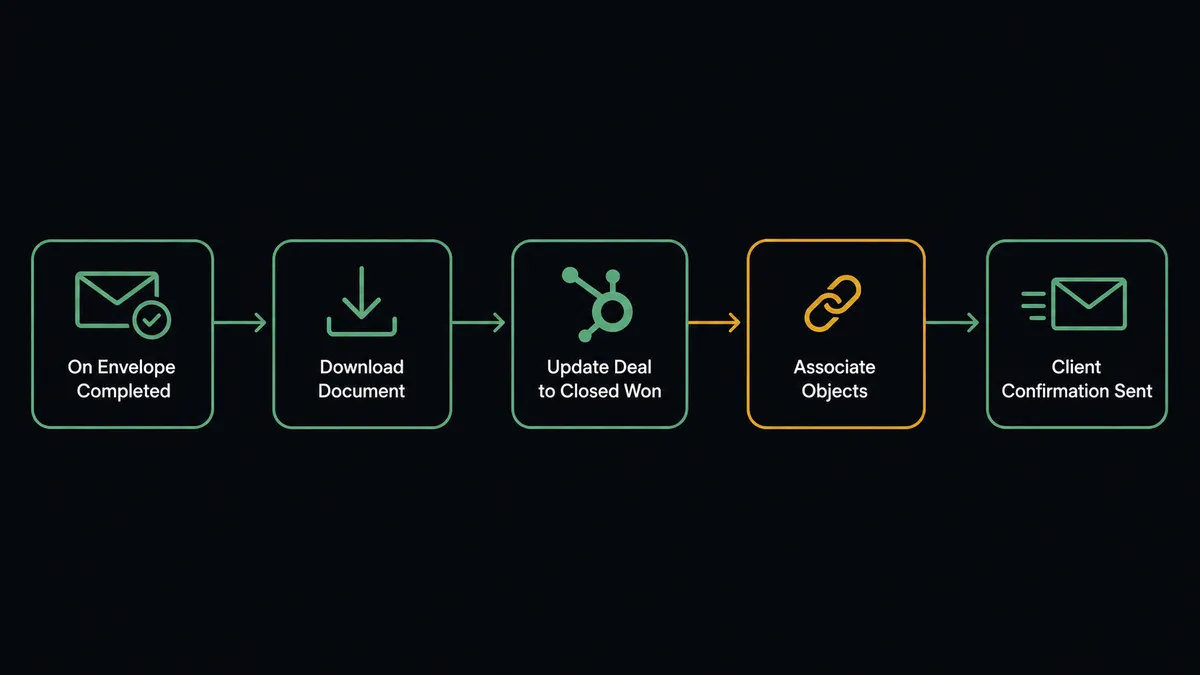
The On Envelope Completed trigger is the foundation. The moment DocuSign collects the final required signature, FlowRunner wakes up. Here is what runs in sequence:
- Download Document retrieves the fully executed PDF from DocuSign and saves it with a structured file name tied to the deal ID.
- Get Deal by ID pulls the corresponding HubSpot record so the agent has full deal context: amount, owner, pipeline stage, and associated contacts.
- Update Deal sets the stage to Closed Won, logs the contract amount, and timestamps the close date.
- Associate Objects links the downloaded document reference to the HubSpot deal record so your team can find it without opening DocuSign.
- A confirmation email goes to the client with the signed agreement attached.
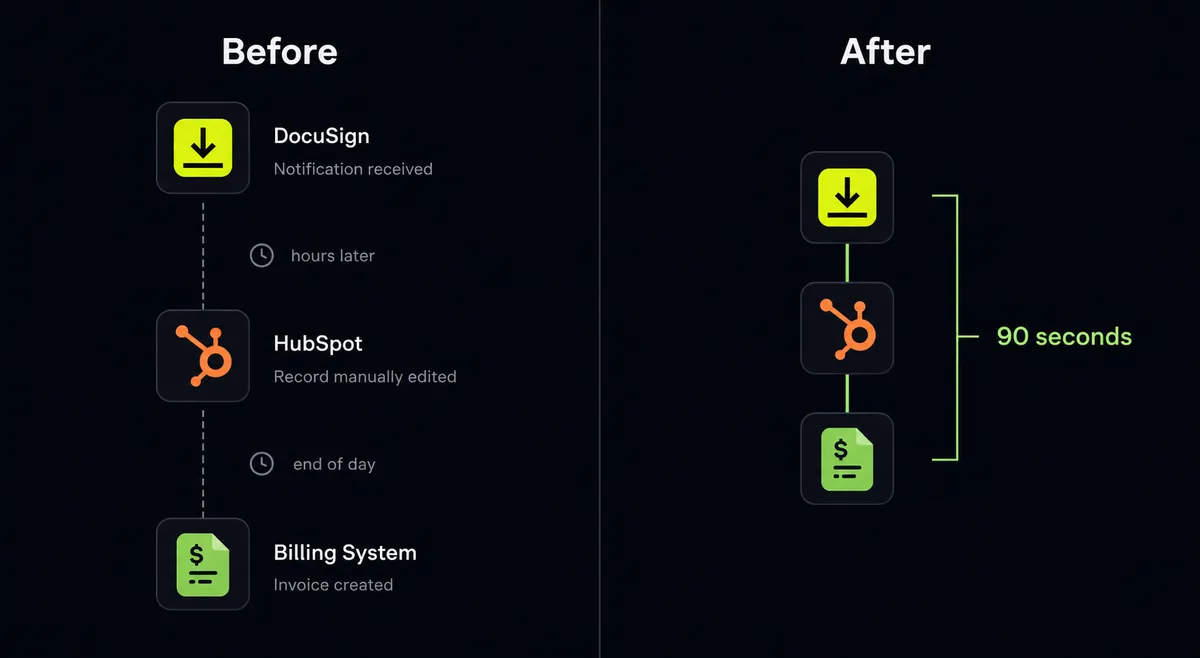
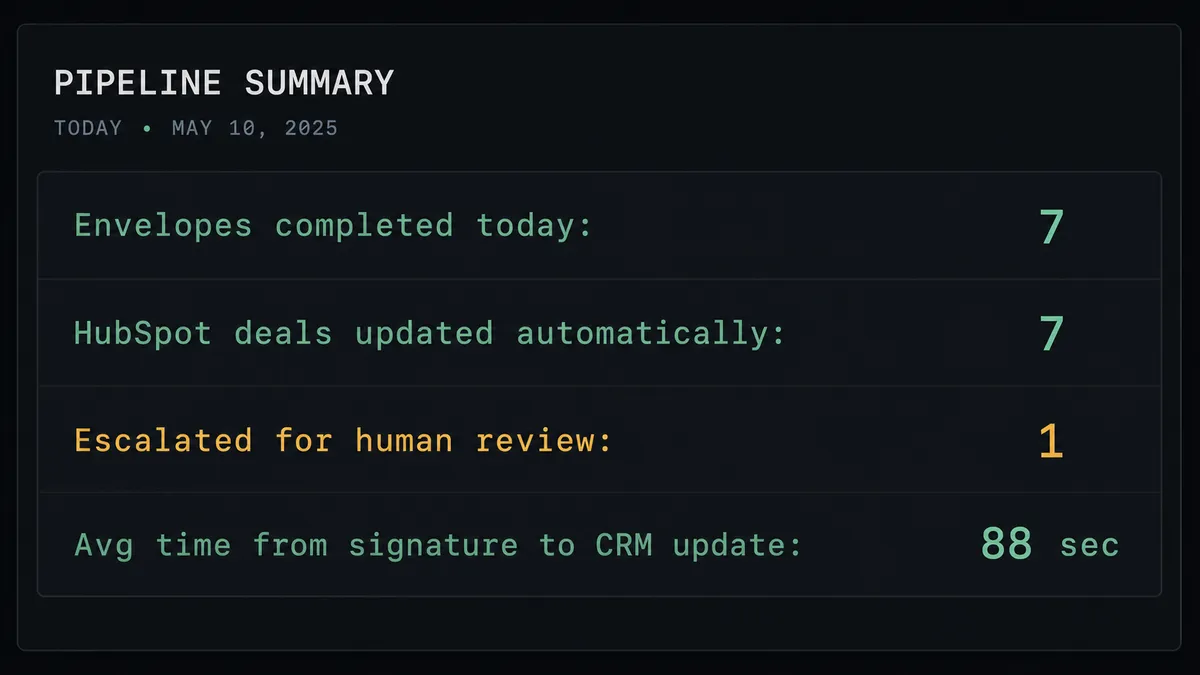
The whole sequence runs in under 90 seconds from signature to CRM update. The rep sees the deal updated before they finish their post-call notes.
For declined contracts, On Envelope Declined fires a separate workflow. The agent calls Get Envelope Recipients to identify who declined, then sends a Slack message to the deal owner with the recipient’s name and a direct link to the DocuSign record. The deal owner does not find out about a declined contract through a daily log check. They find out within minutes.
Can an AI agent run it? (and why a human stays in the loop)
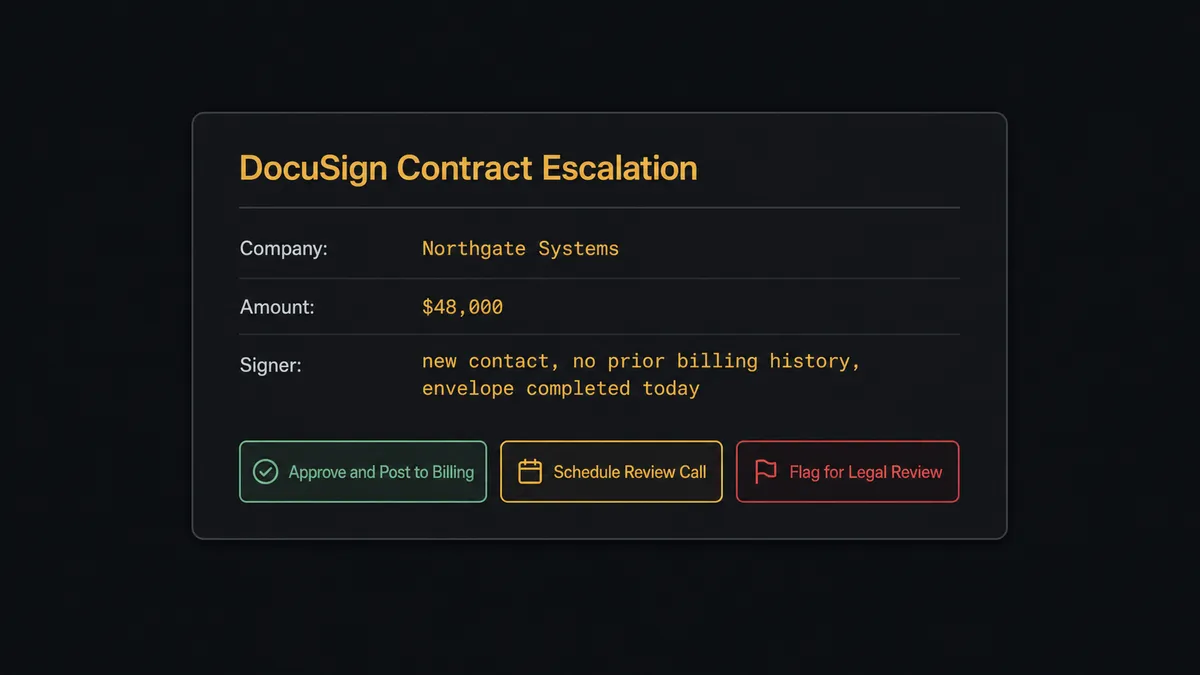
A simple trigger-action connection handles the straightforward case: signature comes in, CRM updates. But straightforward is not every case. A $48,000 contract from a new enterprise prospect is not the same situation as a $2,400 renewal from a customer with three years of clean history. A basic automation treats them identically.
The AI agent reads the deal. It checks the amount against the deal owner’s history. It reviews the signer’s record. If the contract is a standard renewal from a known customer, the agent processes it automatically: downloads the document, updates HubSpot, starts the billing setup. No human needed.
If the contract is from a prospect the company has never billed before, or if the amount is three times the vendor’s usual contract size, or if the envelope was declined and then quickly re-signed under different terms, the agent stops. It invokes the human-in-loop flow as a callable tool. The sales manager receives a Slack message with full context: deal value, signer history, a link to the envelope, and three options: approve and post to billing, schedule a review call, or mark the deal for legal review. The manager clicks. The agent acts on that decision. The decision, the manager’s name, and the timestamp are captured in the audit trail.
This is not a hardcoded threshold. The agent evaluates context. A $3,000 contract from an unknown entity in a flagged geography might escalate while a $25,000 renewal from a ten-year customer does not. The decision to involve a human is itself an AI decision, not a rule.
Prospects sometimes call this a “digital andon cord.” This is not a sync tool. The agent knows when to stop and ask.
FlowRunner vs Zapier
Zapier is genuinely strong for simple two-step automations. If all you need is “envelope completed, update the deal stage,” Zapier handles that quickly and the setup takes minutes. For teams that want a fast, no-code connection with no orchestration complexity, it is a reasonable starting point.
The differences appear when the process gets more complex:
| Capability | Zapier | FlowRunner |
|---|---|---|
| Human-in-loop on exceptions | Not available natively | Native tool the agent invokes by context, not threshold |
| AI agent reasoning over deal data | Not available | Agent reads deal context and decides how to act |
| Audit trail with decision accountability | Not available | Every decision, decider, and timestamp recorded |
| Unlimited users on every paid plan | Per-user pricing | Unlimited users on all tiers |
| Self-hosted deployment option | Not available | Free Community Edition plus Enterprise self-hosted |
| BYOK for AI providers | Not available | Bring your own keys for any AI provider |
If your use case is “connect two systems and never look back,” Zapier may be sufficient. If your use case involves contracts above certain values, new customers, or compliance requirements where someone needs to be accountable for each approval, FlowRunner is built for that layer.
Before and after
| Category | Before | After |
|---|---|---|
| CRM update after signing | Reps manually update HubSpot hours or days after signature | Deal updated to Closed Won in under 90 seconds automatically |
| Signed document access | Team searches DocuSign to find executed contracts | Document downloaded and linked to HubSpot deal record immediately |
| Declined contract response | Deal owner discovers the decline through a log or manual check | Slack notification fires within minutes with signer name and next-action options |
| High-value contract approvals | No systematic review process for large or unusual deals | Agent escalates flagged deals to manager via Slack before billing setup runs |
| Billing setup delay | Stripe or billing setup happens hours after signature, after manual handoff | Subscription start triggered automatically in the same workflow as the CRM update |
| Audit trail | Approval decisions exist only in email threads | Every decision, approver identity, and timestamp recorded in FlowRunner audit log |
What you can build
Contract-to-Billing in 90 Seconds On Envelope Completed fires. The agent downloads the document, calls Update Deal in HubSpot to mark it Closed Won, and triggers the subscription setup in your billing system. From signature to active customer in under two minutes, with no manual steps.
Declined Contract Recovery Workflow On Envelope Declined fires. The agent retrieves the recipient’s details using Get Envelope Recipients and posts to the deal owner’s Slack immediately: who declined, which deal, and the option to respond with revised terms. High-value declined deals route to a sales manager using the human-in-loop tool rather than disappearing into the queue.
Stalled Envelope Follow-Up On Envelope Sent fires and the agent sets a 3-day window. At the window, the agent calls Get Envelope Status. If still pending, it runs Resend Envelope and posts a Slack message to the deal owner: “Envelope to [Signer] has been open 3 days. Resent. Do you want me to send a personal follow-up email?” One reply triggers the email.
Voided Contract Cleanup On Envelope Voided fires. The agent calls Update Deal in HubSpot to reopen the deal and revert the stage. It notifies the deal owner so the pipeline stays accurate and no one quotes a deal as closed that fell apart before signing.
Deal Stage Sync with Full Association When a contract is signed, the agent uses Get Associations to verify that the HubSpot deal is properly linked to the correct contact and company. If the association is missing or ambiguous, it pauses and routes the conflict to a CRM admin using the human-in-loop tool rather than creating a data integrity problem.
Common questions
Is it free to connect DocuSign and HubSpot on FlowRunner? FlowRunner starts with a $100 credit on the Growth tier, which covers roughly 67 days of real usage. No credit card is required to start. Paid plans begin at $45 per month.
Can I self-host FlowRunner? Yes. FlowRunner offers a free Community Edition for single-instance self-hosted deployments, and an Enterprise tier for multi-instance clustering with full compliance features.
Does the AI agent need my own API keys for DocuSign and HubSpot? FlowRunner uses a Bring Your Own Keys model for AI providers. Your DocuSign and HubSpot credentials authenticate through OAuth2 or API key and stay in your account. FlowRunner never holds them centrally.
What happens when the agent isn’t sure what to do? The agent invokes a human-in-loop flow as a callable tool. It pauses the workflow, packages context for a human via Slack or email, waits for a decision, then resumes. The decision, the decider, and the timestamp are all recorded in the audit trail.
Do I need to pay per user to add my sales team? No. Every FlowRunner tier includes unlimited users and unlimited workflows. Your entire sales and ops team can access the platform at no additional per-seat cost.
Can the agent handle declined contracts, not just completed ones? Yes. The On Envelope Declined trigger fires immediately when a signer declines. The agent retrieves the recipient details, notifies the deal owner, and can pause high-value deals for a manager decision rather than sending an automated form response.
Getting started
Connect DocuSign and HubSpot on FlowRunner and your first workflow runs with a $100 credit, no credit card required. That covers roughly 67 days of real usage on the Growth tier at $45 per month, with unlimited users and workflows included.
Start with the integration pages to verify the actions your workflow will use: DocuSign on FlowRunner and HubSpot on FlowRunner.
Ready to build? Start your free trial at flowrunner.ai or book an intro call at calendly.com/flowrunner/intro to see the DocuSign and HubSpot connection running on a real deal workflow.