How to Connect Facebook Lead Ads with HubSpot (With or Without an AI Agent)
Connect Facebook Lead Ads to HubSpot so every form submission becomes a CRM contact in under a minute, optionally as an AI agent that deduplicates, routes, and pauses for a human before acting on ambiguous data.
How do you connect Facebook Lead Ads to HubSpot?
FlowRunner’s Get Lead Form Info action polls your Facebook Lead Ads account for new submissions and passes the data to HubSpot’s Create Contact action, putting a CRM record in place within minutes of form submission. FlowRunner is a visual AI-agent orchestration platform where automations run autonomously and pause for human judgment on the steps that carry real consequence. That same connection can run as an AI agent that deduplicates, routes, and invokes a human before acting on anything ambiguous.
The problem it solves
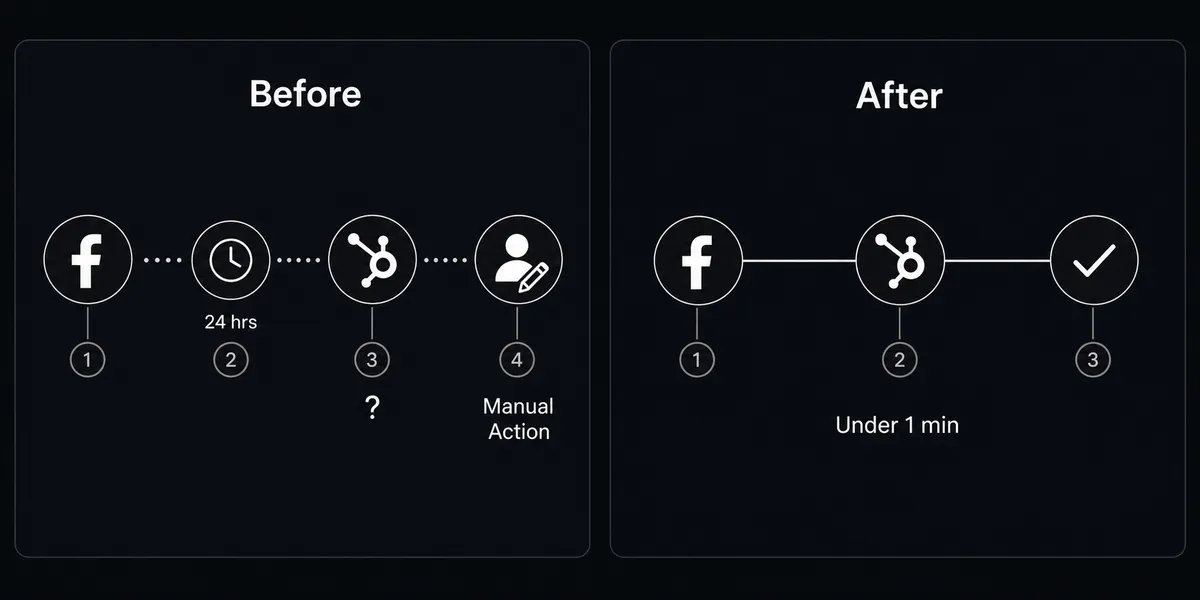
Today, Facebook leads sit in the platform until someone on the marketing team manually exports and uploads them to HubSpot. By the time the contact appears in the CRM, it is missing campaign attribution, the lead is already 24 hours old, and the sales rep has no context about which ad set generated the inquiry. The form submission and the CRM record are two different manual steps that two different people may or may not remember to do.
The downstream effect is predictable. Leads fall through the cracks. Cost-per-lead rises unnoticed because nobody is watching campaign performance in real time. When a rep finally calls, the timing is wrong and the context is thin. Marketing and sales are working from different versions of the same data, connected by a spreadsheet that is already out of date.
How it works: the connection
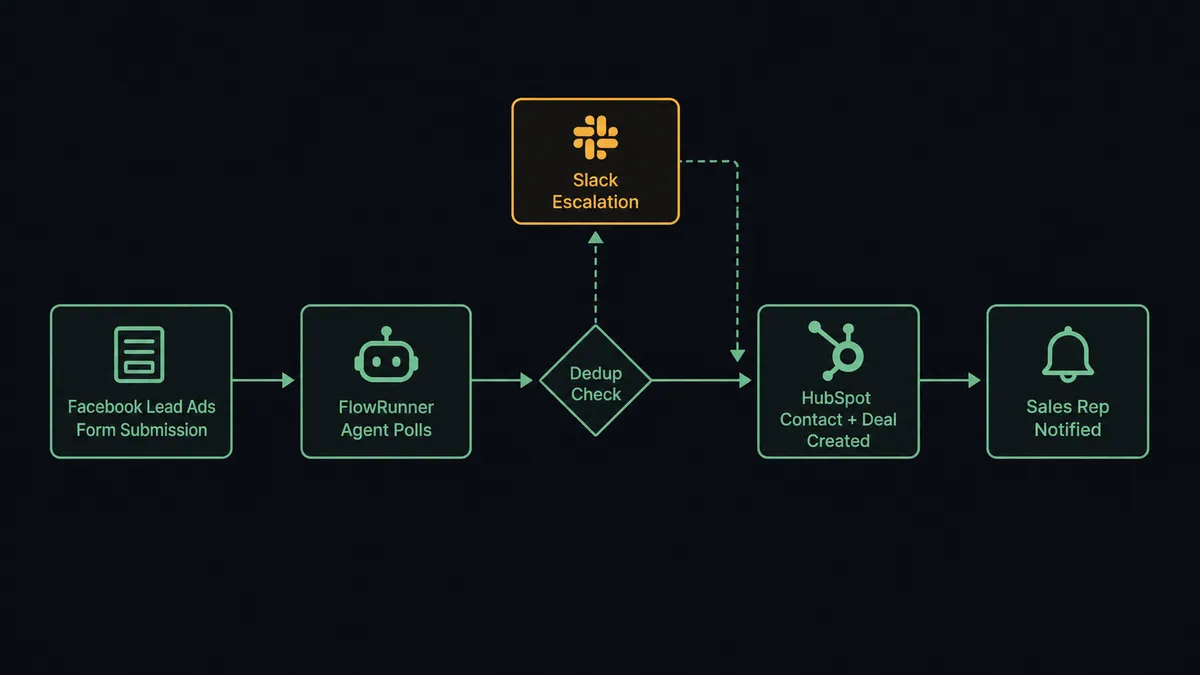
The workflow begins on a schedule. FlowRunner’s agent polls Get Lead Form Info at a regular interval, retrieving any new submissions since the last check. For each submission, the agent calls Get Contact by Email in HubSpot before doing anything else. If the email already exists in the CRM, the agent updates the existing contact record rather than creating a duplicate. If no record is found, it creates a new contact with the form data: name, email, phone, and any custom fields from the lead form.
After the contact exists, the agent runs Associate Objects to link the contact to the right company record. Then it runs Create Deal, placing the opportunity in the correct HubSpot pipeline with the lifecycle stage set to Lead. Campaign source, ad set, and campaign name are logged directly on the contact record so attribution is always visible.
The result: every Facebook form submission becomes a structured HubSpot contact with a deal attached, in under a minute, with full campaign attribution and no manual data entry.
Can an AI agent run it? (And why a human stays in the loop)
A basic Zapier connection moves data from point A to point B. An AI agent in FlowRunner reads that data, reasons about it, and decides what to do. That distinction matters when the data is ambiguous.
Consider a real scenario: a lead comes in from a high-value account that already has two active deals in HubSpot under different contact owners. A sync tool creates a third contact and a third deal. The agent does not. It reads the existing records using Get Contact by Email and Get Contacts at Company, evaluates the ownership conflict, and concludes the situation needs a human. It invokes the human-in-loop flow as a tool, packaging the context: which existing contacts it found, which deals are active, who owns them, and why the new lead complicates the picture.
The sales manager receives a Slack message: “New Facebook lead from Acme Corp matches two existing contacts with conflicting deal owners. Which contact should I associate this lead with, and which rep should own the new deal?” The manager picks one option. The agent associates the record, creates the deal under the correct owner, and logs the decision with the manager’s name and timestamp in the audit trail.
This is not a hardcoded threshold. The agent looked at the context and made the call to stop. That is what the “digital andon cord” framing means in practice: the agent stops the line when it hits uncertainty, rather than running through and creating problems that cost time to clean up later.
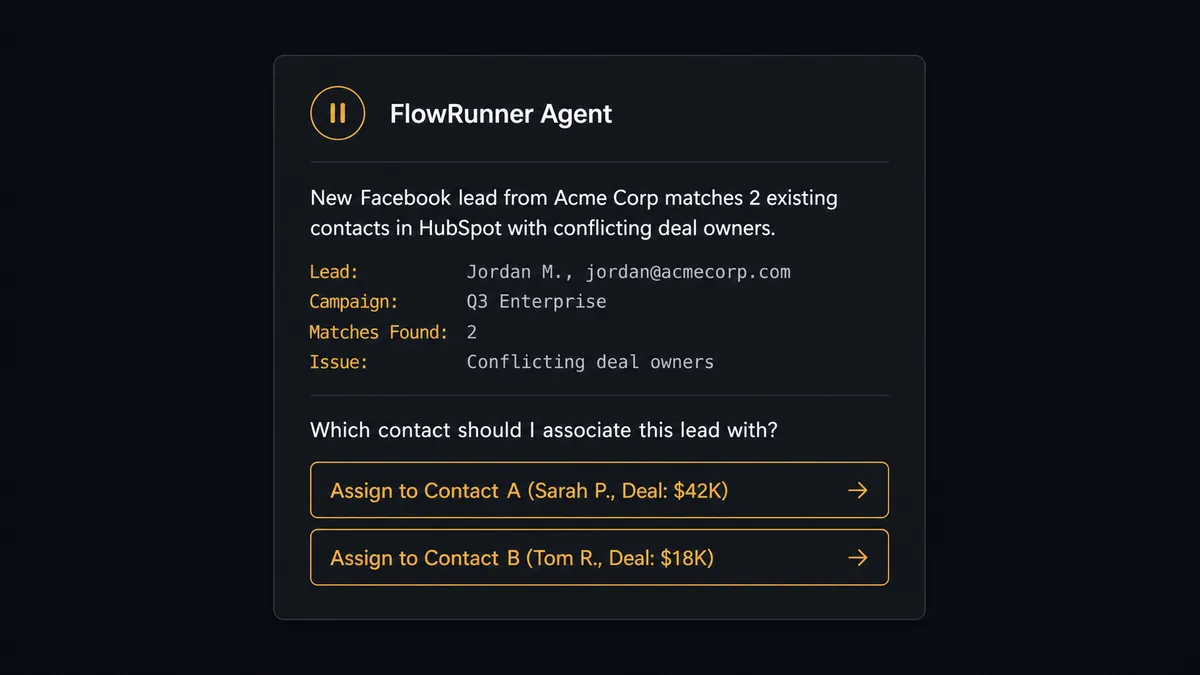
Before creating a new ad campaign that will spend real budget, the agent routes the configuration for approval the same way: campaign name, audience description, daily budget, and duration land in a Slack card for the marketing manager to review before anything goes live. Ad spend has a human gate. Lead routing has a human gate when it needs one. The agent decides when that is.
FlowRunner vs Zapier (the tool you’re probably comparing)
Zapier handles the basic connection well. It is reliable for simple trigger-action automations, has a large library of templates, and does not require technical setup. If all you need is “new Facebook lead creates HubSpot contact,” Zapier can do that.
The gaps appear when the work requires reasoning or when the team grows. Zapier does not check for duplicates before creating records, does not evaluate whether a lead routing decision is ambiguous, and has no mechanism for pausing a workflow to ask a human a question before proceeding. You build that logic separately, if at all.
| Feature | Zapier | FlowRunner |
|---|---|---|
| Basic lead sync (Facebook to HubSpot) | Yes | Yes |
| Deduplication before contact creation | No | Yes, via Get Contact by Email |
| AI agent with reasoning over lead data | No | Yes, native agent node |
| Human-in-loop as a callable tool | No | Yes, any channel (Slack, email, WhatsApp) |
| Unlimited users on every tier | No (seat-based pricing) | Yes |
| BYOK for AI model | No | Yes |
| Audit trail for every agent decision | No | Yes, with human decision timestamps |
Zapier works if your lead flow is simple and your team is small. FlowRunner is the choice when the workflows involve judgment calls, exceptions, or compliance requirements.
Before and after
| Category | Before | After |
|---|---|---|
| Lead response time | Facebook leads sit in the platform until manual export and upload | Every submission becomes a HubSpot contact in under a minute |
| Campaign attribution | Leads arrive in the CRM with no campaign source or ad set tracked | Lead source, campaign, and ad set logged on every contact automatically |
| Duplicate records | No systematic check before creating new contacts | Agent runs Get Contact by Email before every Create Contact call |
| Routing exceptions | Conflicting ownership resolved ad hoc, if at all | Agent surfaces ambiguous leads to a human before creating records |
| Cost-per-lead visibility | Rising CPA goes unnoticed until the budget is overspent | 30%+ CPA increases flagged to marketing manager the same morning |
| Audit trail | No record of who routed what lead or when | Every agent action and human decision logged with timestamps |
What you can build
Lead form to CRM in real time. The agent polls Get Lead Form Info at regular intervals. For each new submission it calls Get Contact by Email, creates or updates the contact, runs Associate Objects to link contact to company, and opens a deal with Create Deal. The sales rep receives a Slack notification within minutes.
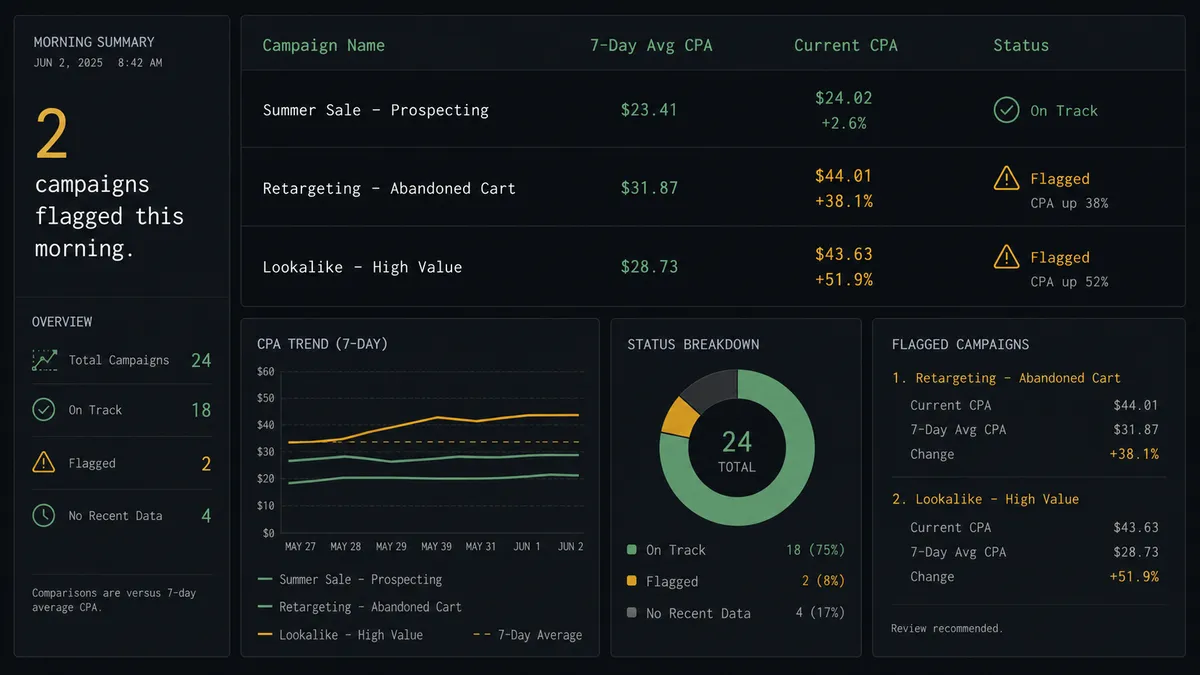
Cost-per-lead monitoring with campaign alerts. Every morning the agent retrieves Get Campaign Insights for all active campaigns. For any campaign where cost per lead has risen more than 30% over the 7-day average, it sends a Slack alert to the marketing manager with the campaign name, current CPA, and daily budget for review.
New campaign approval before spend. When a campaign is ready to go live, the agent packages the configuration using Get Lead Forms and the campaign structure, routes the details for human approval, and only calls Create Ad Campaign after the marketing manager confirms. No budget goes live without a review.
Duplicate contact resolution queue. When the agent detects two contacts with matching email domains under different owners, it pauses, retrieves Get Contacts at Company to map the full account, and sends a resolution request to the CRM admin with both records and a single-click decision. The admin decides; the agent documents the outcome.
Stale deal recovery from campaign activity. When a Facebook lead engages with a retargeting ad, the agent retrieves the existing deal by email, checks the current stage using Get Deal by ID, and updates the deal stage or reopens it if it had been marked inactive. Campaign re-engagement triggers a CRM update automatically.
Common questions
Is it free to connect Facebook Lead Ads and HubSpot on FlowRunner? FlowRunner offers a $100 credit on the Growth tier, which covers roughly 67 days of real workflows with no credit card required. Corporate email is required to sign up.
Can I self-host FlowRunner? Yes. FlowRunner offers a free Community Edition for self-hosted single-instance deployments. Enterprise self-hosted plans with multi-instance clustering and full compliance are available at custom pricing.
Does the AI agent need my own API key to run? FlowRunner uses a Bring Your Own Keys model. You connect your own AI provider credentials. The platform orchestrates the agent; you control the model and the spend.
What happens when the agent finds a duplicate contact? The agent calls Get Contact by Email before creating any record. If a match exists, it updates the existing contact rather than creating a duplicate. If the match is ambiguous, the agent pauses and routes the conflict to a CRM admin via Slack for a human decision.
What happens when the agent is not sure how to route a lead? FlowRunner’s human-in-loop works as a callable tool. The agent evaluates the lead, and if the routing decision carries real consequence, it packages the lead data with its reasoning and contacts a person through Slack, email, or WhatsApp before proceeding.
How many users and workflows can I run on FlowRunner? Every FlowRunner tier includes unlimited users and unlimited workflows. Pricing is based on execution volume, not seat count.
Getting started
Start with a $100 credit on FlowRunner’s Growth tier. That is roughly 67 days of real lead routing at no charge, no credit card required.
Connect both integrations using the links below, build your first workflow in the visual editor, and turn it on. The audit trail starts logging immediately.
Start your free trial at flowrunner.ai or book a 30-minute walkthrough at calendly.com/flowrunner/intro. No sales pitch. Show up with your actual workflow in mind and leave with it mapped out.