How to Connect Facebook Lead Ads with Salesforce Pro (With or Without an AI Agent)
Use FlowRunner to connect Facebook Lead Ads and Salesforce Pro so every form submission becomes a scored, routed Salesforce lead automatically, with a human approval step before irreversible conversions.
How do you connect Facebook Lead Ads to Salesforce Pro?
Use FlowRunner’s Get Lead Form Info action to poll your Facebook lead form for new submissions, then pass each submission to Salesforce Pro’s Create Lead action to create an enriched lead record with full campaign attribution. FlowRunner is a visual AI-agent orchestration platform where automations run autonomously and pause for human judgment on the steps that carry real consequence. The same connection can run as an AI agent that scores each lead, routes it based on your ICP criteria, and pauses for a sales manager’s approval before executing the irreversible Convert Lead to Contact step.
The problem every sales ops team knows
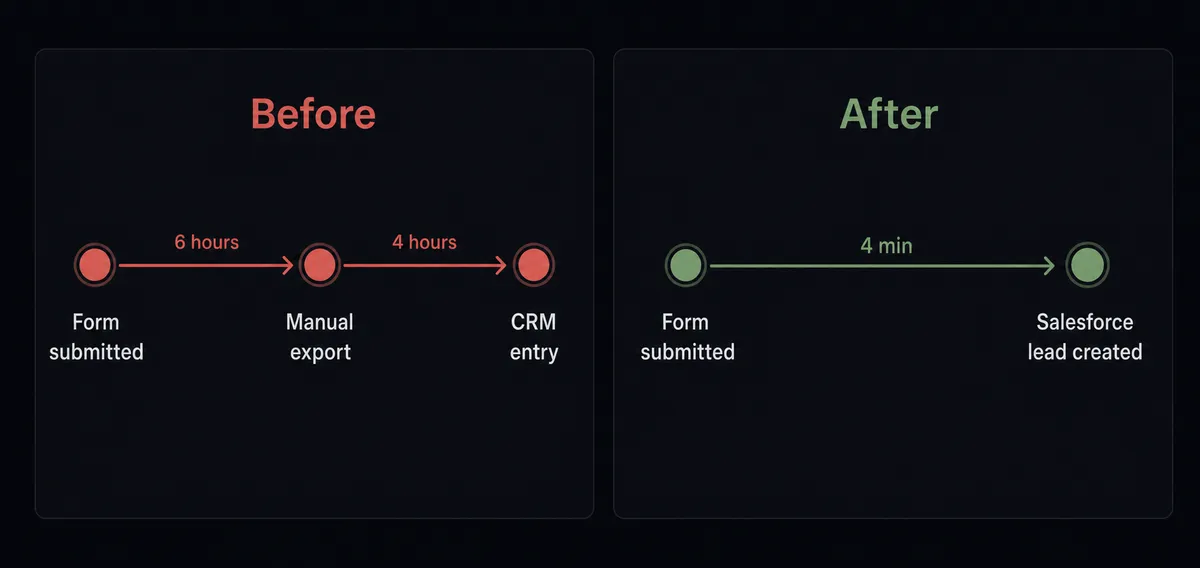
Facebook Lead Ads generate submissions around the clock. Your sales team doesn’t. Between form submission and a qualified lead in Salesforce, there is a gap measured in hours or days. During that gap, leads go cold. By the time a rep picks up the phone, the prospect has already talked to someone else.
The manual version of this process relies on a series of steps that nobody owns end to end. Someone exports the leads from Meta Ads Manager, uploads them to a spreadsheet, hands it to an SDR who scores them manually, routes them by guessing territory, and enters them in Salesforce without the campaign source attached. The attribution is wrong before the call is even made. Exceptions, edge cases, and duplicates fall through the cracks. The ones that don’t fall through still cost 15 to 30 minutes of administrative work per lead before a rep ever picks up the phone.
The downstream cost is worse than the time. Without consistent lead conversion rules, different reps convert leads at different stages of the process. Revenue ops can’t reconcile pipeline because the data going into Salesforce is inconsistent. Marketing can’t calculate campaign ROI because the attribution fields were never populated. The entire funnel is built on a foundation that depends on a person doing the same manual steps correctly, every time, without a system to catch them when they don’t.
How it works: the connection
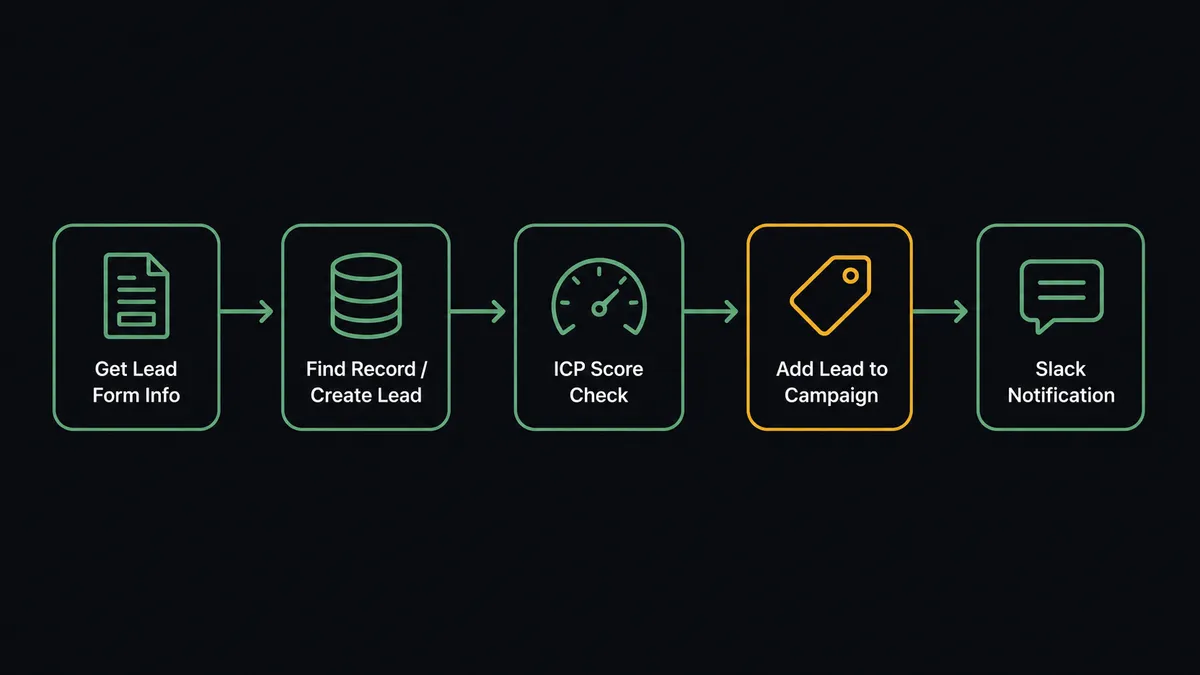
The FlowRunner Facebook Lead Ads integration uses Get Lead Form Info to retrieve new submissions from a specific lead form. You specify the form ID and the polling interval. FlowRunner checks for new entries on that interval and fires the workflow for each new submission.
On the Salesforce Pro side, the agent uses Find Record first to check whether the person has submitted before or already exists in the CRM. If no record is found, the agent creates a new lead using Create Lead, mapping the Facebook form fields to the correct Salesforce fields: first name, last name, company, email, phone, and the campaign source data. If a record exists, the agent uses Update Lead to add the new submission activity without creating a duplicate.
After the lead record exists in Salesforce, the agent runs enrichment steps. Add Lead to Campaign associates the lead with the correct Salesforce campaign object so attribution is captured from the first moment the record exists. The campaign source, campaign name, and ad set that generated the form submission are attached to the record before any rep touches it.
A Slack notification goes to the assigned sales rep immediately after the lead is created. The notification includes the lead’s name, company, phone number, and the ICP score the agent calculated. The rep has a warm lead in their pipeline within minutes of the form submission.
Can an AI agent run it? (And why a human stays in the loop)
A simple trigger-action connection gets leads into Salesforce. An AI agent decides what to do with them.
The agent reads the full lead record: company size, industry, job title, geography. It compares those firmographic signals against your ICP criteria. A prospect from a 200-person manufacturing company in Texas with a VP of Operations title gets a different routing decision than a student from a personal Gmail address who filled in a form because the ad was interesting. The agent makes that distinction without a human writing routing rules for every combination.
High-scoring leads go to a different path than low-scoring leads. Low-scoring leads get added to a Salesforce nurture campaign via Add Lead to Campaign. High-scoring leads move toward conversion. And this is where the human-in-loop moment matters.
Lead conversion in Salesforce is not a reversible action. Convert Lead to Contact creates or merges a contact, an account, and an opportunity. Done incorrectly, it creates territory disputes, orphaned records, and pipeline data that takes revenue ops hours to untangle. This is not a step where a confident threshold is the right control. This is a step where a person should see the decision and confirm it.
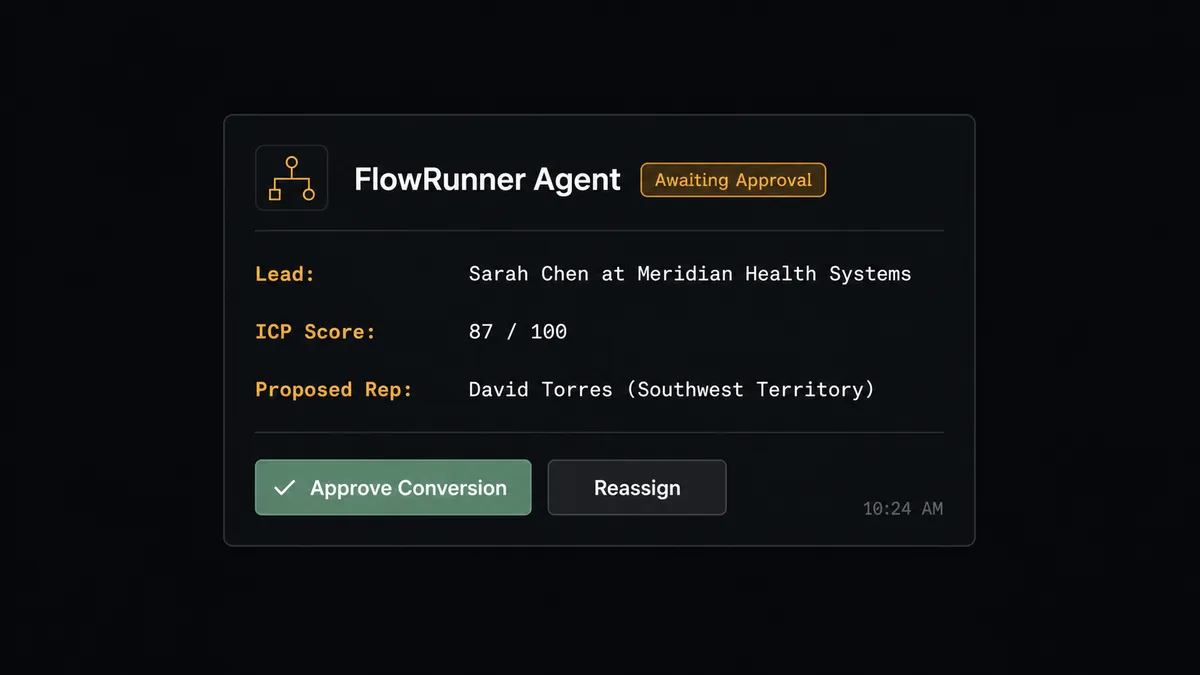
The agent pauses the workflow and sends a Slack message to the sales manager: “Lead [Name] at [Company] scored 87. Ready to convert and assign to [Rep Name]. Confirm or reassign?” The manager sees the lead name, company, ICP score, and the proposed territory rep. They click Approve or choose a different rep. The agent executes Convert Lead to Contact with the confirmed assignment. The decision, the approver’s identity, and the timestamp are all logged in the audit trail.
This is not a hardcoded threshold. The agent might escalate a lead that scored 72 from a company that matches every ICP signal but is headquartered in an unusual region where territory ownership is disputed. The decision to involve a human is itself a judgment call, not a rule.
FlowRunner vs the tool you’re probably comparing
Most teams using Facebook Lead Ads with Salesforce are evaluating Zapier for the connection. Zapier is the right choice for straightforward trigger-action use cases. It is fast to set up, has a large library of pre-built Zaps, and works reliably for teams that need a simple “new form submission creates a Salesforce lead” flow with no added logic.
The differences show up when you need more than that.
| What matters | Zapier | FlowRunner |
|---|---|---|
| AI agent scoring and routing | Not available; routing requires separate conditional branches | Agent reads lead data, applies ICP criteria, and routes without hardcoded rules |
| Human-in-loop on conversion | Not available natively; requires external tools | Human approval is a callable tool the agent invokes when context warrants it |
| Lead conversion (Convert Lead to Contact) | Not supported in standard Zapier actions | Full Salesforce lead lifecycle including conversion with manager approval gate |
| SOQL queries for attribution | Not supported | Custom SOQL Query and Find Records by Query available as agent tools |
| Unlimited users on every plan | Per-user pricing on higher tiers | Unlimited users on every FlowRunner tier including Growth at $45/month |
| BYOK for AI provider | AI features use Zapier’s own model | Bring your own key; FlowRunner orchestrates, you control the AI cost |
For teams that need only the basic connection, Zapier is a reasonable starting point. For teams that need lead scoring, territory routing, conversion approval, and campaign attribution in a single workflow, FlowRunner is built for that without stitching together separate tools.
Before and after
| Category | Before | After |
|---|---|---|
| Lead response time | Leads sit in Meta Ads Manager until someone exports them manually, often hours or days | Every Facebook submission is a Salesforce lead within minutes of the form submission |
| Campaign attribution | Leads enter Salesforce without campaign source; attribution reconstructed manually or not at all | Campaign, ad set, and form source logged on every Salesforce record at creation |
| Lead conversion control | Different reps convert leads at different stages; no consistent process or audit trail | Every conversion requires sales manager approval with the approver and timestamp logged |
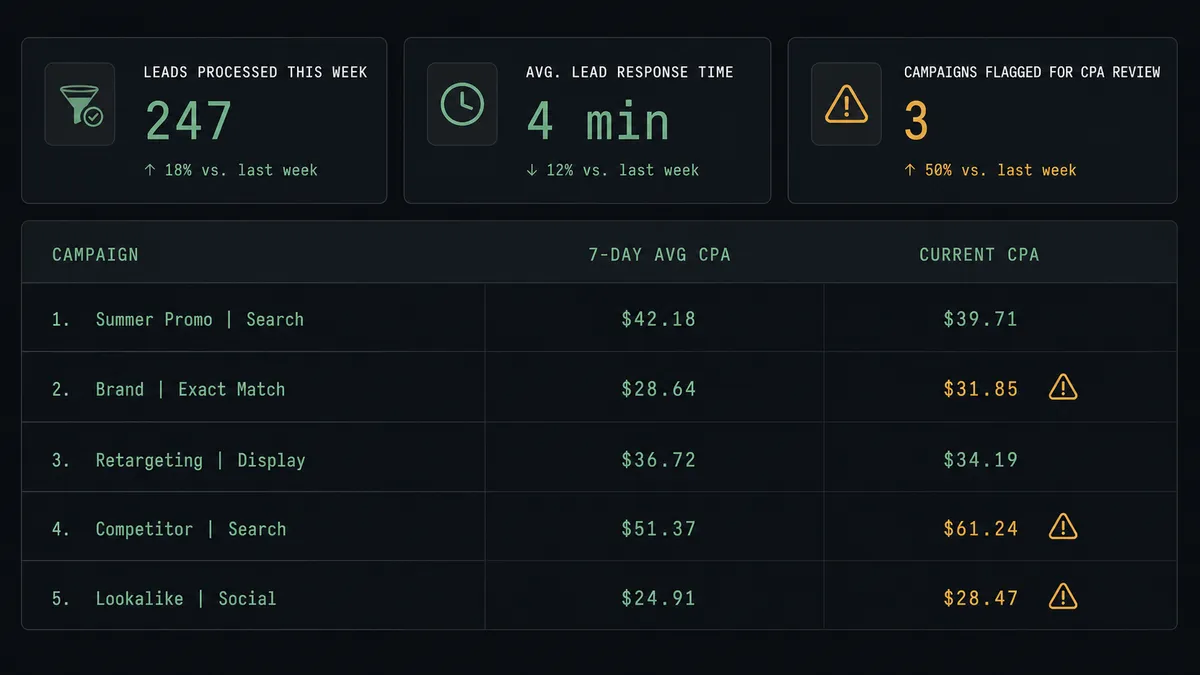
| CPA monitoring | Rising cost per lead goes unnoticed until the budget is already overspent | Daily agent check flags campaigns where CPA increases more than 30 percent over the 7-day average |
| SDR time on qualification | SDRs research each lead, score manually, and decide routing individually | Agent applies ICP criteria to every lead automatically; SDRs focus on conversations |
What you can build
Lead scoring and territory routing without routing tables. The agent polls Get Lead Form Info, retrieves each new submission, and applies your ICP criteria against firmographic data. High-scoring leads get converted to contacts and opportunities and assigned to the correct rep. Low-scoring leads go into a Salesforce nurture campaign via Add Lead to Campaign. No spreadsheet, no routing table, no SDR intervention on the standard path.
Campaign performance alerts before budget burns. An agent runs Get Campaign Insights every morning against all active campaigns. Any campaign where cost per lead has risen more than 30 percent over the 7-day average triggers a Slack alert to the marketing manager with the current CPA, the 7-day average, and the daily budget. The manager investigates before the spend compounds.
Full campaign attribution reconciliation. Each week, the agent runs a Custom SOQL Query against closed opportunities to identify which Facebook campaign and ad set each contact was associated with at conversion. It posts the attribution report to the revenue ops Slack channel and updates custom attribution fields on each opportunity. Marketing gets accurate ROI data without pulling spreadsheets.
Deal document packaging on qualified leads. When a Facebook lead converts and reaches the Proposal stage, the agent uses Find Child Records to retrieve all opportunity line items. It generates a quote document, attaches it to the Salesforce record using Create File, and sends it to the prospect via Send Email. The rep’s paper trail is complete before they make the first call.
Campaign lifecycle management from trigger to report. When a new product campaign is scheduled in your marketing calendar, the agent creates the full Meta campaign structure: Create Ad Campaign, Create Ad Set with audience targeting, Create Ad with the approved creative, and Publish Ad to activate delivery. When the campaign ends, the agent retrieves final insights via Get Campaign Insights, formats a performance summary, and posts it to the marketing channel. The entire campaign lifecycle runs without manual Meta Ads Manager access.
Common questions
Is it free to connect Facebook Lead Ads and Salesforce Pro on FlowRunner?
FlowRunner starts with a $100 trial credit, which covers roughly 67 days of real work on the Growth plan at $45 per month. No credit card is required to start. You can connect both integrations and run the full workflow during the trial.
Can I self-host FlowRunner?
Yes. FlowRunner offers a free Community Edition for single-instance self-hosting and an Enterprise self-hosted plan with clustering and full compliance features. Cloud and self-hosted plans share the same connectors and agent capabilities.
Does the AI agent need my own OpenAI key?
FlowRunner uses a bring-your-own-key model for AI providers. You connect your own key from any supported provider. FlowRunner orchestrates the agent; it does not bundle or bill for model usage on your behalf.
What happens when the agent is not sure whether to convert a lead?
The agent pauses the workflow and routes the decision to a sales manager via Slack with full context: lead name, company, ICP score, and the proposed territory rep. The manager approves or reassigns in one click. The decision, approver, and timestamp are recorded in the audit trail. No conversion happens until a human confirms.
Does FlowRunner support SOQL queries against Salesforce?
Yes. The Salesforce Pro integration includes a Custom SOQL Query action and a Find Records by Query action. Agents can run arbitrary SOQL statements against your Salesforce org for reporting, attribution, or data retrieval workflows.
What is the difference between Facebook Lead Ads and a standard Facebook integration?
The FlowRunner Facebook Lead Ads integration gives agents access to the full Meta advertising stack: campaign creation, ad set and ad management, lead form lifecycle, and performance analytics. It is designed for workflows that both manage ad infrastructure and route the leads those ads generate.
Getting started
FlowRunner’s trial starts with $100 in credit, enough to cover roughly 67 days on the Growth plan at $45 per month. No credit card required. Corporate email required.
Connect both integrations and start building your lead routing workflow today. The Facebook Lead Ads integration and the Salesforce Pro integration are both available on every FlowRunner tier including Growth.
Start your free trial at flowrunner.ai or book a 30-minute walkthrough at calendly.com/flowrunner/intro to see the lead qualification and conversion workflow running live.