How to Connect Freshdesk with Jira Issues (With or Without an AI Agent)
Connect Freshdesk and Jira Issues so that new support tickets automatically create tracked engineering issues, with an AI agent that pauses for human assignment on high-priority cases.
How do you connect Freshdesk to Jira Issues?
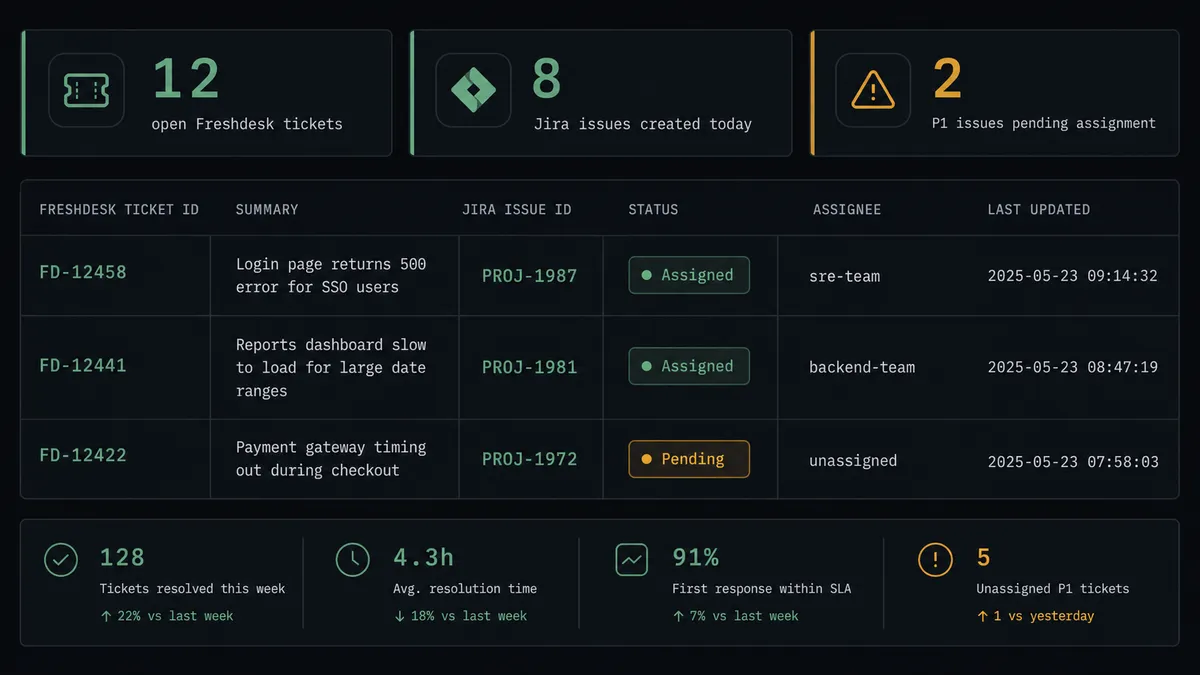
When an inbound support request arrives, a FlowRunner workflow calls Search Contacts and Create Ticket in Freshdesk to open and classify the ticket, then immediately calls Create Issue in Jira with the ticket summary, description, and severity, and Assign Issue to route it to the right engineer. FlowRunner is a visual AI-agent orchestration platform where automations run autonomously and pause for human judgment on the steps that carry real consequence. The same connection can run as an AI agent that reads the ticket content, reasons about severity, and invokes a human-in-loop step to confirm assignment on any P1 issue before it lands in Jira.
The problem it solves
Support and engineering are two teams running in parallel systems that almost never talk to each other. A customer reports a production issue. A support agent opens a Freshdesk ticket. The support agent then switches to Jira, reads through the ticket again, and manually creates an issue with whatever detail they have time to copy. The Jira ticket arrives with a subject line and no structure. The engineer has no context on the customer, no severity classification, and no link back to the Freshdesk thread. Exceptions fall through the cracks not because anyone dropped the ball, but because the handoff was a manual step with no enforcement.
The other half of the problem is visibility. Engineering managers check Jira to find unassigned or blocked tickets. Support leads check Freshdesk queues. Nobody is watching the gap between them. When a support ticket maps to an open Jira issue, that connection exists only in someone’s head or in a Slack thread. When that person is out, it disappears entirely. The team is not slow because it lacks talent. It is slow because the coordination between systems is still manual.
How it works: the connection
The workflow starts where support requests arrive, whether that is an inbound email, a form submission, or a chat message. Since Freshdesk does not expose a webhook management API, the trigger lives in whatever upstream system feeds support requests into Freshdesk.
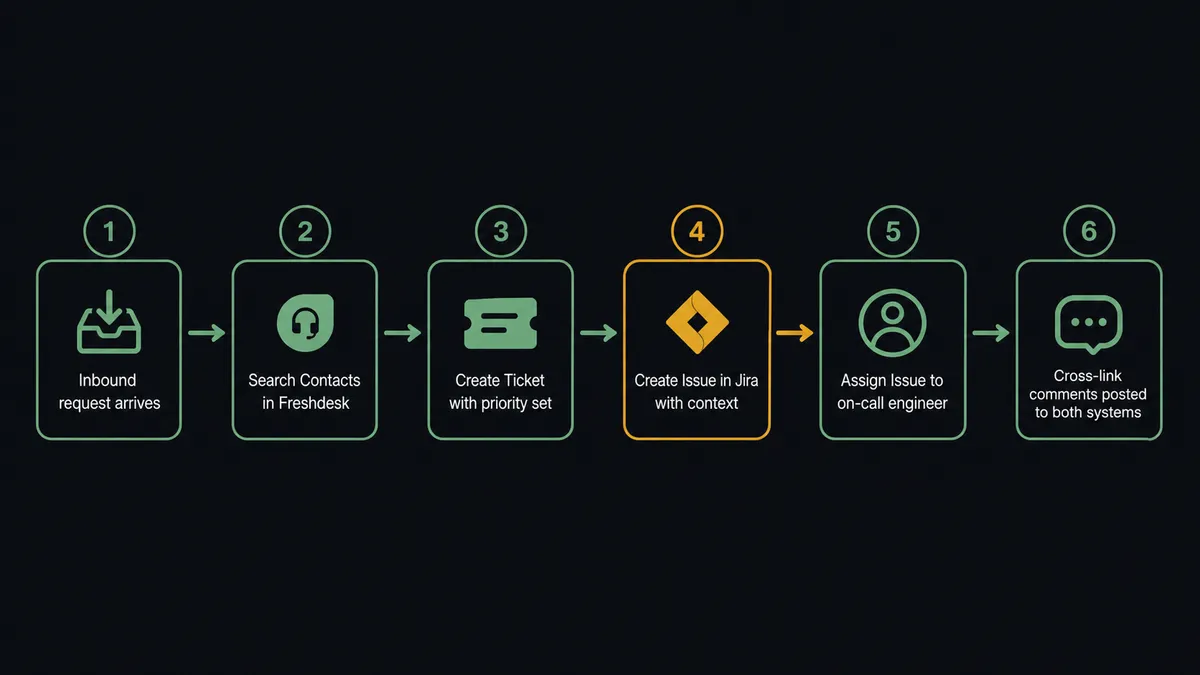
On each incoming request, the agent calls Search Contacts to look up the requester in Freshdesk by email. If the contact exists, it retrieves the account context. If not, it calls Create Contact first. With the requester resolved, the agent calls Create Ticket with the request body as the HTML description, the contact linked as requester, and priority and group set from the routing logic already in the workflow.
At that point the agent has a Freshdesk ticket ID. It then calls Get Project in Jira to confirm the target project’s available issue types and workflow states, and calls Create Issue with the ticket summary mapped to the Jira issue summary, the description carried across, and severity translated to Jira priority. It calls Assign Issue to route the case to the on-call engineer based on rotation data available to the workflow.
After both records exist, the agent calls Add Comment in Jira with the Freshdesk ticket URL so engineers can jump to the original thread, and calls Add Note in Freshdesk with the Jira issue link so support agents see the engineering tracking number without switching tools.
Can an AI agent run it? (and why a human stays in the loop)
A plain trigger-and-action connection moves data. An AI agent decides what to do with it. The difference matters most at the moment a new ticket arrives and its severity is not obvious from the surface.
The agent reads the Freshdesk ticket: the subject line, the description body, the requester’s history, and the tags. It evaluates whether the issue is a billing question, a feature request, or a production failure. It looks at whether the requester is a high-value account. It considers whether the keywords in the description signal a P1, a P2, or something that belongs in a backlog. A plain automation runs the same sequence every time. The agent reasons about what it found.
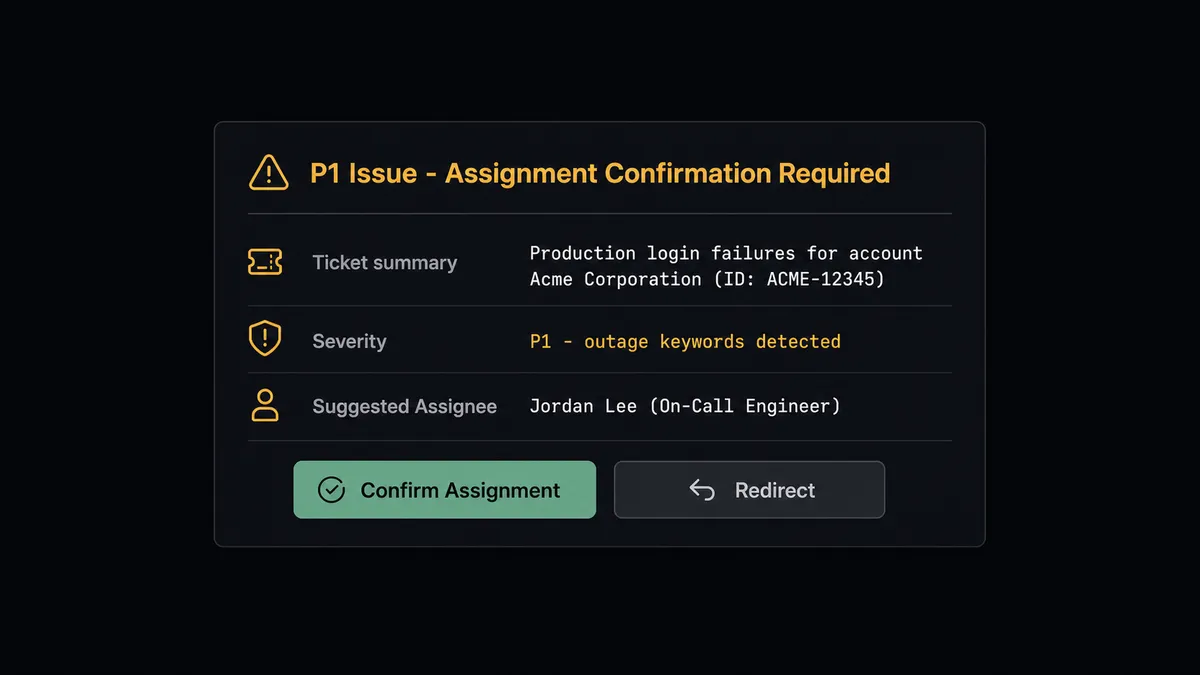
For a P2 ticket from a standard account, the agent creates the Jira issue, assigns it to the next engineer on the rotation, and moves on. For a P1 ticket from a key account, or for any ticket describing a production outage, the agent does not assume the suggested assignee is correct. It invokes the human-in-loop flow as a callable tool.
The agent packages the full context: the Freshdesk ticket summary, the requester’s account tier, the severity classification it reached and why, and the suggested Jira assignee from the rotation. It sends this to the team lead via Slack with two options: confirm the assignment, or redirect to a different engineer. The workflow pauses. Nothing lands in Jira until the team lead responds.
When the team lead confirms, the agent calls Create Issue and Assign Issue with the confirmed assignee. When the team lead redirects, the agent calls Create Issue and Assign Issue with the new name. Either way, the decision, the decider’s identity, and the timestamp are captured in FlowRunner’s audit trail.
Prospects describe this as a “digital andon cord.” The AI stops the line when it hits uncertainty. This is not a sync tool. The agent knows when to stop and ask.
FlowRunner vs Zapier: what to compare honestly
If you are already using Zapier to connect Freshdesk and Jira Issues, here is what Zapier actually does well: it has a shallow learning curve, a large library of pre-built Zaps, and a fast setup path for straightforward trigger-action connections. For teams that need a simple “new ticket creates a Jira issue” flow with no branching, Zapier delivers that quickly.
The differences that matter for this specific integration are:
| Feature | Zapier | FlowRunner |
|---|---|---|
| AI agent with context-aware reasoning | No native AI agent layer; uses Zapier AI add-ons for simple actions | Native AI agent node that reads ticket content, reasons about severity, and picks tools |
| Human-in-loop on consequential steps | Approval steps available, but fixed conditional logic, not agent-invoked judgment | Human-in-loop flow invoked as a callable agent tool; agent decides when to escalate |
| Users per account | Unlimited on paid plans | Unlimited on all paid plans including Growth at $45/mo |
| Audit trail | Limited run history | Full execution audit trail with decision log, human responses, and timestamps |
| Self-hosted option | No | Yes, Community Edition at no cost; Enterprise self-hosted available |
| BYOK for AI | No | Yes, bring your own key from any supported AI provider |
Before and after
| Metric | Before | After |
|---|---|---|
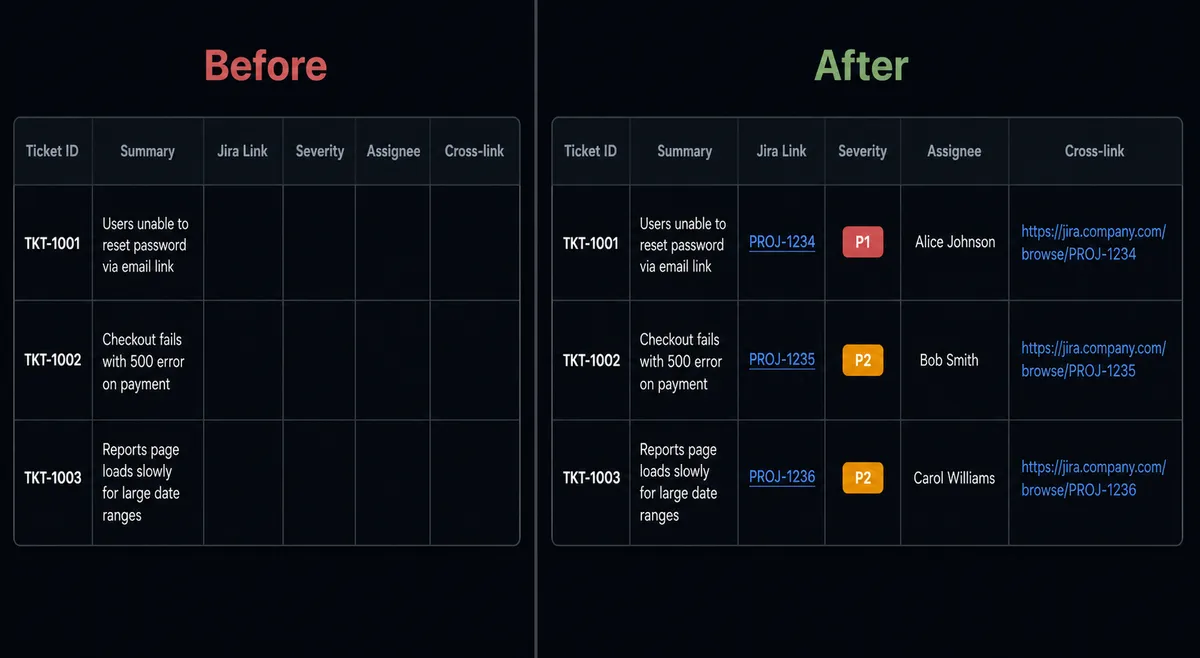
| Jira ticket creation | Support agent reads email, opens Jira, and creates ticket by hand | Agent creates Jira issue with full context within seconds of Freshdesk ticket landing |
| Ticket quality | Subject line only; no structured data, no requester info | Customer name, description, severity, Freshdesk link, and assignee set automatically |
| P1 assignment | Team lead discovers P1 in queue and reassigns retroactively | Agent routes P1 assignment decision to team lead before the Jira issue is created |
| Cross-system links | Support and engineering teams search manually for matching records | Freshdesk ticket contains Jira link; Jira issue contains Freshdesk link, both added at creation |
| Sprint visibility | Engineering manager checks Jira manually for unassigned or blocked issues | JQL-based sweep surfaces unassigned issues each morning; sprint health is automatic |
What you can build
Inbound escalation to engineering. When a customer reports a production issue via support, the agent creates the Freshdesk ticket and the Jira bug report simultaneously, attaches the original message to the Jira issue using Add Attachment, and assigns the bug to the on-call engineer. The engineer has a tracked issue before anyone manually reads the email.
Scheduled triage sweep. On a schedule, the agent runs Search Tickets in Freshdesk to find urgent open tickets that have not been resolved in more than 24 hours, then runs Search Issues in Jira using a JQL query to find matching open issues. Any Freshdesk ticket with no Jira counterpart gets a Create Issue call. Any Jira issue marked Done gets a matching Update Ticket in Freshdesk to close the loop.
Resolution sync. When a Jira issue transitions to Done, the agent calls Get Issue to confirm the resolution and read the closing comment, then calls Update Ticket in Freshdesk to set the ticket status to resolved and calls Add Reply to send the resolution note to the customer. The customer hears back through support without anyone manually copying the engineering update.
Customer sentiment routing. The agent reads the Freshdesk ticket description and uses its instructions to classify the tone: frustrated, neutral, satisfied. For frustrated customers on open Jira issues, it calls Add Comment with a note for the engineer flagging the customer’s state. For satisfied customers after resolution, it adds an internal note to the Freshdesk ticket for the support lead.
Sprint health alert. Each morning, the agent runs Search Issues with a JQL query for unassigned or blocked issues in the current sprint. It posts a structured summary to the engineering Slack channel. If any P1 issue has been unassigned for more than 2 hours, the agent invokes the human-in-loop tool and routes an assignment prompt to the engineering manager directly.
Common questions
Is it free to connect Freshdesk and Jira Issues on FlowRunner? FlowRunner offers a $100 credit on the Growth plan with no credit card required, which covers roughly 67 days of real work. After that, Growth starts at $45 per month with 12,000 executions included. There is no per-connection fee; all integrations are available on every paid tier.
Can I self-host this connection? Yes. FlowRunner offers a self-hosted Community Edition at no cost for a single instance. The Enterprise self-hosted tier adds multi-instance clustering, full audit retention, and compliance tooling. Both run the same Freshdesk and Jira Issues connectors.
Does the AI agent need my own AI API key? Yes. FlowRunner uses a Bring Your Own Key model, so you connect your own key from any supported AI provider. The AI cost goes to your provider account directly and is not bundled into FlowRunner’s pricing.
What happens when the agent is not sure what to do? The agent invokes a human-in-loop flow as a callable tool. It pauses execution, packages the ticket details and its own reasoning, and routes the decision to the right person via Slack or email. Nothing moves forward until a human responds.
Does FlowRunner need Freshdesk webhooks to trigger the workflow? No. The Freshdesk integration in FlowRunner uses polling and schedule-based triggers, or can be started by any upstream system that feeds support requests, such as an inbound email parser, a form submission, or a chat platform. Freshdesk webhooks are configured in the Freshdesk admin UI rather than through a public API.
Can the agent update the Jira issue later when the Freshdesk ticket resolves? Yes. The same agent can run a follow-up step that calls Transition Issue in Jira when the Freshdesk ticket status changes, keeping both systems in sync without manual updates.
Getting started
FlowRunner’s Growth plan includes a $100 credit with no credit card required, which covers roughly 67 days of real work at typical execution volumes.
Both connectors are available now:
- Freshdesk integration: creates and manages tickets, contacts, companies, and agent notes through the Freshdesk REST API v2
- Jira Issues integration: creates, updates, transitions, assigns, comments on, and searches issues with full JQL support
Start at flowrunner.ai to connect both systems and activate your first workflow. If you want to walk through the setup with someone from the team first, book a time at calendly.com/flowrunner/intro.