How to Connect Gemini AI with Slack (With or Without an AI Agent)
Connect Gemini AI and Slack so documents are analyzed, classified, and routed automatically, with a human decision requested in Slack whenever the agent finds something it should not decide alone.
How do you connect Gemini AI to Slack?
You connect Gemini AI to Slack in FlowRunner by choosing a Slack trigger (On File Shared, On Mention, or On Channel Message), running the incoming content through Gemini using Generate Content or Upload File, and posting structured results back to Slack using Send Message to Channel or Send Direct Message. FlowRunner is a visual AI-agent orchestration platform where automations run autonomously and pause for human judgment on the steps that carry real consequence. The same connection can run as a full AI agent: Gemini analyzes incoming documents, the agent reasons about what it found, and a Slack message with interactive buttons lands in front of a human when the analysis surfaces something worth a real decision.
The problem this solves
Operations teams who handle document-heavy work share the same bottleneck. A PDF lands in email or a shared channel. Someone has to open it, read it, extract the relevant fields, decide whether it matches expectations, and then route it to the right person or system. That sequence happens manually, one document at a time, by people whose attention belongs on the exceptions, not the extraction.
The cost is not just time. It is the documents that fall through the cracks when the inbox is full, the contract terms that do not get flagged because nobody had bandwidth to read page 14, the support emails that sit unread for a day because triage is manual. Teams add headcount to handle volume, which works until volume grows again. The underlying process never improves.
How it works: the connection
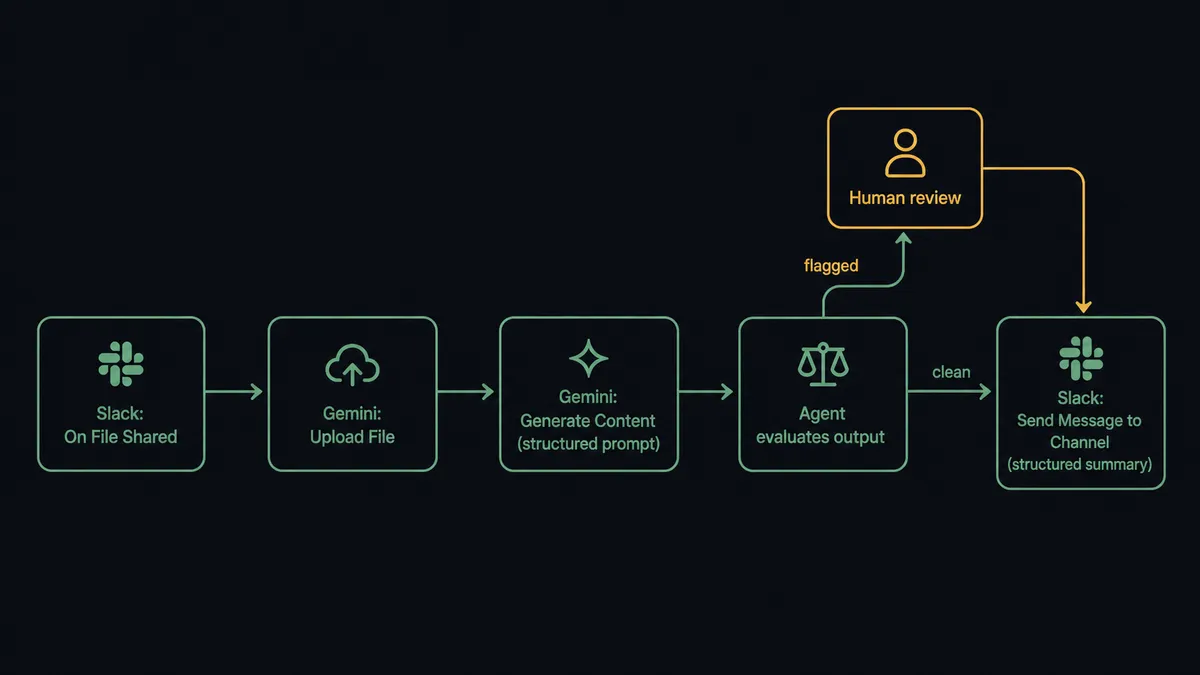
When a file arrives in a designated Slack channel, the On File Shared trigger fires. The agent downloads the file and uploads it to Gemini using Upload File, which pushes the document to the Gemini Files API and waits until it is processed and ready. Then the agent calls Generate Content with a structured prompt: what to extract, what format to return it in, and what fields matter for downstream decisions.
Gemini returns the structured output. The agent maps those fields to whatever action comes next: posting a formatted summary to the Slack thread using Send Message to Channel, finding a matching record in a database, or creating a record in an ERP or CRM. The trigger fires automatically. No one manually monitors the channel. No one manually routes the output.
The same pattern works with On Mention. An operator types @FlowRunner analyze this contract and pastes a document URL. The agent picks up the mention, processes the document through Gemini, and replies in the thread with a structured summary, risk flags, and whatever fields the prompt specified.
Can an AI agent run it? (And why a human stays in the loop)
The plain connection handles routing. An AI agent handles reasoning.
In a basic Zapier or n8n setup, you map a trigger to an action and the workflow runs the same sequence every time. The agent in FlowRunner does something different. It reads the Gemini output, evaluates what it found against its instructions, and decides what tool to use next. It does not follow a fixed script. It reasons about each document individually.
The human-in-loop capability is where this becomes a different category of tool. The agent does not escalate based on a hardcoded threshold. It makes a judgment call.
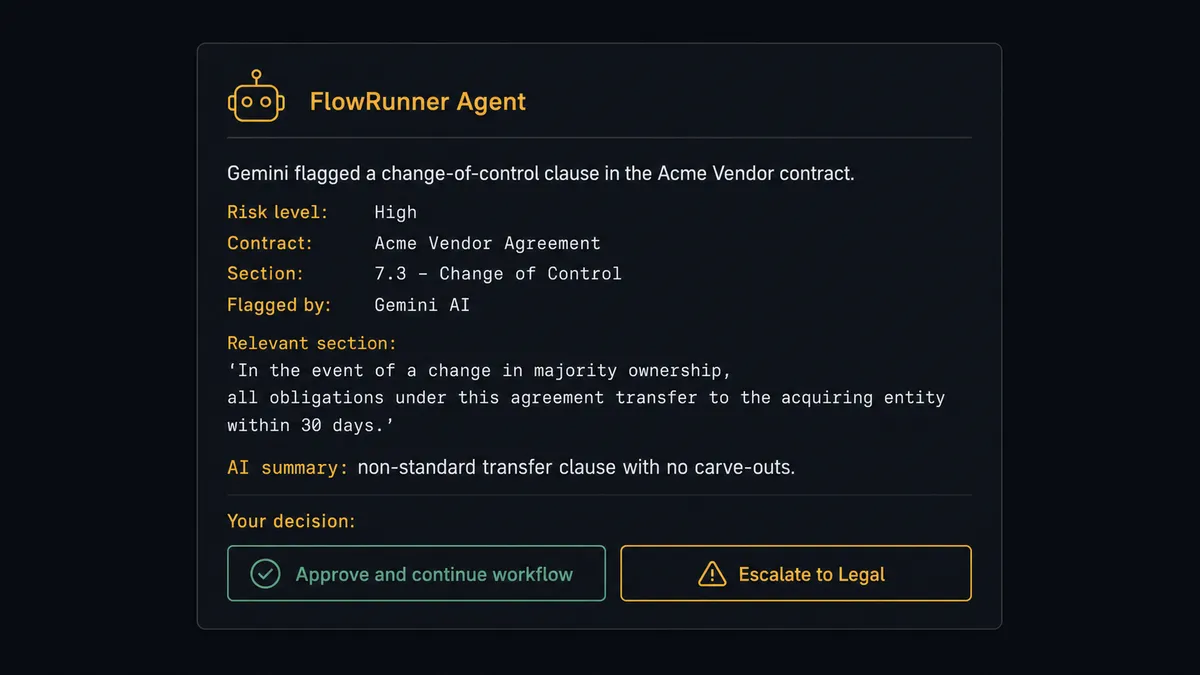
Consider a contract review scenario. An agent processes 20 vendor contracts in a due diligence stack. For 17 of them, Gemini returns a clean summary with no unusual terms and a low risk level. The agent creates a record in Notion with the summary and moves on. For the 18th contract, Gemini returns a change-of-control clause that triggers a flag the agent’s instructions say to treat as high-risk. The agent does not decide whether to proceed. It invokes the human-in-loop subflow.
The human-in-loop subflow sends a Slack direct message to the relevant stakeholder using Send Direct Message: “Gemini flagged a change-of-control clause in the Acme contract. Here is the AI summary. Here is the relevant section. Your options: approve to continue, escalate to legal.” Two interactive buttons. The On Block Action trigger captures the response and routes it back to the agent. The agent resumes with the human’s decision as its next input.
The escalation is not a rule. It is an AI decision, based on the content of the specific document. A $3,000 invoice from a vendor with a decade of clean history gets auto-processed. A $3,000 invoice from a vendor the agent has never seen before, with a billing address that does not match records, gets flagged. The agent reads context. The human decides on the exception.
FlowRunner vs Zapier
Zapier is the right comparison for most non-technical teams looking to connect Gemini AI and Slack. It is the most established tool in the space, has a large integration library, and is genuinely easy to set up for simple trigger-action connections. If your workflow is one trigger and one action with no conditional logic, Zapier works.
The differences become real when the workflow requires reasoning, compliance, or human decisions.
| Feature | Zapier | FlowRunner |
|---|---|---|
| Basic Gemini-to-Slack trigger-action | Yes | Yes |
| AI agent that reasons about each document | No (fixed action sequences) | Yes (agent reads output, picks tools, decides next step) |
| Human-in-loop as agent-invoked tool | No | Yes (agent calls it based on context, not a hardcoded rule) |
| Interactive Slack buttons that resume a paused workflow | No | Yes (On Block Action routes decision back to the agent) |
| BYOK for Gemini (your API key, your costs) | No | Yes |
| Audit trail with decision-maker identity and timestamp | No | Yes (every human decision captured automatically) |
| Unlimited users on every tier | No (user-based pricing) | Yes |
Zapier does the connection. FlowRunner runs the judgment layer on top of it.
Before and after
| Category | Before | After |
|---|---|---|
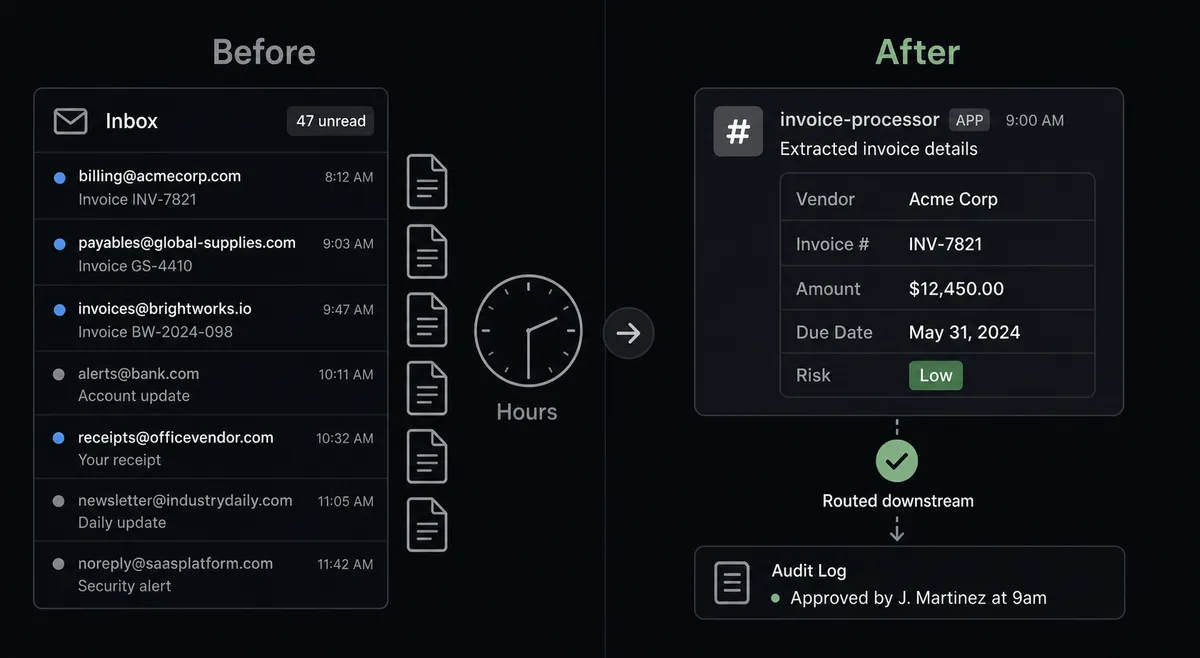
| Document triage | Team opens every file manually to classify and route it | Agent classifies documents before anyone opens the inbox |
| Contract review | Due diligence team reads every contract page manually | Gemini Generate Content returns a structured summary with risk flags in seconds per document |
| Exception handling | Exceptions emailed and tracked in separate threads | Agent posts exceptions to Slack with Approve / Escalate buttons; 6-minute resolution from phone |
| Approval audit trail | Approval decisions captured in email threads or not at all | Every decision captured with approver identity and timestamp in FlowRunner audit log |
| Scanned document entry | Staff types data from low-quality scans manually | Gemini Upload File and Generate Content process scanned images automatically |
What you can build
Vendor document intake with automatic extraction. When a vendor drops a scanned invoice or contract in #vendor-docs, On File Shared fires. The agent runs Upload File and Generate Content to extract structured fields, validates them against records, and posts a summary in the thread. Matched documents post to the ERP automatically. Discrepancies surface in Slack with full context.
Customer feedback classification and routing. Customer emails or Slack messages arrive in a monitored channel. On Channel Message fires. The agent passes the content to Generate Content with a classification prompt: billing issue, technical issue, feature request, or other. Based on the classification, the agent routes the message to the right team using Send Direct Message or Find Channel and Send Message to Channel. Triage happens before anyone opens the queue.
M&A due diligence document processing. For each contract in a deal stack, the agent calls Upload File then Generate Content: “Summarize in 3 bullet points. Flag unusual termination clauses, change-of-control provisions, and indemnification carve-outs. Return as JSON with summary, unusual_terms, and risk_level.” The agent stores clean summaries in a database and invokes the human-in-loop subflow for any document where risk_level is high. The deal team reviews AI-generated summaries with flagged sections instead of reading every page.
Weekly operations digest. Every Monday at 8am, an agent calls Generate Content to synthesize the week’s workflow data into a formatted narrative: executions run, exceptions surfaced, decisions made, patterns in the flags. It posts to #operations using Send Message to Channel with Block Kit formatting. Leadership gets operational visibility without manually pulling reports.
Multi-channel exception escalation. An agent processing documents routes standard exceptions to a Slack channel. For high-priority items, it uses Find Member to locate the right stakeholder and Send Direct Message with an interactive decision card. For urgent items where no Slack response comes within 30 minutes, it triggers a WhatsApp or email follow-up through a parallel subflow. The human-in-loop path adapts to urgency.
Common questions
Is it free to connect Gemini AI and Slack on FlowRunner? FlowRunner starts with a $100 credit on the Growth tier, which covers roughly 67 days of real work. No credit card required. Both the Gemini AI and Slack connectors are included on every tier, and all tiers include unlimited users and workflows.
Do I need my own Gemini API key? Yes. FlowRunner uses a BYOK (Bring Your Own Keys) model, so you connect your own Google API key. You control costs directly and keep your data within your own Google account.
Can the agent handle documents that arrive in Slack? Yes. The On File Shared trigger fires when a file is uploaded to a Slack channel. The agent downloads the file, uploads it to Gemini via Upload File, calls Generate Content with your extraction prompt, and posts structured results back in the thread or routes them downstream.
What happens when the agent is not confident about a result? The agent invokes a human-in-loop flow as a callable tool. It sends a Slack message with full context: what Gemini returned, why the agent flagged it, and what the human needs to decide. The human responds using interactive buttons. The agent resumes with that decision captured in the audit trail.
Can I self-host FlowRunner? Yes. FlowRunner offers a self-hosted Community Edition (free) and an Enterprise self-hosted tier. Both include the Gemini AI and Slack connectors.
Does FlowRunner work with other AI providers besides Gemini? Yes. FlowRunner is provider-agnostic. You can run Claude, OpenAI, and Gemini in the same workflow, each handling the task it does best. Gemini is one model option, not a required dependency.
Getting started
FlowRunner’s Growth tier starts at $45/month and includes a $100 credit covering roughly 67 days of real work. No credit card required. Corporate email only.
Connect both integrations from the FlowRunner integration library: Gemini AI and Slack. Both are available on every tier.
Start at flowrunner.ai or book a 30-minute walkthrough at calendly.com/flowrunner/intro to see the agent and human-in-loop flow running on a real document workflow.