How to Connect HubSpot with Jira Issues (With or Without an AI Agent)
Connect HubSpot and Jira Issues so deals, customer escalations, and CRM events automatically create, update, and transition issues, with a human on the step that carries real consequence.
How do you connect HubSpot to Jira Issues?
You connect HubSpot to Jira Issues by setting a HubSpot event (a deal stage change, a new contact, or a custom property update) as the trigger, then using the Create Issue, Assign Issue, and Add Comment actions in Jira to build the issue with full CRM context. FlowRunner is a visual AI-agent orchestration platform where automations run autonomously and pause for human judgment on the steps that carry real consequence. The same connection can run as an AI agent that reads the deal data, picks the right Jira project and assignee, and pauses for a team lead before creating any high-priority ticket.
The problem this connection solves
Your sales team closes deals in HubSpot. Your engineering and operations teams track work in Jira. Between those two systems is a gap that someone fills manually. When a customer escalation lands in the sales team’s inbox, an AP clerk or ops lead copies the relevant details into a Jira ticket by hand. Context gets lost in the copy. Priority gets assigned by gut feel. The ticket reaches the engineering team missing the account history that would help them respond faster.
The same gap runs in the other direction. When a Jira issue resolves, the sales rep working that account may not hear about it for days. The HubSpot deal record still shows the issue as open. The next call with that customer starts with outdated information. Neither team is failing to do their job. They are paying a coordination tax every time something crosses the boundary between their tools.
How it works: the connection
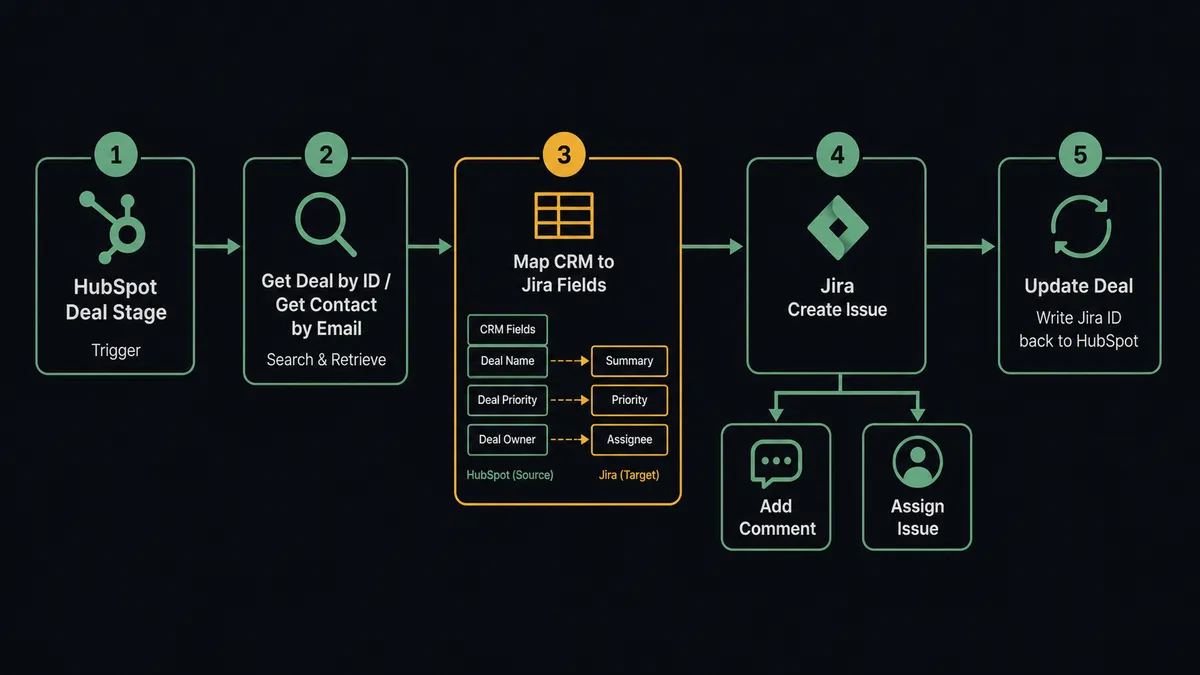
The flow starts with a HubSpot event. A deal moves into the Negotiation stage. A contact property changes. A form submission arrives and creates a new lead. FlowRunner picks up the event and runs Get Contact by Email or Get Deal by ID to retrieve the full CRM record.
That record becomes the raw material for the Jira issue. The agent maps the contact name, company, deal stage, and deal amount directly into the Jira issue fields: summary, description, priority, and custom fields your team has configured. It runs Create Issue in your target Jira project, then Assign Issue to the correct team member based on rotation data or component ownership. Finally, it runs Add Comment to attach the HubSpot deal link, account history notes, and any other context from the CRM record.
The last step runs in the other direction. The agent updates the HubSpot deal with the new Jira issue ID so the sales team can follow the issue status without leaving HubSpot.
Every step uses real data from both systems. Nothing is entered manually. The issue reaches the engineering or operations team with the context they need to act.
Can an AI agent run it? And why a human stays in the loop
A basic Zapier or Make workflow runs a fixed sequence: trigger fires, action runs. It does not read the data. It does not reason about what it found. It does not know whether a $3,000 deal and an $84,000 deal deserve the same handling.
An AI agent in FlowRunner approaches the same event differently. After pulling the HubSpot records, the agent evaluates what it found. It reads the deal value, checks the contact’s history, looks at the account’s open issue count, and decides how to proceed. For a small account with a routine request, it creates the Jira issue and assigns it automatically. For a large account with a deal in late-stage Negotiation, it does something different.
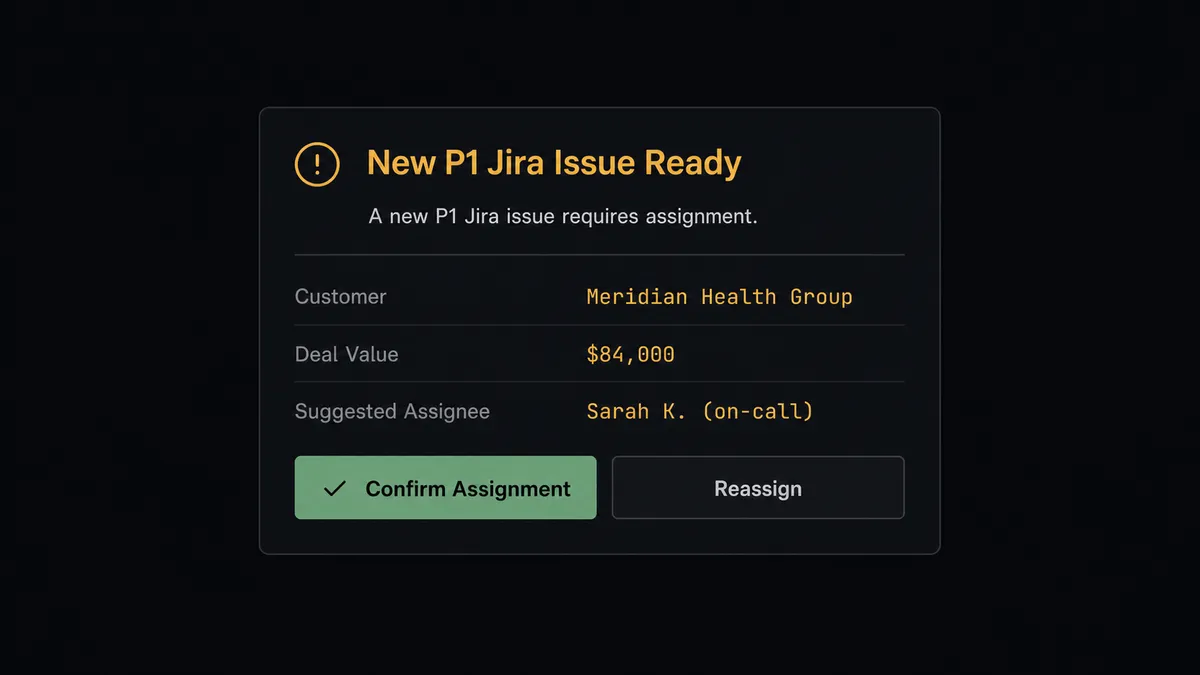
The agent invokes a human-in-loop flow it has been given as a tool. It is not a hardcoded threshold that fires when a number exceeds a limit. The agent makes a judgment call based on the full context it has gathered. It pauses, packages what it knows, and sends a Slack message to the team lead: “New P1 issue ready to create for Meridian Health Group. Deal value: $84,000. Suggested assignee: Sarah K. (on-call rotation). Confirm assignment or reassign?”
The team lead responds. The agent resumes with the confirmed assignment, creates the Jira issue, and logs the decision in the audit trail. The decision, the decider’s name, and the timestamp are all recorded. This is not a sync tool. The agent knows when to stop and ask.
Prospects who have used this kind of orchestration call it a digital andon cord. When the agent hits a decision it should not make unilaterally, it pulls the cord, stops the line, and gets a human. Then it resumes.
FlowRunner vs Zapier for HubSpot and Jira Issues
Zapier is the tool most non-technical teams reach for when they need to connect HubSpot and Jira. It has a large connector library, a clean interface, and a fast setup for simple one-step connections. For teams that need a trigger to create a Jira issue without any reasoning or exception handling, Zapier works.
The differences become real when the workflow needs to do more than that.
| Feature | Zapier | FlowRunner |
|---|---|---|
| Human-in-loop step | Not available. Zaps execute linearly; no native pause-and-ask capability. | Native. The agent invokes a human approval flow as a callable tool and resumes on response. |
| Agent reasoning | Not available. Zap steps execute in fixed sequence regardless of data. | The agent reads deal value, account history, and issue context before deciding how to route. |
| Unlimited users | Billed per seat on higher plans. | Unlimited users on every paid tier. |
| BYOK for AI | Not applicable. Zapier does not run AI agents. | Use your own OpenAI, Anthropic, or other provider key. No AI markup. |
| Audit trail | Basic task history. | Full execution trace: every action, every decision, every human input, timestamped. |
| Self-hosted option | Not available. | Community Edition (free) and Enterprise self-hosted both available. |
Zapier’s strength is breadth and speed for simple automations. FlowRunner’s advantage is in workflows where a fixed sequence is not enough and the decisions that live between the steps carry real consequence.
Before and after
| Category | Before | After |
|---|---|---|
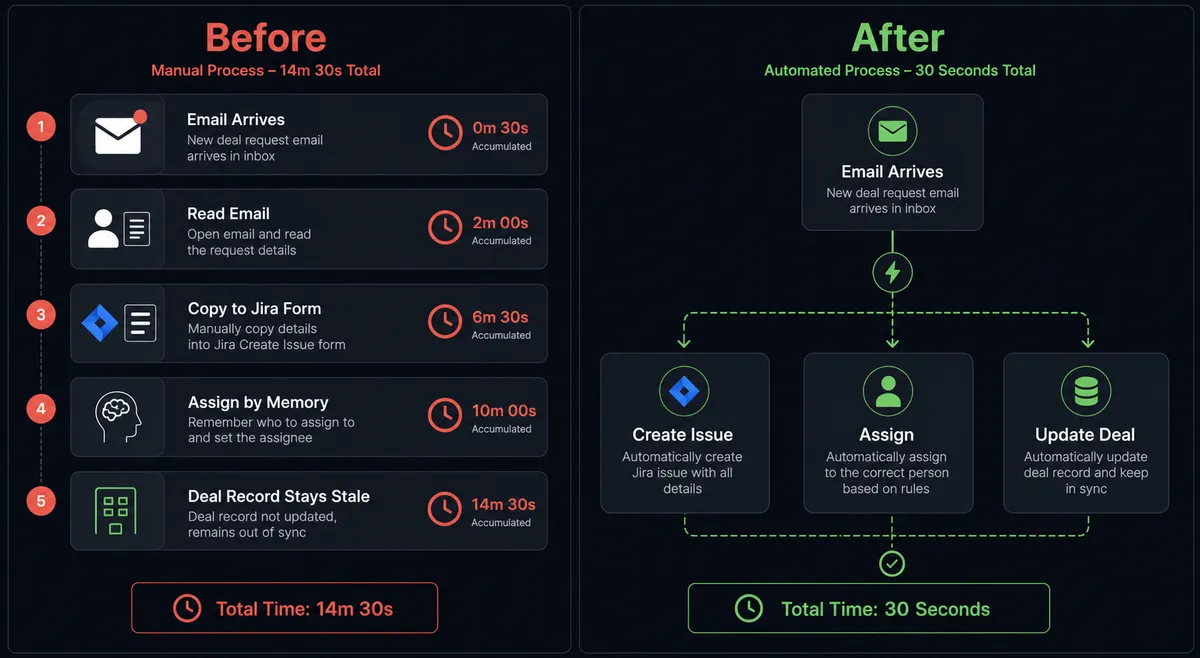
| Ticket creation time | Support or ops staff read each event and create Jira tickets by hand, 15-30 minutes per ticket | Jira issue with full CRM context created and assigned within seconds of the HubSpot event |
| Context in tickets | Engineers receive tickets with a subject line and no account data | Customer name, deal stage, deal value, account history, and source record attached automatically |
| CRM accuracy | HubSpot deal records show Jira issue status only when reps remember to check | Jira issue ID written back to HubSpot deal automatically; both systems reflect current state |
| Duplicate contacts | No deduplication check before creating new contact or linking records | Agent runs Get Contact by Email on every event; potential duplicates routed to CRM admin, not silently merged |
| Escalation handling | High-value account issues routed the same way as routine tickets | Agent evaluates deal size and account history; high-consequence tickets held for team lead confirmation before creation |
| Audit trail | No record of who created the ticket, why, or what context they had | Full execution log: every action, every decision, every human input, timestamped and searchable |
What you can build
Customer escalation to Jira with account context. When a HubSpot contact’s property changes to “Escalated” or a form submission flags a critical issue, the agent retrieves the full contact and deal records using Get Contact by Email and Get Deal by ID, then creates a Jira issue with the customer name, account value, and deal stage mapped into the issue fields. The agent Assigns Issue to the on-call engineer and Add Comments with the HubSpot deal link. High-value accounts trigger the human-in-loop step for assignment confirmation before the issue is created.
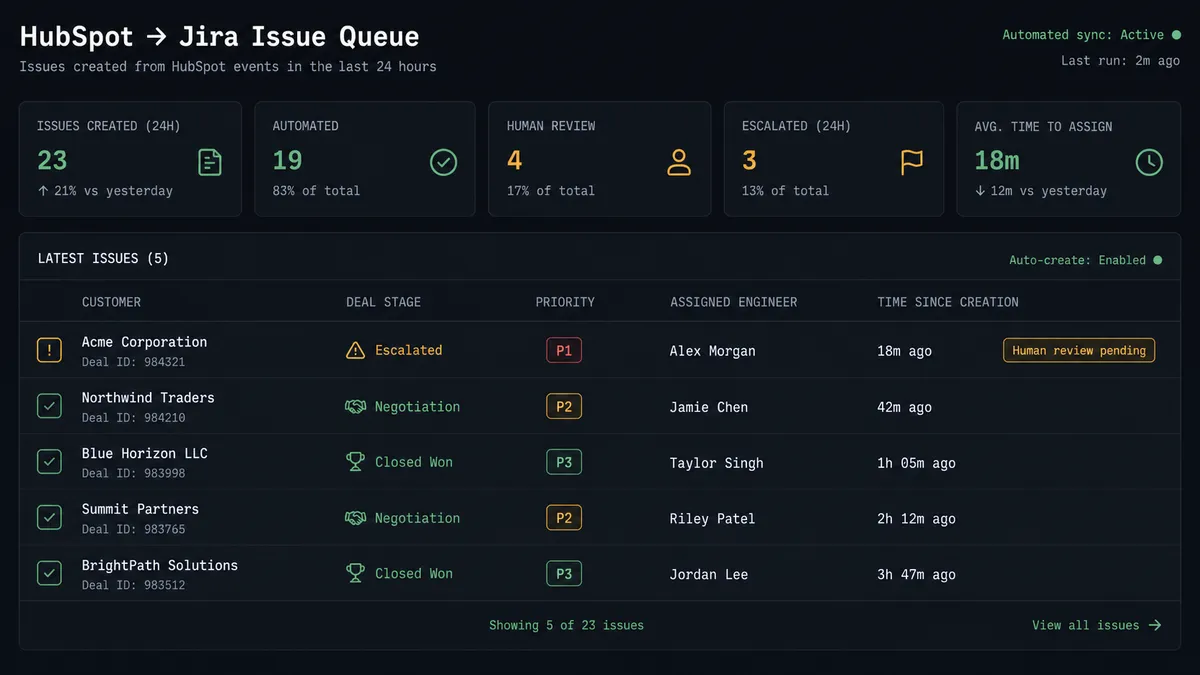
Deal stage sync to engineering work. When a HubSpot deal reaches a stage that requires product work, such as a custom integration request or a scoping milestone, the agent creates a Jira task in the product backlog automatically. It maps the deal name, expected close date, and deal owner into the Jira issue. The Jira issue ID is written back to the HubSpot deal using Update Deal so the sales rep can track progress without leaving HubSpot.
Jira resolution closes the loop in HubSpot. When a Jira issue that was created from a HubSpot event transitions to Done, the agent uses the stored Jira issue ID to find the originating deal, runs Update Deal in HubSpot to reflect the resolution, and logs a note on the contact record. The sales team sees the resolved status before their next customer call.
Sprint health alerts tied to account status. Every morning, the agent runs a Search Issues JQL query for unassigned or blocked issues in the current sprint. It cross-references those issues with their linked HubSpot deals using Get Deal by ID. It posts a summary to the engineering Slack channel that includes not just issue count but deal value at risk: “3 sprint items unassigned. 2 blocked. $210,000 in deals waiting on resolution.” The team prioritizes with full business context.
Operational exception routing. When a payment workflow, fulfillment check, or compliance review throws an exception that requires investigation, the agent creates a Jira bug report with the full error context, attaches the relevant transaction ID, and links the issue to the originating HubSpot deal. Engineering has a tracked, assigned issue before anyone manually triages the exception queue.
Common questions
Is it free to connect HubSpot and Jira Issues on FlowRunner?
FlowRunner starts with a $100 credit on the Growth plan, which covers roughly 67 days of real usage. No credit card required. You can connect HubSpot and Jira Issues and run live workflows before spending a dollar.
Can I self-host FlowRunner for this integration?
Yes. FlowRunner offers a self-hosted Community Edition at no cost and a self-hosted Enterprise tier for teams that need multi-instance clustering and full compliance features. Both support the HubSpot and Jira Issues connectors.
Does the AI agent need my own API key for AI providers?
FlowRunner uses a Bring Your Own Key model for AI providers. You connect your preferred provider, such as OpenAI or Anthropic, and the agent uses your key. FlowRunner does not mark up AI usage.
What happens when the agent is not sure what to do?
The agent invokes a human-in-loop flow it has been given as a tool. It pauses the workflow, sends full context to the right person through Slack, email, or another channel, and waits for a decision before proceeding. The decision, the decider, and the timestamp are captured in the audit trail.
Does this require a developer to set up?
No. FlowRunner is a visual, no-code platform. You connect your HubSpot and Jira accounts, choose a trigger, map actions, and add a human-in-loop step if you want one. All configuration happens in the visual builder.
How does FlowRunner handle duplicate contacts or mismatched records?
The agent uses Get Contact by Email to check for an existing HubSpot record before creating anything. If it finds a potential duplicate, it pauses and routes the decision to a CRM admin via Slack rather than silently picking one.
Getting started
The $100 Growth credit gives you roughly 67 days to build and test HubSpot and Jira Issues workflows at no cost. No credit card required. Corporate email only.
Connect both integrations from the FlowRunner integrations library: HubSpot and Jira Issues. Build your first flow in the visual builder, test it against a real HubSpot event, and verify the Jira issue arrives with the context your team needs.
Start at flowrunner.ai or book a 30-minute walkthrough at calendly.com/flowrunner/intro if you want to see the human-in-loop step in a live environment before building.