How to Connect Notion with Google Calendar (With or Without an AI Agent)
Connect Notion and Google Calendar so meetings create documentation automatically, prep pages link to upcoming events, and a human confirms any change that affects multiple attendees.
How do you connect Notion to Google Calendar?
You connect Notion and Google Calendar in FlowRunner by wiring a trigger from one system into actions on the other: a Calendly booking fires, the agent calls Create Event on Google Calendar with deal context, then calls Create Page on Notion to document the meeting. FlowRunner is a visual AI-agent orchestration platform where automations run autonomously and pause for human judgment on the steps that carry real consequence. That same connection runs as an AI agent that creates the calendar event and the prep page together, and invokes a human confirmation before modifying any event that affects multiple attendees.
The problem it solves
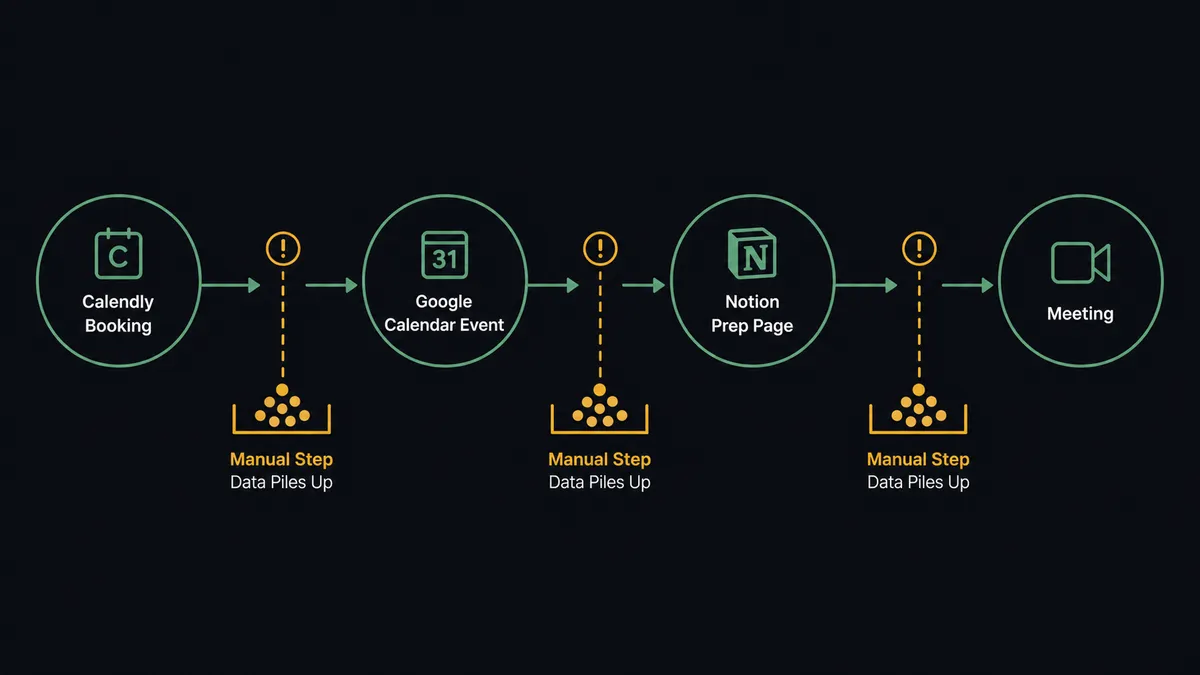
Most teams run Notion and Google Calendar as two separate mental spaces. A meeting gets booked in Calendly, someone manually creates the calendar event, someone else manually creates the Notion meeting page, and the prep work gets done (or not) in a third place. When volume increases, that chain of manual steps breaks. Meetings happen with no agenda page, no account history in the calendar entry, and no record of what was decided. The ops lead sends a Slack message after every call asking where the notes are.
The gap between booking and documentation is where things fall through the cracks. An account executive managing 12 active deals cannot remember to create a Notion page for every call, link it to the calendar entry, and update the page properties when the meeting date shifts. They do the work in the meeting but the record never gets written. By Monday, the only trace of Friday’s call is a half-edited personal note and a calendar entry with no context.
How it works: the connection
The direct connection is straightforward. A trigger fires when a booking happens or on a schedule. The agent runs Create Event on Google Calendar with the meeting title, attendees, time, and description filled in from the trigger data. It runs Create Page on Notion in the target database, with the event title, attendees, and date as page properties. It then runs Update Event to write the Notion page URL into the calendar event description. Every attendee sees the prep page link in their calendar within seconds of the booking.
For the weekly agenda scenario, List Events handles the retrieval step. Every Friday at 4pm, the agent calls List Events with a filter for the coming week. It loops over the results. For each client meeting, it calls Find or Create Database Item on Notion to check whether a prep page already exists. If it does not, it calls Create Page and then Append Block Children to add structured sections: account background, open action items, and a space for agenda notes. It finishes by calling Update Event to add the Notion page link to the calendar entry. The sales team starts Monday with seven fully prepared, linked calendar entries.
The Notion actions available to the agent as tools include: Create Page, Find Page by Title, Update Page Properties, Create Database Item, Find or Create Database Item, Append Block Children, Add Content to Page, Create Comment, and Update Database Item. The Google Calendar actions include: Create Event, List Events, Get Event, Update Event, and Delete Event.
Can an AI agent run it? (and why a human stays in the loop)
A standard workflow runs the same sequence every time. An AI agent reads the data in front of it, decides which tools to use, and adjusts based on what it finds. That difference matters when the context varies.
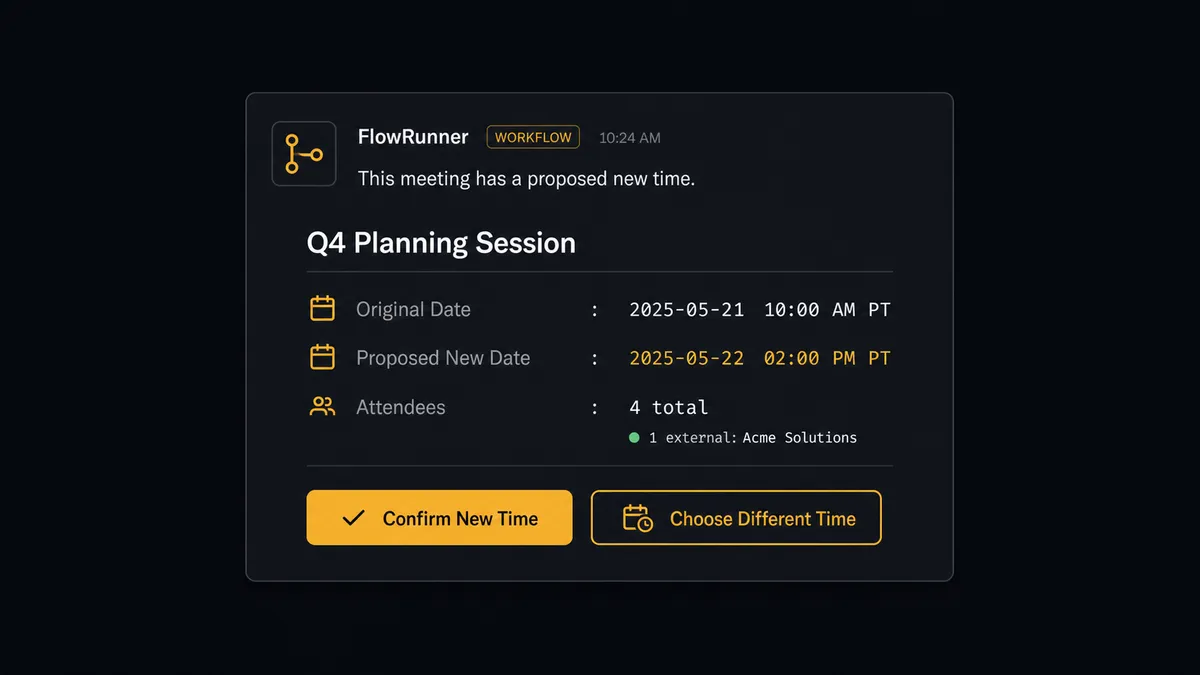
Consider a rescheduling scenario. An agent is managing a project’s review meeting schedule. A milestone slips. The agent detects the completion date has moved by four days. It calls List Events to find the review meeting. It evaluates what it finds: the meeting has 11 attendees including an external client. It does not call Update Event and move the meeting. It calls the human-in-loop flow.
The event organizer receives a Slack message: “The [Project Name] review is scheduled for Thursday at 2pm. The milestone completion slipped to Tuesday, making the Thursday slot too early. Proposed new time: the following Monday at 2pm. This affects 11 attendees including [Client Name]. Confirm the change, pick a different time, or let me know how to handle it.” The organizer replies. The agent resumes with the decision recorded. The calendar entry updates with the new time. A comment is added to the Notion project page noting the change and when the organizer approved it.
This is not a threshold rule (“if attendees > 5, ask human”). The agent evaluated that an external client was affected, that the proposed new time landed on a different week, and that this kind of change carries reputational consequence. The decision to stop and ask was the agent’s call.
FlowRunner vs Zapier
Zapier is the right comparison for teams that discovered this integration pair while looking for a no-code way to connect Notion and Google Calendar. Zapier does this well: it is mature, has clean connectors for both, and requires no technical setup.
| Feature | Zapier | FlowRunner |
|---|---|---|
| Connect Notion and Google Calendar | Yes, with Zap builder | Yes, with visual flow builder |
| AI agent reasoning over event data | No. Zaps follow fixed sequences | Yes. Agent reads event context and decides which actions to call |
| Human-in-loop as a callable tool | No. Filters stop the flow; no human confirmation step | Yes. Agent invokes a human oversight flow before consequential calendar changes |
| BYOK for AI model | No | Yes. Bring your own API key for any supported provider |
| Unlimited users on every tier | No. Zapier charges per user on some plans | Yes. Every FlowRunner tier includes unlimited users |
| Audit trail for agent decisions | No | Yes. Every human escalation recorded with context, decider identity, and timestamp |
Zapier handles the direct trigger-to-action case well. FlowRunner handles it too, and adds the layer Zapier cannot: an agent that reasons about what it finds, creates documentation alongside the calendar event, and knows when to stop and ask before making a change that affects a client meeting.
Before and after
| Category | Before | After |
|---|---|---|
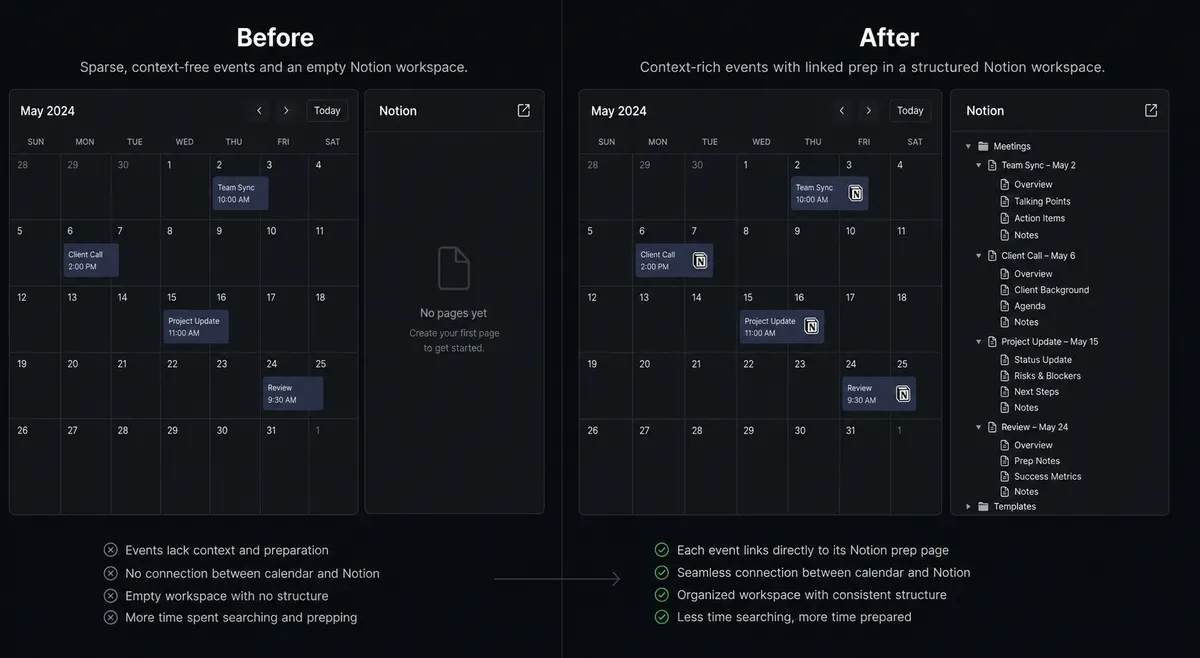
| Calendar event creation | Sales rep creates the Google Calendar event manually after each Calendly booking | Event appears within seconds of booking with deal notes and account context in the description |
| Meeting documentation | Notion page created by hand, if created at all | Create Page runs automatically with meeting properties set; page lives in Notion before the meeting happens |
| Prep materials | Reps gather account context from memory or CRM the morning of the meeting | Notion prep page linked in the calendar entry every Friday for the coming week’s meetings |
| Rescheduling with multiple attendees | Organizer manually updates the calendar entry and notifies attendees via email | Agent detects the conflict, proposes a new time, and waits for organizer confirmation before changing anything |
| Decision audit trail | Rescheduling decisions happen in Slack threads with no searchable record | Every agent escalation logged in Notion with context, decision, and timestamp |
What you can build
Automatic meeting documentation. When a Calendly booking fires, the agent calls Create Page on Notion with the meeting title, attendees, and date as properties. It calls Append Block Children to add a summary template. It calls Update Event on Google Calendar to add the Notion URL to the event description. Every meeting has a page. Every page is linked from the calendar.
Weekly prep batch. Every Friday at 4pm, the agent calls List Events for the coming week. For each client meeting, it calls Find or Create Database Item to check for an existing prep page. If none exists, it calls Create Page and Append Block Children with account history and open items. It calls Update Event to add the link. Monday starts with linked, structured prep for every client call.
Project milestone review scheduling. When a milestone is marked complete in a connected project tool, the agent calls Create Event on Google Calendar for a review meeting 48 hours later. It calls Create Page on Notion for the review agenda. It calls Update Event to add the agenda link. The team has review meetings created automatically without anyone booking them manually.
Conflict-aware rescheduling. When a meeting needs to move, the agent calls Get Event to check attendees. If the event includes external attendees or more than a threshold count, it invokes the human-in-loop flow before calling Update Event. The organizer confirms. The agent updates the calendar and adds a change note to the Notion page using Create Comment.
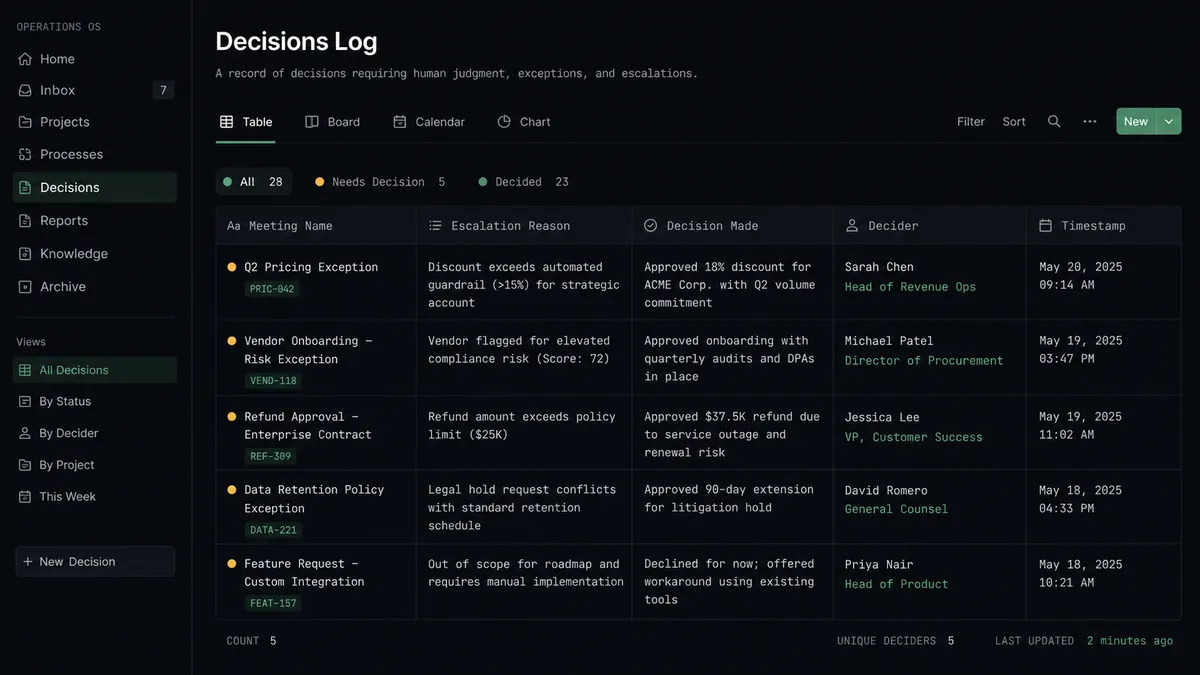
Decision log maintenance. For every human escalation decision the agent handles in any workflow, it calls Create Database Item on a Notion decisions database: what the agent found, what it escalated, what the human decided, and when. Operations managers have a searchable log of every exception without accessing FlowRunner’s audit trail directly.
Common questions
Is it free to connect Notion and Google Calendar on FlowRunner? FlowRunner offers a $100 credit on signup, equivalent to roughly 67 days of use on the Growth tier, with no credit card required. Corporate email only. After the trial, Growth starts at $45 per month with 12,000 workflow executions and unlimited users.
Can I self-host the Notion and Google Calendar integration? Yes. FlowRunner has a free Community Edition for single-instance self-hosting. The Enterprise tier adds multi-instance clustering, full audit retention, and SSO for teams that need it.
Does the AI agent need my own OpenAI key? FlowRunner uses a BYOK (Bring Your Own Keys) model. You connect your own API key from any supported AI provider. FlowRunner does not bundle a provider or charge a markup on model usage.
What happens when the agent isn’t sure about a calendar change? The agent invokes a human-in-loop flow as a callable tool. It pauses execution, packages full context about the change and who is affected, and contacts the event organizer through Slack or email. The workflow resumes only after the organizer confirms.
Does Notion have triggers in FlowRunner? Notion currently has 0 native triggers in FlowRunner. Workflows involving Notion typically fire from a scheduled trigger, a Calendly booking, or a status change in a connected system like HubSpot or Asana. The 22 Notion actions cover the full write and read surface of the Notion API.
Can one FlowRunner workflow link prep pages to multiple upcoming meetings at once? Yes. Using List Events on Google Calendar and a loop over the results, an agent can retrieve every meeting in a date range, check each one against a Notion database, and create or link a prep page for each. The weekly agenda scenario in the Google Calendar integration does exactly this.
Getting started
FlowRunner gives you a $100 credit on signup. That covers roughly 67 days on the Growth tier with no credit card required. Corporate email only.
Connect both integrations from the FlowRunner integrations library: Notion and Google Calendar. Both connectors are verified against the vendor API and available on every tier.
Start your trial at flowrunner.ai or book a 30-minute walkthrough at calendly.com/flowrunner/intro. The walkthrough covers the weekly prep workflow end to end so you can see the agent’s decision-making before you build.