How to Connect Notion with Slack (With or Without an AI Agent)
Connect Notion and Slack so that page creation, database updates, and document events in Notion trigger structured Slack messages automatically, with an AI agent that pauses for human review on the steps that carry real consequence.
How do you connect Notion to Slack?
You connect Notion and Slack by triggering a FlowRunner workflow from a Slack event (such as On File Shared or On Channel Message), then using Notion actions like Create Database Item or Append Block Children to write structured records, and Slack actions like Send Message to Channel to notify your team when a record is ready. FlowRunner is a visual AI-agent orchestration platform where automations run autonomously and pause for human judgment on the steps that carry real consequence. The same connection that runs as a simple trigger-action pair can be upgraded to an AI agent that reads each document, reasons about what it found, writes the right Notion record, and asks a human via Slack only when it encounters something it should not decide alone.
The problem with disconnected documentation
Most teams already use Notion for their knowledge base and Slack for day-to-day communication. The problem is that Notion stays accurate only when someone manually updates it. Meeting notes pile up in personal apps. Vendor documents land in Slack, get a quick reply, and disappear from view. Decision logs that should exist in Notion instead live in email threads that nobody searches.
The ops lead or knowledge manager who is supposed to keep Notion current is also the person handling exceptions, answering questions, and running the processes that generate the documentation in the first place. Updating Notion becomes the thing that falls through the cracks because it always comes after the actual work. When you finally need to find something, the database is three weeks out of date and the team member who remembered it has moved on.
How it works: the Notion and Slack connection
The FlowRunner connection between Notion and Slack works in both directions depending on which system drives the workflow.
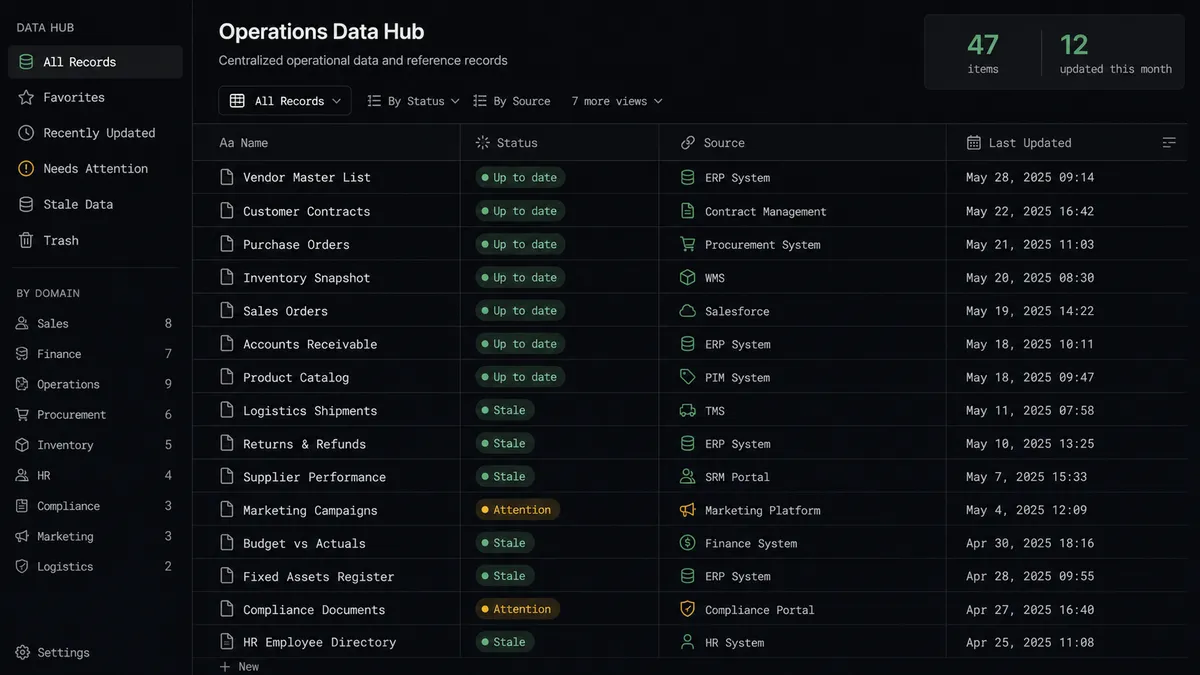
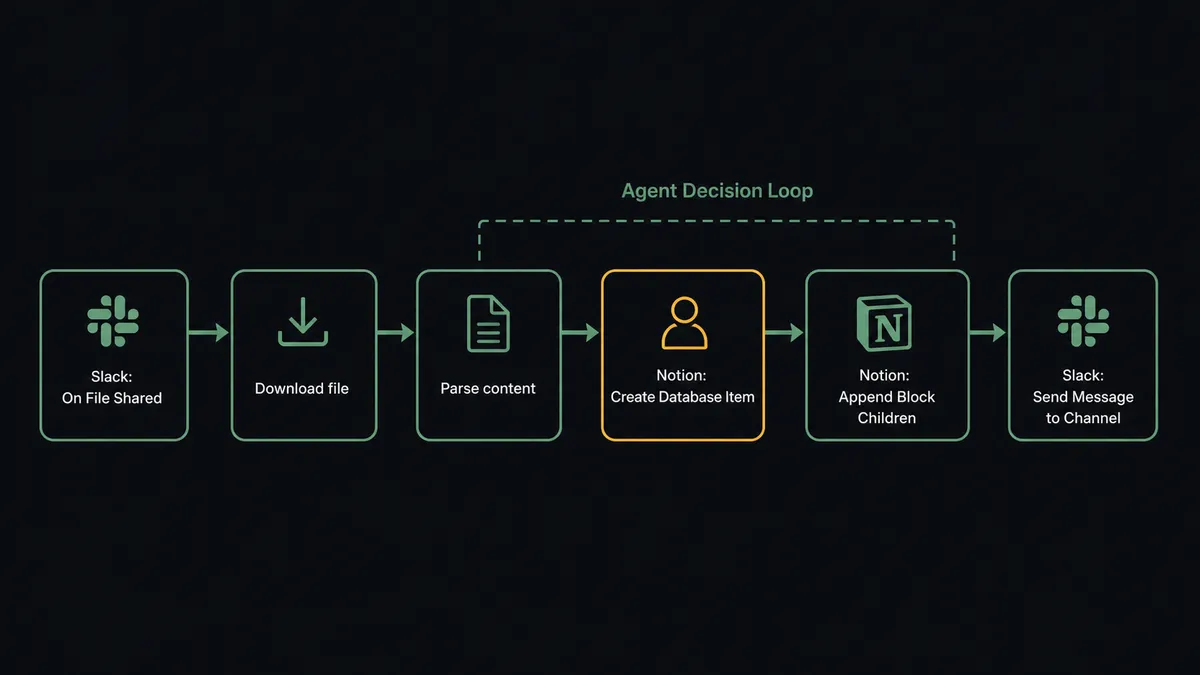
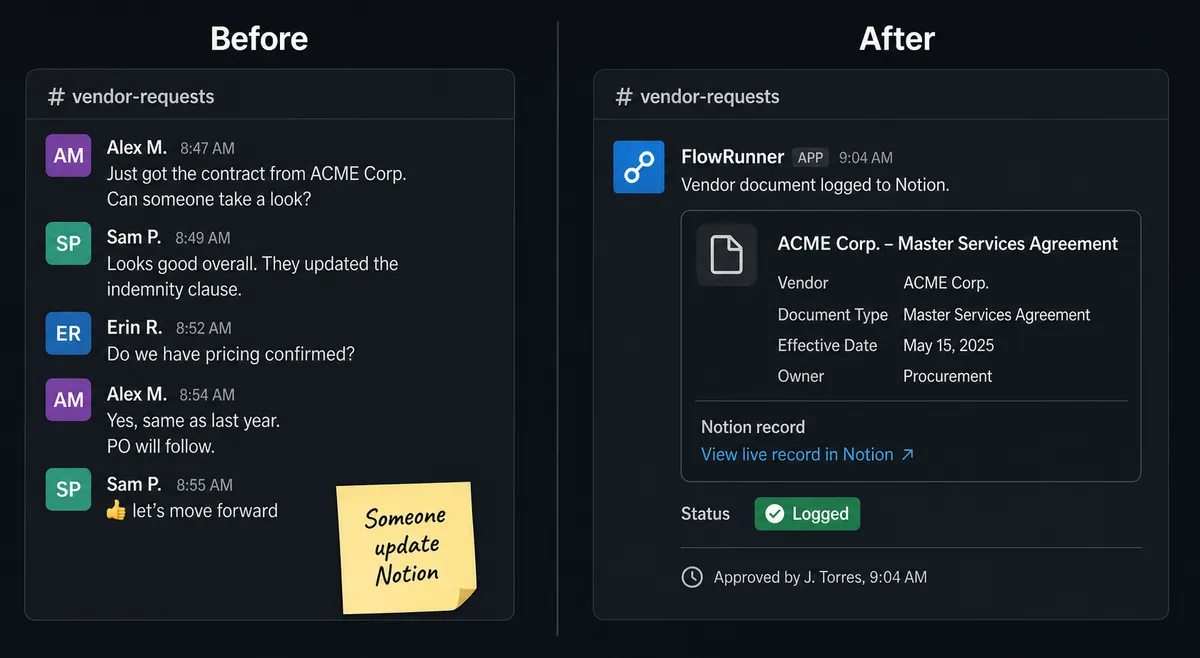
Slack to Notion. When a team member uploads a vendor document to a designated Slack channel, the On File Shared trigger fires. The agent downloads the file, parses its content, and writes a structured record to a Notion database using Create Database Item. It maps the document type, vendor name, date, and extracted fields to the database columns automatically. The Notion record is live within minutes of the file appearing in Slack, with no manual data entry.
Notion to Slack. When an agent creates or updates a Notion page as part of a workflow, it uses Send Message to Channel to notify the relevant team members. The message includes the page title, a summary of what was added, and a direct link to the Notion record. Team members get context in Slack without switching to Notion to check whether documentation exists.
Slack approval back to Notion. When a Notion record requires review before it is shared or acted on, the agent sends a Slack message with Approve and Escalate buttons. The team member clicks directly in Slack. The agent receives the decision via the On Block Action trigger, updates the Notion database item status using Update Database Item, and appends the decision and approver identity to the page using Append Block Children.
The actions involved are grounded in real FlowRunner connector capabilities: Create Database Item, Update Database Item, Find Database Item, Append Block Children, Create Comment, and Create Page on the Notion side. Send Message to Channel, Send Direct Message, Update Message in Channel, and On Block Action on the Slack side.
Can an AI agent run it? And why a human stays in the loop
A trigger-action connection between Notion and Slack handles routine, predictable events well. An AI agent handles the work that requires judgment.
Here is the difference in practice. A rules-based connection creates a Notion database item every time a file is shared in Slack. An AI agent reads the file, evaluates what it found, compares it to existing Notion records using Find Database Item, and decides whether to create a new item, update an existing one, flag a duplicate, or escalate a discrepancy to a human before writing anything.
The escalation moment is not a hardcoded threshold. The agent might auto-process a routine vendor invoice for a supplier with a clean history and matching PO. It might escalate a document from a vendor it has never seen before, or one where the extracted total is three times the vendor’s usual amount, or one where a required field is missing entirely. The decision to involve a human is itself an AI decision based on the agent’s instructions and the data in front of it.
This is what FlowRunner calls the “digital andon cord.” Like Toyota’s quality control pull cord, the agent stops the line when it hits something that should not move forward without a human.
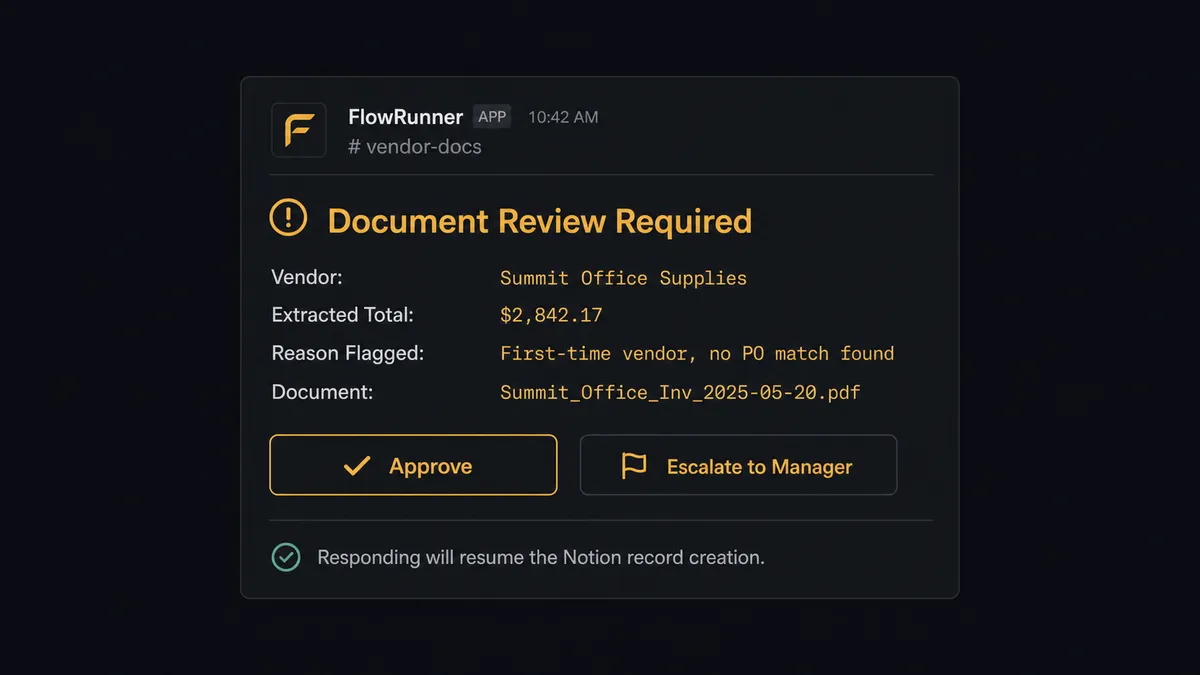
When the agent decides to escalate, it sends a Slack message with everything the human needs: what it found in the document, what Notion record would have been created, why it flagged the item, and two buttons to Approve or Escalate to a manager. The approving team member clicks in Slack. The agent receives the On Block Action trigger, resumes the workflow, writes the Notion record, and logs the decision with the approver’s identity and timestamp in the audit trail.
This is not a sync tool. The agent knows when to stop and ask.
FlowRunner vs Zapier for Notion and Slack
If your team is non-technical and already using Zapier, that comparison is worth making honestly.
Zapier connects Notion and Slack reliably. Its trigger-action model is fast to set up, the interface is approachable for non-developers, and its integration library is large. For simple one-directional flows like “new Notion database item posts to Slack,” Zapier works fine.
The differences become material when your use case involves judgment, volume, or compliance.
| Area | Zapier | FlowRunner |
|---|---|---|
| Human-in-loop decisions | Not available natively; requires external tools or workarounds | Native: agent invokes human approval as a callable tool, collects decision, resumes workflow |
| Agent reasoning | Trigger-action pairs only; no data evaluation or branching decisions | AI agent reads data, compares records, and chooses which actions to take based on context |
| Audit trail | Basic run history | Every agent action, human decision, approver identity, and timestamp captured automatically |
| Users and workflows | Per-seat pricing on higher tiers | Unlimited users and workflows on every FlowRunner tier |
| Self-hosting | Cloud only | Community Edition (free self-hosted) and Enterprise self-hosted available |
| AI model | Limited AI steps with provider-managed keys | Bring your own key from any AI provider; you control the model and the cost |
If you are running simple notification flows, Zapier’s simplicity is a genuine advantage. If you are running document intake, decision logging, or any workflow where a human approval should be captured and auditable, FlowRunner handles the full loop that Zapier cannot close.
Before and after
| Category | Before | After |
|---|---|---|
| Meeting documentation | Call notes scattered across personal apps; Notion updated manually, if at all | Notion page created within 2 minutes of call ending with summary, action items, and attendees |
| Document intake | Vendor files dropped in Slack, reviewed manually, data re-entered into Notion by hand | Agent parses document, writes Notion record, and surfaces exceptions in Slack for review |
| Decision logging | Approval decisions made in Slack threads with no structured record | Every human decision captured in Notion with approver identity, timestamp, and full context |
| Exception resolution | Exception emails tracked in separate threads; managers asked directly for status | Exceptions land in Slack with full context; agent resumes on button click; 6-minute resolution |
| Knowledge base currency | Notion updated reactively, often weeks behind current state | Notion updated as a byproduct of every workflow run; always reflects current operational state |
What you can build
Meeting summary to Notion with Slack review. After a sales call, an agent creates a Notion page in the Deals database using Create Page and Append Block Children with the summary, key topics, and next steps. It sends a Slack notification to the account owner using Send Direct Message with a link to the page and a note that it was auto-generated and ready for review before any external sharing.
Inbound vendor document processing. A designated Slack channel receives vendor documents via On File Shared. The agent downloads each file, extracts structured fields, runs Find Database Item to check for duplicates, and either creates a new Notion database item or flags the discrepancy in Slack using Send Message to Channel with Approve and Escalate buttons.
Workflow decision log. For every exception an agent escalates to a human, it creates a Notion database item using Create Database Item with what it found, what options it presented, and what the human decided. The decision log is searchable and filterable in Notion without requiring access to the FlowRunner execution log.
Scheduled operations digest. Every Monday morning, an agent compiles workflow metrics from the past week and posts a formatted report to a Slack channel using Send Message to Channel with Block Kit structure. It also creates or updates a Notion page with the same data using Update Page Properties so leadership has a running record alongside the live Slack post.
Project workspace provisioning. When a new deal or project starts, an agent creates a dedicated Notion database and project page using Create Database and Create Page. It also creates a private Slack channel using Create Private Channel and invites the relevant team members using Invite User to Channel. The workspace is ready before the first meeting.
Common questions
Is it free to connect Notion and Slack on FlowRunner? FlowRunner offers a $100 credit on the Growth plan with no credit card required. That covers roughly 67 days of real usage. After that, Growth starts at $45 per month with 12,000 workflow executions included.
Can I self-host FlowRunner? Yes. FlowRunner offers a free Community Edition for self-hosted, single-instance deployments. Enterprise self-hosting with multi-instance clustering and the full compliance suite is available on a custom plan.
Does the AI agent need my own OpenAI or Claude API key? FlowRunner uses a bring-your-own-key model. You connect your own API key from any supported AI provider. FlowRunner orchestrates the agent; you own the relationship with the model.
What happens when the agent isn’t sure whether to post or escalate? The agent evaluates the data in front of it and decides to invoke a human-in-loop flow as a callable tool. It sends a Slack message with full context, Approve and Escalate buttons, and waits. Your team resolves the exception. The agent resumes with the decision recorded in the audit trail.
How is this different from a Zapier zap connecting Notion and Slack? A Zapier zap is a fixed rule: if this, then that. A FlowRunner AI agent reads the data, reasons about it, and decides which actions to take and when to involve a human. It is not a trigger-action pair. It is a decision-maker with Notion and Slack as its tools.
Does FlowRunner have a limit on users or workflows? No. Every FlowRunner tier includes unlimited users and unlimited workflows. You are never charged per seat or per workflow.
Getting started
FlowRunner’s Growth plan includes a $100 credit with no credit card required. That covers roughly 67 days of real workflows before you spend anything. You connect both integrations in minutes and build the first flow in the visual editor without writing code.
Start at flowrunner.ai to create your account. Review the integration pages for Notion and Slack for the full list of available actions and triggers. If you want to talk through your specific use case before building, book a 30-minute call at calendly.com/flowrunner/intro.
Your team already works in Notion and Slack. FlowRunner connects them so the documentation happens as a byproduct of the work, not as extra work after the fact.