How to Connect Sentry with Jira Issues (With or Without an AI Agent)
Connect Sentry error monitoring to Jira Issues so new critical errors automatically become tracked, assigned tickets, with a human in the loop for permanent deletes and high-priority assignments.
How do you connect Sentry to Jira Issues?
You connect Sentry to Jira Issues in FlowRunner by scheduling a flow that calls List Issues in Sentry, then calls Create Issue in Jira for every error that meets your routing criteria. FlowRunner is a visual AI-agent orchestration platform where automations run autonomously and pause for human judgment on the steps that carry real consequence. The same connection runs as an AI agent that reads each Sentry issue, decides how to classify it, and stops to ask a human before creating high-priority Jira tickets or permanently deleting any issue.
The problem that falls through the cracks
Sentry catches errors. Jira tracks work. The gap between them is a spreadsheet, a Slack message someone forgets to act on, or a ticket that never gets created because the engineer who saw the error was heads-down on something else. By the time someone opens Jira, the context is gone: which release introduced it, how many users it hit, what the stack trace said.
On the deletion side, the risk runs the other direction. Engineers bulk-delete stale noise from Sentry and occasionally pull issues they later needed, because the decision was made quickly without a clear record of what was in each batch. Neither direction has a reliable handoff, and both cost time that compounds across a sprint.
How it works: the connection
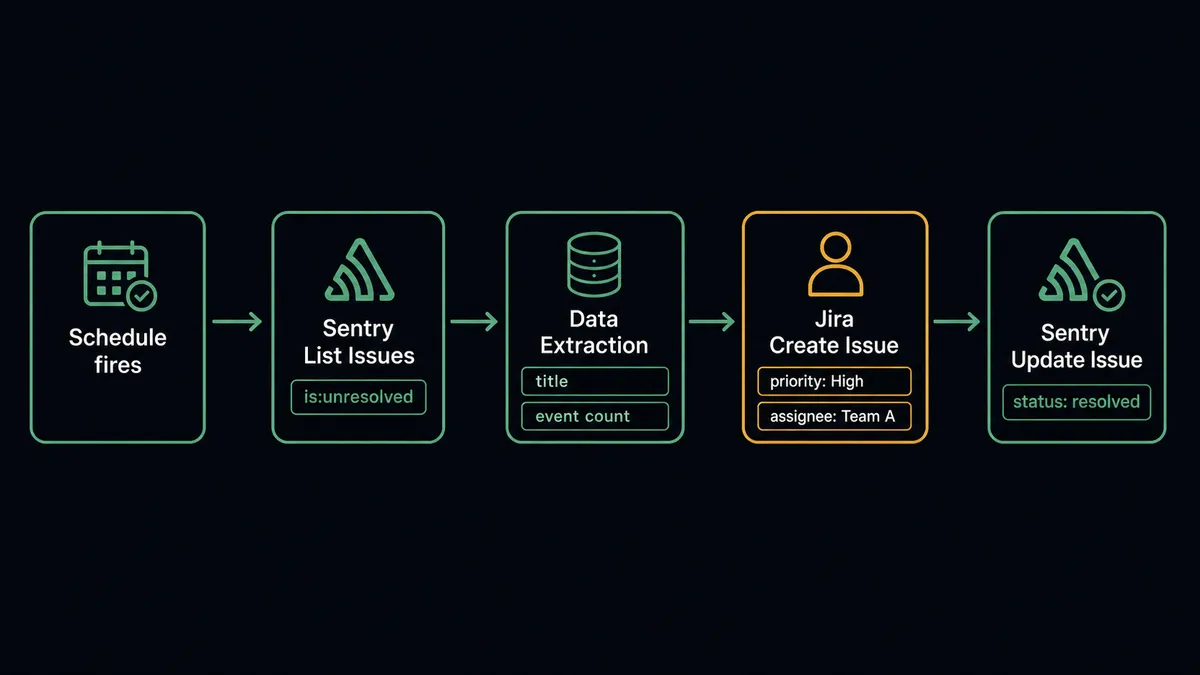
A scheduled FlowRunner flow calls List Issues from the Sentry connector on whatever interval makes sense for your team, every 15 minutes during business hours, hourly at night. It applies Sentry’s own search syntax: is:unresolved to surface open issues, combined with project and tag filters if you want to narrow by service or environment.
For each issue returned, the flow reads the title, culprit, event count, and any tags. It then calls Create Issue in Jira Issues, mapping those fields to the Jira issue’s summary, description, and priority. The Sentry issue ID goes into a custom field or comment so engineers can jump directly to the error from the Jira ticket. When the engineering team resolves the issue and transitions the Jira ticket to Done, the agent can loop back and call Update Issue in Sentry to mark the original issue resolved, keeping both systems consistent.
Can an AI agent run it? (And why a human stays in the loop)
The plain connection routes every unresolved issue to Jira. The agent version reads each issue and decides what to do with it. That distinction matters when you have fifty unresolved issues in a project: some are known noise, some are regressions, and one is a silent data corruption that needs a P1 ticket opened in the next ten minutes.
The agent has these tools from the Sentry connector: List Issues, Get Issue, Get Latest Event, Update Issue, and Delete Issue. From Jira Issues it has Create Issue, Assign Issue, Add Comment, and Transition Issue. It also has a human-in-loop flow it can invoke as a callable tool at any point.
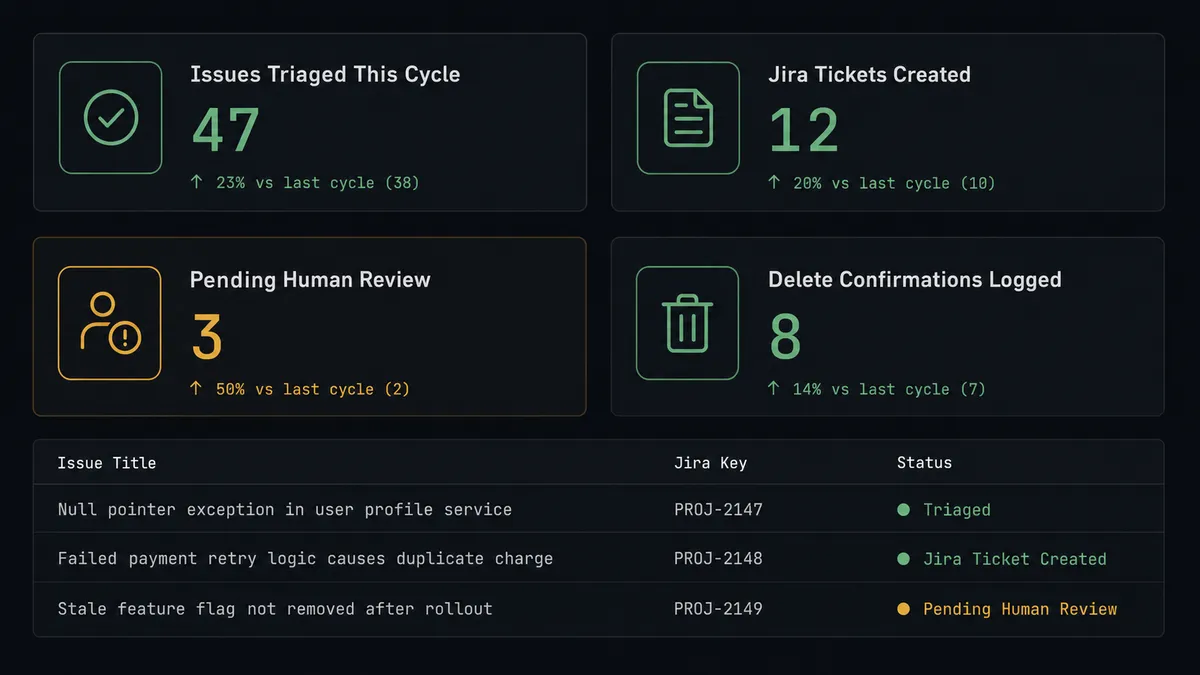
Here is a real decision moment. The agent is triaging a batch of issues. It hits an issue titled “NullPointerException in checkout: billing address missing.” Event count: 847 in the last two hours. The agent checks the culprit path, cross-references the release tag, and identifies this as a regression from yesterday’s deploy. It does not auto-ignore it. It does not auto-route it to a standard bug project. Instead, it creates a P1 Jira ticket in the Payments project, uses Assign Issue to put it on the on-call engineer based on the current rotation, and uses Add Comment to attach the Sentry event link and the deploy that introduced it.
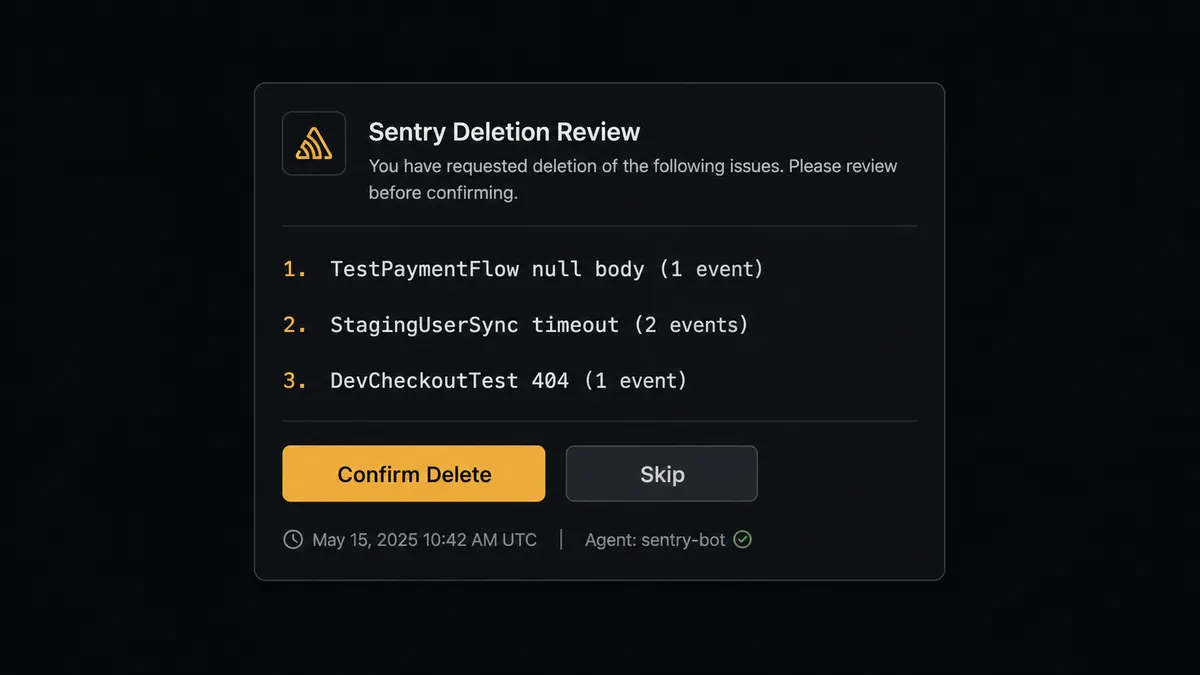
Then there is a separate batch of forty issues tagged as test environment noise. The agent classifies them as deletion candidates and calls the human-in-loop tool. It posts to the engineering channel: “These 40 issues look like stale test noise. Event counts: 1-3 each, all from the test environment. Confirm which to delete permanently, or reply ‘skip’ to leave them.” An engineer reviews the list and confirms. Only after that response does the agent call Delete Issue.
This is not a hardcoded threshold. The agent evaluated context: event count, environment tag, culprit path, and recency. It made a judgment. The delete gate exists because deleting an issue removes every event under it, and that cannot be undone.
FlowRunner vs the tool you are probably comparing
If your team is non-technical or ops-led, you may be evaluating Zapier. If your team has engineers comfortable with YAML and self-hosting, you have probably looked at n8n. Both are legitimate tools. Here is an honest comparison for this specific integration.
Zapier has a large library of pre-built Zaps, a polished setup experience, and a low learning curve for non-technical users. n8n is open source, self-hostable, and has strong support for developer workflows including webhook handling and code nodes.
| Feature | Zapier | n8n | FlowRunner |
|---|---|---|---|
| Native human-in-loop (agent invokes as a tool) | Not available | Not available | Built in on all tiers |
| AI agent with context-aware routing | Not available | LangChain nodes (developer setup required) | Visual, no-code agent builder |
| Sentry Delete Issue gate | Must wire manually with workarounds | Must wire manually | Native human checkpoint in the agent |
| Unlimited users on every paid tier | Per-user pricing | Team seats limited by tier | Unlimited on all tiers |
| Self-hosted option | No | Yes (self-hosted plans) | Yes (Community Edition free) |
| BYOK for AI provider | No | No | Yes, all tiers |
The key difference for this pair is the deletion gate. Sentry’s Delete Issue action is irreversible. Zapier and n8n can filter before the action, but neither gives the agent a native mechanism to pause and wait for an asynchronous human response before proceeding. FlowRunner’s human-in-loop is a callable flow the agent invokes at runtime based on its own reasoning. The agent stops, the human gets context, and the flow resumes with the decision recorded.
Before and after
| Category | Before | After |
|---|---|---|
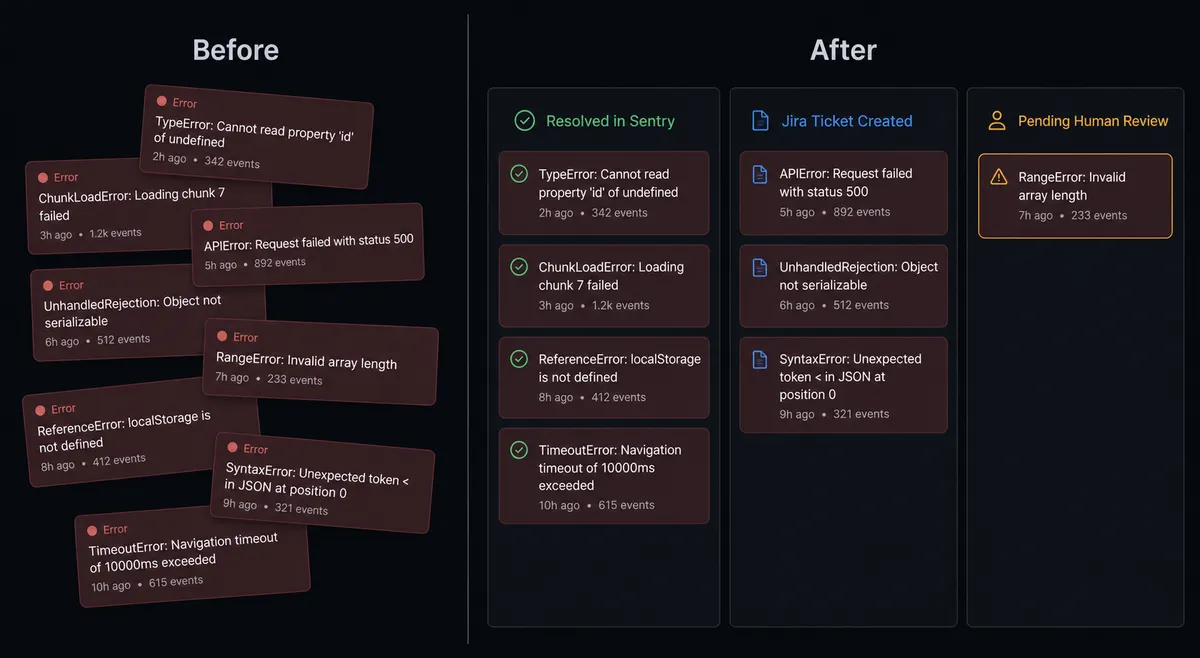
| Issue backlog | Unresolved issues pile up faster than anyone triages them | Agent resolves, ignores, and assigns issues that match clear rules each cycle |
| Jira ticket creation | Engineer reads Sentry, opens Jira, manually creates and assigns a ticket | Ticket created and assigned with full Sentry context within seconds of the flow run |
| Deletion risk | Engineers bulk-delete and occasionally lose events they later needed | Permanent deletes wait for engineer confirmation; decision is logged in the audit trail |
| Sprint visibility | Engineering manager checks Jira manually for unassigned or blocked issues | Agent runs a JQL query each morning and posts sprint health to the team channel |
| Context attached | Ticket has a subject line; engineer opens Sentry separately to find the stack trace | Sentry event link, event count, culprit path, and relevant release tag attached to every Jira ticket |
What you can build
Error-to-ticket pipeline with assignment routing. The agent lists unresolved Sentry issues, classifies each one by severity and project component, and calls Create Issue in Jira with the appropriate project, issue type, and priority. It uses Assign Issue to route based on on-call rotation data the flow pulls from a separate source. P1 tickets pause for team lead confirmation before the assignment is committed.
Release regression tracker. After a deploy, the agent calls Create Release and Create Deploy in Sentry to register the version. It then runs List Issues with a filter for issues first seen after the deploy timestamp. Any regression gets a Jira bug report with the deploy version in the title, the error count, and a comment linking to the Sentry event. The engineering team sees regressions correlated to releases without running the query manually.
Daily sprint health monitor. Each morning, the agent runs a Search Issues JQL query in Jira for items in the current sprint that are unassigned or flagged as blocked. It posts the results to the engineering channel. If the blocked count is above a threshold the team sets, it also tags the engineering manager and invokes the human-in-loop tool to ask whether any items need reassignment.
Stale noise cleanup with deletion gate. The agent identifies Sentry issues older than 30 days with low event counts and test environment tags. Rather than deleting them automatically, it posts a review card to the engineering channel listing each candidate with its event count. An engineer confirms the list. The agent calls Delete Issue only for the confirmed items, and logs the confirmation to the audit trail.
Common questions
Is it free to connect Sentry and Jira Issues on FlowRunner?
FlowRunner starts with a $100 credit on the Growth tier, which covers approximately 67 days of real work. No credit card is required. After the credit period, Growth is $45 per month and includes unlimited users and workflows.
Can I self-host FlowRunner for this integration?
Yes. FlowRunner offers a self-hosted Community Edition at no cost, and a self-hosted Enterprise tier for organizations that need multi-instance clustering and compliance features. Both support the Sentry and Jira Issues connectors.
Does the agent need my own OpenAI key to run?
FlowRunner uses a BYOK (Bring Your Own Keys) model. You connect whichever AI provider you prefer, whether that is OpenAI, Anthropic, or another supported provider. The integration itself does not require an AI key; you add one only when you want an agent making decisions inside the flow.
What happens when the agent is not sure about an assignment or a delete?
The agent pauses the flow and routes the decision to a human via Slack, email, or another channel you configure. It packages the full context: what it found, why it stopped, and what the options are. The flow resumes only after the human responds. The decision, the decider’s identity, and the timestamp are captured in the audit trail.
Can I connect Sentry issues to Jira without the AI agent layer?
Yes. The plain connection works as a rule-based automation: a scheduled flow lists unresolved Sentry issues and creates corresponding Jira tickets without any AI reasoning. You can add the agent layer later when you want context-aware triage and autonomous routing.
Does FlowRunner support self-hosted Sentry?
Yes. The Sentry connector supports self-hosted Sentry instances. You point the connector at your instance URL instead of the Sentry cloud endpoint, and everything else works the same way.
Getting started
FlowRunner’s Growth tier includes a $100 credit, approximately 67 days of real workflows, with no credit card required. You connect Sentry and Jira Issues in a single flow and can have your first triage cycle running within an hour.
Start at flowrunner.ai to activate your trial. If you want to walk through the Sentry-to-Jira setup with someone before building, book a 30-minute call at calendly.com/flowrunner/intro. Your team only reviews the exceptions. FlowRunner handles the rest.