How to Connect Slack with Asana (With or Without an AI Agent)
Connect Slack and Asana so messages and decisions flow into tracked tasks automatically. Optionally run it as a FlowRunner AI agent that creates, assigns, and escalates Asana tasks from Slack activity, with a human in the loop on the steps that carry real consequence.
How do you connect Slack to Asana?
Use the On Channel Message trigger in Slack to fire a FlowRunner workflow, then call Create Task in Asana to open a structured work item with the message content, an assigned owner, and a due date. FlowRunner is a visual AI-agent orchestration platform where automations run autonomously and pause for human judgment on the steps that carry real consequence. The same Slack-to-Asana connection can run as an AI agent that reads the incoming message, reasons about priority and routing, creates the task, and sends a Slack notification to the assignee, pausing for a human decision only when the situation calls for it.
The problem when Slack and Asana are not connected
Decisions made in Slack do not automatically become tracked work in Asana. A manager approves something in a thread and that approval lives in a Slack message, not a task. A teammate flags an issue in a channel and it gets buried under twenty more messages by noon. The ops lead who needs to follow up has no queue. The AP analyst who needs to act has no owner, no due date, and no supporting detail attached to the request.
The result is manual effort that should not exist. Someone reads the Slack message and manually creates the Asana task. Someone else checks back on the thread to see if the task was created. A third person asks in the channel whether the issue was resolved. Work that could have been tracked from the moment it surfaced is instead tracked by memory, and memory is not reliable at scale.
How it works: the Slack-to-Asana connection
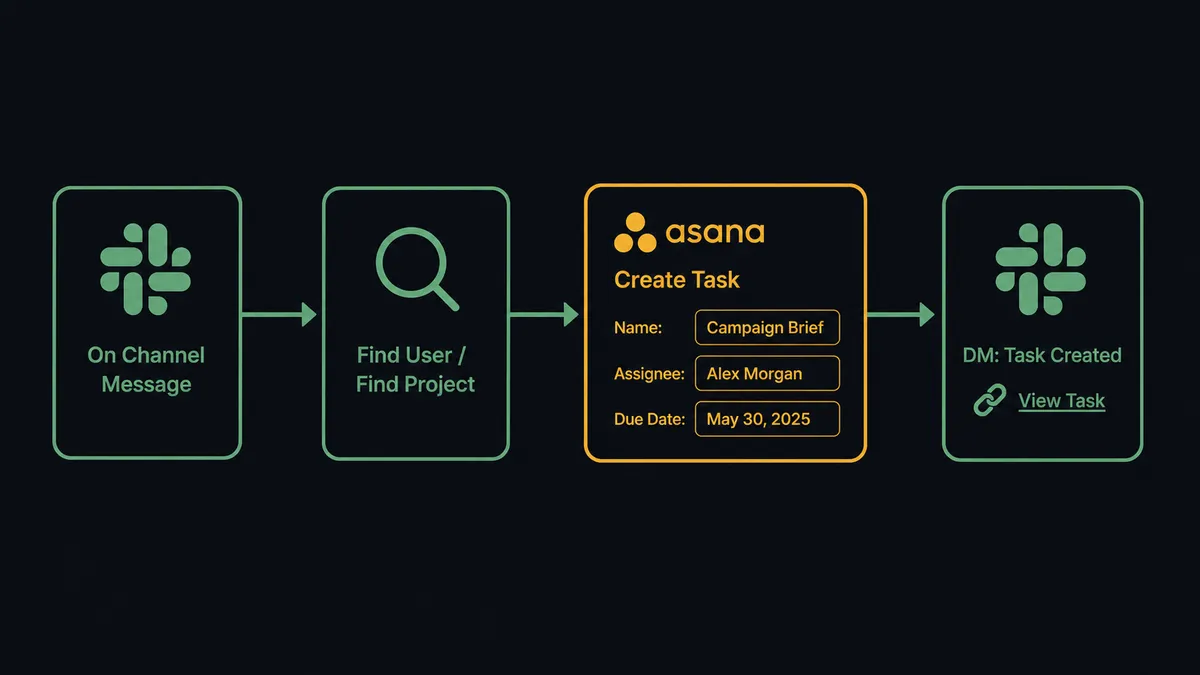
The On Channel Message trigger watches a designated Slack channel. When a message arrives, the workflow fires. The agent reads the message content and calls Find Project by Name to locate the right Asana project, then Find User by Email or ID to resolve the correct assignee based on routing rules or rotation. It then calls Create Task with the task name derived from the message subject, the description populated with the full message text and any attached context, the assignee set to the resolved user, and the due date calculated from priority signals in the message.
The agent also calls Add Comment to log what it found and why it made the routing decision it did. If the task requires supporting documents already present in the thread, the agent calls Get File Info on any attached files before creating the task, then uses Attach File to connect them to the work item.
For urgent items, the agent calls Send Direct Message in Slack immediately after creating the task, sending the assignee a direct link to the new Asana task with a one-line summary. The assignee does not need to open Asana to know something needs attention.
Can an AI agent run it? (and why a human stays in the loop)
A basic Slack-to-Asana connection creates a task when a message arrives. An AI agent on FlowRunner does something different: it reads the message, evaluates what kind of work it represents, and decides what to do. It does not execute a fixed sequence. It picks from its toolbox based on what it sees.
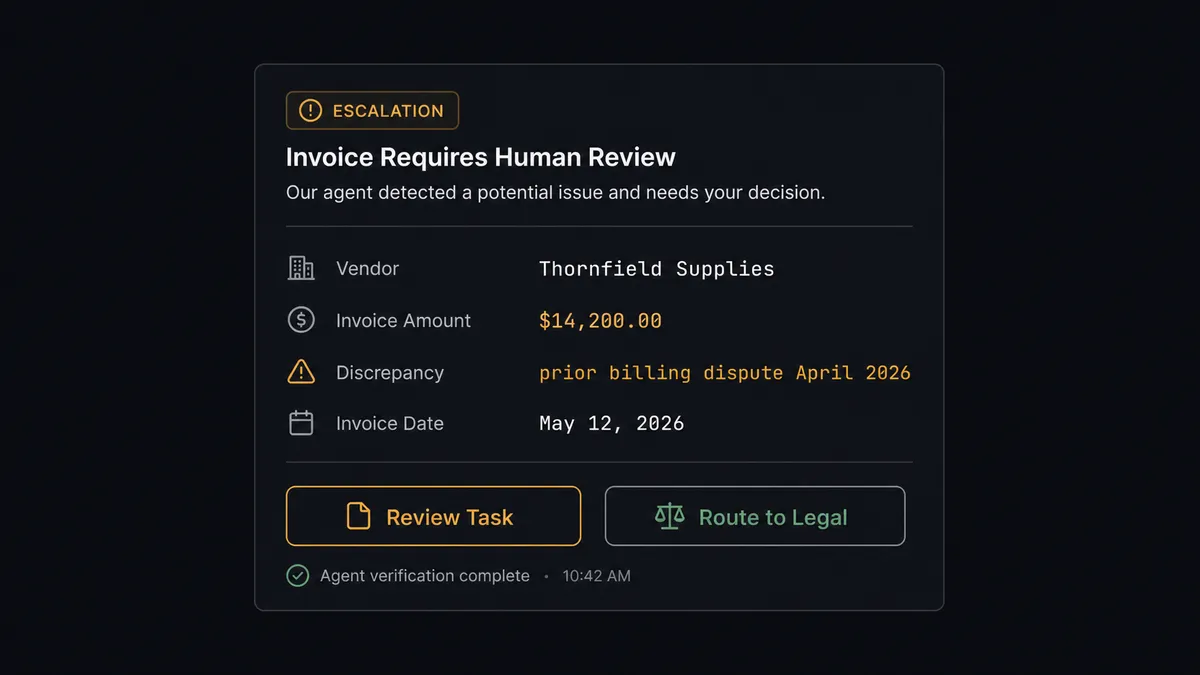
Take an AP exception workflow. The agent watches the #finance-ops channel. When a vendor invoice discrepancy is posted, the agent reads the amounts, the vendor name, and the history. For a $450 discrepancy from a vendor with 18 months of clean invoices, the agent creates the Asana task, assigns it to the AP analyst on rotation, and moves on. For a $14,200 discrepancy from a vendor the team has flagged before, the agent does something different. It does not create the task and wait. It invokes the human-in-loop subflow.
The agent packages the context: vendor name, invoice number, amount, the prior flag from 90 days ago, and the current discrepancy. It sends a Slack message to the finance director: “I flagged a $14,200 discrepancy from Thornfield Supplies. They had a billing dispute in April. Do you want me to create a review task with same-day priority, or route this directly to legal?” The message includes two buttons: Review Task and Route to Legal. The workflow pauses.
The finance director clicks Route to Legal from their phone. On Block Action fires. The agent creates the Asana task in the Legal Review project, assigns it to the general counsel, attaches the invoice, and adds a comment logging the finance director’s decision, the time, and the context it used to escalate. The task is created, assigned, documented, and linked back to the original Slack thread, all in one agent run.
This is what prospects call the “digital andon cord.” The agent stops the line when it hits something it should not decide alone. The agent knows when to stop and ask.
FlowRunner vs Zapier for Slack and Asana
If your team is non-technical, Zapier is the most common starting point. It is well-documented, reliable, and easy to set up with no technical background. A Zapier Zap can watch a Slack channel and create an Asana task. For simple, consistent trigger-action pairs that do not change, Zapier works.
The differences show up when the connection needs to reason, route conditionally, or pause for a human decision.
| Capability | Zapier | FlowRunner |
|---|---|---|
| Slack to Asana basic trigger-action | Yes | Yes |
| AI agent reads and reasons about message content | No | Yes |
| Human-in-loop via interactive Slack buttons (native, not add-on) | No | Yes |
| Unlimited users on every plan | No (user-based pricing) | Yes |
| Audit trail with decision, decider identity, and timestamp | No | Yes (Professional tier, $299/mo) |
| Bring your own AI provider key (no markup on AI calls) | No | Yes |
| Self-hosted deployment option | No | Yes |
Zapier’s per-task pricing can also become unpredictable as volume grows. FlowRunner uses workflow-based execution tiers with hard limits so workflows pause at 100% rather than generating surprise overages.
Before and after
| Category | Before | After |
|---|---|---|
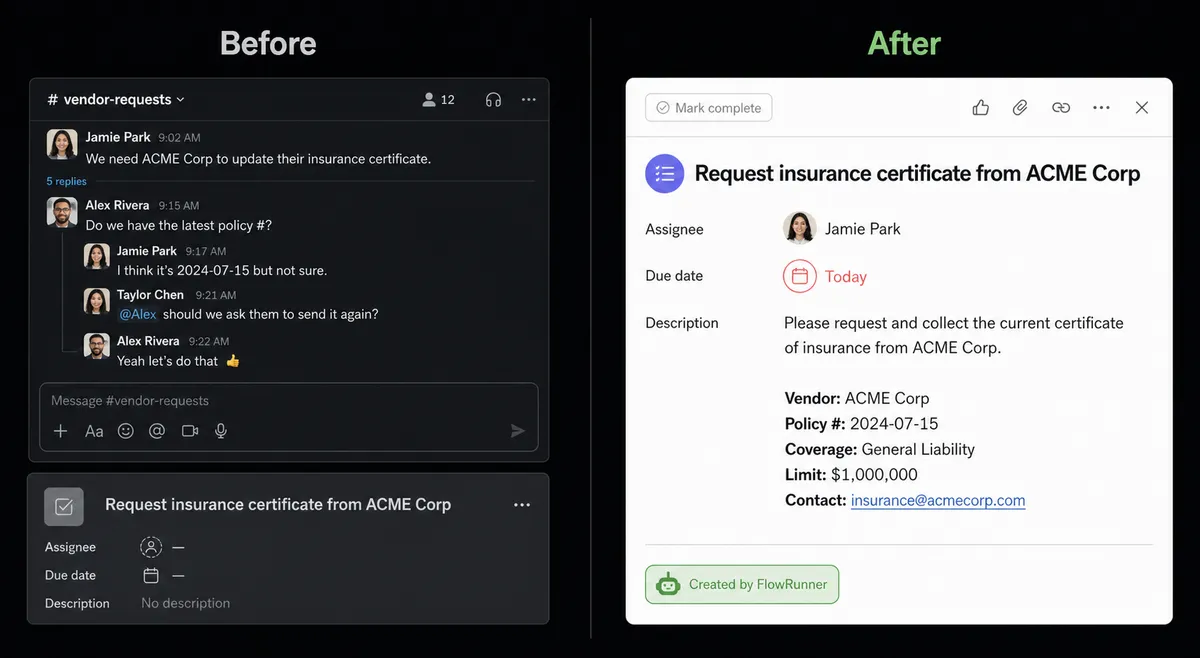
| Task creation from Slack | Manual. Someone reads the message and creates the Asana task by hand. | Automatic. FlowRunner creates the task within seconds of the message arriving, with the assignee, due date, and context already set. |
| Exception visibility | Buried in Slack threads with no ownership or due date. | Structured Asana task per exception. Every issue has an owner, due date, and full context attached. |
| Escalation | Email chains or meetings to resolve high-stakes exceptions. | Agent sends a Slack message with decision buttons. Resolution in minutes, not hours. |
| Audit trail | None. Decisions live in message threads with no structured record. | Every agent decision, human approval, and escalation logged with identity and timestamp. |
| Follow-up | Managers ask team members directly for status. | Agent updates the Asana task when the resolution arrives. Team opens Asana to a current queue. |
What you can build
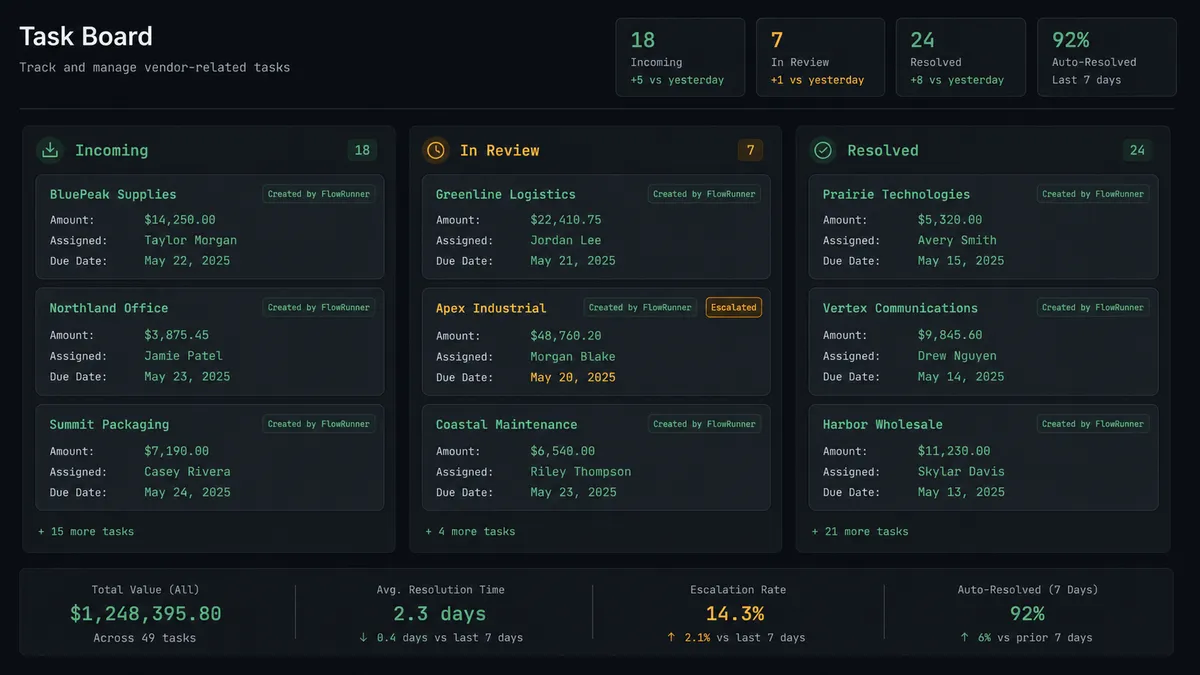
Exception queue from any Slack channel. Watch a specific channel with On Channel Message. The agent reads each message, creates an Asana task via Create Task, assigns it via Find User by Email or ID, and sets the due date by priority. Your team opens Asana to a structured queue each morning instead of scanning a Slack channel for unresolved threads.
Approval workflows with Slack buttons. The agent sends an exception summary to a decision-maker in Slack. On Block Action fires when they click Approve or Reject. The agent then calls Update Task in Asana to mark the item resolved or escalated, and adds a comment with the decision and timestamp logged.
Inbound document processing into Asana tasks. Use On File Shared to detect when a vendor drops a document in a designated Slack channel. The agent calls Get File Info, parses the document, and creates a task in the correct Asana project via Find Project by Name, attaching the file with Attach File and assigning it to the analyst responsible for that vendor relationship.
Client onboarding triggered from Slack. When a new-client message arrives in a sales channel, the agent creates an Asana project via Create Project from Template, names it with the client and start date, creates the kickoff task with the account manager as the assignee, and sends a direct Slack message to the AM with the Asana project link. The onboarding structure is ready before anyone opens their laptop.
Status digest posted back to Slack. After an Asana project milestone updates (detected via a FlowRunner scheduled trigger reading Get Project by ID), the agent compiles a summary and posts it to the relevant Slack channel with Send Message to Channel. Leadership gets project status without pulling reports.
Common questions
Is it free to connect Slack and Asana on FlowRunner? FlowRunner starts with a $100 credit on the Growth tier, which covers roughly 67 days of real use. No credit card required. The Growth tier costs $45 per month after the credit is exhausted.
Can I self-host this connection? Yes. FlowRunner offers a self-hosted Community Edition at no cost and an Enterprise self-hosted tier with full compliance features. The Slack and Asana connectors are available on both.
Does the AI agent need my own OpenAI or AI provider key? FlowRunner uses a bring-your-own-keys model for AI providers. You connect your own API key from any supported provider. FlowRunner does not mark up or resell AI calls.
What happens when the agent is not sure what to do? The agent invokes a human-in-loop flow as a callable tool. It pauses execution, sends a Slack message with the full context of what it found and what options are available, and waits for a human decision before continuing. The decision, the decider’s identity, and the timestamp are all captured in the audit trail.
Does FlowRunner create Asana tasks automatically from Slack messages? Yes. A FlowRunner workflow can watch a Slack channel with the On Channel Message trigger and use Create Task to open a structured Asana work item with context from the message, an assigned owner, and a due date.
How is FlowRunner different from a Zapier or n8n connection for Slack and Asana? Zapier and n8n create simple one-to-one automations. FlowRunner runs an AI agent that reads the data, reasons about it, and decides what to do. The agent can create the task, add context, ping the assignee in Slack, and pause for a human decision on the steps that carry weight. It is not a sync tool.
Getting started
FlowRunner’s $100 trial credit covers roughly 67 days on the Growth tier. No credit card required. Corporate email only.
Connect both integrations from the FlowRunner integrations library: Slack and Asana. Build your first Slack-to-Asana workflow in the visual editor, add the AI agent node, and configure the human-in-loop subflow for the exceptions your team actually cares about.
Start at flowrunner.ai or book a 30-minute walkthrough at calendly.com/flowrunner/intro to see the agent decision layer in action on a workflow that matches your use case.