How to Connect Slack with Notion (With or Without an AI Agent)
Connect Slack and Notion so messages, decisions, and exceptions automatically become searchable Notion records. Optionally run by an AI agent that pauses for a human before writing anything consequential.
How do you connect Slack to Notion?
You connect Slack to Notion by choosing a Slack trigger (On Channel Message, On File Shared, or On Block Action) and mapping the event data to a Notion action such as Create Database Item, Create Page, or Append Block Children. FlowRunner is a visual AI-agent orchestration platform where automations run autonomously and pause for human judgment on the steps that carry real consequence. The same Slack-to-Notion connection can run as an AI agent that reads the incoming content, decides what kind of Notion record to create, and invokes a human-in-loop step before writing anything that will be shared externally.
The problem with keeping Slack and Notion in sync
Slack is where decisions happen. Notion is where institutional knowledge lives. Between the two sits a manual, unreliable handoff that most teams handle badly.
A Slack channel fills up with approvals, exceptions, vendor documents, and meeting follow-ups. Someone is supposed to take the relevant pieces and log them in Notion. That task falls to whoever has time, which means it falls through the cracks. Decisions made in a Slack thread are searchable only if someone took the time to document them. Exceptions escalated by message leave no organized record. Files dropped in a channel get processed by whoever saw the notification. The ops lead spends hours each week hunting for context that should already be in the team’s knowledge base.
The gap between “the discussion happened in Slack” and “the outcome is documented in Notion” costs operations teams more than they realize. It is not just lost information. It is lost time reconstructing context, lost compliance coverage when audits come, and lost scale because the process depends on individuals remembering to do an extra step.
How it works: the Slack-to-Notion connection
The connection starts with a Slack trigger and ends with a Notion write. Here is what each step does with real actions from both integrations.
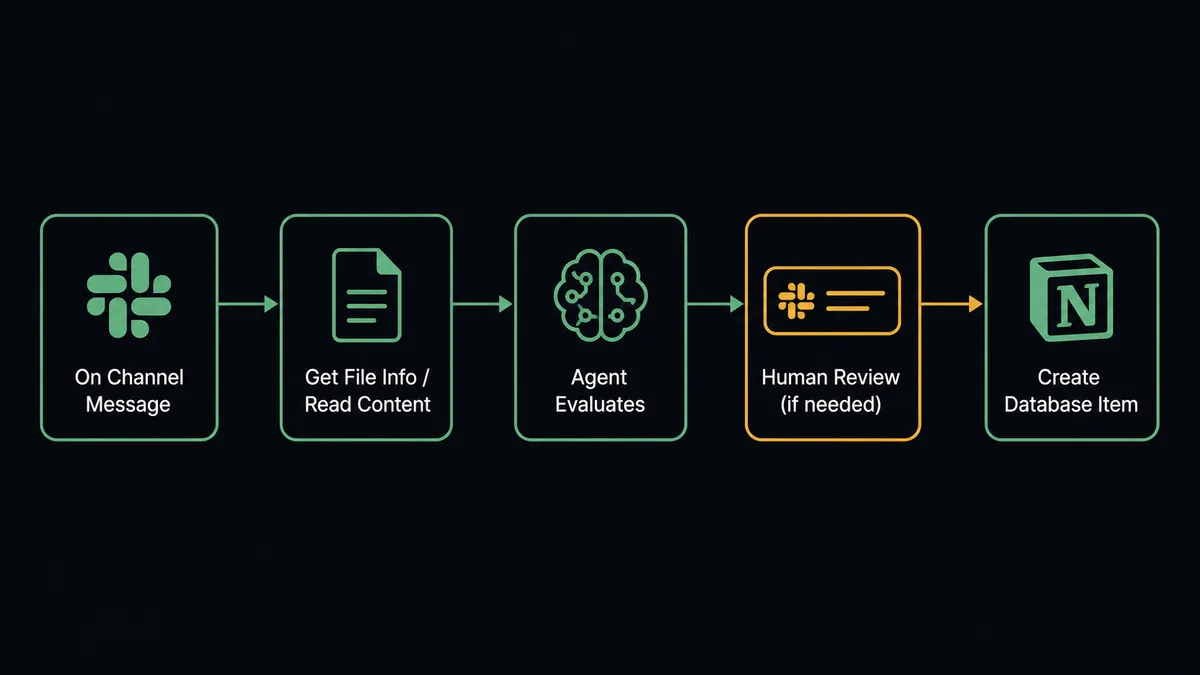
On Channel Message fires when a message arrives in a monitored Slack channel. The agent reads the message content. If the message contains structured data (a vendor invoice number, a decision, a project update), the agent maps it to a Notion database item using Create Database Item. The item gets the message content, the sender, the timestamp, and any relevant properties from the message text.
On File Shared fires when a team member uploads a document to a designated channel. The agent retrieves the file metadata with Get File Info, processes the document content, and creates a Notion page using Create Page with the document summary and key findings appended as blocks via Append Block Children.
On Block Action fires when a team member clicks an interactive button in a FlowRunner-generated Slack message. This is how human decisions flow back into the workflow. A finance manager clicks Approve on an exception card. The trigger fires, the agent reads the decision, and it creates a Notion database item that logs the decision with the approver’s identity and timestamp.
For straightforward cases, the connection is fully automated. A message arrives in Slack. A Notion record is created. No one has to do anything manually.
Can an AI agent run it? (And why a human stays in the loop)
The plain connection described above is rules-based. A message arrives, a record gets created. The agent does not think. That works for simple logging, but it breaks down the moment the incoming data needs judgment.
FlowRunner’s AI agent changes this. The agent sits between the Slack trigger and the Notion action. Instead of following a fixed mapping, the agent reads the content, reasons about what it found, and decides what to do. It has access to Slack and Notion actions as callable tools: Get Latest Thread Messages to gather context, Find Database Item to check for existing records before creating duplicates, Update Database Item to update a row instead of creating a new one, Create Comment to flag something for human review.
The agent decides when to invoke the human-in-loop step, and not based on a hardcoded rule. Here is what that looks like in practice.
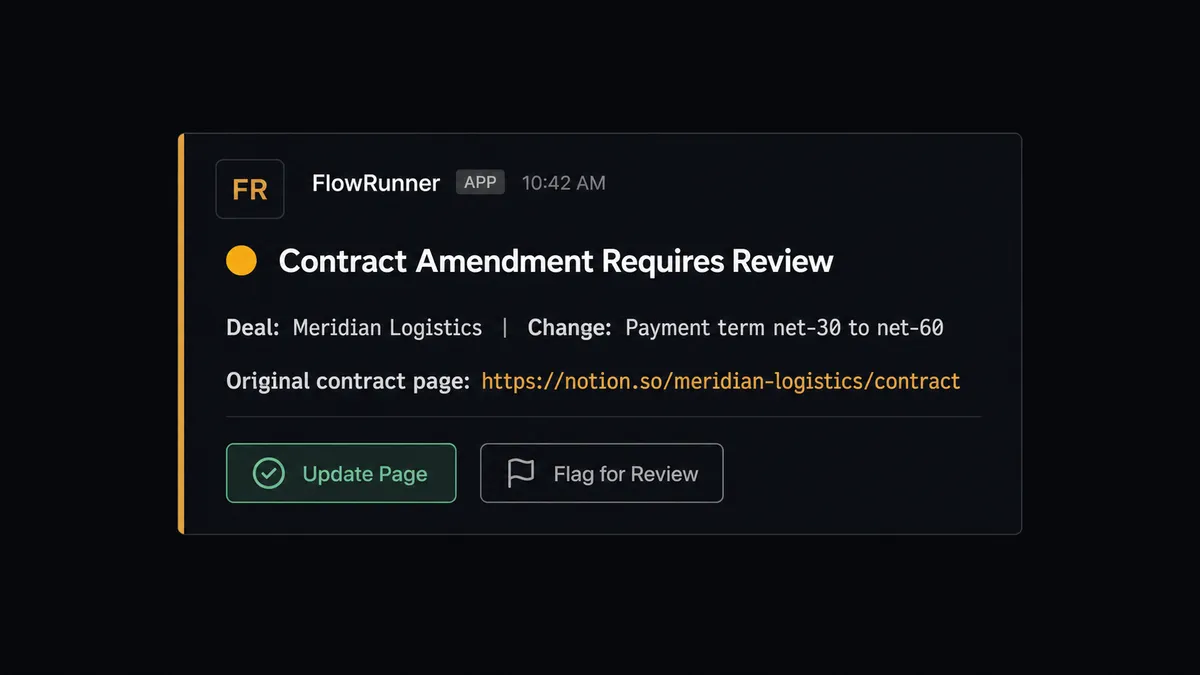
An ops team uses a #vendor-docs channel. A vendor drops a contract amendment for a deal that is already in Notion. The agent reads the file via Get File Info, finds the existing deal page using Find Page by Title, and reads the current page content with Get Page. It finds a discrepancy: the amendment changes a payment term that the original contract does not mention. This is not a situation where auto-updating the page is appropriate.
The agent invokes the human-in-loop subflow. It sends a Slack direct message to the deal owner using Send Direct Message: “I found an amendment for [Deal Name] that changes the net-30 payment term to net-60. The original contract is in Notion here: [link]. Do you want me to update the Notion page with the amended term?” The message includes two buttons: Update Page and Flag for Review. The workflow pauses.
The deal owner clicks Update Page. The On Block Action trigger fires. The agent resumes, updates the Notion page properties with Update Page Properties, appends a note to the page body with Append Block Children that records what changed and who approved it, and adds a comment with Create Comment: “Payment term updated from net-30 to net-60 per amendment received [date]. Approved by [name].”
This is not a sync tool. The agent knows when to stop and ask.
FlowRunner vs Zapier for Slack and Notion
If you searched for how to connect Slack and Notion, you have probably already looked at Zapier. Zapier is the right choice for many teams. It has a large template library, a well-documented Slack integration, and a straightforward setup experience for non-technical users. If your use case is a simple one-to-one trigger and action (a message arrives, a Notion row gets created), Zapier handles that well.
The differences show up when the connection needs to think.
| Feature | Zapier | FlowRunner |
|---|---|---|
| Human-in-loop decision step | Not available | Native: agent invokes as a callable tool, not a conditional branch |
| AI agent with reasoning | Add-on, linear rules only | First-class node; agent reads data and picks actions as tools |
| Notion actions available | Create and update items | 22 actions: pages, databases, blocks, comments, users |
| Slack actions available | Send messages | 16 actions including Update Message, Get Thread, Find Member |
| Unlimited users on every tier | Per-seat pricing | Yes, all tiers |
| Self-host option | No | Yes, Community Edition free |
| BYOK for AI models | No | Yes |
Zapier’s strength is simplicity and a large template library. FlowRunner’s advantage is what happens when the incoming data needs judgment before a record gets written. If your team needs an audit trail for every Notion record created from a Slack event, with a human in the loop on the steps that carry weight, FlowRunner is the right choice.
Before and after
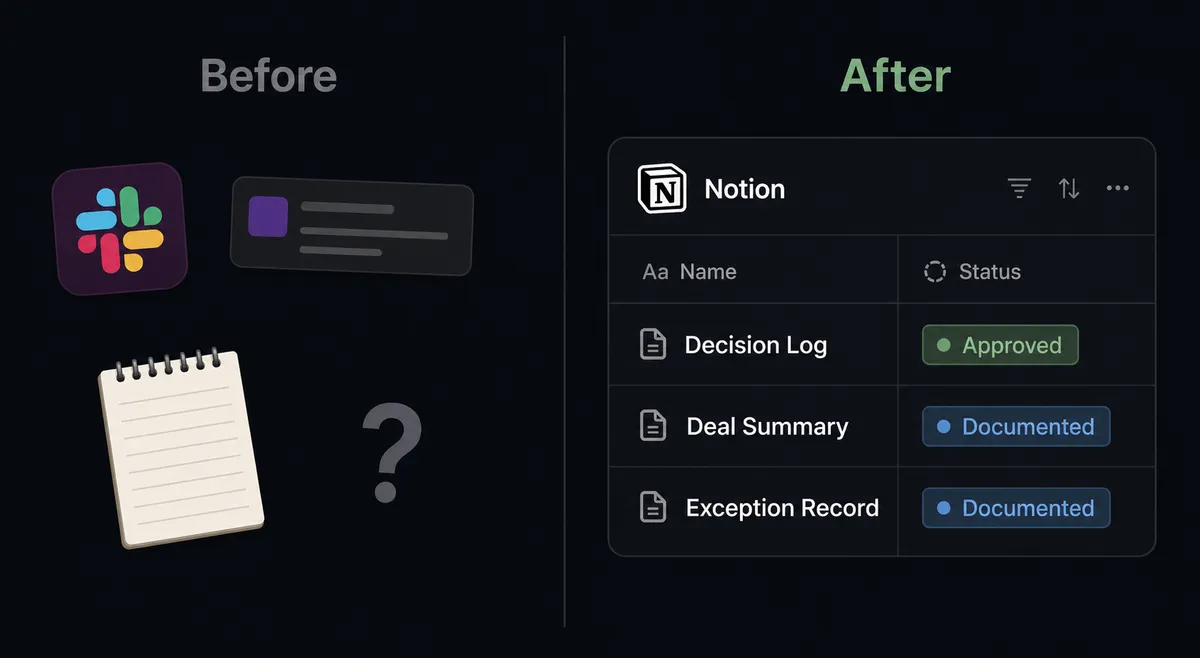
| Category | Before | After |
|---|---|---|
| Meeting documentation | Notes scattered in personal apps or not taken; deals go undocumented | Call summary and action items in Notion within 2 minutes of a Slack trigger firing |
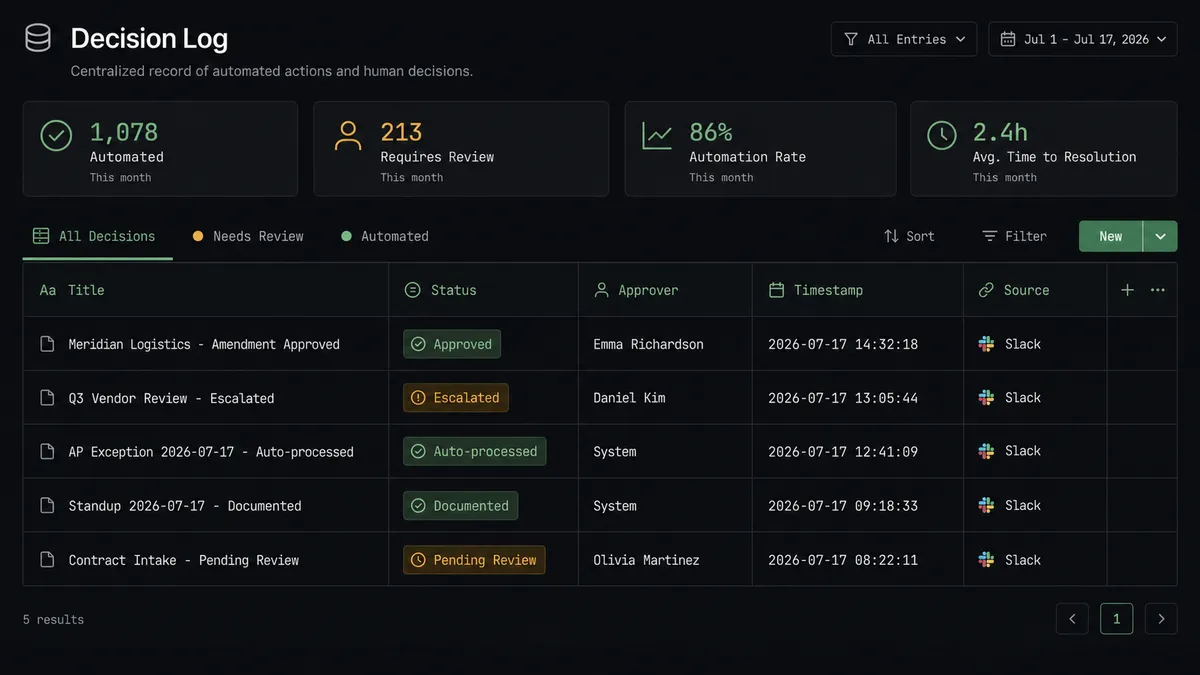
| Decision records | Slack threads hold the context; no searchable Notion log | Every escalation decision creates a Notion database item with full context, approver identity, and timestamp |
| Exception handling | Email chains or meetings to resolve; no structured record | 6-minute exception resolution in Slack with the outcome written automatically to Notion |
| File processing | Team member manually reads the file and updates Notion | Agent reads On File Shared, processes content, writes structured Notion record automatically |
| Duplicate records | Created manually with no dedup check | Agent runs Find Database Item before creating; updates existing rows instead of duplicating |
| Audit coverage | Decisions exist only in Slack, inaccessible to auditors | Notion decision log is searchable and filterable, stored in the team’s existing workspace |
What you can build
Approval decision log. When a team member clicks Approve or Reject on any FlowRunner Slack message, On Block Action fires and the agent creates a Notion database item with the decision, the approver’s Slack identity retrieved via Find Member, and a timestamp. Your decision log builds itself.
Automatic meeting notes. After a Slack trigger fires at the end of a scheduled standup or call, the agent creates a Notion page using Create Page, appends the discussion summary and action items as blocks with Append Block Children, and posts the Notion link back to the Slack channel using Send Message to Channel. The meeting is documented before anyone leaves.
Vendor document intake. An ops team monitors a #vendor-docs channel. When a vendor uploads a contract or invoice via On File Shared, the agent reads the file with Get File Info, searches for the existing deal in Notion with Find Page by Title, and either updates the existing page with Update Page Properties or creates a new one. Exceptions surface as Slack cards for human review before any Notion record is finalized.
Exception escalation audit trail. For every workflow exception routed to a human reviewer via Slack, the agent creates a Notion database item logging the exception type, what the agent found, what options it presented, and what the human decided. The agent adds a comment to the page via Create Comment with the approver’s identity and timestamp. Auditors access the log without needing to access FlowRunner directly.
Project workspace provisioning. When On Channel Created fires for a new project channel in Slack, the agent creates a matching Notion database using Create Database with standard columns: owner, status, due date, decision log. It invites the relevant team members to the Notion database using Get Users List to match Slack identities. The project workspace exists in both tools from day one.
Common questions
Is it free to connect Slack and Notion on FlowRunner? FlowRunner offers a $100 credit trial on the Growth plan with no credit card required. That credit covers roughly 67 days of real usage. After the trial, Growth starts at $45 per month with 12,000 workflow executions included. All tiers include unlimited users and unlimited workflows.
Can I self-host FlowRunner? Yes. FlowRunner offers a free Community Edition for self-hosting on a single instance. Enterprise self-hosting with multi-instance clustering and the full compliance suite is available on a custom plan.
Does the AI agent need my own API key? FlowRunner uses a Bring Your Own Keys model for AI providers. You connect your own Claude, OpenAI, or other provider key directly. You control the cost and the model.
What happens when the agent isn’t sure what to do? The agent invokes a human-in-loop flow as a callable tool. It packages the full context of what it found, sends a Slack message with the decision options, and pauses. The workflow resumes only after the human responds. The decision, the decider’s identity, and the timestamp are captured in the audit trail.
Does Notion have triggers in FlowRunner? Notion does not currently expose native webhook triggers through its API. FlowRunner uses Slack triggers (On Channel Message, On File Shared, On Block Action, On Mention) to start workflows. Notion is the destination where agents write structured records and documentation.
How is FlowRunner different from Zapier for this connection? Zapier connects Slack events to Notion actions in a linear, rule-based way. FlowRunner runs the same connection as an AI agent that reads data, reasons about it, and invokes human oversight as a callable tool on the steps that carry real consequence. Not a hardcoded threshold: the agent’s own judgment determines when to pause.
Getting started
FlowRunner’s $100 credit trial covers roughly 67 days of real work on the Growth plan. No credit card required. Corporate email only.
Connect both integrations and build your first Slack-to-Notion workflow today:
- Slack integration: 8 triggers, 16 actions
- Notion integration: 22 actions for pages, databases, blocks, and comments
Start your trial at flowrunner.ai or book a 30-minute intro call to see the agent in action before you build.