How to Connect Stripe with Airtable (With or Without an AI Agent)
Connect Stripe payment events to Airtable records automatically, and optionally run the connection as an AI agent that pauses for a human before processing refunds, disputed charges, or failed subscriptions.

How do you connect Stripe to Airtable?
When a Stripe payment event fires (a failed charge, a new subscription, a dispute), FlowRunner’s Parse Webhook Event trigger picks it up and runs a Create Record or Create or Update Record action in your Airtable base, mapping the payment data across automatically. FlowRunner is a visual AI-agent orchestration platform where automations run autonomously and pause for human judgment on the steps that carry real consequence. That same Stripe-to-Airtable connection can run as an AI agent: one that reads the payment context, decides whether the event is routine or needs a human, and invokes your team before moving money.
The problem it solves
Right now, Stripe and Airtable do not talk to each other. A payment fails in Stripe. Someone on your billing team notices it on a daily dashboard review, copies the relevant details into a spreadsheet or Airtable manually, and decides what to do next. For high-volume operations, this process does not scale. Exceptions fall through the cracks. A dispute that needed evidence within 48 hours goes unnoticed until it is too late.
The AP clerk or billing manager becomes the manual bridge between two systems. They spend time on data entry that a machine should handle, and they spend mental energy triaging events that should already be routed and labeled when they arrive. The result: slow response times, inconsistent handling, and no reliable audit trail for what decision was made, by whom, and when.
How it works: the connection
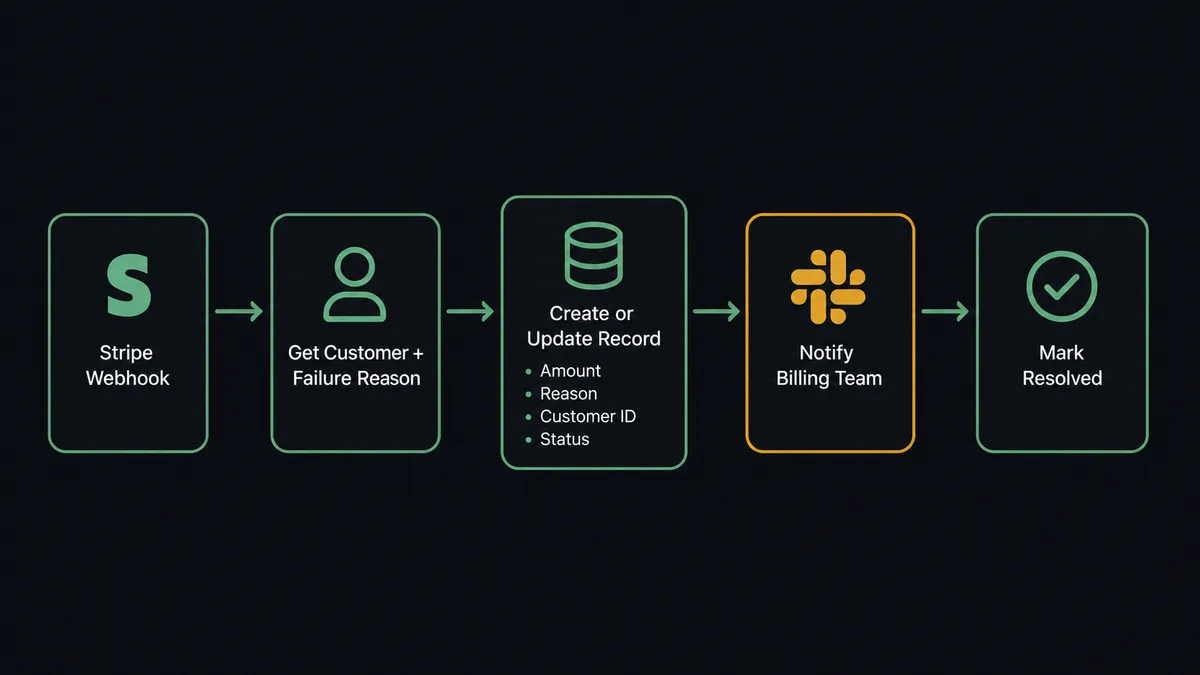
FlowRunner connects Stripe and Airtable through a single flow. Stripe’s Parse Webhook Event trigger listens for the events you specify: payment_failed, charge.dispute.created, invoice.paid, customer.subscription.deleted. When one fires, the flow starts.
From there, the agent has a set of tools it can call. On the Stripe side: Get Customer to pull billing history, Get Subscription to check the subscription status, List Invoices to find related outstanding amounts. On the Airtable side: Create Record to log the event, Create or Update Record to avoid duplicate entries for the same customer, Update Record to mark an event resolved, Create Comment to log the agent’s reasoning directly on the record.
A basic connection logs every Stripe payment failure as a new Airtable record with the customer ID, amount, failure reason, and timestamp. Your billing team opens Airtable each morning and sees a clean, structured queue of events to review, rather than hunting through Stripe’s event log or email threads.
Can an AI agent run it? (And why a human stays in the loop)
A basic Stripe-to-Airtable sync treats every payment event the same. An AI agent does not.
The agent reads the incoming Stripe webhook data and reasons about it. A $45 monthly subscription failing for an expired card is different from a $12,000 enterprise contract failing for the second time in a row. A chargeback dispute from a customer who has never disputed before is different from one from an account with three disputes in 90 days. The agent evaluates these differences and decides how to respond.
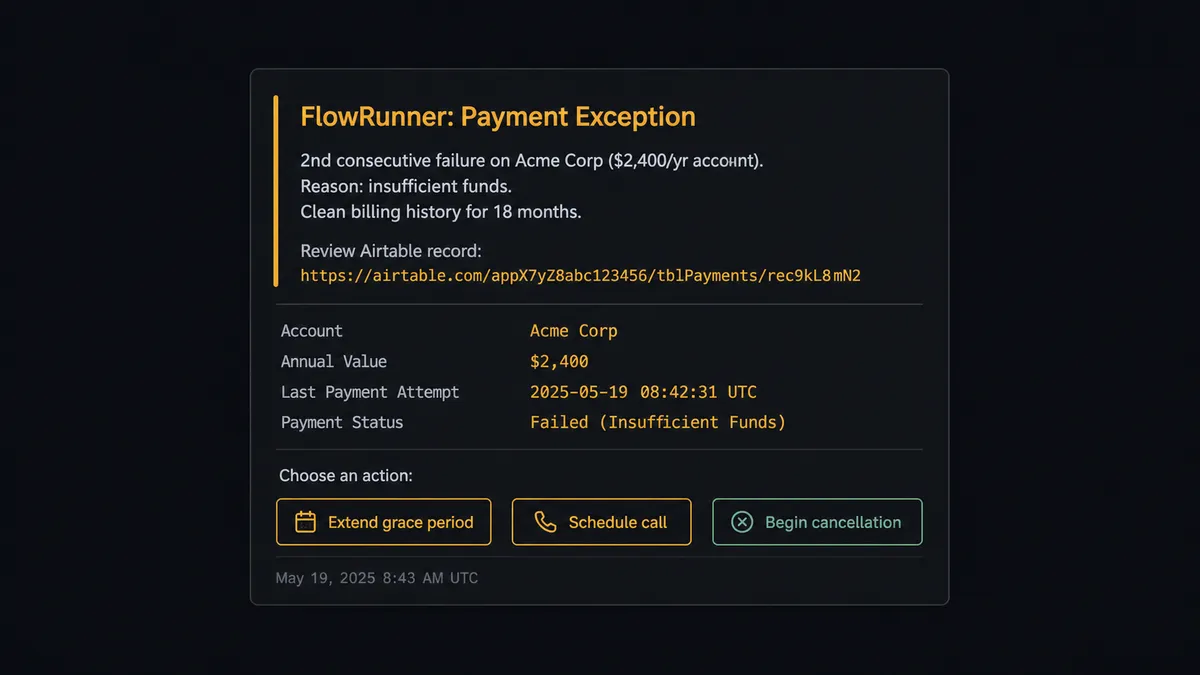
Here is a real decision moment. A subscription payment fails. The agent uses Get Customer to pull the account’s billing history. It uses Get Subscription to confirm the current plan and billing cycle. It sees this is the second consecutive failure on an account with an 18-month clean record and a $2,400 annual contract value. The failure reason is insufficient funds, not an expired card.
The agent does not auto-retry. It does not send a generic payment failure email. It creates an Airtable record with the full context and invokes its human-in-loop tool: a Slack message to the billing manager that reads, “Second failure on a high-value account with clean history. Insufficient funds, not a card issue. Recommend reaching out directly before retry. Review record here: [link]. Options: extend grace period, schedule call, begin cancellation process.”
The billing manager clicks through to the Airtable record, reads the agent’s context notes, and marks the record with their decision. The On New or Updated Record trigger fires. The agent reads the resolution field and acts: it either retries the charge, sends a custom outreach email, or begins the cancellation flow.
This is not a hardcoded threshold. The agent might auto-retry a $45 account that fails once. The same agent might escalate a $45 account that has failed three times in a row, because the pattern tells it something the threshold does not. Every decision, the decider’s identity, and the timestamp are logged in the audit trail.
Prospects call this a digital andon cord. Like Toyota’s quality control pull cord, FlowRunner stops the line when the agent hits a situation where a human decision produces a better outcome than any rule it could apply.
FlowRunner vs Zapier
Zapier is the tool most non-technical billing and operations teams reach for first. It is easy to set up, it has a large integration library, and it handles simple trigger-action connections well. If you need to log every successful Stripe charge as an Airtable record and nothing more, Zapier does that.
The gap shows up at the decision layer. Zapier can run a conditional branch based on a field value. It cannot read payment history, evaluate context, and decide whether this specific exception warrants human review. It does not have an AI agent that reasons about the data it is processing. And when you do need to loop in a human, Zapier does not have native human-in-loop orchestration: you are building that yourself with webhooks or external tools.
| Feature | Zapier | FlowRunner |
|---|---|---|
| Basic Stripe to Airtable sync | Yes, easy to set up | Yes, visual no-code builder |
| AI agent that reasons about payment events | No | Yes, native AI Agent node |
| Human-in-loop as a callable agent tool | No (manual workaround required) | Yes, built-in to every tier |
| Unlimited users on every paid plan | No (user limits on lower tiers) | Yes |
| BYOK for your own AI provider | No | Yes |
| Audit trail with decision logs | No | Yes, from Professional tier ($299/mo) |
Before and after
| Category | Before | After |
|---|---|---|
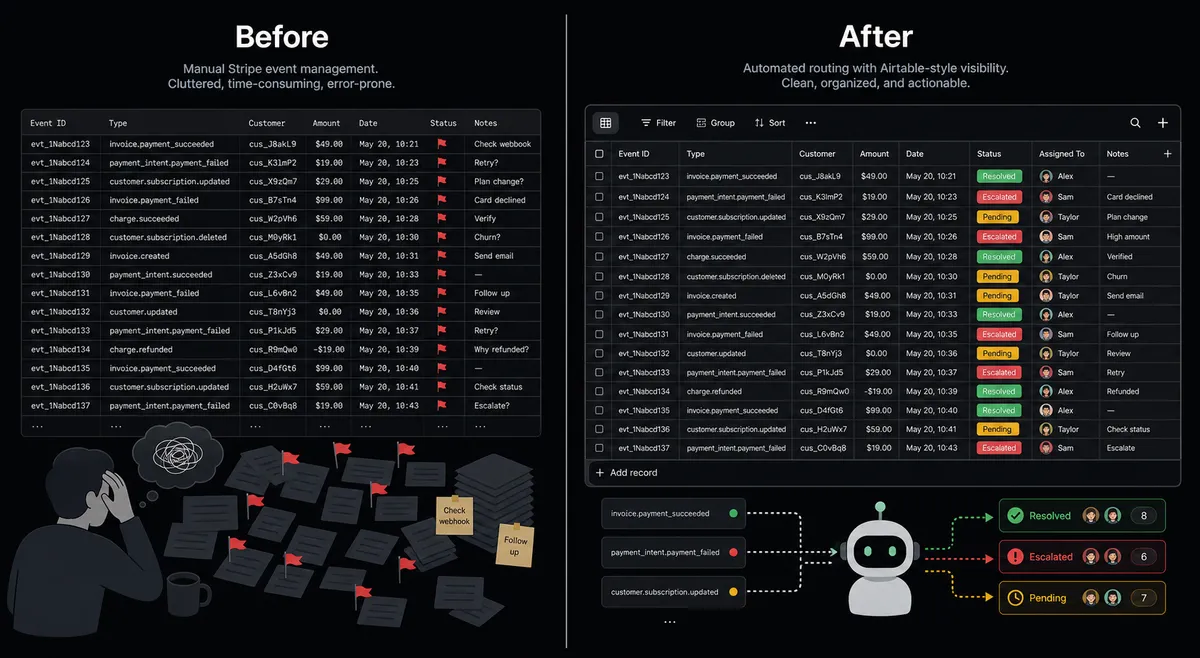
| Exception tracking | Billing team hunts through Stripe event log and email threads | Every exception logged to Airtable automatically with full context on arrival |
| Triage time | 20-40 minutes per day reviewing dashboard and deciding what to act on | Agent routes and labels events; team reviews a structured queue in minutes |
| Dispute response | Evidence assembled manually over 2-3 hours from multiple systems | Agent compiles order records, emails, and shipping data and logs them to Airtable in under 4 minutes |
| Human decisions | Ad hoc, undocumented, based on whoever sees the Stripe alert first | Structured, documented, with full context and audit trail of who decided and when |
| Repeat failures | Missed or treated the same as first-time failures | Agent detects patterns, escalates repeat failures with history before money moves |
What you can build
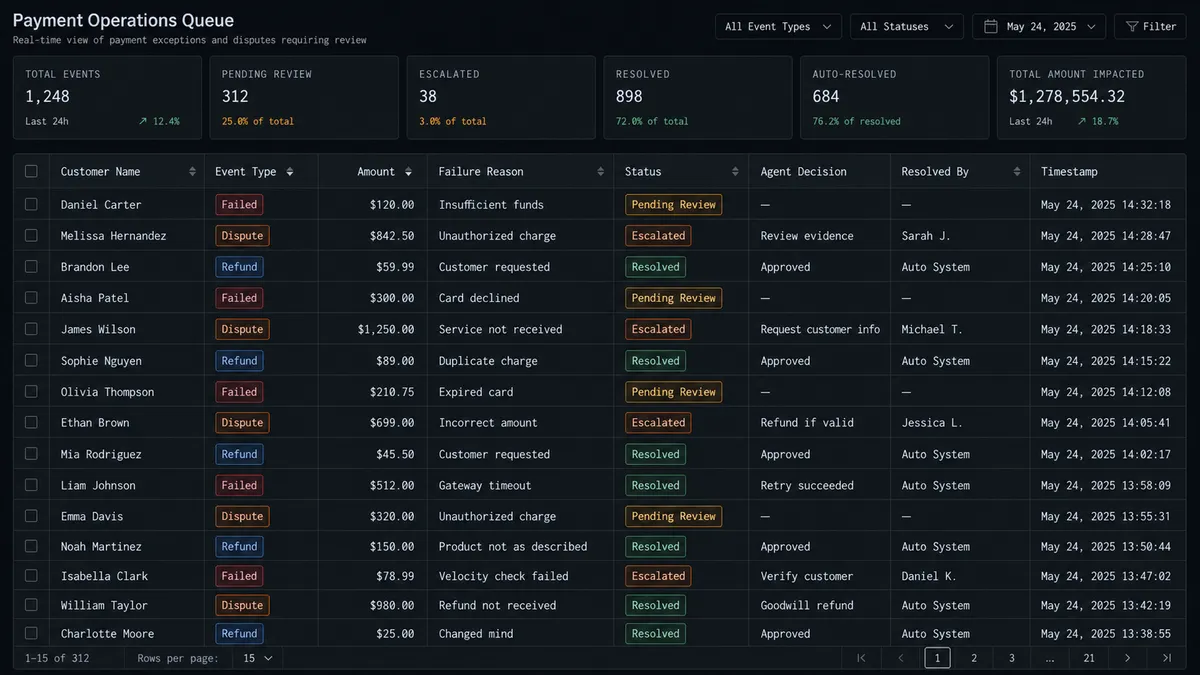
Subscription dunning queue. When a subscription payment fails, the agent uses Get Subscription and Get Customer to check the failure reason and account history. It creates an Airtable record with the recommended action (retry, email, escalate) and updates the record as each step completes. Your billing team sees the full dunning sequence in one table.
Dispute evidence tracker. Parse Webhook Event fires on charge.dispute.created. The agent logs the dispute to Airtable with the customer ID, disputed amount, and response deadline. It uses Create Comment to log the evidence it finds automatically. When evidence is uploaded to Stripe, it updates the Airtable record to Submitted with the timestamp.
Refund approval queue. An agent holds all refund requests in an Airtable table. Refunds under $100 auto-process via Create Refund. Refunds over $100 create an Airtable record and notify the billing manager via Slack with a direct link. The manager approves in Airtable. The On New or Updated Record trigger fires and the agent calls Create Refund with the approved amount.
New customer revenue log. When a new Stripe customer and subscription are created as part of a CRM deal-close workflow, the agent uses Create Record in Airtable to add the account to your revenue tracking base: plan, MRR, billing cycle start, account owner. Your ops team has a live revenue database without any manual entry.
Common questions
Is it free to connect Stripe and Airtable on FlowRunner? FlowRunner starts with a $100 credit on the Growth plan, which covers roughly 67 days of real workflows at no charge. No credit card is required to start. After the credit runs out, Growth is $45 per month.
Can I self-host FlowRunner? Yes. FlowRunner offers a free Community Edition for self-hosting on a single instance, and an Enterprise self-hosted tier for multi-instance deployments with full compliance features. Cloud-hosted plans start at $45 per month.
Does the AI agent need my own API key for Stripe or Airtable? No. FlowRunner uses your Stripe Secret Key and your Airtable API key to authenticate the connectors. The AI reasoning layer uses FlowRunner’s own infrastructure. You can bring your own AI provider key under the BYOK model if you prefer.
What happens when the agent is not sure what to do? The agent invokes a human-in-loop flow as a callable tool. It packages the full context, including the payment amount, the customer history, and the reason for uncertainty, and routes it to your team via Slack, email, or WhatsApp. The workflow pauses until a person responds. Every decision is logged in the audit trail.
Can the agent handle subscription failures automatically? Yes. The agent reads the failure reason from the Stripe webhook, routes expired-card failures to an email recovery sequence and insufficient-funds failures to a retry queue, and escalates accounts that fail twice to a billing manager in Airtable with full context for a grace period or cancellation decision.
What is the difference between a trigger and an action in this connection? A trigger is what starts the workflow. For this pair, Stripe’s Parse Webhook Event fires on payment events like failures, disputes, or successful charges. An action is what the agent does in response, such as Create Record in Airtable to log the event or Update Record to change a payment status.
Getting started
FlowRunner’s Growth plan includes $100 in free credit, covering roughly 67 days of real payment workflows. No credit card required. Corporate email required.
Connect both integrations from the FlowRunner integration library: Stripe and Airtable. Build your first flow in the visual editor and activate it. The agent starts processing Stripe events and logging them to Airtable immediately.
To see it live or get help scoping a payment operations workflow for your team, book a 30-minute call at calendly.com/flowrunner/intro.
Start building at flowrunner.ai.