How to Connect Supabase with Slack (With or Without an AI Agent)
Connect Supabase record events to Slack messages automatically, or run the connection as an AI agent that pauses for a human before propagating anomalous data downstream.
How do you connect Supabase to Slack?
You connect Supabase to Slack by setting the On Record Created trigger in Supabase to fire a Send Message to Channel action in Slack whenever a new row is inserted into a monitored table. FlowRunner is a visual AI-agent orchestration platform where automations run autonomously and pause for human judgment on the steps that carry real consequence. That same connection can run as an AI agent: instead of always sending a message, the agent reads each record, evaluates it against context, and only routes to Slack when something needs a human eye before it moves downstream.
Why teams need this connection
Operations teams that run SaaS products, internal tools, or data pipelines on Supabase face a common problem. Something changes in the database and nobody finds out until it has already propagated to three other systems. A billing event fires without a matching record in the CRM. An onboarding step completes with an anomalous field value that will break the downstream intake workflow. A record gets inserted with a foreign key that points nowhere.
The manual process today: someone sets up a webhook, writes code to post to Slack, and hopes the webhook stays live. Or they check the database directly, which means checking on a schedule rather than in real time. When a field value falls outside expected ranges, there is no gate. The bad data moves. Your AP clerk, your billing manager, your ops lead, all of them hear about it from a downstream system that failed rather than from an alert that caught it at the source.
The fix is not more webhook code. It is a connection that watches the database, evaluates what it sees, and routes exceptions to Slack with enough context for someone to make a fast decision. Routine records proceed automatically. Exceptions land in Slack with the raw data and clear options. The difference between the two is not a hardcoded threshold. It is the agent reading what it found.
How it works: the connection
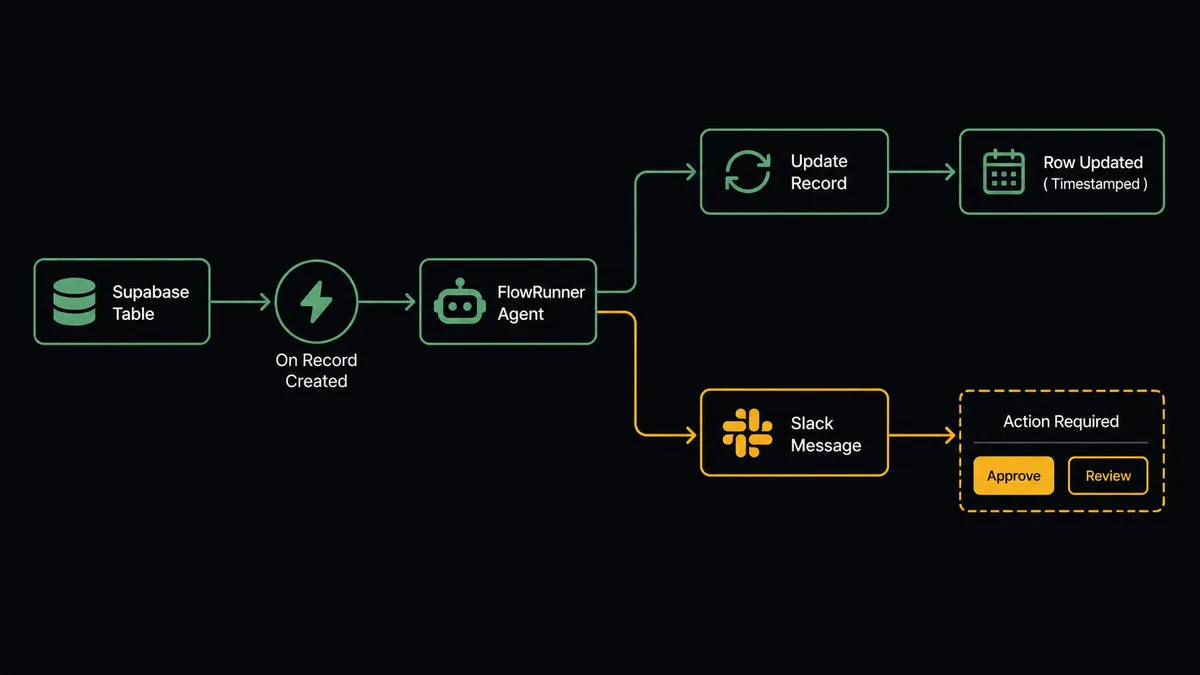
When On Record Created fires in Supabase, FlowRunner receives the full row: every field, every value, the table name, and the timestamp. The agent has access to three actions from the Supabase side and several from Slack:
On the Supabase side:
- Select Records reads related rows for comparison. If the new record is a billing event, the agent pulls the last three billing records from the same user to check for pattern anomalies.
- Update Record writes back to Supabase after processing. It sets a processed_at timestamp and a status field so the workflow is idempotent. No record gets processed twice.
- Get Tables Dictionary and Get Columns Dictionary let the agent discover schema dynamically. You do not hardcode table names or field lists.
On the Slack side:
- Send Message to Channel posts summaries, alerts, and exception reports to a channel like #data-ops or #app-events.
- Send Direct Message routes exceptions to a specific person when a channel message would interrupt the whole team.
- Update Message in Channel lets the agent edit its own message after a decision comes back: “Pending review” becomes “Approved by [name].”
The agent maps data from the Supabase record to Slack message fields. It does not just pass raw JSON. It reads the event type field, formats the relevant values, and includes context the human needs to make a decision quickly.
Can an AI agent run it? (And why a human stays in the loop)
The plain connection sends every new Supabase record to Slack. That is useful for monitoring but noisy. An AI agent does something different: it reads the record, reasons about it, and decides what to do.
Here is a real scenario grounded in what the Supabase integration data shows. An agent monitors the application events table. Most records are routine: user completed onboarding, event_type is “onboarding_complete,” all fields within normal ranges. The agent calls Update Record to stamp the record as processed and moves on. No Slack message needed.
Then a record arrives: event_type is “billing_event,” amount is 3x the user’s historical average, and the payment method field contains a value the agent has not seen before for this account. The agent calls Select Records to pull the last six months of billing records for this user. It compares. The pattern does not fit.
The agent does not auto-process this record. It invokes the human-in-loop subflow.
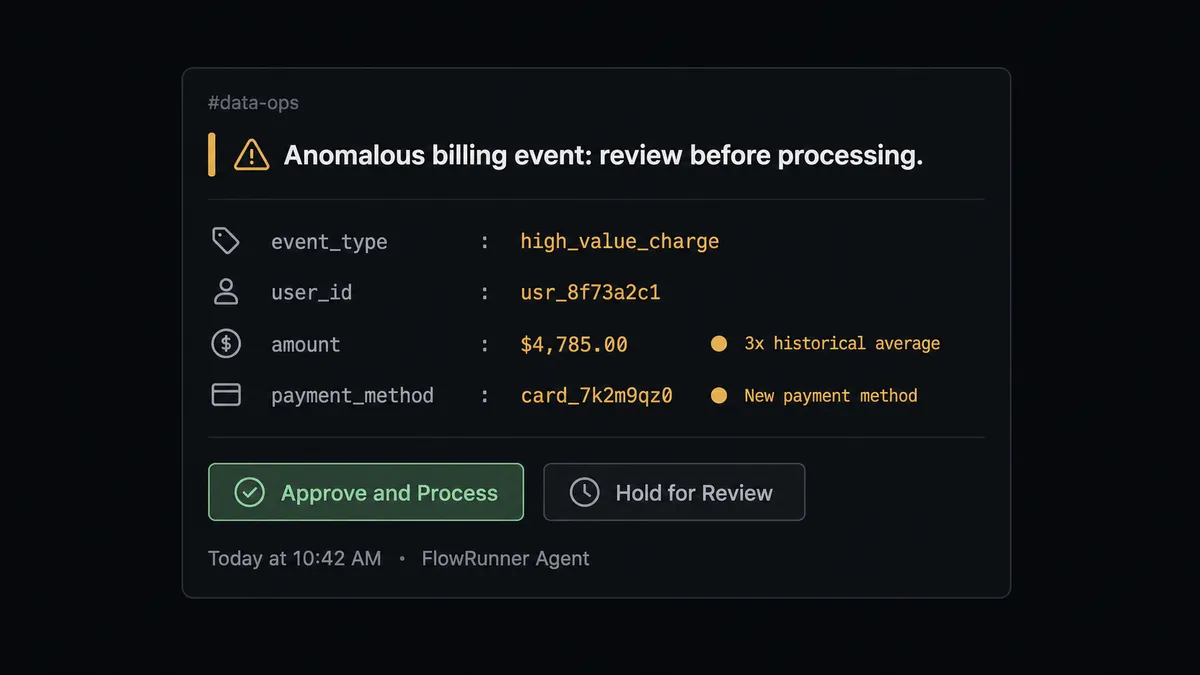
What the agent packages for the human:
- The raw field values from the new record
- The comparison data it pulled from Select Records (the last six billing events for this user)
- The specific discrepancy it detected (amount is 3x the trailing average, payment method is new)
- Two options via Slack interactive buttons: Approve and Process, or Hold for Review
The human opens Slack, sees full context, and makes a decision in under two minutes. On Block Action fires when they click a button. The agent resumes with their decision as input. If they approved: Update Record stamps the row as processed. If they held it: the record stays unprocessed with a review_status field set, and a direct message goes to the operations lead.
This is not a sync tool with a conditional attached. The agent knows when to stop and ask. That is the digital andon cord: AI that pulls the line when it hits genuine uncertainty, not arbitrary thresholds.
FlowRunner vs Zapier
Zapier is the most common starting point for teams connecting SaaS apps. It is fast to set up, has a large library of triggers and actions, and works well for straightforward send-this-when-that flows.
| Feature | Zapier | FlowRunner |
|---|---|---|
| Basic Supabase to Slack trigger | Yes, supported | Yes, supported |
| Human-in-loop with interactive buttons | Not available | Native: agent invokes human flow as a callable tool, On Block Action captures the response |
| AI agent with reasoning and tool use | Not available | Native AI Agent node with BYOK model access |
| Data validation before downstream sync | Not available | Agent reads and evaluates records; anomalies held for review |
| Unlimited users on every tier | No (user-based pricing) | Yes, all tiers |
| Self-hosted option | No | Yes, Community Edition (free) and Enterprise |
| Audit trail with approver identity | Not available | Every human decision captured with user, timestamp, and outcome |
Zapier’s strength is speed: you can connect two apps in minutes without thinking about data quality or edge cases. FlowRunner’s strength is what happens when the data is not clean: the agent evaluates the record and does not let bad data propagate without a human seeing it first.
Before and after
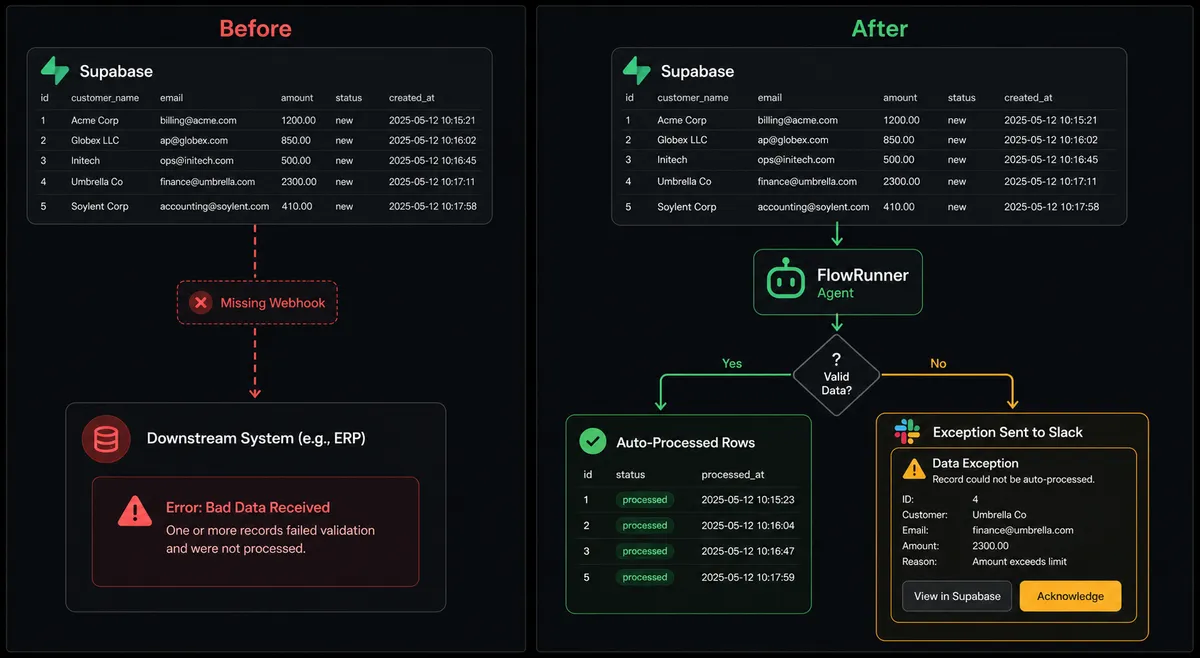
| Category | Before | After |
|---|---|---|
| Anomaly detection | Out-of-range values in Supabase sync to downstream systems without any check | Anomalous records held for operations review before they reach connected systems |
| Processing status | No way to tell which records have been processed in a batch workflow | processed_at timestamps prevent any record from being processed twice |
| Exception handling | Exceptions discovered after downstream failure | Exceptions surfaced in Slack with full context before propagation |
| Setup complexity | Custom webhook code required for every application event connection | No-code agent workflow connects in minutes; schema discovery is automatic |
| Audit trail | No record of who reviewed what or when | Every human decision captured with approver identity and timestamp |
What you can build
Application event routing with anomaly gating On Record Created fires for every event in your app events table. The agent reads event_type and routes normally: onboarding events to your CRM, billing events to Stripe. Records with field values outside expected ranges pause and route to Slack for review before any downstream action runs.
Batch processing with overnight summaries The agent processes Supabase records in batches using Select Records with a null processed_at filter. After each batch, it posts a summary to #data-ops via Send Message to Channel: total processed, exceptions held, time taken. Your team wakes up to an audit of what happened overnight, not a queue of manual work.
Inbound Slack document drops
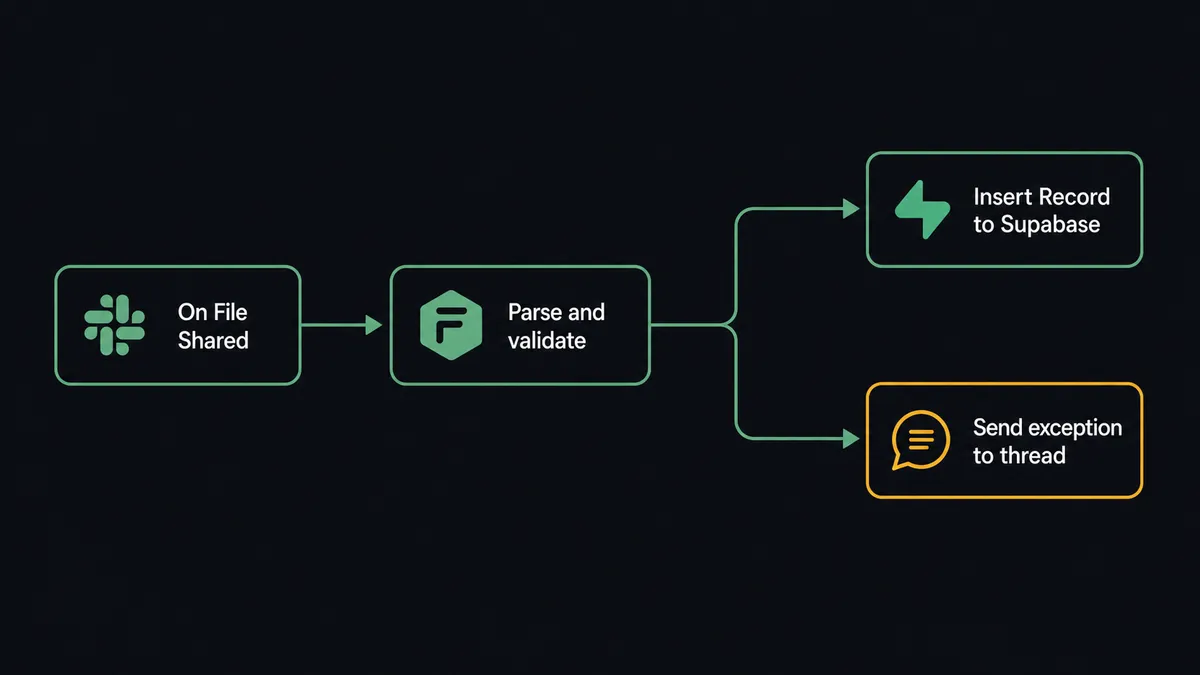
On File Shared fires when a team member drops a file in a monitored Slack channel. The agent downloads the file, extracts structured data, validates it against expected schema, and calls Insert Record to write clean records into Supabase. If validation fails, the agent replies in the thread with the specific issue and what it needs from the team to proceed.
Real-time status updates back to Slack When a Supabase record’s status field changes (On Record Updated fires), the agent calls Update Message in Channel to reflect the new status in the original Slack thread. A message that said “pending review” becomes “approved and processed” without anyone touching it.
Deleted record audit alerts On Record Deleted fires when a row is removed. The agent checks the record against a whitelist of expected deletions (cleanup jobs, archival workflows). Unexpected deletions trigger a Send Direct Message to the data owner with the deleted record’s field values for immediate review.
Common questions
Is it free to connect Supabase and Slack on FlowRunner? FlowRunner offers a $100 credit on the Growth tier, which covers roughly 67 days of real use. No credit card is required to start. After the credit, Growth is $45 per month and includes unlimited users and workflows.
Can I self-host this integration? Yes. FlowRunner offers a self-hosted Community Edition at no cost for a single instance. Enterprise self-hosted includes multi-instance clustering and the full compliance suite. You connect your own Supabase project and Slack workspace either way.
Does the AI agent need my own API keys for AI models? Yes. FlowRunner uses a Bring Your Own Key (BYOK) model. You supply the API key for your preferred AI provider. FlowRunner orchestrates the agent; it does not charge you separately for model usage.
What happens when the agent is not sure what to do? The agent invokes a human-in-loop flow as a callable tool. It pauses the workflow, sends a Slack message with full context about what it found and why it stopped, and waits for a human decision before proceeding. The decision, the decider’s identity, and the timestamp are all recorded in the audit trail.
Can this handle every Supabase table, or do I have to configure each one? FlowRunner’s Supabase integration includes Get Tables Dictionary and Get Columns Dictionary actions that dynamically discover your schema. Agents can adapt to your table structure without hardcoded configuration.
What if the Slack approval message goes unanswered? You can configure a timeout on the human-in-loop step. If no response arrives within the window you set, the workflow can escalate to another channel, send a direct message, or pause and alert an operations lead.
Getting started
FlowRunner’s $100 credit on Growth covers roughly 67 days of real workflows, no credit card required. Corporate email gets you in.
Connect your Supabase project at flowrunner.ai/integrations/supabase and your Slack workspace at flowrunner.ai/integrations/slack. Both connections take under five minutes.
Start at flowrunner.ai or book a 30-minute walkthrough at calendly.com/flowrunner/intro. Bring a real Supabase table and a Slack channel, and you will leave with a working agent.