How to Connect Apollo.io with HubSpot (With or Without an AI Agent)
Connect Apollo.io and HubSpot so every inbound lead arrives fully enriched, routed, and ready for outreach, optionally as an AI agent that pauses for human review before adding contacts to high-priority sequences.
How do you connect Apollo.io to HubSpot?
You connect Apollo.io to HubSpot by using an inbound lead event as the trigger, calling Apollo’s Enrich Person and Enrich Organization actions to build a complete contact profile, then writing that enriched data to HubSpot via Create Contact, Associate Objects, and Create Deal. FlowRunner is a visual AI-agent orchestration platform where automations run autonomously and pause for human judgment on the steps that carry real consequence. The same connection can run as an AI agent that scores the lead against your ICP, checks for duplicates with Get Contact by Email, and pauses for a sales rep review before adding any contact to a high-priority outreach sequence.
The problem: leads arrive incomplete, outreach starts late
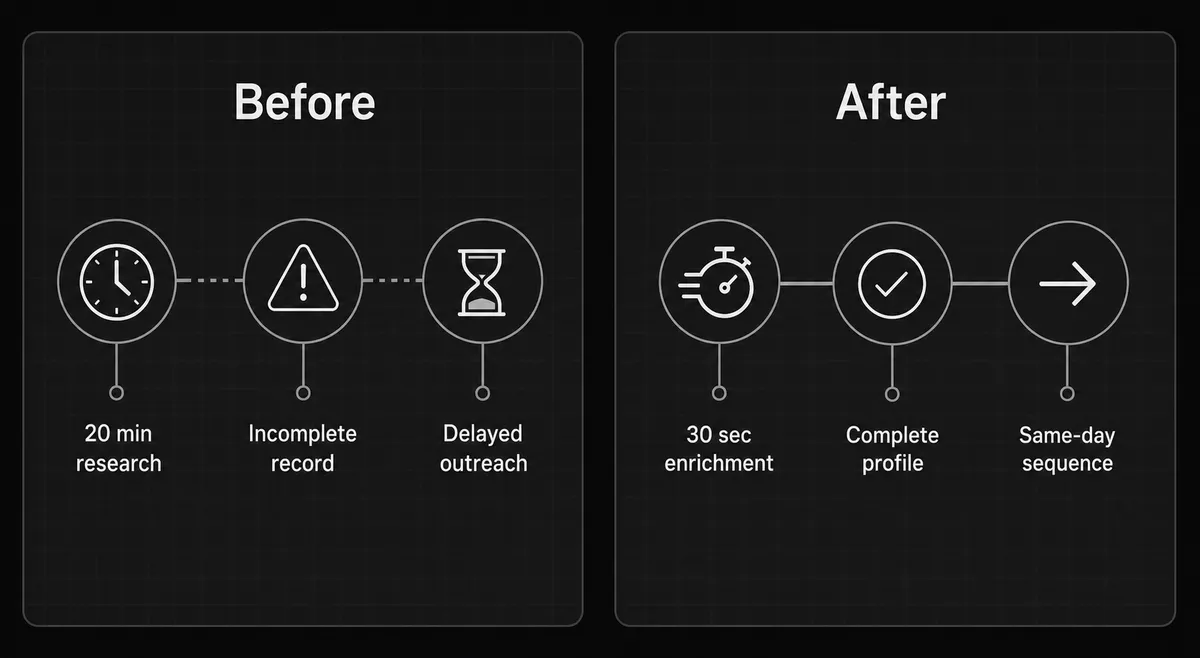
A prospect fills out your form. Your CRM gets their name, company, and email. That is it. The sales rep who picks up that record spends the next 15 to 20 minutes in browser tabs: LinkedIn for the job title, Google for the company size, Apollo.io for a phone number. By the time the rep has a usable record, the lead has been sitting for hours. Some fall through the cracks entirely.
The same problem shows up on the outbound side. Someone on the team runs a search in Apollo, exports a spreadsheet, pastes it into HubSpot, and manually deduplicates against existing records. Monday morning list-building takes the better part of a morning and the data quality depends on whoever had time to do it. The systems exist. The connection between them is a human doing copy-paste work that should run automatically.
How it works: the connection between Apollo.io and HubSpot
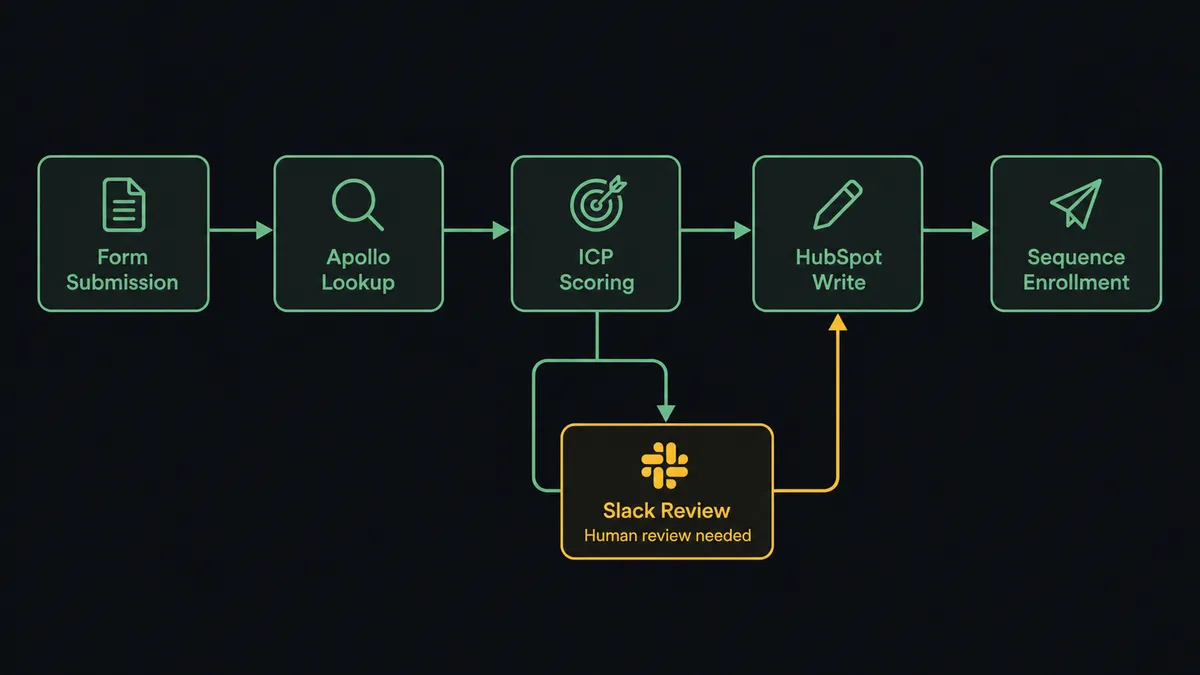
When a lead arrives, the FlowRunner agent fires Enrich Person with the contact’s email. Apollo returns job title, phone, LinkedIn URL, and job history. The agent calls Enrich Organization with the company domain and gets employee count, revenue range, industry, and technology stack. Within seconds, the agent has a complete record.
Before writing anything to HubSpot, the agent calls Get Contact by Email. If a record exists, it updates the existing contact rather than creating a duplicate. If the agent finds two records with the same email, it does not silently merge them. It pauses and routes the conflict to a CRM admin: which record should this deal associate with? The admin decides. The agent acts on that decision and logs it.
For net-new contacts, the agent calls Create Contact, maps all enriched fields into the correct HubSpot properties, and calls Associate Objects to link the contact to the company record. It creates a deal in your inbound pipeline with the lifecycle stage set to Lead. Total time from form submission to CRM record: under 30 seconds.
For outbound list-building, the agent runs People Search in Apollo against your ICP criteria, calls Search Contacts in HubSpot to deduplicate, creates new records for net-new prospects, and can call Add Contacts to Sequence to enroll qualified leads in the right outreach sequence automatically.
Can an AI agent run it? (And why a human stays in the loop)
A basic Zapier workflow can move a form submission to HubSpot. What it cannot do is reason about the data it moves.
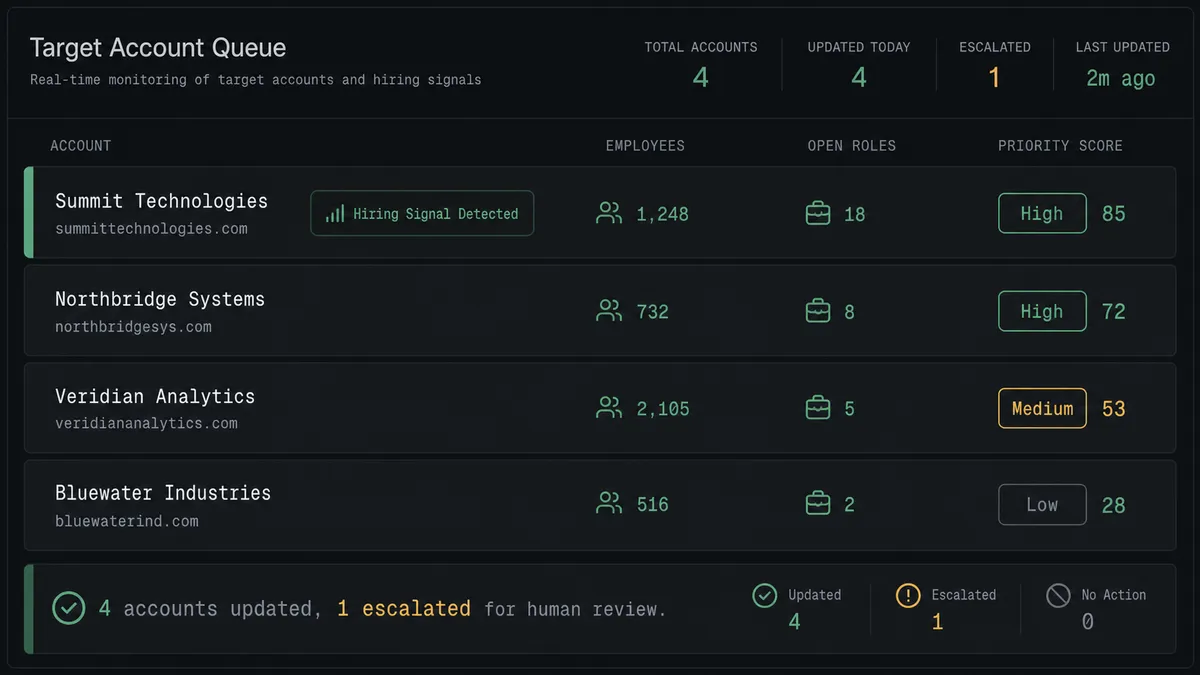
A FlowRunner AI agent reads the enriched Apollo profile and evaluates it against your ICP: industry, seniority, company size, hiring signals from Get Organization Job Postings. An agent working a target account sees that a company just posted three operations roles. That is a buying signal. It raises the priority score, moves the account to the top of the queue, and notifies the account owner: “[Company] is actively hiring 3 operations roles. High buying signal. Prioritized.”
The human-in-loop moment comes before the agent adds any contact to a high-priority outreach sequence based entirely on enriched data. Apollo enrichment is accurate but not perfect. The agent does not take that risk autonomously. It packages the full enriched profile and sends it to the sales rep via Slack: “Before I add [Name] to the [Campaign] sequence, here is their Apollo profile. Confirm the fit or adjust targeting.”
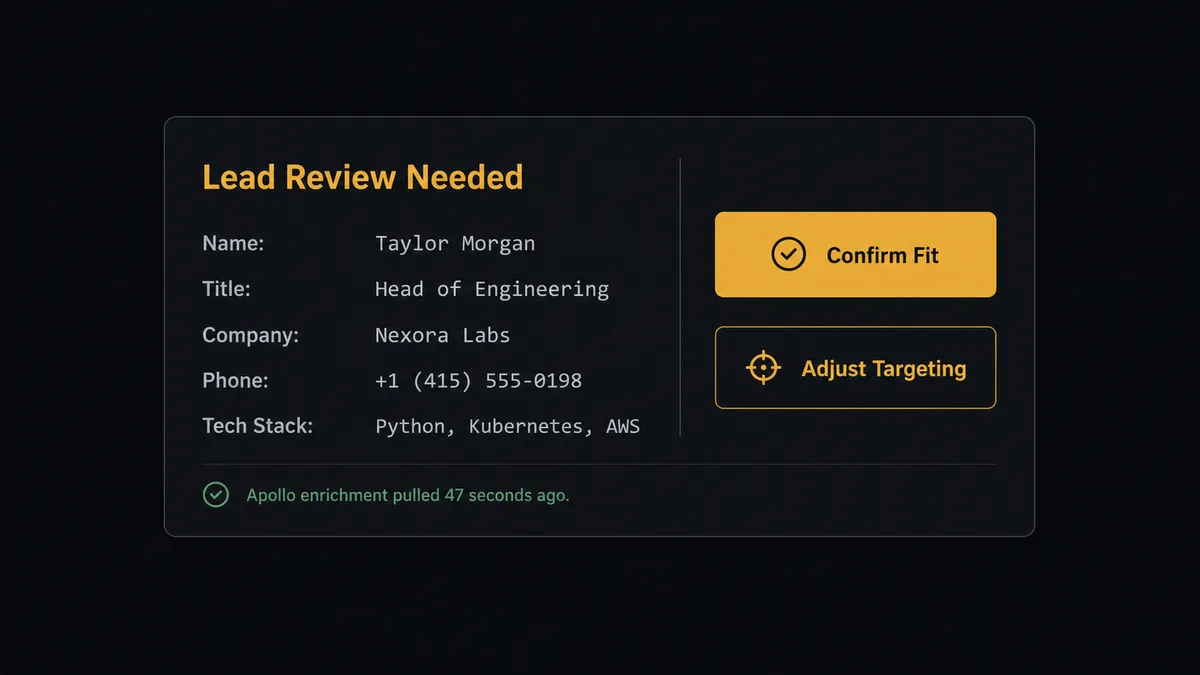
The rep glances at the profile and clicks Confirm. The agent resumes, enrolls the contact, and logs the rep’s decision with a timestamp in the audit trail. This is not a threshold rule triggered by job title or deal size. The agent evaluates the full context and decides when automated enrichment needs a human check. Prospects call this the “digital andon cord”: AI that stops the line when it hits uncertainty rather than proceeding with bad data.
FlowRunner vs Zapier
Zapier is the most common tool non-technical sales teams use for this connection. It connects Apollo.io and HubSpot reliably for simple one-to-one workflows: new form submission creates HubSpot contact. That is a genuine strength and the right tool for that job.
The differences become real when the workflow needs judgment.
| Feature | Zapier | FlowRunner |
|---|---|---|
| Basic trigger-to-action sync | Yes, well-supported | Yes |
| AI agent that reasons about enriched data | No | Yes: agent evaluates ICP fit, scoring, and hiring signals |
| Human-in-loop as a callable tool | No native option | Yes: agent invokes human review at the step that carries weight, not on a hardcoded rule |
| Duplicate detection before CRM write | Requires manual Zap design | Agent calls Get Contact by Email and branches on the result |
| Outbound list-building with deduplication | Multi-Zap setup, fragile | Single agent workflow: People Search, dedup, Create Contact, enroll |
| Unlimited users and workflows | Per-task pricing adds up | All tiers, including Growth at $45/mo |
| Self-host option | No | Yes, Community Edition free |
If your team does basic form-to-CRM routing, Zapier works. If you want the agent to score leads, catch duplicates, run outbound list-building, and escalate exceptions to humans with full context, FlowRunner is the right layer.
Before and after
| Metric | Before | After |
|---|---|---|
| Time to enrich a new lead | 15 to 20 minutes of manual research per lead | Full profile retrieved from Apollo in under 30 seconds |
| CRM record completeness | Name, company, email only from form | Job title, phone, company size, tech stack, LinkedIn URL |
| Duplicate records | No systematic check before new contact creation | Agent calls Get Contact by Email on every inbound lead |
| Outbound list-building | Half a morning, manual export and paste | Agent runs People Search, deduplicates, and creates records automatically |
| Time to outreach sequence | Leads sit until a rep has time to research | Qualified leads in sequence before the rep checks their queue |
| Human review accountability | Ad hoc, undocumented | Every approval logged with decider identity and timestamp |
What you can build
Inbound lead enrichment and routing. Every form submission triggers Enrich Person and Enrich Organization. The agent checks for duplicates, creates a fully enriched HubSpot contact and deal, and routes the lead to the correct sales rep with full context, all in under 30 seconds.
Weekly outbound list-building. Every Monday, the agent runs People Search with that week’s ICP criteria, deduplicates against HubSpot using Search Contacts, creates new contacts for net-new prospects, and enrolls them in the week’s Apollo sequence via Add Contacts to Sequence. Monday morning, the sales team has a fresh, enriched list without anyone doing manual research.
Target account intelligence updates. The agent calls Enrich Organization and Get Organization Job Postings for accounts in your target list. Companies posting multiple operations or finance roles get priority scores raised and account owners notified via Slack. HubSpot company records update with the latest hiring signals automatically.
Stalled deal reactivation. The agent queries Get All Deals for opportunities in Negotiation stage with no activity in 14 days. It enriches the associated contacts with Enrich Person to get fresh contact data, then sends the deal owner an update request. Deals that stay unresponded surface to the sales manager.
Duplicate contact resolution. When the agent detects two HubSpot contacts with the same email domain or a conflicting company association, it pauses and routes the conflict to a CRM admin via Slack with both records displayed. The admin decides which is canonical. The agent merges and documents the decision.
Common questions
Is it free to connect Apollo.io and HubSpot on FlowRunner? FlowRunner offers a $100 credit on the Growth tier, which covers roughly 67 days of real workflows. No credit card required. After that, Growth starts at $45 per month and includes unlimited users and workflows.
Can I self-host this connection? Yes. FlowRunner offers a self-hosted Community Edition at no cost. The Enterprise self-hosted tier adds multi-instance clustering, full audit retention, RBAC, and SSO for teams with compliance requirements.
Does the AI agent need my own API keys for Apollo or HubSpot? You bring your own API keys for Apollo.io and HubSpot. FlowRunner is a BYOK platform, so your credentials stay under your control and your API costs stay separate from your FlowRunner subscription.
What happens when the agent is not sure whether to add a contact to a sequence? The agent pauses and routes the contact profile to a sales rep via Slack, email, or another channel you configure. The rep sees the enriched Apollo profile, confirms or adjusts targeting, and the agent resumes with that decision logged. This is not a threshold rule; the agent makes the call based on context.
Can I use this workflow to deduplicate contacts in HubSpot? Yes. The agent calls Get Contact by Email as its first step on every inbound lead. If a match exists, it updates the existing record. If it finds two records with the same email, it pauses and routes the ambiguity to a CRM admin for resolution rather than silently picking one.
Can I run outbound list building with this connection? Yes. The agent runs People Search in Apollo against your ICP criteria, deduplicates against existing HubSpot contacts using Search Contacts, creates new records for net-new prospects, and can enroll qualified leads in an outreach sequence via Add Contacts to Sequence.
Getting started
FlowRunner’s $100 credit covers roughly 67 days on the Growth tier. No credit card required. Corporate email preferred.
Connect both integrations and build your first enrichment workflow in one session:
Start at flowrunner.ai or book a 30-minute walkthrough at calendly.com/flowrunner/intro. Bring your current enrichment workflow and we will show you where the agent layer changes the work.