How to Connect Apollo.io with Salesforce Pro (With or Without an AI Agent)
Connect Apollo.io to Salesforce Pro so enriched prospect data flows into your CRM automatically, with an AI agent that pauses for human approval before converting high-value leads.
How do you connect Apollo.io to Salesforce Pro?
When a new lead arrives, a FlowRunner workflow calls Apollo’s Enrich Person and Enrich Organization actions to retrieve the full contact and company profile, then uses Salesforce Pro’s Create Lead action to write that enriched record directly into your CRM. FlowRunner is a visual AI-agent orchestration platform where automations run autonomously and pause for human judgment on the steps that carry real consequence. The same connection can run as an AI agent that scores each lead, decides whether to route it to a rep or a nurture campaign, and stops for a manager’s approval before executing the irreversible Convert Lead to Contact step in Salesforce.
The problem with managing Apollo and Salesforce separately
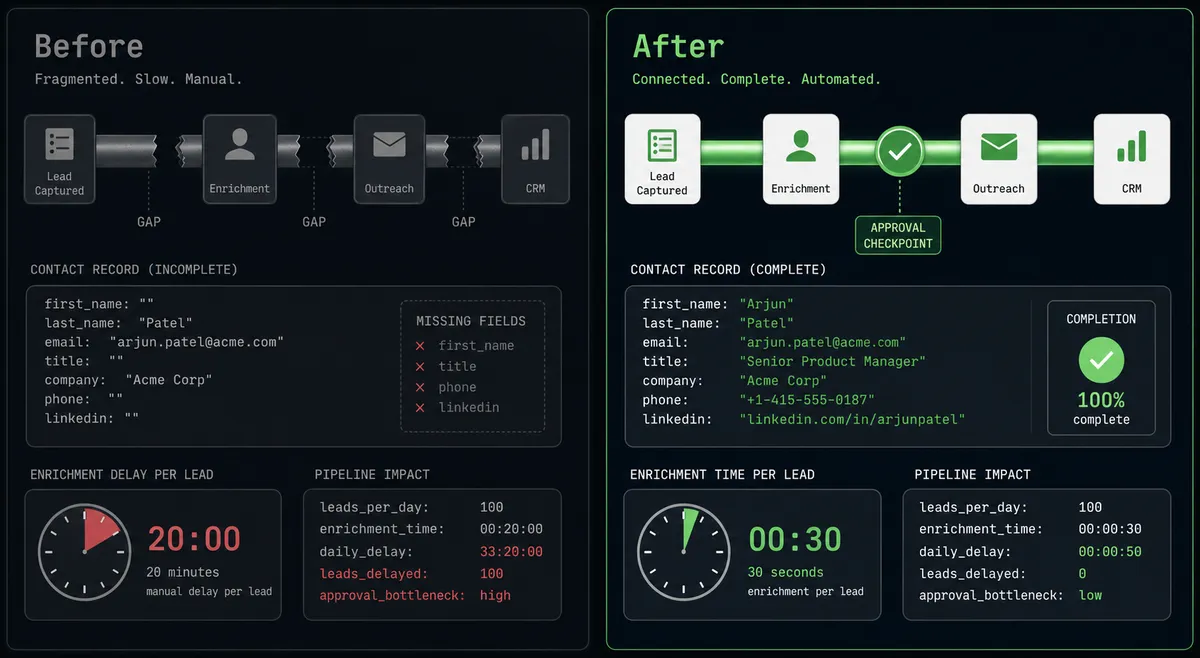
Sales teams running Apollo and Salesforce side by side end up with a gap between the two systems that only a person can bridge. A prospect submits a form. A rep gets a notification with a name, email, and company. Then the research begins: open Apollo, search the contact, pull the organization profile, check job postings for buying signals, copy data into Salesforce, decide on routing, and enroll in the right sequence. That process takes 15 to 20 minutes per lead. Multiply it across the week’s inbound volume and most of the research effort is happening before a rep has had a real conversation.
The manual process also creates consistency problems. Different reps apply different standards when deciding whether to convert a lead. Some convert on first contact. Others wait for a meeting. The result is inconsistent pipeline data, territory disputes, and attribution reports that do not reflect reality. Meanwhile, leads that should be in a nurture campaign sit in a rep’s queue, and leads worth calling same-day fall through the cracks while someone finishes their spreadsheet.
How it works: the connection between Apollo.io and Salesforce Pro
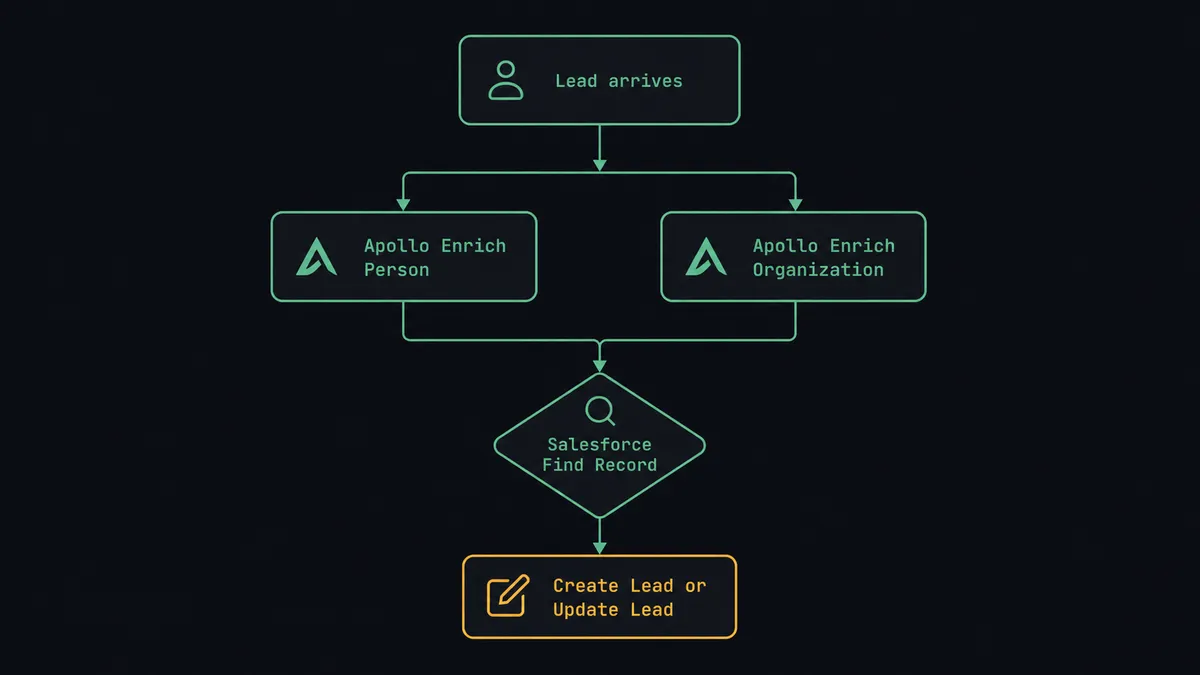
The core flow runs like this. A trigger fires when a new lead arrives. The agent calls Apollo’s Enrich Person action with the contact’s email or name-plus-company. Apollo returns the full profile: job title, phone number, LinkedIn URL, company size, and technology stack. The agent immediately calls Enrich Organization on the same company, retrieving revenue range, headcount, funding history, and current job postings.
Before writing to Salesforce, the agent calls Find Record to check whether the contact already exists. If a match is found, the agent calls Update Lead with the new Apollo data. If no match exists, the agent calls Create Lead and maps the enriched fields across: title, phone, company size, and any relevant firmographic data from the Apollo response.
For outbound list building, the same connection runs on a schedule. The agent calls People Search in Apollo with the week’s ICP parameters (job title, company size, industry, geography), deduplicates results against existing Salesforce contacts using Search Contacts, and creates net-new leads for prospects not already in the system. Monday morning, the team has a fresh enriched list without anyone doing the research manually.
Can an AI agent run it? (And why a human stays in the loop)
The plain connection handles data movement. An AI agent handles judgment.
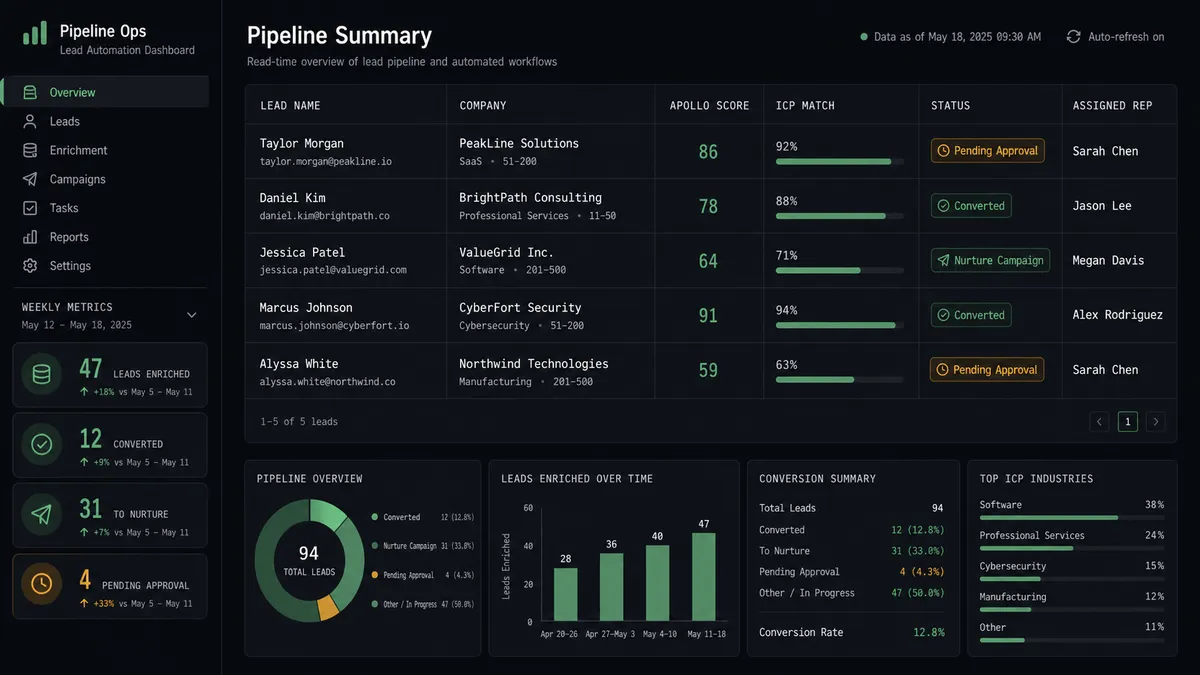
The agent reads the enriched Apollo profile and evaluates the lead against ICP criteria: company size above a threshold, industry match, job title seniority, and signals from Get Organization Job Postings showing active hiring in the relevant department. Based on that reasoning, not a hardcoded threshold, the agent assigns a score and decides what happens next. A lead from a 200-person logistics company where the COO submitted the form and the company has three open operations roles looks different from a 10-person company where an intern submitted. The agent knows the difference.
When the score crosses the conversion threshold, the agent does not immediately execute Convert Lead to Contact. That action is irreversible in Salesforce. A phantom conversion creates a contact, an account, and an opportunity that sales ops then has to clean up manually. So the agent pauses.
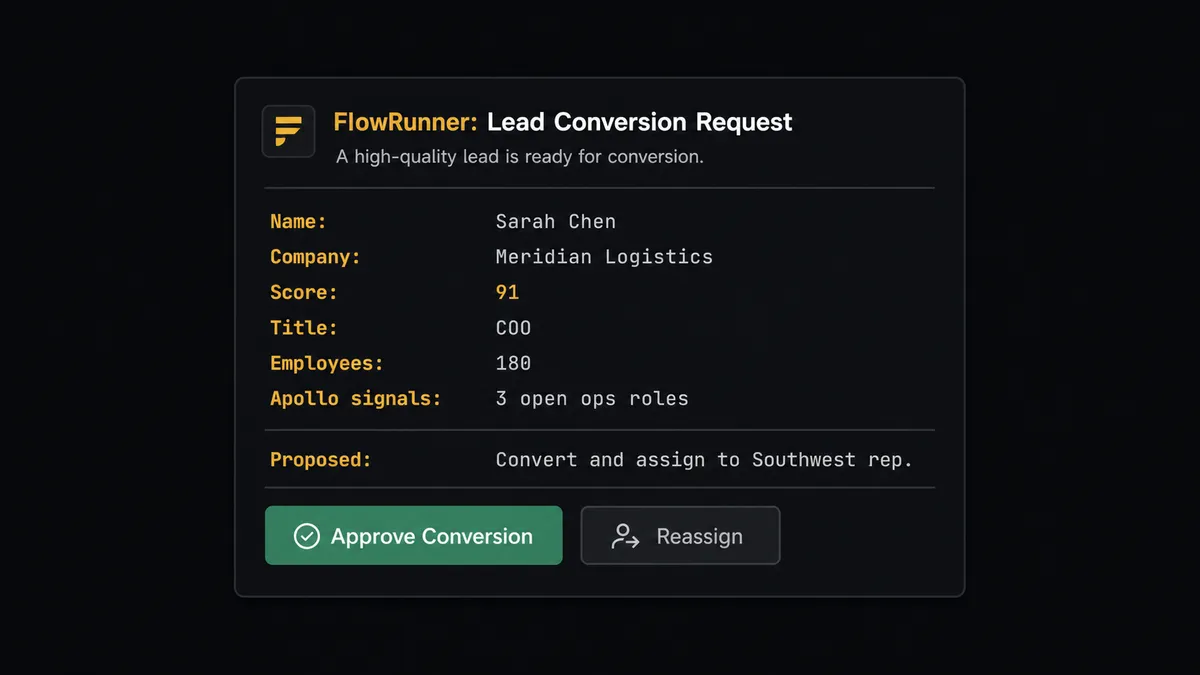
It invokes the human-in-loop flow as a callable tool. The sales manager receives a Slack message: “Lead [Name] at [Company] scored 91. Apollo profile shows COO-level title, 180 employees in logistics, and 3 open ops roles. Proposed action: convert and assign to [Rep Name] in the Southwest territory. Confirm or reassign?” The manager clicks Approve. The agent executes Convert Lead to Contact, assigns the opportunity to the right rep, and logs the approver’s identity, the timestamp, and the lead score in the Salesforce audit trail using Create Note.
This is not a sync tool. The agent knows when to stop and ask. Prospects call this pattern a “digital andon cord”: the agent stops the line when it hits a step that carries real consequence, hands context to a person, and resumes only after a human makes the call.
FlowRunner vs Zapier for Apollo and Salesforce
Zapier is the tool most non-technical teams already use for this kind of connection. It has a large library of pre-built Zaps, a low learning curve, and it genuinely handles simple trigger-and-action flows well. For a basic “new form submission creates a Salesforce lead” workflow, Zapier works.
The comparison changes when the workflow involves reasoning, enrichment chains, and human approval before an irreversible action.
| Feature | Zapier | FlowRunner |
|---|---|---|
| Native AI agent with tool-calling | No | Yes. The agent reads the data and picks actions, including human escalation, based on judgment. |
| Human-in-loop as a callable tool | No | Yes. The agent invokes a human approval flow on its own initiative, not via a hardcoded branch. |
| Lead scoring and conditional routing | Limited (Zapier Filters are threshold-based) | Agent-based: the agent weighs multiple signals and reasons about the decision. |
| BYOK for AI providers | No | Yes. Bring your own Claude, OpenAI, or other provider key. |
| Unlimited users on every tier | No (Zapier charges per user on higher tiers) | Yes. Every FlowRunner tier includes unlimited users. |
| Audit trail on human decisions | No | Yes. Approver identity, timestamp, and context captured on every escalation. |
For teams doing basic automation, Zapier is a reasonable starting point. For teams running multi-step sales enrichment workflows where a lead conversion requires oversight, FlowRunner’s native agent and human-in-loop capability is the difference between a sync tool and a judgment-capable process.
Before and after
| Metric | Before | After |
|---|---|---|
| Lead research time | 15-20 minutes per lead, done manually by reps | Under 30 seconds: Apollo Enrich Person and Enrich Organization run automatically on arrival |
| Lead record completeness | Form submissions arrive with name, email, and company only | Every lead arrives with job title, phone, company size, tech stack, and firmographic data |
| Lead conversion consistency | Each rep converts at a different point in the process | Every conversion above the ICP threshold requires explicit manager approval, decision logged |
| Routing accuracy | Reps manually decide territory and rep assignment | Agent assigns based on territory criteria; manager confirms before conversion fires |
| Attribution reporting | Revenue ops runs manual SOQL queries against spreadsheets weekly | Custom SOQL Query runs on schedule and posts campaign ROI directly to the revenue ops channel |
| Duplicate records | Reps create duplicate leads when they miss existing records | Find Record pre-check on every inbound lead; duplicates skipped or merged automatically |
What you can build
Inbound lead enrichment and conversion pipeline. Every inbound form submission triggers Enrich Person and Enrich Organization in Apollo. The agent scores the lead, creates the Salesforce record with full data via Create Lead, and routes high-scoring leads through the manager approval flow before converting.
Outbound list building on a Monday schedule. A weekly agent calls People Search with the ICP parameters, deduplicates against Salesforce using Search Contacts, creates net-new leads via Create Lead, and adds qualified contacts to the appropriate Apollo sequence using Add Contacts to Sequence. The sales team starts the week with a populated, enriched outreach list.
Target account research with hiring signal detection. For each account in a strategic target list, the agent calls Enrich Organization and Get Organization Job Postings. Companies posting for operations or finance roles get their Salesforce account records updated via Update Record with a raised priority score, and the account owner receives a Slack notification with the hiring signal context.
Deal desk document and activity logging. When a Salesforce opportunity reaches Proposal stage, the agent calls Find Child Records to retrieve all opportunity products, generates the quote document, attaches it via Create File and Add File to Record, sends it to the customer with Send Email, and creates a structured summary using Create Enhanced Note. The full paper trail lives in Salesforce without the rep assembling it manually.
Campaign attribution reconciliation. Weekly, the agent runs a Custom SOQL Query against closed opportunities to match contacts to the campaign associated at conversion. The attribution report posts to the revenue ops Slack channel via a notification step. Marketing gets accurate ROI data without manual report assembly.
Common questions
Is it free to connect Apollo.io and Salesforce Pro on FlowRunner? FlowRunner offers a $100 credit trial on the Growth plan, which covers roughly 67 days of real workflow usage. No credit card required. Both the Apollo.io and Salesforce Pro connectors are included on every paid tier starting at $45 per month.
Can I self-host this integration? Yes. FlowRunner offers a self-hosted Community Edition and an Enterprise self-hosted tier. The Apollo.io and Salesforce Pro connectors work identically in both cloud and self-hosted deployments.
Does the AI agent need my own OpenAI or AI provider key? FlowRunner uses a BYOK (Bring Your Own Keys) model. You connect your own AI provider account. The platform supports multiple providers so you are not locked into a single model.
What happens when the agent is not sure about a lead conversion? The agent pauses the workflow and routes the lead to the appropriate person via Slack, email, or WhatsApp. It packages the full context: the enriched Apollo profile, the ICP score, and the proposed action. The person approves or redirects. The agent resumes with that decision logged in the audit trail.
Does FlowRunner deduplicate against existing Salesforce records? Yes. Before creating a lead, the agent uses the Find Record or Search Contacts action to check whether the contact already exists in Salesforce. Duplicates are skipped or merged rather than created.
Can I run bulk Apollo enrichment against a list of existing Salesforce leads? Yes. The Enrich People action handles batch enrichment. You can point the agent at a query of existing Salesforce leads missing key fields, run bulk enrichment through Apollo, and write the results back using Update Lead.
Getting started
FlowRunner offers a $100 credit trial on the Growth tier, which runs roughly 67 days of real usage at no cost. No credit card required. Corporate email sign-up takes two minutes.
To build this workflow, start with the integration pages for both connectors: Apollo.io on FlowRunner and Salesforce Pro on FlowRunner. Each page shows the full list of available actions and triggers.
Ready to connect them? Start your free trial at flowrunner.ai or book a 30-minute intro call at calendly.com/flowrunner/intro if you want to walk through the setup with the team.