How to Connect Clearbit with HubSpot (With or Without an AI Agent)
Connect Clearbit enrichment to HubSpot CRM using FlowRunner: enrich inbound signups automatically, create complete contact and company records, and pause for a human before any low-confidence match triggers an outreach campaign.
How do you connect Clearbit to HubSpot?
You connect Clearbit to HubSpot by setting up a FlowRunner workflow that fires on an inbound signup, calls Clearbit’s Enrich Combined action to retrieve the person’s employment and the company’s firmographics, then writes the enriched data to HubSpot using Create Contact, Create Company, Associate Objects, and Create Deal. FlowRunner is a visual AI-agent orchestration platform where automations run autonomously and pause for human judgment on the steps that carry real consequence. That same connection runs as an AI agent: the agent evaluates each enriched record, scores it against your ICP, routes it to the right rep, and stops to ask a human before a low-confidence match triggers an outreach campaign.
The problem: thin records and manual research
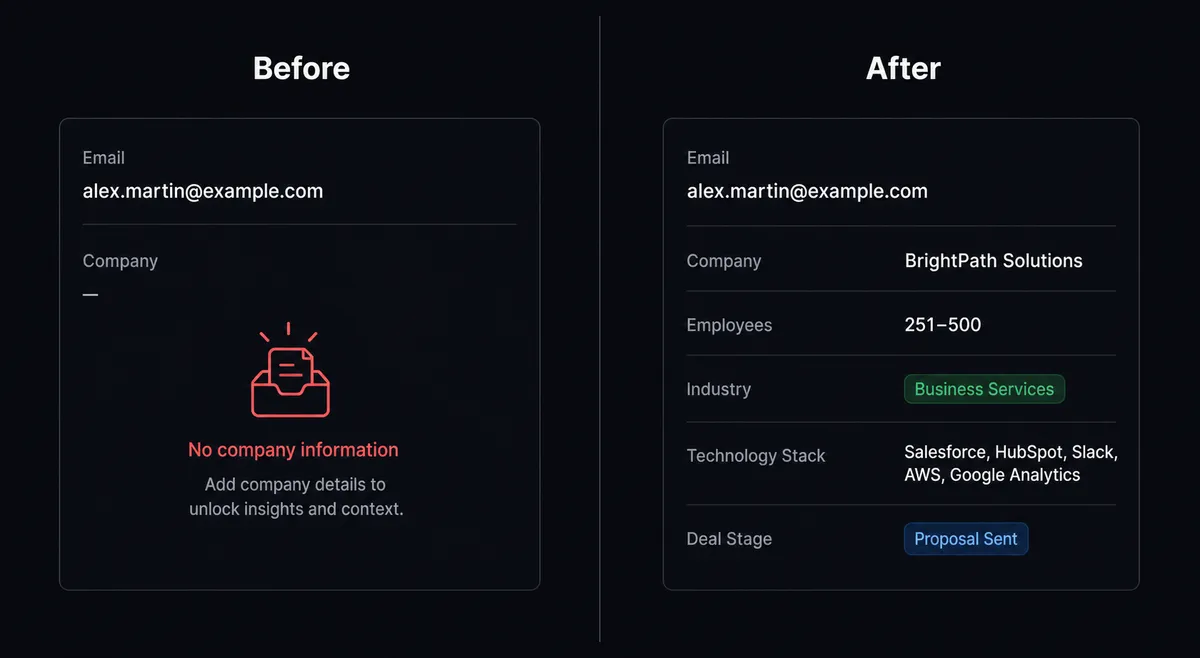
A prospect submits a form with a work email. Your CRM gets a record with a name and an address. No title, no company size, no industry, no technology stack. Before that account can be routed to the right rep, someone has to look it up. That work lands on whoever is covering inbound that day. It happens for every signup, every day, and the research never makes it into the CRM consistently because it is manual and rushed.
Anonymous traffic is the same problem at scale. High-intent visitors browse your pricing page and leave no trace. Marketing can see session volume. They cannot see which companies are already evaluating you. Both problems share the same root: the data exists, but the step that connects it to your CRM is a person doing repetitive research instead of a system doing it automatically.
How it works: the connection
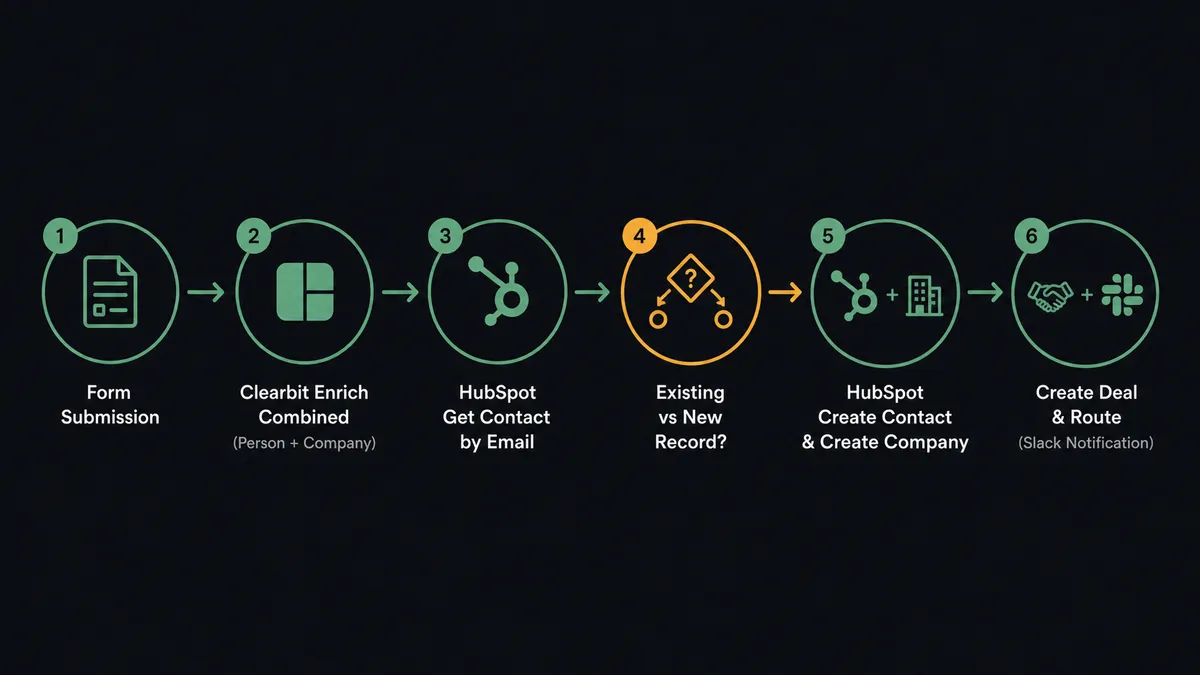
The flow starts when a prospect submits a form or when your website records an anonymous session. FlowRunner fires the workflow and passes the trigger data to the agent.
For an inbound signup, the agent calls Enrich Combined with the prospect’s email. Clearbit returns the person’s full name, title, seniority, and role alongside the company’s name, domain, employee count, industry, estimated revenue, technology stack, and social profiles. The agent gets both records in a single call.
For anonymous traffic, the agent calls Reveal Company with the visitor’s IP address. Clearbit returns the matched company and a confidence level for the match.
The agent then moves to HubSpot. It calls Get Contact by Email to check whether this person already exists. If no record is found, it calls Create Contact with the Clearbit person data, Create Company with the firmographics, and Associate Objects to link them. It opens a deal in your inbound pipeline with Create Deal and sets the lifecycle stage. It routes the deal to the correct rep using your territory rules and fires a Slack notification with the full enriched profile attached.
The rep opens a complete account. The research is already done.
Can an AI agent run it? (And why a human stays in the loop)
A simple Zapier or n8n connection moves data from Clearbit to HubSpot. It does not reason about the data it moves. The agent does.
When Clearbit returns an enriched profile, the agent reads it. It scores the company against your ideal customer profile: does the employee count, industry, and technology stack match what you sell to? It evaluates the deal’s priority. It decides which rep the account belongs to based on territory. A rule-based automation applies the same logic to every record regardless of context. The agent evaluates each one.
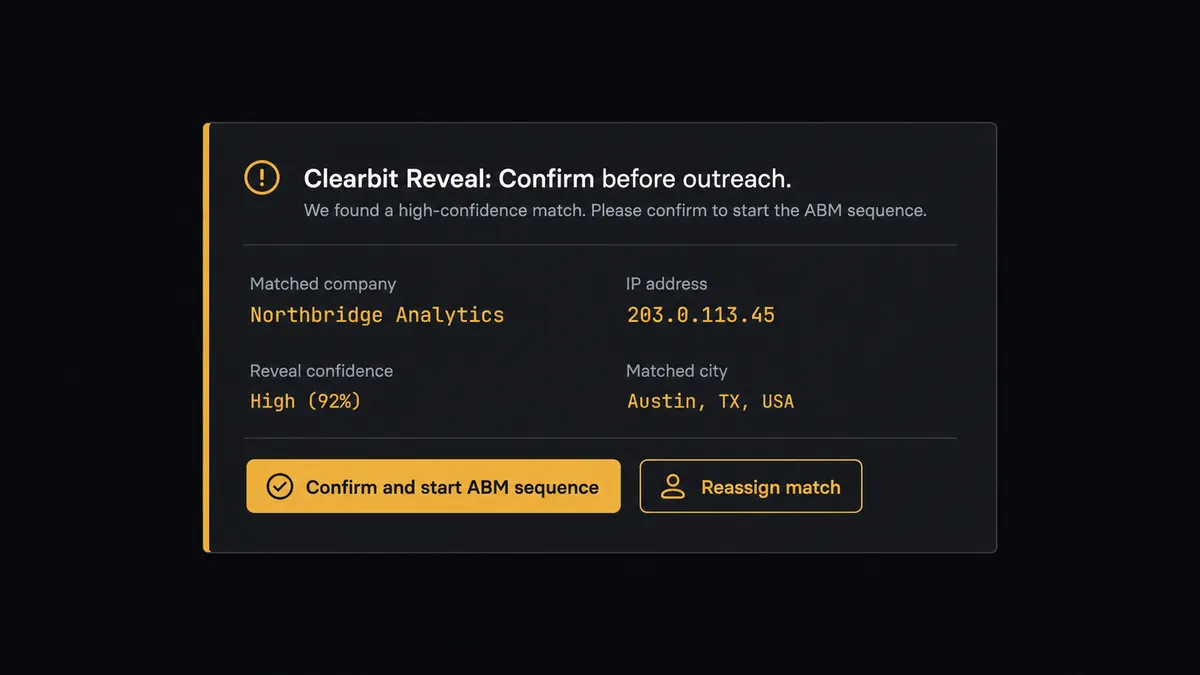
Reveal is where this matters most. A Reveal match carries a confidence level, and a confident match is not the same as a certain one. Before the agent creates a named account and triggers an account-based outreach campaign, it checks that confidence score. When the score is low, the agent stops. It sends the marketer a message through Slack with full context: “Reveal matched this visitor’s IP to [Company Name] at [confidence level]. Confirm before I create the account and start the ABM sequence, or reassign the match.” The marketer sees the company, the confidence, and the data behind the match. They confirm or correct with a single click. The campaign fires against a company you meant to target.
This is the digital andon cord. The agent does not push a shaky match downstream. It stops the line and asks.
FlowRunner vs Zapier for this integration
Zapier is the tool most non-technical teams already use, and it earns that position: it is fast to set up, has a large library of pre-built connectors, and requires no code. For a simple “enrich signup and create HubSpot contact” flow, Zapier works.
The gaps appear when the data gets complicated.
| Zapier | FlowRunner | |
|---|---|---|
| Human-in-loop on low-confidence matches | Not available; every match runs through the same path | Agent pauses on low confidence and routes to a human through Slack, email, or WhatsApp |
| Agent reasoning about ICP fit | Logic requires Zaps with multiple filter steps and paths | Agent evaluates the enriched profile and makes routing decisions without additional configuration |
| Duplicate detection before creating records | Manual Zap path setup required | Agent calls Get Contact by Email as a first step on every inbound record |
| Pricing model | Per-task pricing; high-volume enrichment pipelines accumulate costs quickly | Workflow-based tiers with clear execution limits; Growth at $45/mo for 12,000 executions |
| Users and workflows | Seat-based pricing on higher tiers | Unlimited users and unlimited workflows on every tier |
For teams that want to build once and let an agent handle enrichment, routing, exceptions, and escalations without a patchwork of Zap paths, FlowRunner is the alternative.
Before and after
| Before | After | |
|---|---|---|
| CRM record quality | Thin records with only a name and email; reps research each account by hand | Complete profiles with employment, firmographics, and technology stack on every new contact |
| Time to a routed lead | Manual research delays routing by hours or a day | Lead created, enriched, associated, and routed in under 30 seconds |
| Anonymous traffic | High-intent visitors leave no trace sales can act on | Reveal turns anonymous sessions into named companies queued for account-based outreach |
| Duplicate contacts | No systematic check before creating new records | Agent checks HubSpot by email before every create; duplicates routed to a CRM admin |
| Outreach accuracy | Low-confidence enrichment data pushed downstream with no review | Agent pauses on low-confidence matches; human confirms before any campaign fires |
What you can build
Signup-to-pipeline in under 30 seconds. When a prospect submits your form, the agent calls Enrich Combined, creates the HubSpot contact and company with full firmographics, opens a deal in the inbound pipeline, and routes the lead to the right rep before the prospect’s confirmation email arrives.
ICP scoring at the point of entry. The agent reads the Clearbit company profile: employee count, industry, technology stack, estimated revenue. It scores the account against your ICP criteria and sets a deal priority before the rep ever opens it. High-fit accounts get a different first touch than low-fit ones.
Account-based outreach from anonymous traffic. A Reveal Company call on every high-intent page view turns your website sessions into a ranked list of named companies. The agent checks each match against your target account list and notifies the account owner when a named target visits.
Weekly pipeline hygiene from enrichment. A scheduled agent calls Enrich Company on company records that have gone stale, updates firmographics and technology stack in HubSpot, and flags records where the company data no longer matches your ICP. Clean CRM, current data, no manual maintenance.
Prospect list building from firmographic criteria. The agent calls Search Companies (Discovery) with a query built from your ICP criteria, finds matching companies, calls Enrich Company on each, and creates the accounts in HubSpot ready for outreach. A targeted list built without a data vendor subscription.
Common questions
Is it free to connect Clearbit and HubSpot on FlowRunner? FlowRunner offers a $100 credit on the Growth tier with no credit card required, covering roughly 67 days of real use. The Growth plan starts at $45 per month after the credit is used. All tiers include unlimited users and unlimited workflows.
Can I self-host FlowRunner for this integration? Yes. FlowRunner offers a self-hosted Community Edition at no cost for single-instance deployments, and an Enterprise self-hosted tier with multi-instance clustering and a full compliance suite. Both tiers connect to Clearbit and HubSpot using the same connector.
Does the AI agent need my own OpenAI or Clearbit API key? FlowRunner uses a BYOK (Bring Your Own Keys) model for AI providers, so you connect your own key. For Clearbit, you supply your existing secret API key. For HubSpot, you authenticate via API key or OAuth2. You control the credentials; FlowRunner never holds them.
What happens when the agent is not sure about a Clearbit match? The agent evaluates the confidence level returned by Clearbit Reveal or Enrich Combined. When confidence is low or the result is pending, the agent pauses the workflow and sends a structured message to a human through Slack, email, or WhatsApp. The human confirms or corrects, and the agent resumes with the verified data.
Does this replace my existing Clearbit HubSpot native integration? It extends it. The native Clearbit-HubSpot connector syncs enrichment data but does not reason about what it finds or pause for a human on ambiguous matches. FlowRunner adds an AI agent that evaluates each enriched record, scores it against your ICP, routes it to the right rep, and escalates exceptions rather than pushing shaky data downstream.
Can the agent handle duplicate contacts in HubSpot? Yes. The agent calls Get Contact by Email before creating any new record. If it finds a potential duplicate, it pauses and routes the conflict to a CRM admin via Slack with full context: which records match, what differs, and which should be associated. The admin decides. The agent documents the decision in the audit trail.
Getting started
FlowRunner’s Growth tier includes a $100 credit that covers roughly 67 days of real use. No credit card required. Corporate email only.
Connect both integrations from the FlowRunner integration library: Clearbit and HubSpot. Both connectors are pre-built and verified against the live APIs.
Start at flowrunner.ai or book a 30-minute walkthrough at calendly.com/flowrunner/intro to see the agent run a live enrichment workflow against your own data.