How to Connect Copper with Mailchimp Marketing (With or Without an AI Agent)
Connect Copper CRM to Mailchimp Marketing so new leads and converted contacts are added to the right audience automatically, with a human checkpoint before any campaign sends to a large list.
How do you connect Copper to Mailchimp Marketing?
You connect Copper and Mailchimp Marketing in FlowRunner by using a trigger (a form submission, an inbox event, or a scheduled lead sweep) to fire a Copper Create Lead or Convert Lead action, then immediately calling Mailchimp’s Add Or Update List Member to enroll the contact in the right audience. FlowRunner is a visual AI-agent orchestration platform where automations run autonomously and pause for human judgment on the steps that carry real consequence. The same connection can run as an AI agent that reads each lead’s data, decides which Mailchimp audience applies, and routes a human for approval before converting a strategic account or sending a large campaign.
The problem most teams are living with
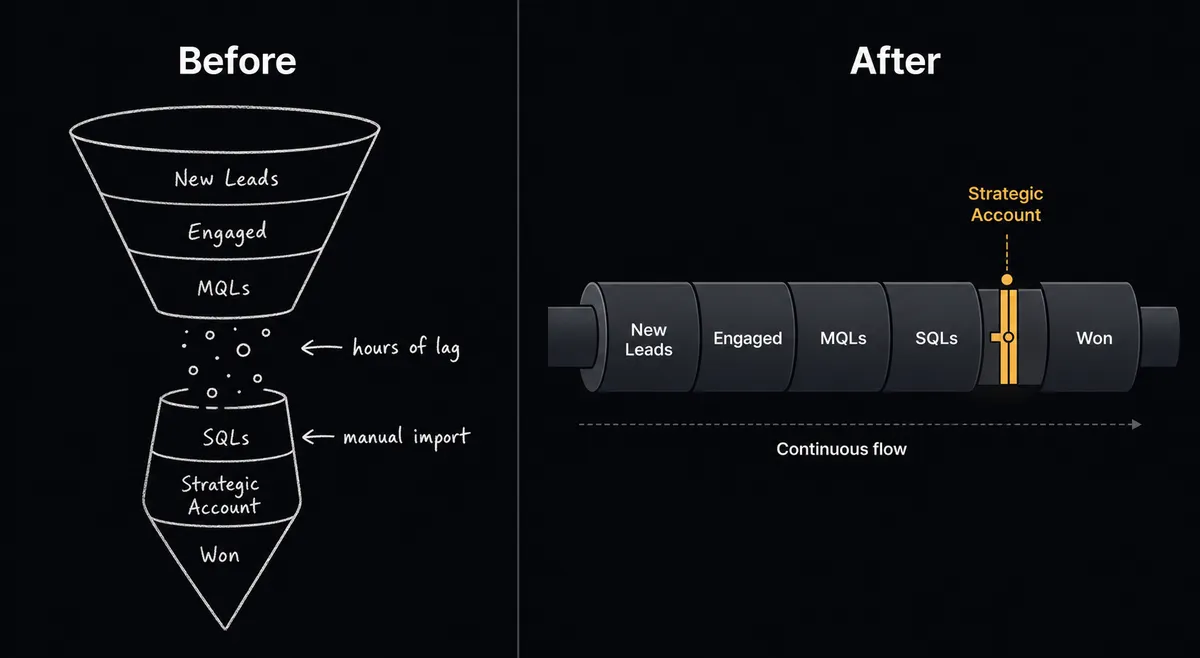
A sales rep fills out a form. Another rep copies the submission into Copper by hand, usually hours later and sometimes not at all. When a lead finally converts, someone has to remember to export the new contact and import it into Mailchimp. By the time the marketing team has a clean list, the contact’s intent has cooled and the segment is already stale.
The gap between Copper and Mailchimp is manual, and manual means exceptions fall through the cracks. The ops lead can see what should happen: qualified leads should hit the nurture sequence the same day they convert. What they cannot see is how many leads silently miss that step because the spreadsheet in between the two systems got skipped.
How it works: the connection
FlowRunner bridges Copper and Mailchimp Marketing at the point where a lead or contact record changes state.
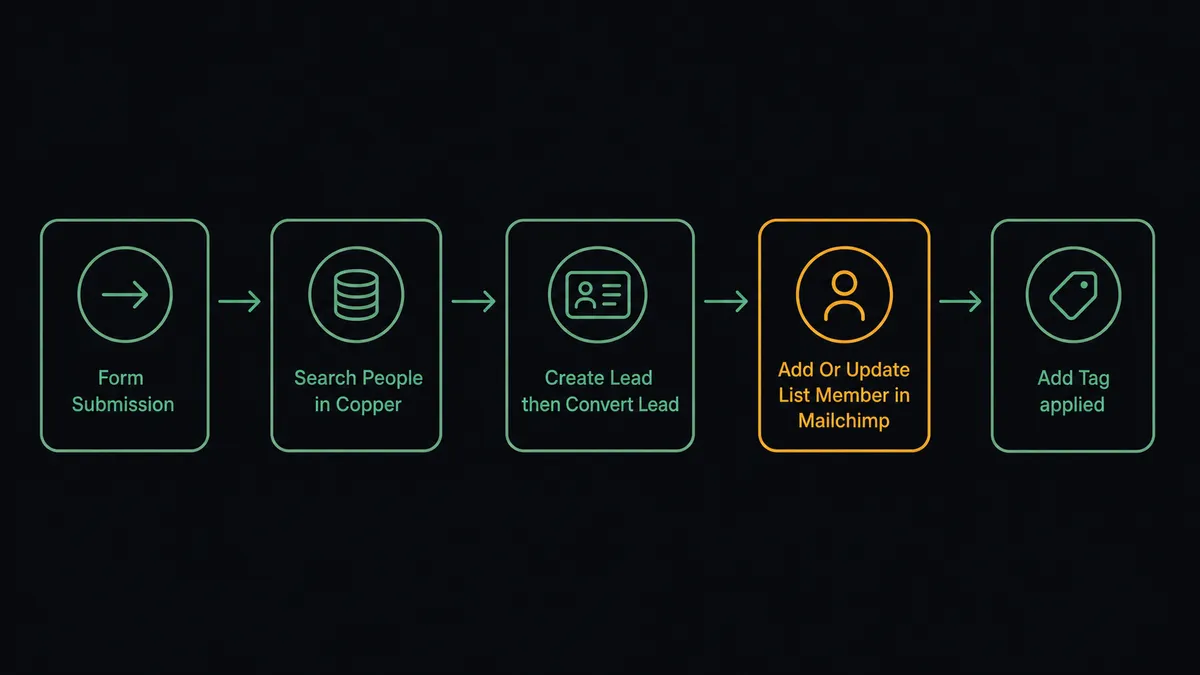
Because Copper does not emit its own events, the flow starts from an adjacent system. A Typeform or Gravity Forms submission triggers the flow. An inbox message or a scheduled sweep of unworked Copper leads can also serve as the entry point. Once the flow fires, the agent runs Search People or Search Leads to check whether the person already exists in Copper. This keeps duplicates out before any record is written.
For a new lead, the agent calls Create Lead with the contact’s name, email, phone, company, and title pulled directly from the form. Once the lead qualifies, the agent runs Convert Lead, which produces a linked person, company, and opportunity in a single step. There is no separate “create person,” “create company,” “create deal” sequence. The conversion happens in one call.
Immediately after, the agent calls Mailchimp’s Add Or Update List Member. It checks whether the contact already exists in the audience and updates if found, creates if not. Then it applies a tag with Add Tag to mark the subscriber’s lifecycle stage, such as MQL or New Opportunity, so the contact lands in the right email sequence without manual segmentation.
Can an AI agent run it? (And why a human stays in the loop)
A basic Zapier or Make connection moves data from one system to the other in the same sequence every time. An AI agent in FlowRunner reads the lead record, reasons about what it finds, and decides what to do next. This is not a sync tool. The agent knows when to stop and ask.
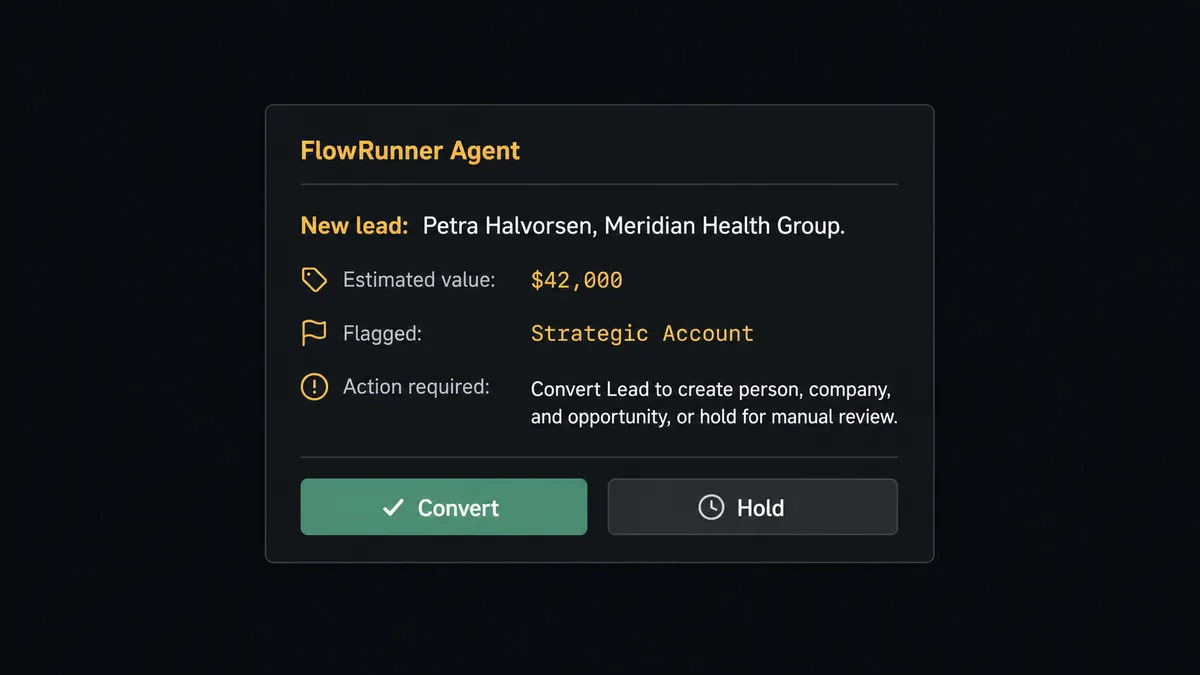
Here is a real decision moment. The agent runs Search People and confirms the lead does not exist. It reads the lead’s company name and deal value from the form. The deal value is three times the team’s average inbound value, and the company name appears on a strategic accounts list the agent has access to as a knowledge base. The agent does not run Convert Lead automatically. It treats the conversion as a decision that deserves a human.
It pauses and sends a Slack message: “New lead: Petra Halvorsen, Meridian Health Group, $42,000 estimated value. Flagged as strategic account. Convert and create opportunity, or hold for manual review?” The sales manager gets the full context, the lead details, and the records the conversion will produce. The manager approves. The agent runs Convert Lead, creates the opportunity, and logs the manager’s decision, their identity, and the timestamp in the audit trail.
Routine leads convert automatically. The ones that shape the pipeline get a decision. That is the digital andon cord: the agent stops the line when it hits something that carries weight.
The same logic applies on the Mailchimp side. When the agent is about to run Send Campaign to an audience above the threshold, it does not send automatically. It routes approval through Slack with the campaign name, subject line, audience size, and scheduled send time. The marketing manager approves or asks for a content review first. Large campaigns have a human checkpoint before deployment, and small ones ship without interrupting anyone.
FlowRunner vs Zapier
Zapier is the right choice for many teams. It has a large template library, broad integration coverage, and a low barrier to entry for straightforward one-trigger, one-action connections. If you want a Copper-to-Mailchimp sync that fires the same action every time with no exceptions handling, Zapier gets you there quickly.
The differences matter when the workflow needs to reason rather than just route.
| Feature | Zapier | FlowRunner |
|---|---|---|
| Human-in-loop | Not available natively | Native: agent invokes approval flow as a callable tool |
| AI agent reasoning | Not available | Agent reads data, picks tools, and decides what to do |
| Users included | Per-seat pricing on most plans | Unlimited users on every tier |
| BYOK for AI providers | Not available | Yes, connect your own OpenAI or Anthropic key |
| Audit trail | Not available at standard tiers | Full decision log including approver identity and timestamp |
| Self-hosted option | Not available | Community Edition (free) and Enterprise self-hosted |
Before and after
| Category | Before | After |
|---|---|---|
| Lead capture | Rep copies form submissions into Copper manually, hours later | Agent creates the lead in Copper the moment the form is submitted |
| Mailchimp sync | Marketing team exports CRM contacts and imports to Mailchimp manually | Agent calls Add Or Update List Member immediately after lead creation |
| Behavioral tagging | Tags applied manually when someone remembers | Agent applies lifecycle and intent tags automatically with Add Tag |
| Strategic lead handling | Strategic accounts processed in the same queue as routine leads | Agent flags strategic accounts and routes for manager approval before conversion |
| Campaign sends | Large sends go out without a review checkpoint | Agent pauses before large audience sends and routes Slack approval |
| Pipeline visibility | Deal stages updated in batches, not as work happens | Agent updates opportunity stage with Update Opportunity as the deal advances |
What you can build
Inbound lead capture and nurture enrollment. A form submission triggers the flow. The agent runs Search Leads to check for duplicates, calls Create Lead, and adds the new contact to the correct Mailchimp audience with Add Or Update List Member. The contact is in the nurture sequence before the form confirmation email has landed.
Qualified lead conversion with strategic account approval. The agent monitors Copper leads that reach a qualification threshold. For routine leads, it runs Convert Lead automatically and applies an MQL tag in Mailchimp. For leads matching a strategic account list, it pauses and routes the conversion decision to a sales manager.
Deal-closed campaign trigger. When a rep marks an opportunity Won with Update Opportunity, the agent adds the customer to a post-sale Mailchimp audience with Add Member to List and applies an Onboarding tag. The customer onboarding email sequence starts the moment the deal closes.
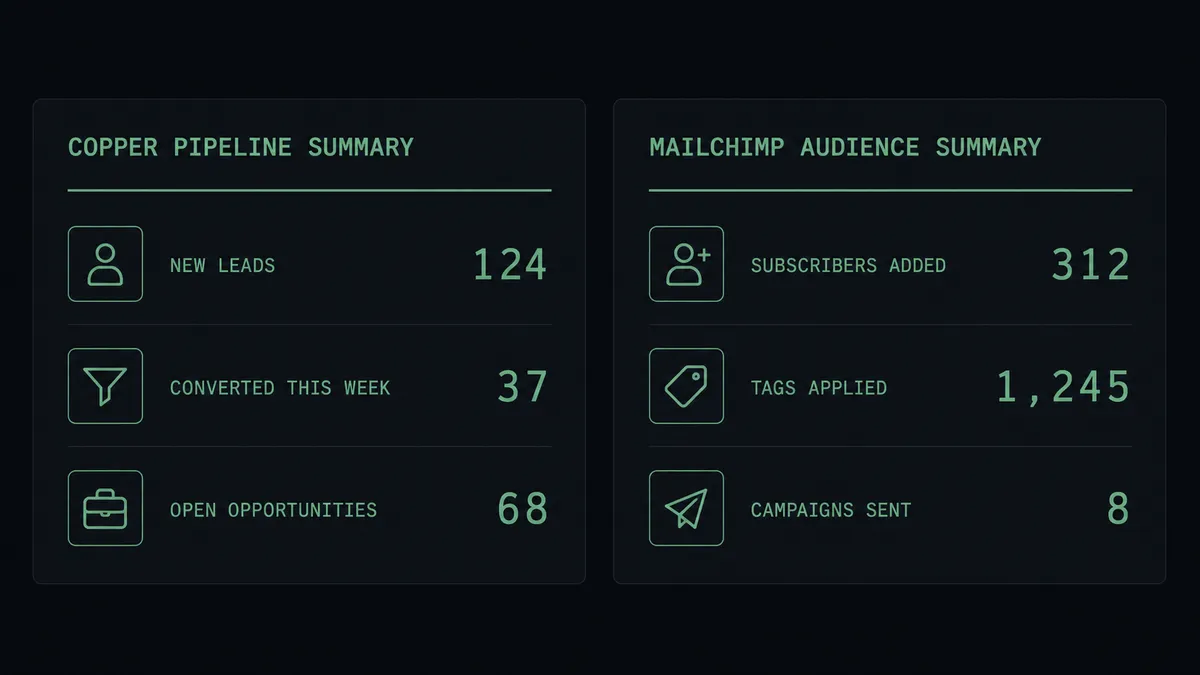
Weekly pipeline and campaign digest. A scheduled flow sweeps Copper opportunities using Search Opportunities, retrieves last week’s email performance with Get Campaign Report, and posts a combined summary to the operations Slack channel. Ops leadership sees both pipeline health and marketing performance in one Monday morning message.
Behavioral tag routing. When a Mailchimp contact clicks a pricing link (tracked via a connected email tool), the agent finds the matching Copper lead with Search People, updates the lead’s status or custom field, and applies a Pricing Intent tag in Mailchimp with Add Tag. The contact moves to the right sequence without anyone checking a click report.
Common questions
Is it free to connect Copper and Mailchimp Marketing on FlowRunner? FlowRunner gives every new account a $100 credit on the Growth plan, which covers roughly 67 days of real workflows at no cost. No credit card is required to start. The Growth plan is $45 per month after the credit is used.
Does my Mailchimp audience update in real time when a lead converts in Copper? Yes. When the workflow runs Convert Lead in Copper, the agent immediately calls Add Or Update List Member in Mailchimp to add or update the contact in the correct audience. There is no batch sync or scheduled import.
Can I self-host FlowRunner? Yes. FlowRunner offers a self-hosted Community Edition at no cost and a self-hosted Enterprise tier for teams that need multi-instance clustering and a full compliance suite. Cloud-hosted tiers start at $45 per month.
Does the agent need my own AI API key? FlowRunner uses a bring-your-own-key (BYOK) model for AI providers. You connect your own OpenAI, Anthropic, or other provider key. Your data does not flow through a shared AI endpoint.
What happens when the agent is not sure whether to add a contact to Mailchimp? The agent evaluates the lead or contact record it just created or converted in Copper and decides which audience applies. For edge cases, such as a contact that matches two audiences or a campaign send that would reach a large list, the agent pauses and routes the decision to a human through Slack or email before proceeding.
Can an agent handle campaign sends, not just audience management? Yes. The Mailchimp Marketing integration includes Send Campaign and Add Campaign actions. An agent can create a campaign, check the audience size, seek human approval if it exceeds a threshold, and then send. The agent decides when approval is needed based on context, not a hardcoded rule.
Getting started
FlowRunner’s $100 trial credit covers roughly 67 days of real workflows on the Growth plan. No credit card required. Corporate email gets you in.
Both integrations are ready to connect today:
Start at flowrunner.ai or book a 30-minute walkthrough at calendly.com/flowrunner/intro. The walkthrough covers building your first Copper-to-Mailchimp flow and adding the human-in-loop step.