How to Connect Eventbrite with Mailchimp Marketing (With or Without an AI Agent)
Connect Eventbrite to Mailchimp Marketing so that new event registrants are automatically added to the right audience, tagged by event, and enrolled in follow-up sequences, with a human confirmation step before any campaign deploys to a large list.
How do you connect Eventbrite to Mailchimp Marketing?
You connect Eventbrite to Mailchimp Marketing by polling List Attendees on a schedule in Eventbrite and calling Add Or Update List Member in Mailchimp to enroll each new registrant into the right audience, then applying an event-specific tag with Add Tag. FlowRunner is a visual AI-agent orchestration platform where automations run autonomously and pause for human judgment on the steps that carry real consequence. The same connection can run as an AI agent that reasons about each registrant and invokes a human confirmation before it sends any campaign to a large list.
The problem event teams run into
After every event, someone on the marketing team exports the attendee list from Eventbrite, cleans it up in a spreadsheet, and imports it into Mailchimp. That process takes time the team does not have, and it happens after the fact. By the time the list is in Mailchimp, the event is two days old and the follow-up email is already late.
The problem compounds when you run multiple events. Each event needs its own segment in Mailchimp so you can send relevant follow-ups. Without automation, that segmentation happens manually too, which means it often does not happen at all. Attendees from a product launch webinar end up in the same audience bucket as attendees from a regional user conference, and the follow-up message misses both groups. Registrant data falls through the cracks, and the window to reach engaged prospects closes.
How it works: the connection
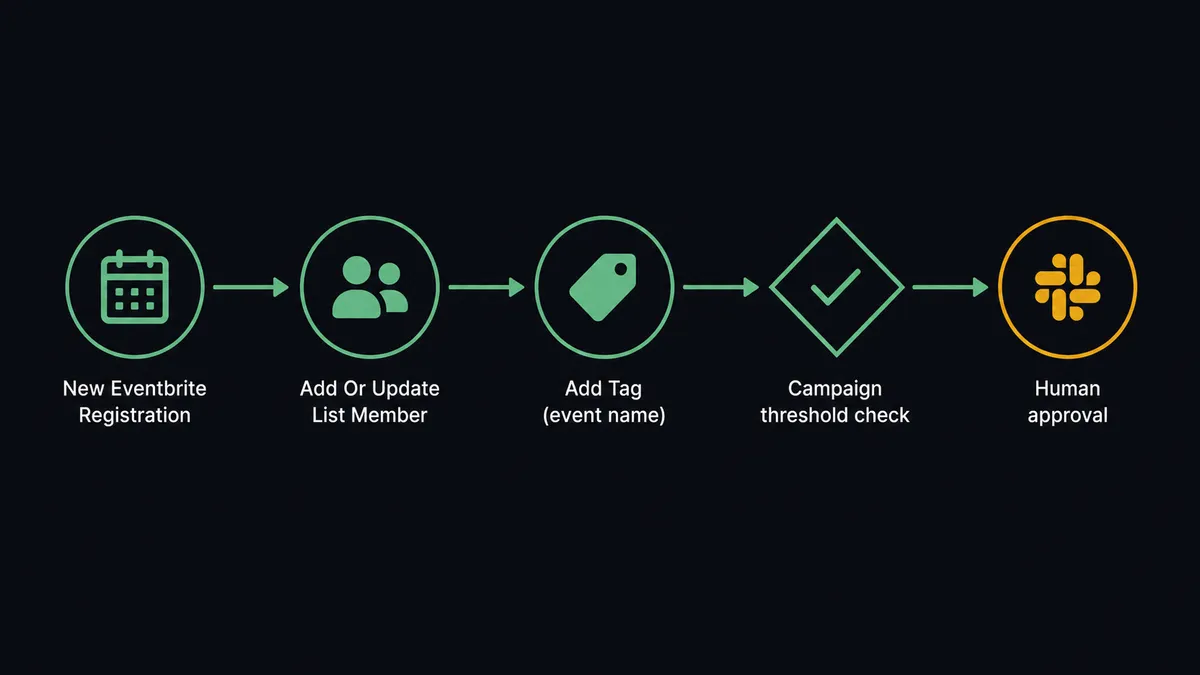
The flow starts with a scheduled trigger that calls List Attendees on your target Eventbrite event. Every time it runs, FlowRunner compares the returned attendee list against what has already been processed. For each new registrant, it calls Add Or Update List Member in Mailchimp, mapping the attendee email, first name, and last name into the correct audience. If the subscriber already exists, Mailchimp updates their record rather than creating a duplicate.
After enrollment, the agent calls Add Tag and applies a tag that identifies the specific event: for example, “Webinar-2026-08” or “Conference-Austin-Fall.” That tag becomes the segmentation key. Follow-up campaigns can target exactly the people who attended that event rather than the entire list.
For order data, a parallel step calls List Orders on the same event and logs each purchase into a tracking system. Revenue from ticket sales stays current without anyone exporting a CSV.
The Eventbrite side uses these actions as the agent’s tools: List Attendees to pull new registrants, Get Attendee when a specific attendee’s check-in status or profile answers are needed, and List Orders to track ticket revenue. The Mailchimp side uses Add Or Update List Member for enrollment, Add Tag for segmentation, Search Member when the agent needs to confirm a subscriber’s current state before acting, and Add Member Note to log any context that does not fit in standard fields.
Can an AI agent run it? (and why a human stays in the loop)
Yes. The plain connection syncs attendees and applies tags. The AI-agent version adds judgment.
The agent reads each new registrant’s data before it acts. If an attendee registered for multiple events in the same month, the agent evaluates whether they belong in a re-engagement sequence or a VIP track based on their tag history. If a batch of registrants came through a partner discount code, the agent applies a different tag and routes them into a partner-specific follow-up sequence rather than the standard one. It is not executing a fixed script. It is reading the data and choosing the right tool.
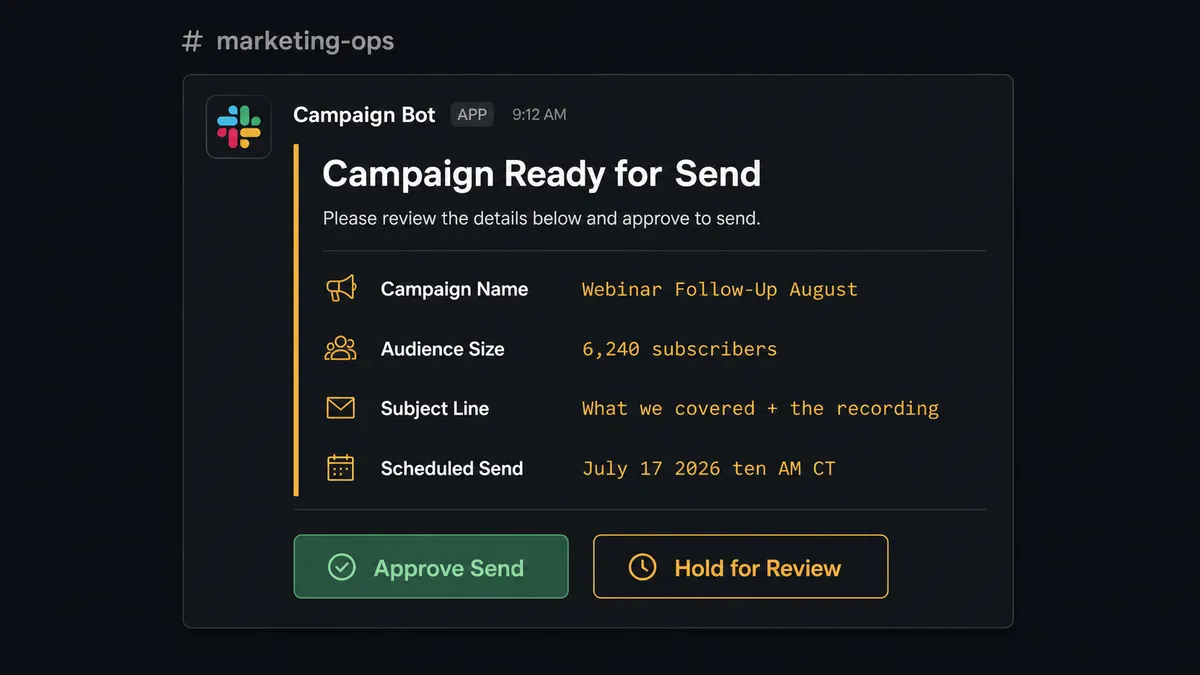
The moment that carries real consequence is the campaign send. When an event generates a large registrant batch and the flow is configured to send a follow-up campaign, the agent does not call Send Campaign automatically. It checks the audience size against a configured threshold. If the campaign would reach more than 5,000 subscribers, the agent stops and routes approval to Slack.
The message looks like this: “Campaign ‘Webinar Follow-Up August’ is ready to send to 6,240 subscribers. Subject line: ‘What we covered + the recording.’ Scheduled send: today at 10:00 AM CT. Approve send or hold for review?” The marketing manager sees the full context: audience size, subject line, timing. They approve or they ask for a content review. The agent resumes with that decision as input.
This is not a threshold trigger. The agent decides to escalate because it evaluated the risk of the step. A follow-up to 200 attendees from a small in-person meetup goes automatically. A campaign to 6,000 registrants from a high-profile launch event gets a human set of eyes. The decision to stop and ask is itself an AI decision, not a rule.
FlowRunner vs the tool you are probably already using
If you searched “connect Eventbrite to Mailchimp,” you have likely already looked at Zapier. Zapier is genuinely good at simple two-step connections, its setup takes minutes, and it has a massive template library that makes it easy to get started without any configuration work. For teams that need a basic sync and nothing more, it is a reasonable choice.
The differences show up when the connection needs to reason, not just route.
| Feature | Zapier | FlowRunner |
|---|---|---|
| Basic Eventbrite to Mailchimp sync | Yes, via Zap templates | Yes, via scheduled flow |
| AI agent that reads data and picks the right action | No | Yes, native agent nodes |
| Human-in-loop on campaign sends | No native support | Yes, callable approval flow with full context |
| Unlimited users on every plan | No (seat-based on higher tiers) | Yes, all tiers |
| Bring Your Own AI Keys (BYOK) | No | Yes |
| Audit trail on every agent decision | No | Yes, built into every execution |
| Self-hosted deployment option | No | Yes, Community Edition and Enterprise |
Zapier routes data. FlowRunner runs agents that reason about data and know when to stop and ask. For teams that run multiple events, manage behavioral segmentation, or need a human checkpoint before a campaign reaches thousands of subscribers, that difference is the one that matters.
Before and after
| Category | Before | After |
|---|---|---|
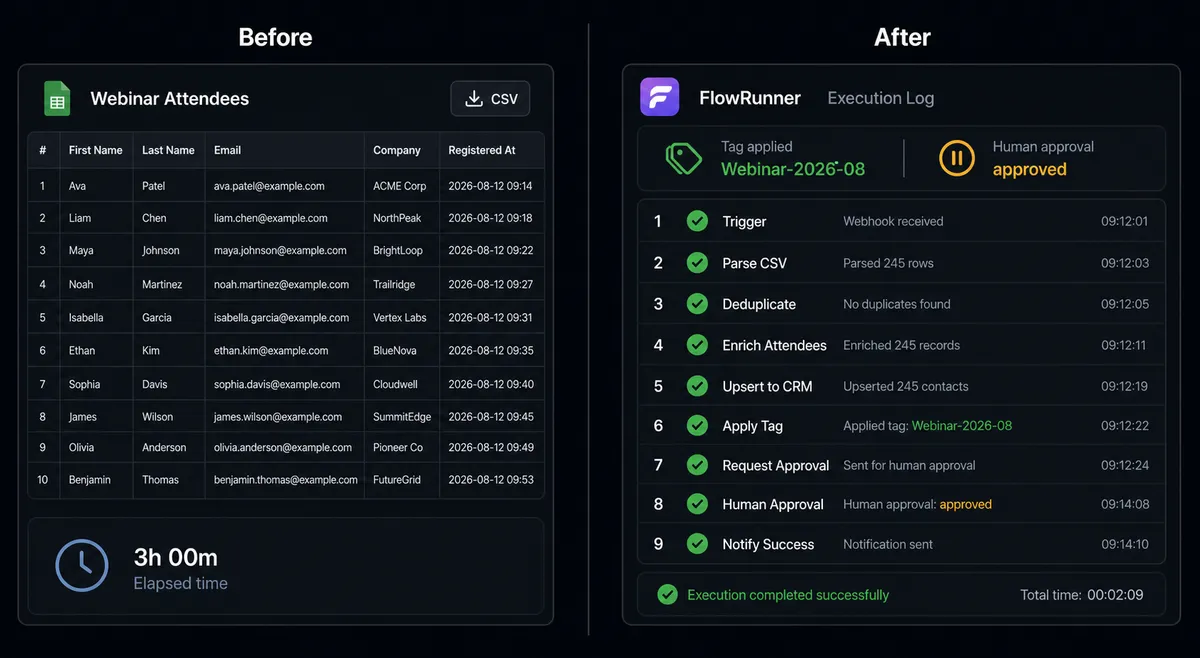
| Attendee sync | Manual CSV export from Eventbrite, import into Mailchimp after the event | Attendees enrolled in Mailchimp within minutes of registration, on a schedule |
| Audience segmentation | All attendees land in one list regardless of event | Each registrant tagged with the specific event for precise follow-up targeting |
| Campaign send oversight | Campaigns sent manually with no structured review step | Large campaigns paused for Slack approval before send |
| Order tracking | Ticket revenue logged by hand into spreadsheets | List Orders syncs sales data automatically on each poll cycle |
| Duplicate handling | Duplicates created when the same contact registers twice | Add Or Update List Member checks for existing subscribers and updates, not duplicates |
| Team time on list management | Hours per event managing exports, imports, and tags manually | Team reviews exceptions and approves campaigns; routine sync runs without intervention |
What you can build
Event registration to Mailchimp enrollment. Every new Eventbrite registrant is added to the correct Mailchimp audience with Add Or Update List Member and tagged by event with Add Tag. The audience reflects live registration data without anyone managing it.
Post-event follow-up sequence. When an event ends, the agent calls List Attendees one final time, enrolls all confirmed attendees in a post-event email sequence, and logs check-in status from Get Attendee to differentiate follow-ups for attendees who showed up versus those who registered but did not attend.
Campaign send with human approval. The agent builds a follow-up campaign using Add Campaign, checks audience size, and routes Slack approval for any send above a threshold. The marketing manager approves or holds. After approval, the agent calls Send Campaign and logs the decision in the audit trail.
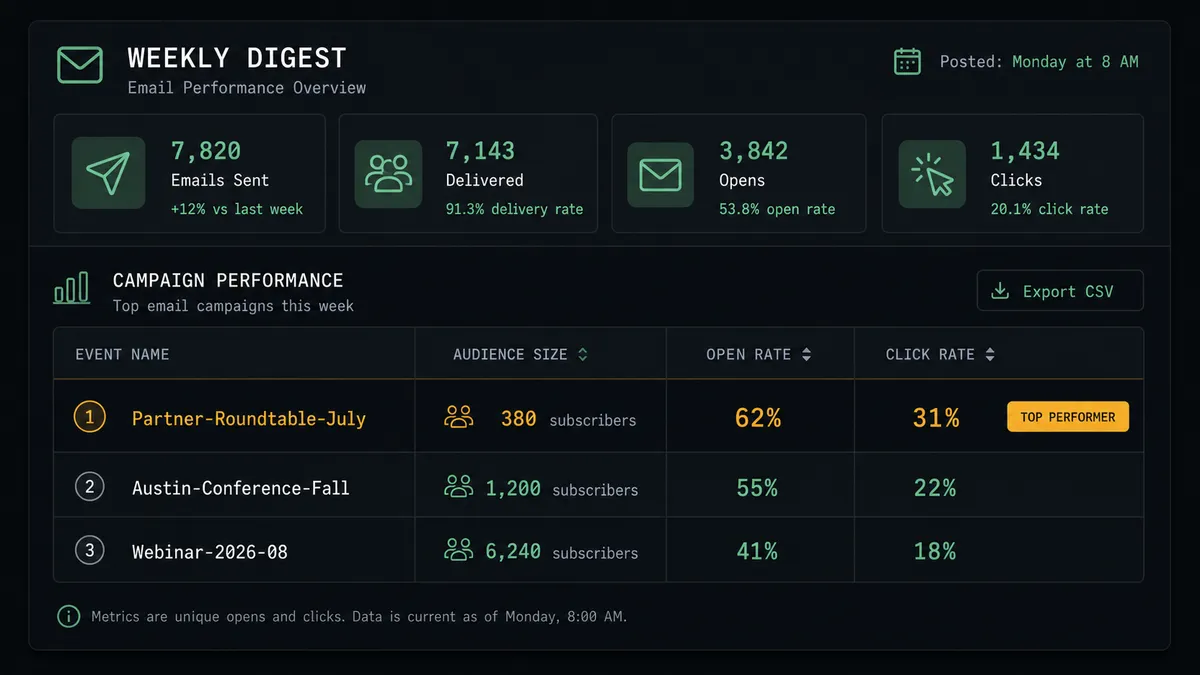
Weekly event performance digest. Every Monday, the agent calls Get Campaign Report for each post-event campaign sent in the prior week, formats open rate and click rate by event, and posts the summary to the marketing Slack channel. Leadership sees event email performance without pulling reports manually.
Behavioral retargeting from event clicks. After a post-event campaign sends, the agent calls Get Clicks Report to identify which links registrants clicked. Subscribers who clicked a product demo link get tagged “Demo Intent” with Add Tag and routed into the product-focused follow-up sequence.
Common questions
Is it free to connect Eventbrite and Mailchimp Marketing on FlowRunner? FlowRunner offers a $100 credit on the Growth plan, which covers roughly 67 days of real usage with no credit card required. After the credit runs out, Growth starts at $45 per month. All tiers include unlimited users and workflows.
Can I self-host FlowRunner? Yes. FlowRunner offers a free Community Edition for self-hosted single-instance deployments and an Enterprise self-hosted option with multi-instance clustering and full compliance features.
Does the AI agent need my own OpenAI key? FlowRunner uses a Bring Your Own Keys model. You connect your preferred AI provider directly. The platform is not tied to any single model or vendor.
What happens when the AI agent is not sure what to do? The agent pauses and routes to a human through your preferred channel, Slack, email, or WhatsApp. It packages the full context of what it found, why it stopped, and what the options are. The human decides; the agent resumes with that decision as input.
Can FlowRunner sync attendees on a schedule, not just on registration? Yes. A scheduled flow can call List Attendees and List Orders on any interval, enrolling new registrants into Mailchimp audiences and logging sales data without anyone manually exporting a CSV.
Does FlowRunner work if Eventbrite has no webhook support? FlowRunner agents can poll Eventbrite on a schedule using List Attendees and List Orders, so you get near-real-time sync even without a native webhook trigger from Eventbrite.
Getting started
FlowRunner includes a $100 credit on the Growth plan, covering roughly 67 days of real usage. No credit card is required to start.
Connect both integrations in minutes: Eventbrite and Mailchimp Marketing. Build your first attendee sync flow, add the human-in-loop approval step for campaigns, and have it running before the end of the week.
Start at flowrunner.ai or book a 30-minute walkthrough at calendly.com/flowrunner/intro.