How to Connect Outlook with HubSpot (With or Without an AI Agent)
Connect Outlook and HubSpot so inbound emails automatically create or update HubSpot contacts and deals, optionally running as a FlowRunner AI agent that pauses for a human before writing to your CRM on ambiguous or high-stakes records.
How do you connect Outlook to HubSpot?
You connect Outlook to HubSpot by building a FlowRunner workflow that polls your Outlook inbox using Get Emails, then calls Get Contact by Email in HubSpot to match or create a CRM record from the inbound message. FlowRunner is a visual AI-agent orchestration platform where automations run autonomously and pause for human judgment on the steps that carry real consequence. That same connection runs as an AI agent that reads inbound emails, decides how to classify them, creates or updates HubSpot contacts and deals, and invokes a human decision on any record it is not confident about.
The problem: email and CRM living in separate worlds
Right now, every email that arrives in your shared operations inbox sits there until a person reads it, decides what it means, finds the matching HubSpot record, and manually updates the deal or creates a contact. For a team handling dozens of inbound messages a day, that is hours of work that produces no revenue. It is classification, copy-paste, and record-keeping, and it is exactly the kind of work that falls through the cracks when the team is stretched.
The downstream cost is a CRM full of stale data. Deal stages reflect what someone entered last Tuesday, not what happened this morning. Contacts get created twice because there was no deduplication check. Leads wait in an inbox while the person who routes them is in a meeting. By the time the right sales rep sees the opportunity, the prospect has already talked to a competitor.
How it works: the connection
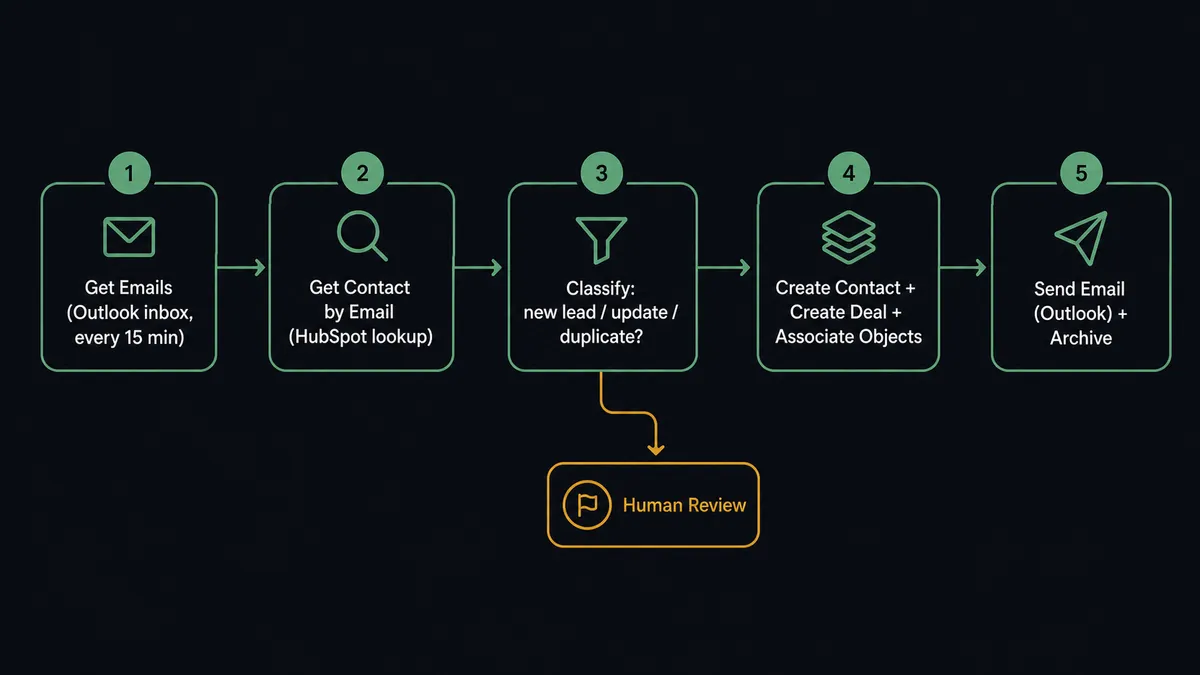
A FlowRunner workflow sits between your Outlook inbox and your HubSpot CRM and runs every 15 minutes without anyone touching it.
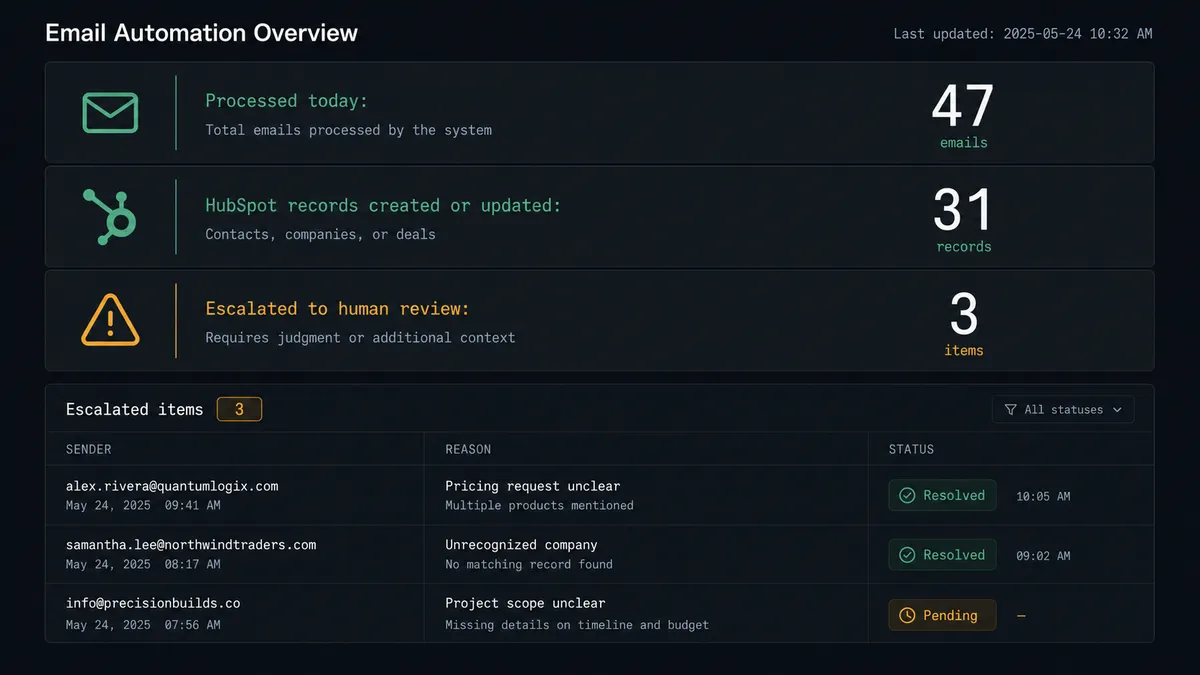
The trigger is a scheduled run that calls Get Emails on your dedicated operations inbox. The agent reads the batch of new messages and begins classifying each one. For a message that looks like a new lead or inbound inquiry, the agent calls Get Contact by Email in HubSpot using the sender’s address. If no record exists, it calls Create Contact and associates the new record with the company using Associate Objects. It then calls Create Deal to open an opportunity in the right pipeline stage, routes it to the correct owner, and calls Send Email from the account manager’s real Outlook address to acknowledge receipt. The original message is archived.
For messages that match an existing contact, the agent calls Update Contact or Update Deal to keep the record current. Purchase order confirmations, meeting requests, and status updates each route to the right workflow step. The inbox is processed and cleared before anyone on your team arrives in the morning.
Can an AI agent run it? (and why a human stays in the loop)
A basic Zapier or Make connection maps a trigger to a single action. When your Outlook inbox gets a message, it creates a HubSpot contact. That works until the message is ambiguous: two people with the same company name, a contact who already exists but with a different email, a deal with an owner who left the company last month. A rule-based tool picks wrong and moves on. Your CRM accumulates the error silently.
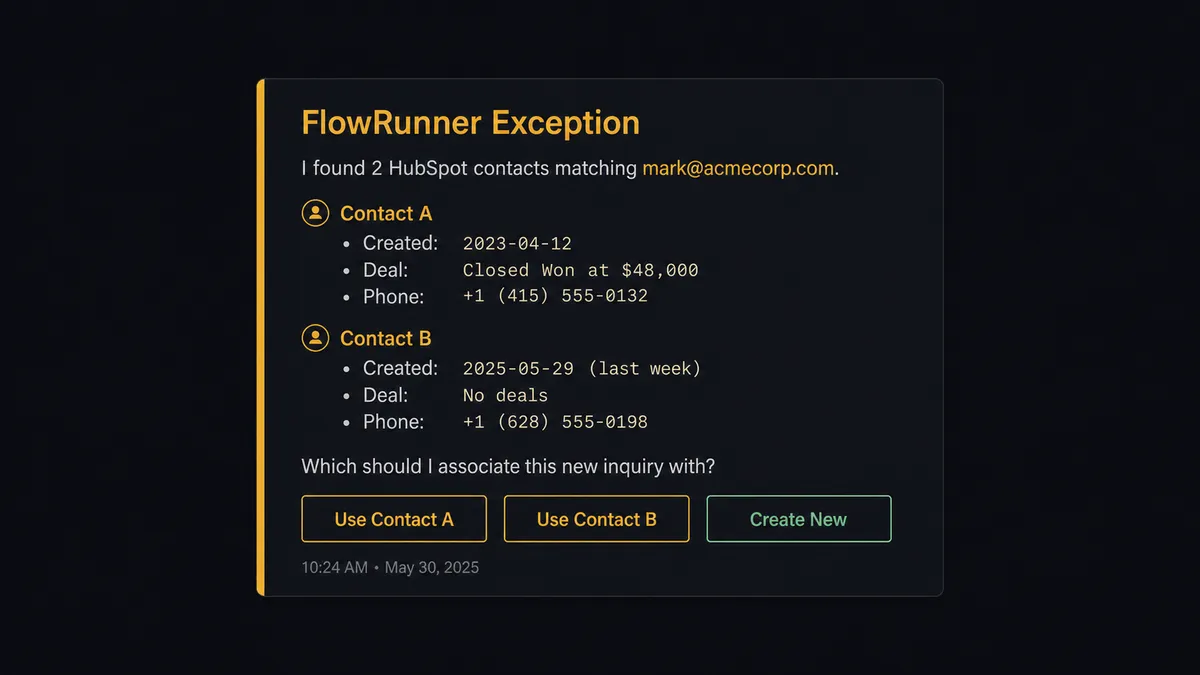
A FlowRunner AI agent reads the inbound email, evaluates the HubSpot data, and makes a reasoned decision about what to do. It calls Get Contact by Email and finds two records that could match. It checks the company domain on both. It looks at the deal history on each. And then, because the decision carries weight, it invokes the human-in-loop flow it was given as a callable tool.
The workflow pauses. The CRM admin receives a Slack message: “I found two HubSpot contacts matching this email. Contact A (created 2023, deal closed) and Contact B (created last week, no deals). Which should I associate this new inquiry with? Reply A, B, or create new.” The admin responds. The agent associates the record, updates the deal, and resumes. The decision, the decider’s identity, and the timestamp are all logged in the audit trail.
This is not a hardcoded threshold. The agent does not escalate every email or only escalate emails above a certain deal value. It escalates when the data it finds makes it uncertain. A clean new lead from a domain it has never seen before goes straight through. A contact with three possible matches in a $200K account goes to a human.
Prospects call this the “digital andon cord.” The agent stops the line when it hits genuine uncertainty. That is not a limitation. That is the point.
FlowRunner vs Zapier
Zapier is the tool most non-technical teams already use. It is easy to set up, has a large integration library, and works well for straightforward trigger-to-action connections. If you need “when I get an Outlook email, create a HubSpot contact,” Zapier can do that in about ten minutes.
The gaps become visible when your workflow involves decisions. Zapier executes a fixed sequence. It does not read data and reason about what to do next. It does not detect a duplicate contact and route the exception to a human. It does not create a draft email for human review before sending from an executive’s real Outlook mailbox. Every exception in a Zapier workflow either breaks the flow or gets ignored.
| Feature | Zapier | FlowRunner |
|---|---|---|
| Basic trigger-to-action connection | Yes | Yes |
| AI agent that reasons about data | No | Yes, native AI Agent node |
| Human-in-loop on ambiguous records | No (conditional branches only) | Yes, agent invokes as a callable tool |
| Deduplication before CRM write | Manual configuration required | Agent calls Get Contact by Email first |
| Draft email for human approval | No | Create Draft Email + human review flow |
| Unlimited users on every tier | Per-seat pricing | Yes, all tiers |
| Self-hosted option | No | Yes, Community Edition free |
If you are a non-technical ops team running straight-line automations, Zapier is a reasonable tool. When your workflows need to evaluate data, make decisions, and escalate exceptions intelligently, FlowRunner is the right layer.
Before and after
| Category | Before | After |
|---|---|---|
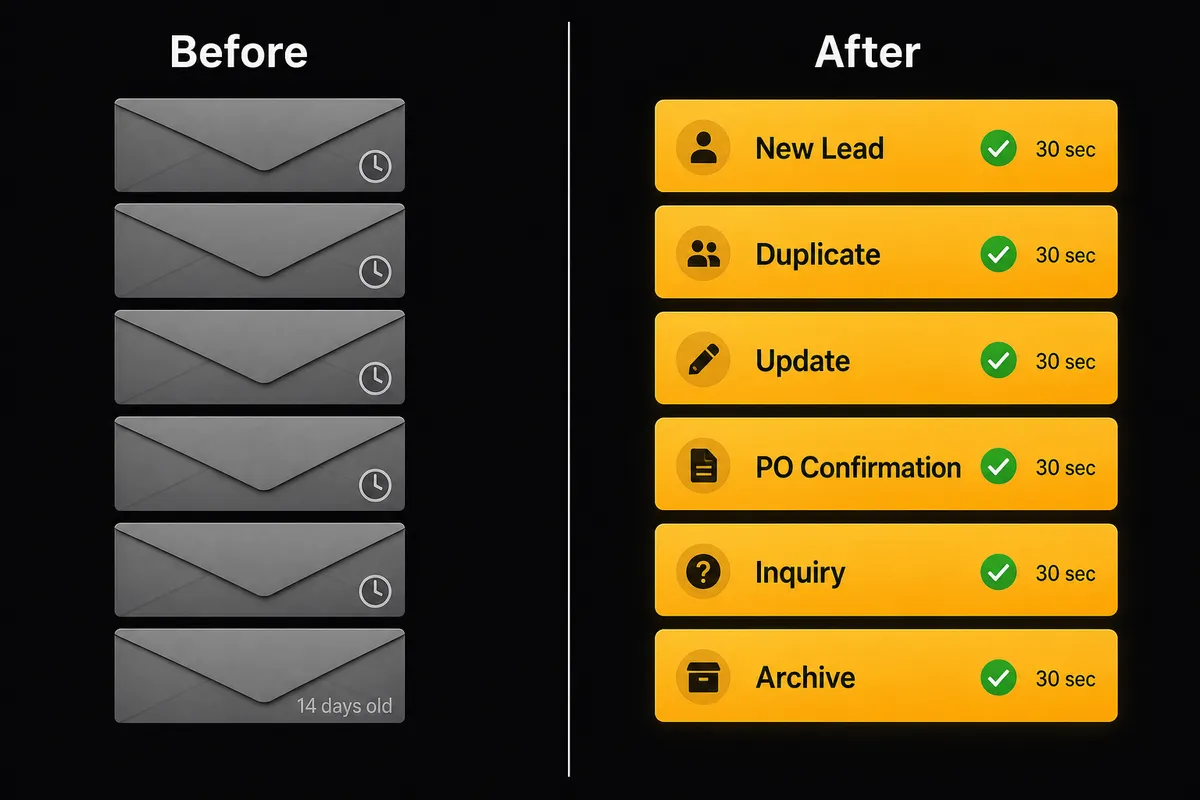
| Inbox processing | Staff read every email manually and route it by hand | Inbox processed every 15 minutes, messages classified and routed before the team arrives |
| CRM record creation | Sales reps create contacts and deals by hand from email notifications | Contact created, associated, and deal opened in under 30 seconds from any inbound email |
| Deduplication | No systematic check before creating new contacts | Agent calls Get Contact by Email on every inbound before writing a single record |
| Deal stage accuracy | Stages reflect what someone entered last; stale by the time the rep checks | ERP activity and inbound email both trigger automatic deal stage updates |
| Exception handling | Ambiguous records silently written wrong or skipped | Agent pauses, routes to CRM admin via Slack, resumes with the human’s decision logged |
| Email sends from real accounts | Reps write and send individually; no audit of what was sent | Agent creates drafts, human approves, send is logged in audit trail |
What you can build
New lead from inbound email to HubSpot deal in under 30 seconds. An email arrives from a prospect who found your website. The agent calls Get Contact by Email, finds no record, calls Create Contact with the sender’s name and company domain, creates a deal in the inbound pipeline with Create Deal, and associates the contact and company using Associate Objects. The sales rep receives a Slack notification with the full deal context before they have opened their laptop.
Contract signed, Outlook welcome email sent automatically. A deal closes in HubSpot. The agent calls Get Contact by ID to retrieve the new customer’s details, calls Create Draft Email in Outlook with a personalized welcome message from the account manager’s real Microsoft 365 address, then routes the draft to the account manager for one-click approval before Send Draft Email fires. The customer receives a human email. The account manager did not write it.
Stalled deal recovery with Outlook follow-up. Every Friday, an agent queries Get All Deals for opportunities in the Negotiation stage not updated in 14 days. For each, it calls Get Contact by ID and calls Send Email from the rep’s Outlook account: a direct follow-up with the deal summary as context. Deals that remain unresponsive after 48 hours surface to the sales manager.
Shared inbox triage into HubSpot contact updates. The operations inbox receives customer questions, vendor notices, and support requests. The agent reads the batch with Get Emails, matches each sender using Get Contact by Email or Search Contacts, and calls Update Contact to log the interaction. Unmatched senders become new HubSpot contacts automatically. Nothing sits in the inbox unprocessed.
Common questions
Is it free to connect Outlook and HubSpot on FlowRunner? FlowRunner offers a $100 credit on the Growth tier with no credit card required, giving most teams roughly 67 days of real usage at no cost. After that, Growth starts at $45 per month. All tiers include unlimited users and unlimited workflows.
Can I self-host FlowRunner? Yes. FlowRunner offers a free self-hosted Community Edition for single-instance use. Enterprise self-hosting with multi-instance clustering and a full compliance suite is available on a custom contract.
Does the AI agent need my own OpenAI or AI provider key? FlowRunner uses a Bring Your Own Key model. You connect your preferred AI provider, such as Anthropic or OpenAI, directly. Your data never passes through FlowRunner’s own AI layer.
What happens when the agent is not sure what to do? The agent invokes a human-in-loop flow as a callable tool. It packages the relevant context, routes the exception to the right person via Slack, email, or another channel, pauses the workflow, and resumes with the human’s decision as input. The decision and the decider’s identity are recorded in the audit trail.
Do I need separate licenses for each team member? No. Every FlowRunner tier includes unlimited users. There are no per-seat fees.
Can the agent handle duplicate contacts in HubSpot? Yes. The agent calls Get Contact by Email before creating any new record. If it finds a potential duplicate or conflicting owner assignment, it pauses and routes the ambiguity to a CRM admin via Slack rather than silently choosing.
Getting started
Connect your first Outlook-to-HubSpot workflow with a $100 credit on the Growth tier at flowrunner.ai. No credit card required. That covers roughly 67 days of real usage at the Growth tier rate.
The Outlook and HubSpot integrations are both active. You can review their full action libraries at /integrations/outlook and /integrations/hubspot before you build.
If you want to talk through the right workflow structure for your team before you start, book a 30-minute intro call at calendly.com/flowrunner/intro. We map the exceptions your team handles manually, identify which ones the agent should own, and decide where the human-in-loop steps belong.