How to Connect Slack with Trello (With or Without an AI Agent)
Connect Slack and Trello so messages and reactions trigger card creation, movement, and updates automatically, then upgrade to an AI agent that handles exceptions and pauses for a human before any destructive action.
How do you connect Slack to Trello?
You connect Slack to Trello by using a Slack trigger (On Channel Message, On Mention, On Block Action, or On Reaction Added) to start a FlowRunner workflow that calls Trello actions like Create Card, Move Card to List, or Add Comment to Card. FlowRunner is a visual AI-agent orchestration platform where automations run autonomously and pause for human judgment on the steps that carry real consequence. That same connection can run as an AI agent that reads each Slack message, decides which Trello action to take, and contacts a human before executing anything that cannot be undone.
The problem operations teams are living with today
Project managers and ops leads spend a meaningful part of every day moving cards. A Slack message comes in, someone has to create a Trello card. An issue surfaces, someone has to move a card from In Progress to Blocked. A deliverable clears review, someone has to update the card and notify the stakeholder. None of these tasks require judgment. They just require attention, which means they fall through the cracks when the team is busy.
Exceptions are worse. When something unusual lands in Slack (a vendor complaint, a billing discrepancy, a production issue), the process is to start an ad hoc thread, tag the right people, and hope someone eventually creates a card with the right context. Cards created manually in the middle of a crisis rarely have complete information. The checklist items are missing. The assignee is wrong. The description is whatever someone typed in 30 seconds. The board reflects what the team intended to do, not what is actually happening.
How it works: connecting Slack to Trello with FlowRunner
The connection starts with a Slack trigger. On Channel Message fires whenever a message is posted to a monitored channel. On Mention fires when someone tags your agent directly. On Reaction Added fires when a team member drops an emoji on a message. On Block Action fires when someone clicks an interactive button in a Block Kit message. Each of these triggers hands FlowRunner the message content, the sender, the channel, and the timestamp.
On the Trello side, the agent has 67 actions available as tools. The most used ones for this connection:
- Create Card: Creates a new card in a specified list. The agent maps the Slack message subject to the card title, the full message to the card description, and the sender to the card assignee.
- Move Card to List: Advances a card from one pipeline stage to another. The agent triggers this when a Slack message confirms a status change (a payment confirmed, a deliverable approved, a review completed).
- Update Card: Modifies any card field. Name, description, due date, list position.
- Add Comment to Card: Posts a comment on an existing card with the Slack message content and sender identity.
- Add Checklist Item and Mark Checklist Item as Complete: The agent adds resolution steps as checklist items when creating exception cards, and marks them complete as Slack messages confirm each step is done.
- Find or Create Card: Looks up a card before creating it to prevent duplicates.
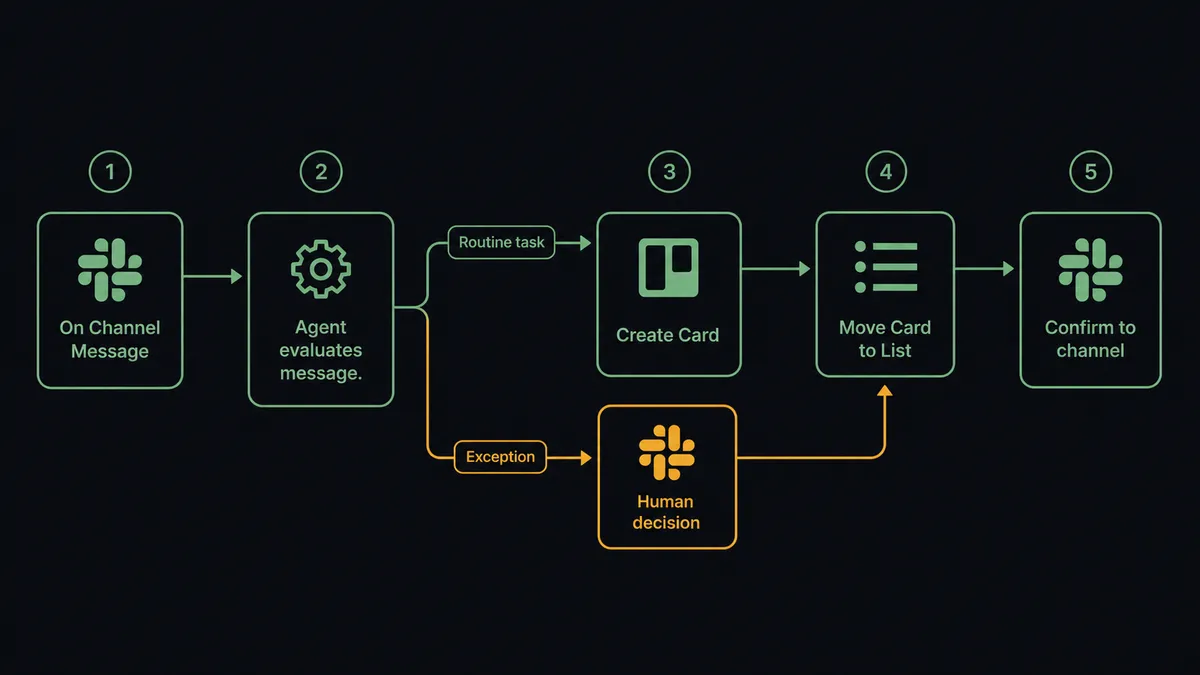
A simple version of this flow without an AI agent looks like: On Channel Message fires, a condition node checks if the message contains a keyword (like “issue” or “blocker”), and if yes, Create Card runs with static field mapping. That works. The card is created every time the keyword appears, with the same template, regardless of context.
The AI agent version is different. It reads the message. It decides.
Can an AI agent run it? (And why a human stays in the loop)
An AI agent in FlowRunner is a workflow node that evaluates data and picks tools from its toolbox. It does not just call Action A then Action B. It reads the Slack message, interprets the situation, and decides which Trello actions to use and in what order. This is the upgrade Zapier and n8n cannot offer with a standard connection.
Here is a real decision moment. A vendor posts in your #exceptions channel: “Invoice 4821 was flagged. The amount is $34,000. We have not seen a payment in 6 weeks.” The agent reads this and evaluates: this is not a routine card-creation task. The amount is 4x the vendor’s usual invoice size. The payment gap suggests either a system failure or a dispute. Creating a card with a standard template would lose critical context.
The agent invokes its human-in-loop subflow. It sends a Slack Block Kit message to the AP operations lead: “Invoice 4821 flagged by vendor. Amount: $34,000 (4x usual). No payment recorded in 6 weeks. Possible ERP processing failure or dispute. Action needed: Confirm payment status or open dispute card?” Two buttons: Confirm Payment Issue and Open Dispute Card.
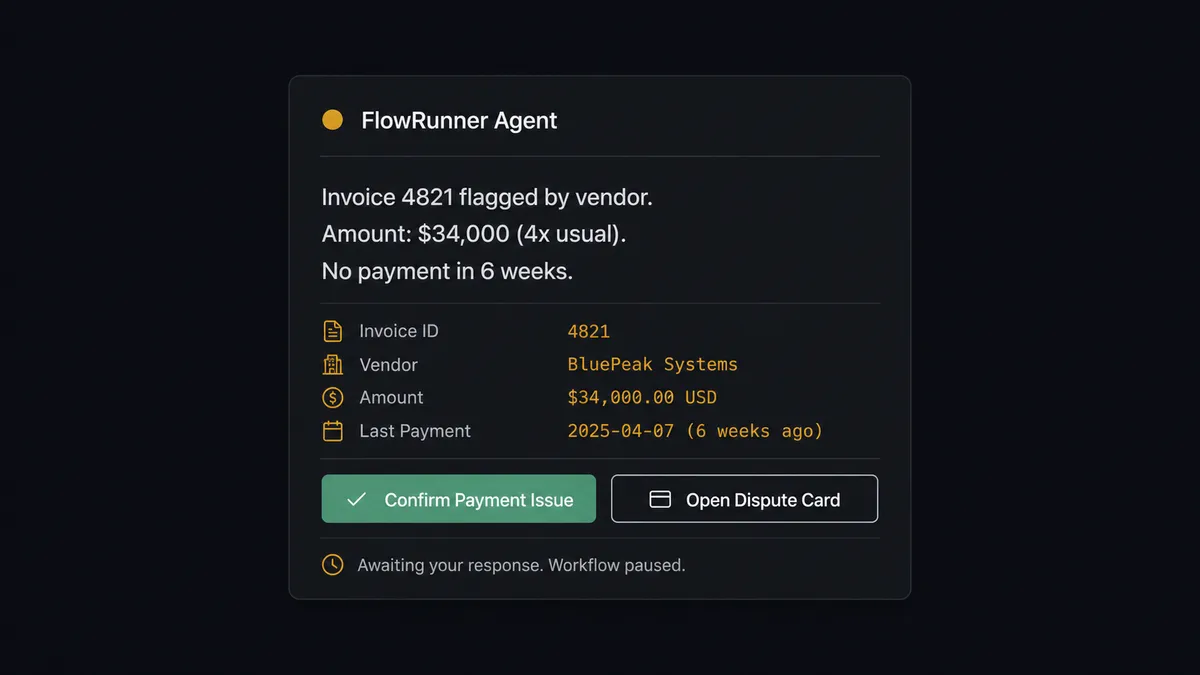
The AP lead clicks Open Dispute Card. The On Block Action trigger fires. The agent resumes with the human’s decision as input. It calls Create Card in the AP Exceptions board: title is “Invoice 4821 - Vendor Dispute - $34,000,” description includes the full vendor message, the payment gap, and the lead’s decision. It adds checklist items: “Verify ERP payment status,” “Contact vendor,” “Escalate to finance director if unresolved.” It assigns the card to the AP manager. The decision, the decider, and the timestamp are captured in FlowRunner’s audit trail.
This is what the “digital andon cord” looks like in practice. The agent stops the line when it hits something it should not decide alone. The human makes the call with full context. The workflow resumes with the decision preserved.
The agent also handles the other case: a simple “#standup update - onboarding for Acme Corp complete” message. No exception. No ambiguity. The agent calls Create Card in the Client Onboarding Completed list, marks the card’s checklist item as complete, and posts a confirmation back to #standup. No human needed.
FlowRunner vs Zapier (the tool you are probably comparing)
Zapier is the natural comparison for non-technical operations teams. It deserves credit: Zapier has been connecting Slack and Trello for years, the setup is fast, and the trigger/action library is large. For simple “message in, card out” automations, Zapier works.
The real differences show up in three places: what the agent can actually do, what happens at decision points, and what compliance looks like at scale.
| Feature | Zapier | FlowRunner |
|---|---|---|
| Slack to Trello basic connection | Yes, reliable and fast to set up | Yes, same connectors plus 67 Trello actions |
| AI agent decision-making | No native AI agent node; uses integrations for external AI calls | Native AI Agent node; reads data and selects tools based on context |
| Human-in-loop on exceptions | No native mechanism; requires workarounds | Built-in: agent invokes a human subflow as a callable tool and pauses execution |
| Audit trail on decisions | Zapier logs task history; no identity-linked decision capture | Every human decision logged with approver identity and timestamp |
| Trello action coverage | Standard card and list operations | 67 actions: full board, card, checklist, label, member, and attachment control |
| Pricing model | Per-task pricing; costs scale with volume | Workflow-based tiers; unlimited users and unlimited workflows on every plan |
| BYOK for AI | Requires third-party AI step at additional cost | Native BYOK; connect your own AI provider API key |
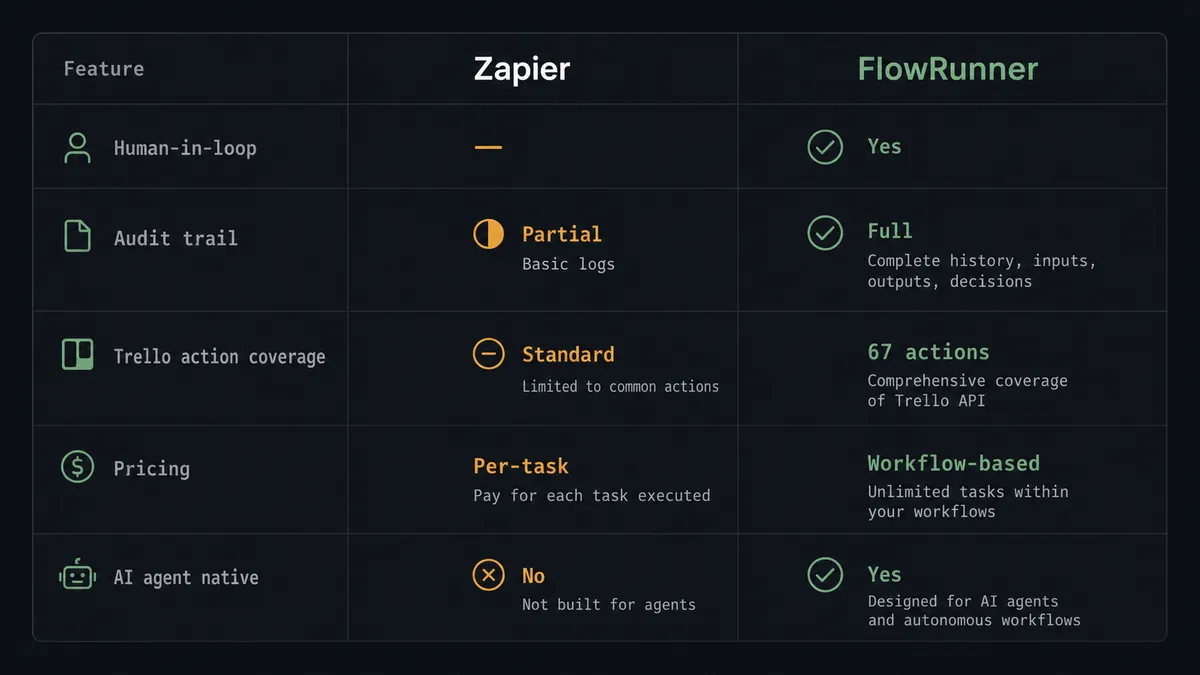
Zapier is a good choice for simple, high-volume, low-stakes connections. FlowRunner is the right choice when the connection involves decisions, exceptions, compliance requirements, or an AI agent that needs to reason about what it is looking at.
Before and after
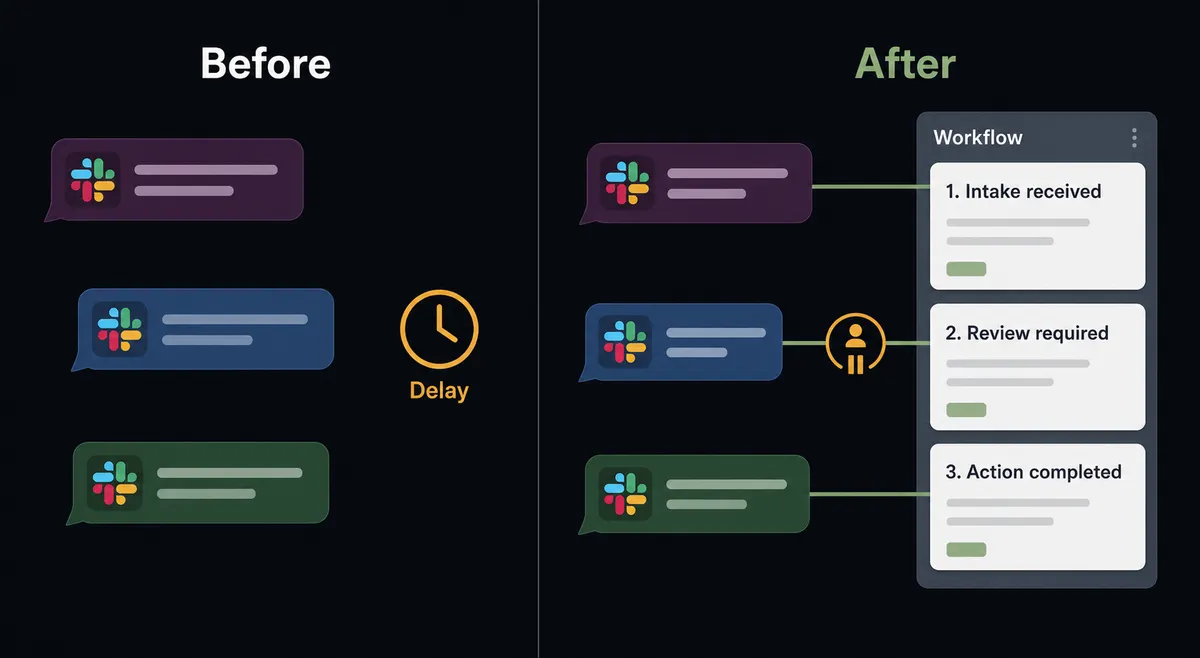
| Category | Before | After |
|---|---|---|
| Card creation from Slack | Someone reads the Slack message and manually creates the card. Happens when they have time. | Agent creates the card within seconds of the message, with full context mapped from the message content. |
| Exception handling | Exception buried in a Slack thread. Ownership unclear. Card created later, often with missing context. | Agent creates a structured exception card with checklist items, assignee, and full context. Human confirms before card is created if the situation is ambiguous. |
| Pipeline board accuracy | Board reflects last week’s state because reps forget to move cards manually. | Agent moves cards when Slack messages confirm stage transitions. Board is current in real time. |
| Decision audit trail | No record of who approved what or when. Decisions reconstructed from Slack threads. | Every agent pause, every human decision, and every card action captured with actor identity and timestamp. |
| Destructive actions | Board archives and bulk deletions happen without confirmation. Mistakes require manual recovery. | Agent routes destructive actions to a human checkpoint via Slack before executing. |
What you can build
Exception card creation from Slack threads. When a team member posts an issue in #exceptions, the agent reads the thread, creates a Trello card in the AP Issues list with the full context, adds checklist items for resolution steps, assigns the card to the right team member, and posts a card link back in the thread. No one has to leave Slack to start tracking the issue.
Pipeline stage automation. When a Slack message confirms a deal milestone (demo completed, contract signed, onboarding kicked off), the agent moves the corresponding Trello card from its current list to the next stage. It adds a comment to the card with the confirmation details from the Slack message.
Approval-gated card actions. The agent posts a Slack Block Kit message with the proposed Trello action and two buttons. The right person approves or redirects from Slack without opening Trello. The agent executes the card action and logs the approver.
Scheduled board digests. Every Monday at 8am, the agent reads the Trello board using Get Board Lists and Get Member’s Cards, compiles a summary of open cards by list and assignee, and posts a structured digest to #operations via Send Message to Channel. Leadership sees board status without pulling it manually.
Onboarding card provisioning. When a new team member joins a Slack channel (On New Member fires), the agent creates a Trello card in the Onboarding board using a standard template, creates a checklist of onboarding steps, and assigns the card to the new member’s manager. The board is ready before the manager thinks to set it up.
Common questions
Is it free to connect Slack and Trello on FlowRunner? FlowRunner starts with a $100 credit on the Growth tier, which covers roughly 67 days of real usage. No credit card required. After the trial, Growth is $45 per month and includes unlimited users and workflows.
Can I self-host the Slack and Trello integration? Yes. FlowRunner offers a self-hosted Community Edition at no cost. It runs the full Slack and Trello connector set. Enterprise self-hosted adds multi-instance clustering, full audit retention, and SSO.
Does the AI agent need my own OpenAI key? FlowRunner uses a bring-your-own-key (BYOK) model. You connect any supported AI provider using your own API key. The platform orchestrates the agent; the model runs under your account.
What happens when the agent is not sure what to do? The agent pauses and contacts the right person in Slack with full context: what it found, why it stopped, and what options are available. Interactive buttons collect the decision. The agent resumes with that input and logs the decision, the decider, and the timestamp in the audit trail.
Does FlowRunner support Trello triggers? Trello does not expose native webhooks in its standard API, so FlowRunner uses Slack triggers, schedule triggers, or other connected-system events to start workflows that then act on Trello. Outbound from Trello is handled through polling or through the On Message from Query trigger in Slack.
How many Trello actions does the FlowRunner integration support? The FlowRunner Trello integration covers 67 actions spanning every Trello object: boards, cards, lists, checklists, labels, attachments, stickers, members, and notifications. It is the most comprehensive Trello connector available on any orchestration platform.
Getting started
Start with a $100 credit on FlowRunner’s Growth tier. That covers roughly 67 days of real usage with no credit card required. Corporate email gets you in.
Connect both integrations in minutes: Slack integration details at flowrunner.ai/integrations/slack and Trello integration details at flowrunner.ai/integrations/trello.
Build the basic Slack-to-Trello connection first. Watch a few runs. Then add the AI agent node and the human-in-loop subflow when you have seen the exceptions your team actually faces.
Ready to get started? Visit flowrunner.ai to activate your trial, or book a 30-minute intro call to walk through a workflow built around your team’s specific Slack channels and Trello boards.