How to Connect Twilio with Google Sheets (With or Without an AI Agent)
Connect Twilio SMS and voice activity to Google Sheets automatically, optionally as an AI agent that logs every message, escalates exceptions, and pauses for human approval before placing a call.
How do you connect Twilio to Google Sheets?
You connect Twilio and Google Sheets on FlowRunner by using the On New SMS trigger to fire a flow when a customer replies, then calling Add Row or Update Row to log the event directly to your tracking sheet. FlowRunner is a visual AI-agent orchestration platform where automations run autonomously and pause for human judgment on the steps that carry real consequence. The same connection can run as a full AI agent: it reads the customer’s reply, reasons about it against the existing record, and updates the sheet, and when it decides a voice call is warranted, it routes that decision to a manager for approval before dialing.
The manual process and what falls through the cracks
Most operations teams track outbound Twilio activity in a spreadsheet by hand. A billing manager exports the message log at the end of the week, pastes it into the AR sheet, and then someone manually marks which customers replied. By the time that row is updated, the window for a timely follow-up has already closed.
The real cost is not the time spent updating rows. It is the exceptions that never make it to anyone’s attention. A customer texts back “PAID” three hours after receiving an SMS reminder. Nobody sees it until Friday’s export. The agent sends another reminder on Thursday. The customer calls in frustrated. The team spends twenty minutes on a call that should have been resolved automatically. Multiply that by the number of outstanding invoices, and you see where the hours go.
How it works: the Twilio and Google Sheets connection
The core connection works in both directions. The first direction: Twilio drives Google Sheets.
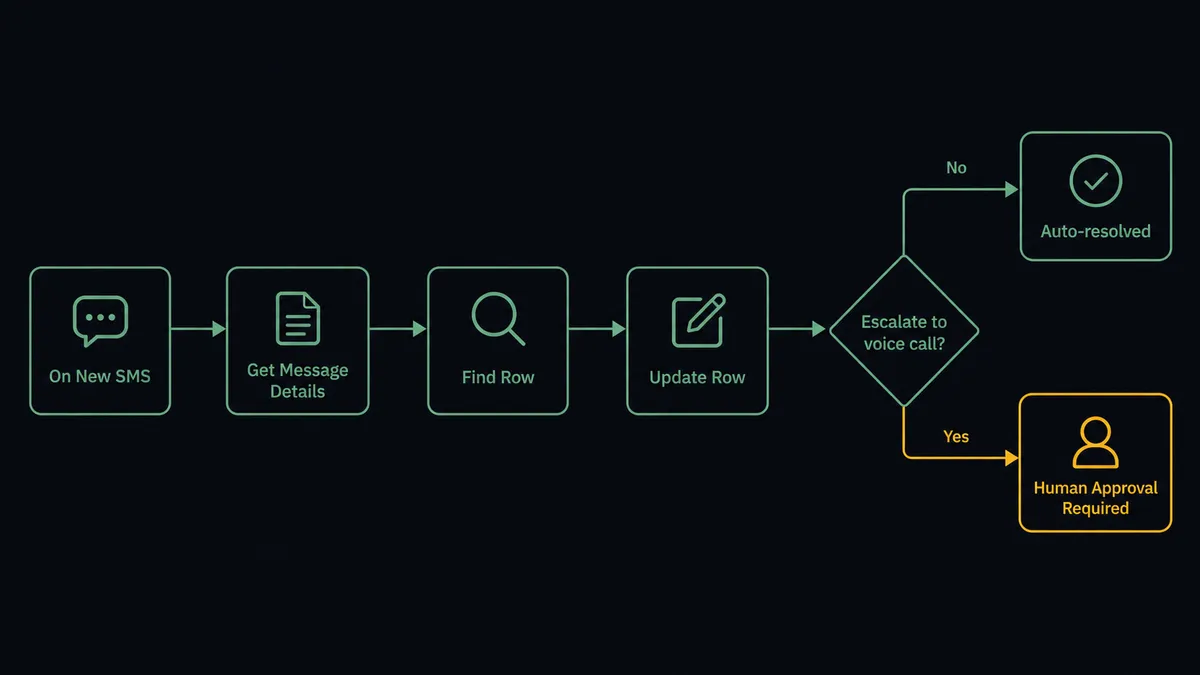
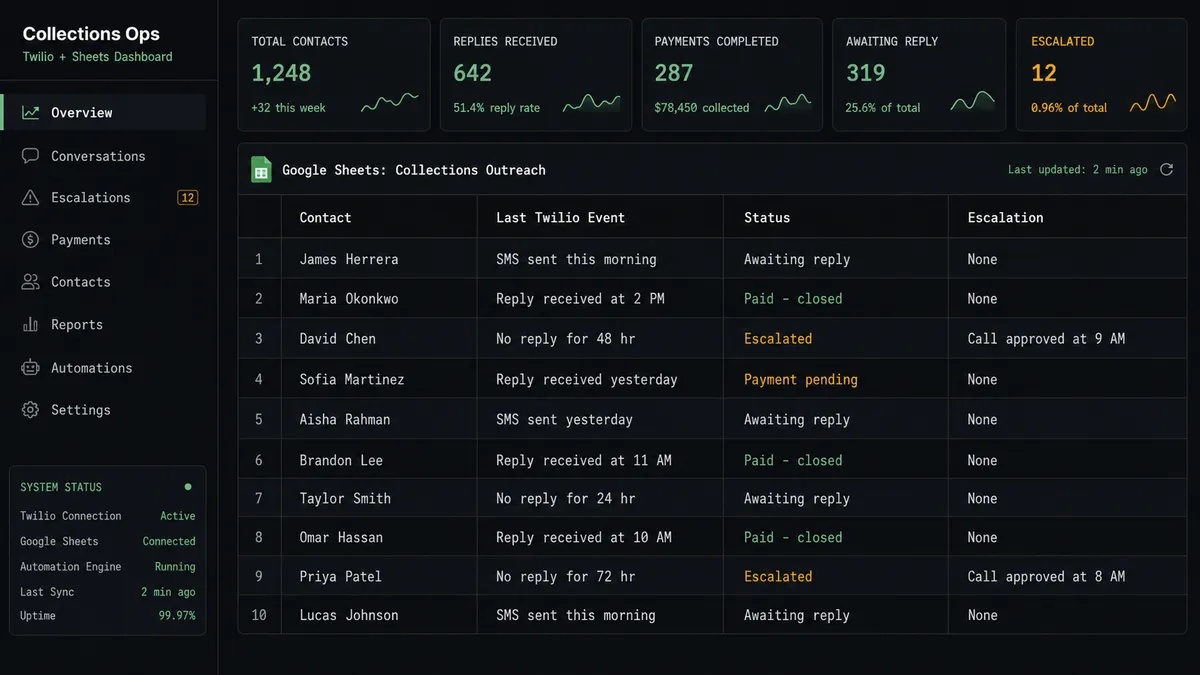
When a customer replies to an outbound SMS, the On New SMS trigger fires. The agent calls Get Message Details to confirm the message content and delivery status. It calls Find Row in the tracking sheet to locate the customer’s record. Then it calls Update Row to write the reply text, timestamp, and a status of “Responded” back to the sheet. The entire sequence completes in seconds. The sheet reflects reality without anyone touching it.
The second direction: Google Sheets drives Twilio. A new row lands in the sheet, On New Row fires, and the agent calls Send SMS to reach the contact. This is the outbound reminder sequence. A new invoice row triggers an SMS with the invoice number and payment link. A new appointment row triggers a confirmation text. The sheet is the record of truth; Twilio is the channel that reaches people.
For audit purposes, Get Message Details retrieves delivery status and error codes. List Messages returns the full communication history by date range or phone number. The sheet always has the current status; the Twilio logs have the underlying evidence.
Can an AI agent run it? And why a human stays in the loop.
The plain connection handles the predictable cases well. What it cannot do is reason about the data it is looking at.
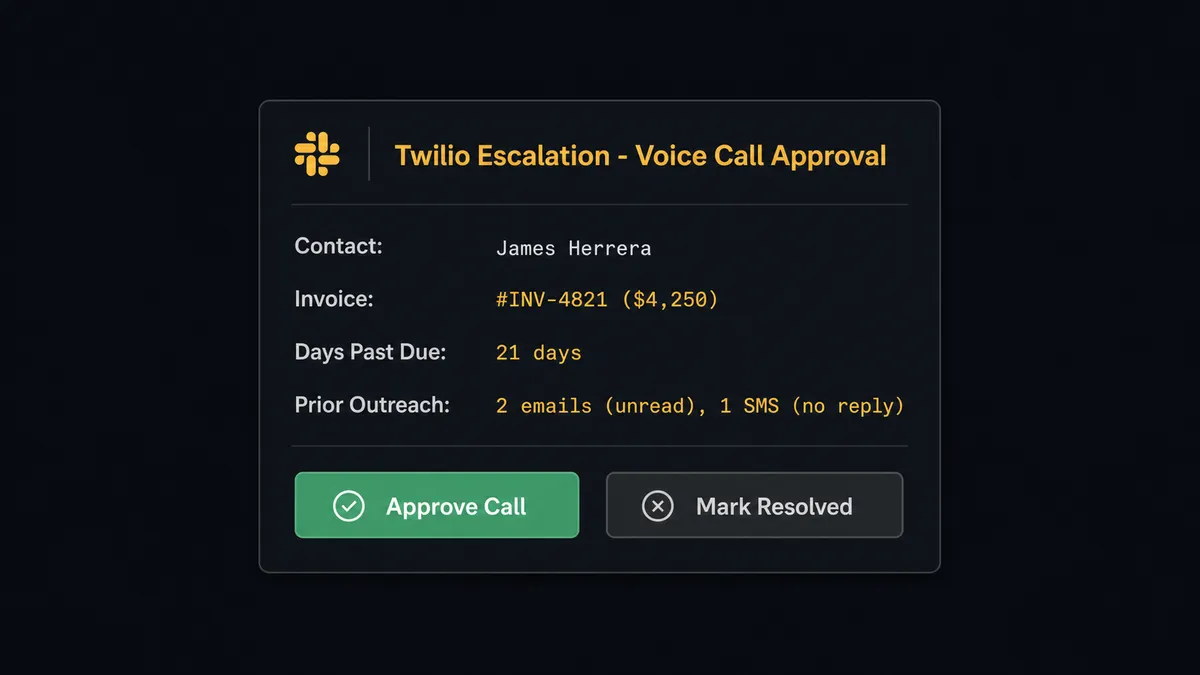
An AI agent running on this integration reads the customer’s situation, not just their latest SMS. It knows that a contact has already received two email reminders with no response, one SMS four days ago, and is now two weeks past due on a $4,250 invoice. A standard sync tool updates a row and stops. The agent evaluates whether the situation warrants escalation and decides what to do next.
This is where human-in-loop becomes the differentiator. When the agent concludes that a voice call is the right next step, it does not dial automatically. It builds a context packet for the AR manager: the contact’s name, the invoice amount and age, the number of prior reminders sent, the delivery statuses of each, and the content of any replies received. It sends that packet to the manager via Slack with two options: Approve the call or Mark as resolved. The manager has everything they need to decide in under a minute.
The agent waits. When the manager responds, the agent either calls Make Voice Call and logs the outcome to the sheet using Update Row, or it closes the escalation record and marks the row accordingly. The audit trail captures the manager’s identity, their decision, and the timestamp. No voice call goes out without a human sign-off.
Prospects describe this capability as a “digital andon cord.” The agent stops the line when the situation crosses from routine into consequential. This is not a sync tool. The agent knows when to stop and ask.
FlowRunner vs Zapier
Zapier is the right comparison for most non-technical teams connecting Twilio and Google Sheets. It has a large library of pre-built Zap templates, a clean interface, and a low learning curve. If you need a straight trigger-and-action connection with no conditional logic, Zapier gets you there quickly.
The real differences emerge when the workflow needs to reason about data or coordinate a human decision.
| Feature | Zapier | FlowRunner |
|---|---|---|
| Twilio + Google Sheets connection | Yes, via Zap templates | Yes, via native connectors |
| AI agent with reasoning | No native agent layer; Logic steps are conditional filters | AI Agent node reads context and chooses tools based on the situation |
| Human-in-loop as a callable tool | No; approval steps require separate workarounds | Human oversight is a callable flow the agent invokes autonomously |
| Unlimited users on every plan | No; per-seat pricing on most tiers | Yes; all tiers include unlimited users |
| BYOK for AI providers | No | Yes; bring your own Twilio and AI provider credentials |
| Self-hosting option | No | Yes; Community Edition is free |
| Audit trail and RBAC | Not available below Business tier | Available at Professional tier ($299/mo) |
If your team needs a Twilio-to-Sheets log and nothing more, Zapier is a reasonable tool. When the workflow needs an agent that decides whether to send a text, escalate to a call, wait for a reply, and update the record based on what the customer said, FlowRunner is the layer that makes that possible.
Before and after
| Metric | Before | After |
|---|---|---|
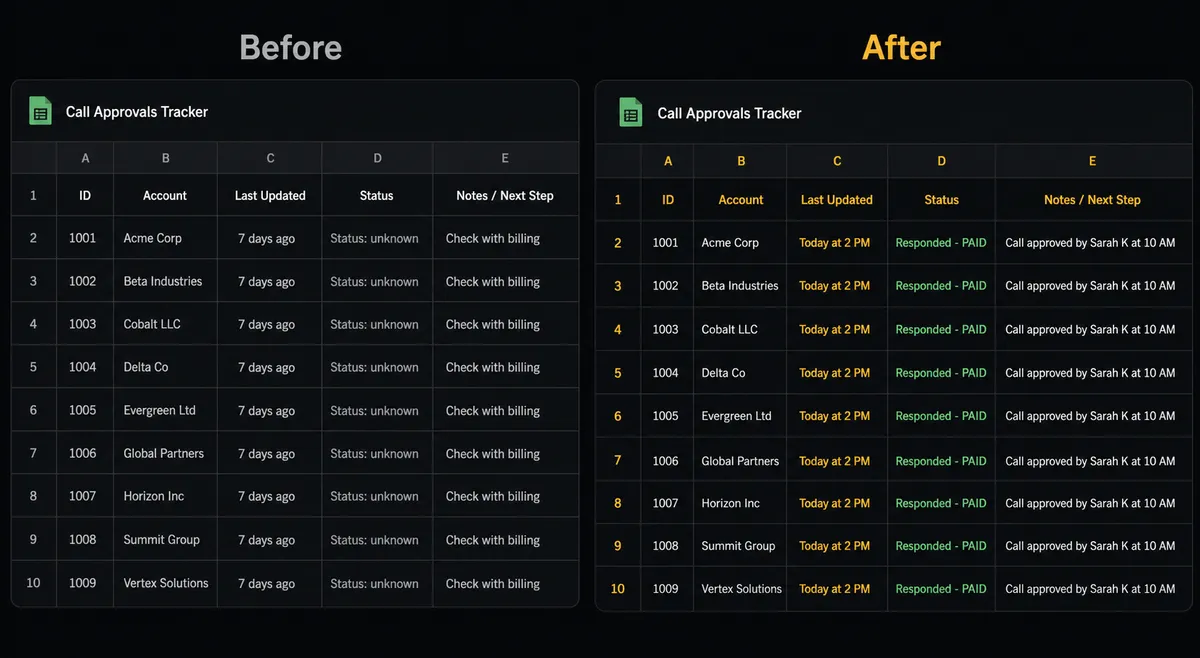
| Row update lag | Weekly batch export pasted by hand | Row updated within seconds of the Twilio event |
| Inbound reply handling | Discovered during manual review | On New SMS fires; agent matches and updates the record automatically |
| Escalation timing | Unresponsive accounts surface at the next weekly AR review | Flagged to the AR manager the same day the escalation threshold is met |
| Voice call approval | Ad hoc; manager may not know a call was placed | Structured Slack approval with full context before the agent dials |
| Audit evidence | Scattered across Twilio logs and spreadsheet notes | Unified: reply status, escalation decision, call outcome, and timestamps in one row |
| Team visibility | Only the person maintaining the sheet knows current status | Sheet is live; any team member can see the current state of any account |
What you can build
Payment reminder sequence with reply tracking. The agent sends a Twilio SMS when an invoice row is added to the sheet. On New SMS fires when the customer replies. The agent updates the row using Update Row and closes the reminder sequence if the customer confirms payment. No manual follow-up needed unless the agent flags the account for escalation.
Appointment confirmation and rescheduling flow. A new row in the appointments sheet triggers an SMS confirmation via Send SMS. The customer replies C to confirm or R to reschedule. On New SMS fires, the agent reads the reply, updates the row status, and triggers the rescheduling subflow if needed. The sheet stays current throughout.
Emergency escalation chain with logged outcomes. When a critical metric row crosses a threshold, the agent first sends a Slack alert. If no acknowledgment arrives within 15 minutes, it sends an SMS via Twilio. If no reply comes in 5 more minutes, it routes a voice-call approval to the on-call manager. Every escalation step is logged back to the sheet using Add Row, with timestamps and outcome.
Inbound SMS intake and sheet logging. On New SMS fires on a monitored Twilio number. The agent reads the message, identifies the sender using Find Row, and appends a new log entry with Add Row. Unknown numbers get a row added with status “New contact” for the team to review. The sheet becomes a complete inbound communication record.
Common questions
Is it free to connect Twilio and Google Sheets on FlowRunner? FlowRunner starts with a $100 credit on the Growth tier, which covers roughly 67 days of real usage. No credit card is required. After the credit, Growth is $45 per month. Both Twilio and Google Sheets connect with your own credentials, so the only cost beyond FlowRunner is your existing Twilio usage.
Can I self-host FlowRunner for this integration? Yes. FlowRunner offers a self-hosted Community Edition at no cost, with the same Twilio and Google Sheets connectors. Enterprise self-hosted adds multi-instance clustering and the full compliance suite.
Does the AI agent need my own API keys? FlowRunner uses a BYOK (Bring Your Own Keys) model. You connect your own Twilio account and your Google account via OAuth2. FlowRunner never holds your credentials beyond what is needed to make the connection.
What happens when the agent is not sure whether to send a message or place a call? The agent evaluates the full context, previous messages sent, customer response history, and outstanding amount, and then decides whether to escalate. When it decides a voice call is warranted, it packages that context and routes the decision to a manager via Slack before dialing. No unexpected calls go out without a human sign-off.
Can the agent log inbound Twilio replies directly to the sheet? Yes. The On New SMS trigger fires when a customer replies. The agent reads the message content, finds the matching row in the sheet using Find Row, and writes the reply and a status update back to that row using Update Row.
How many users can access the connected workflow? All FlowRunner tiers include unlimited users and unlimited workflows. There is no per-seat charge for sharing the Twilio and Google Sheets workflow with your entire team.
Getting started
FlowRunner’s $100 credit trial gives you roughly 67 days on the Growth tier. No credit card required. Corporate email gets you in.
Connect your integrations at /integrations/twilio and /integrations/google-sheets, then build the flow directly in the visual editor.
Start your trial at flowrunner.ai or book a 30-minute walkthrough at calendly.com/flowrunner/intro.