How to Connect Twilio with Slack (With or Without an AI Agent)
Connect Twilio and Slack so incoming SMS and voice triggers route directly to Slack channels, optionally as an AI agent that pauses for human sign-off before escalating to a voice call.
How do you connect Twilio to Slack?
You connect Twilio to Slack by using FlowRunner’s On New SMS trigger to detect inbound messages on your Twilio number, then routing the content to Slack with a Send Message to Channel action. FlowRunner is a visual AI-agent orchestration platform where automations run autonomously and pause for human judgment on the steps that carry real consequence. That same connection can run as an AI agent that reads the message, evaluates the customer’s history, and decides whether to reply automatically, escalate to a Slack thread, or hold for manager approval before placing a voice call.
The problem with managing Twilio and Slack separately
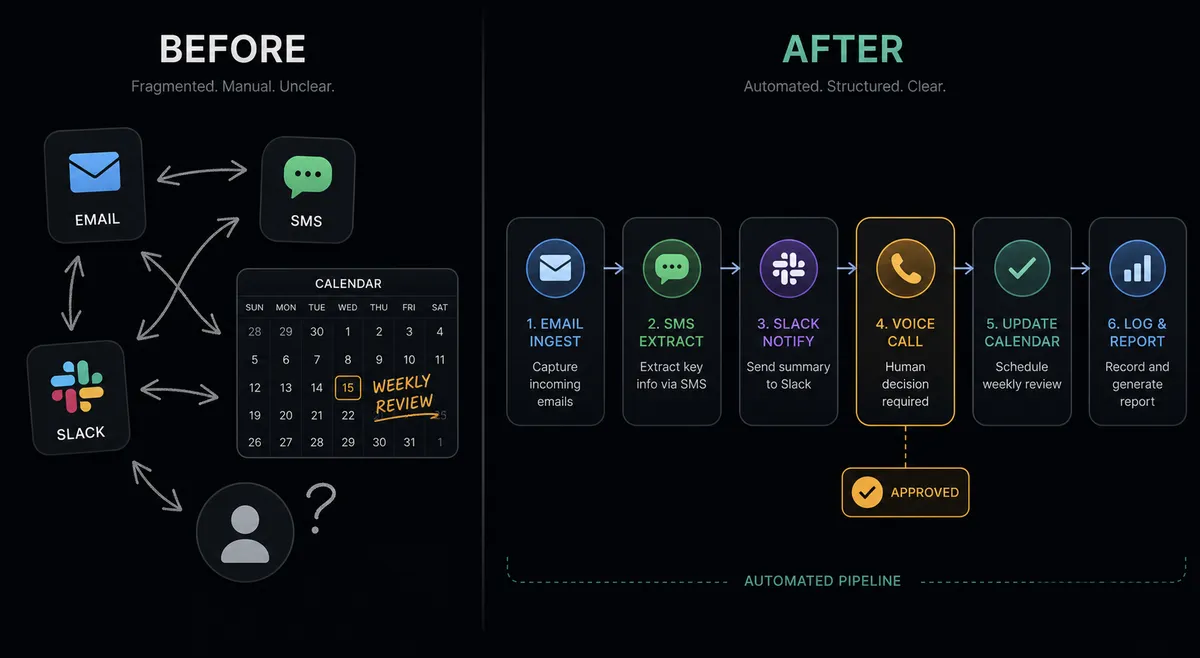
Most teams use Twilio for outbound reminders and inbound replies, and Slack for internal coordination. The two systems do not talk to each other, so the connection lives inside someone’s head. An AR coordinator sends an SMS reminder. The customer replies. The coordinator checks Twilio, decides to escalate, writes a Slack message to their manager, waits for a response, then manually initiates the next step. At each handoff, something falls through the cracks.
The bigger issue is the escalation chain. When a customer stops responding to email and SMS, the decision to place a voice call requires a human. But nothing in a manual process surfaces that moment reliably. Managers learn about unresponsive accounts during the weekly AR review, not the day it matters. By then, seven days of collection time have passed.
How it works: the connection
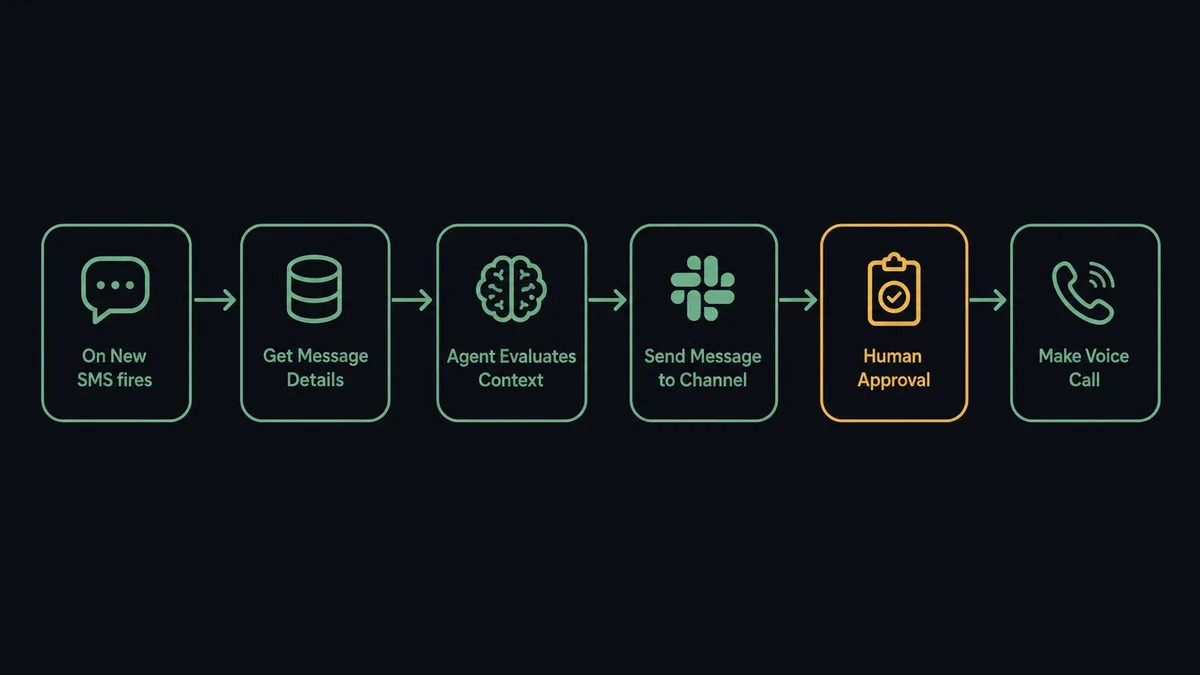
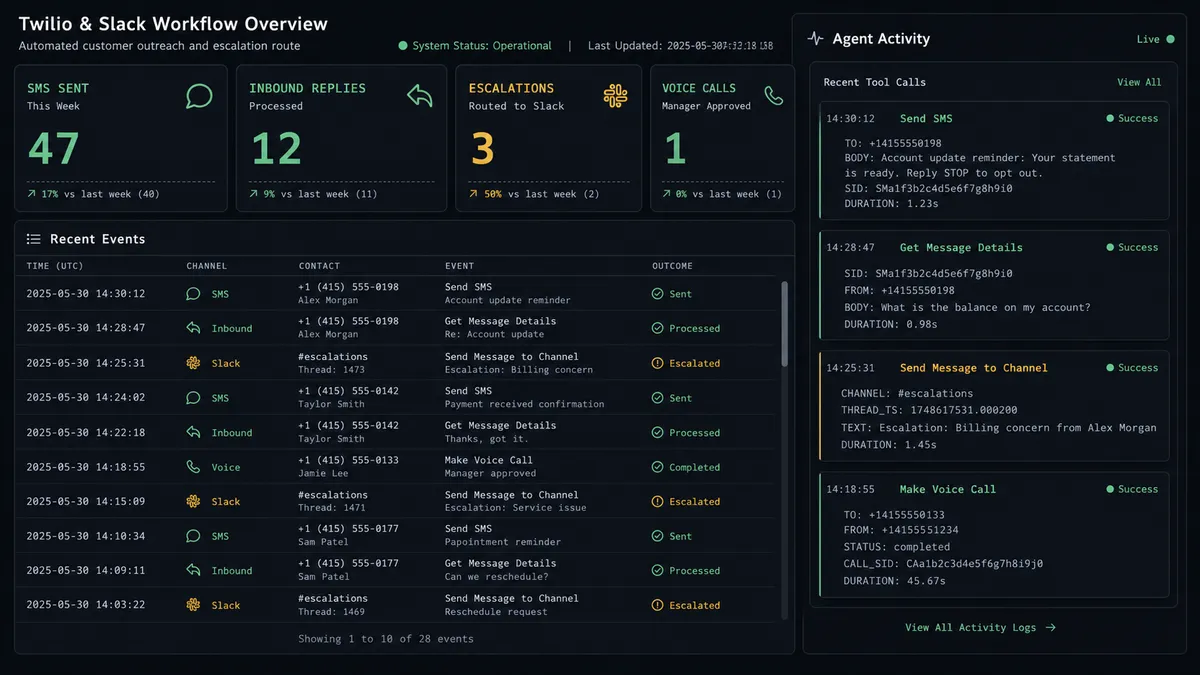
The base connection is straightforward. When a customer sends an SMS to your Twilio number, the On New SMS trigger fires in FlowRunner. The agent pulls the message body, the sender’s phone number, and the timestamp. It then calls Send Message to Channel in Slack, posting the full details to a designated channel: #ar-team, #ops-escalations, wherever your team monitors.
For outbound flows, the pattern reverses. A CRM update or a schedule trigger kicks off the workflow. The agent uses Send SMS to send a payment reminder, appointment confirmation, or operations alert. If the customer replies, On New SMS fires and the agent processes the response: a PAID reply closes the sequence, a RESCHEDULE reply starts the rescheduling flow, silence after 24 hours triggers the next escalation step.
The data that maps across: sender phone number, message body, delivery status from Get Message Details, and communication history from List Messages. Every piece of context lands in Slack so the human reading it has what they need without switching systems.
Can an AI agent run it? (And why a human stays in the loop)
A basic Twilio-to-Slack connection routes data. An AI agent reasons about it.
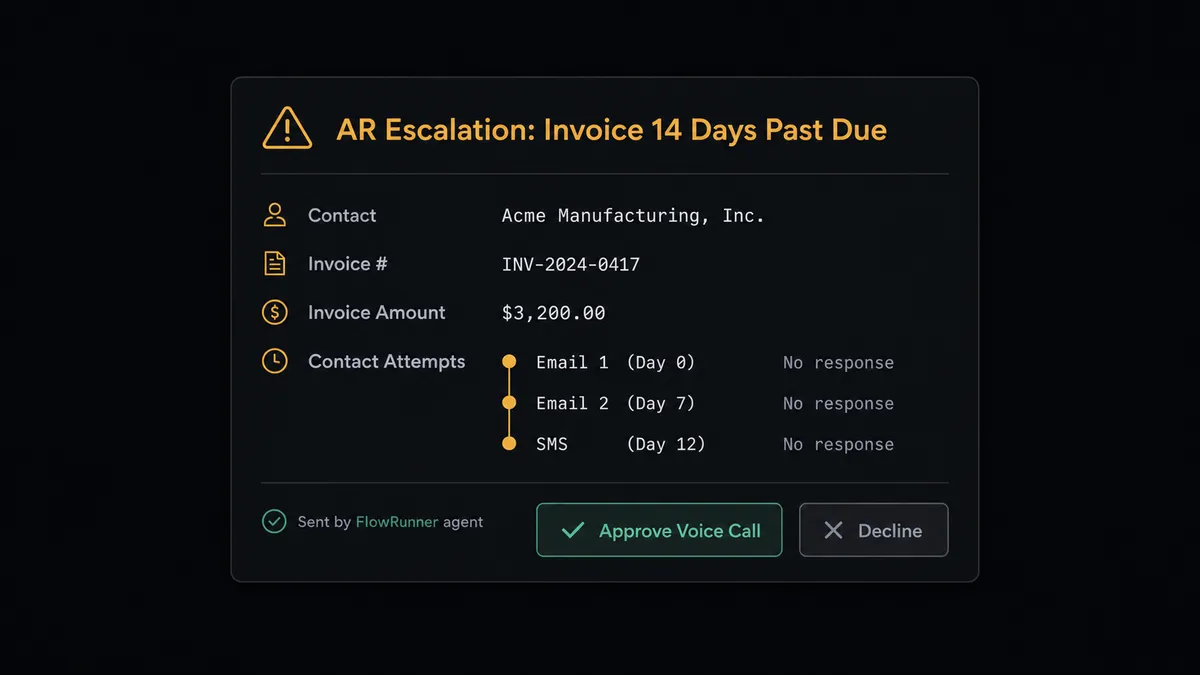
Here is the scenario from the Twilio integration’s own workflow data. An invoice is 14 days past due. The agent checks the customer’s communication history using Get Message Details and List Messages. It has already sent two email reminders and one SMS with no response. This is not the agent’s first look at this contact.
The agent does not automatically place a voice call. It knows that calling someone on behalf of a business without a human making that decision is the kind of step that creates problems. Instead, it packages what it found and sends a Slack message to the AR manager: “Contact [Name] has not responded to two emails and one SMS about invoice #[number] for $[amount]. The invoice is 14 days past due. Approve voice call outreach?”
The message includes interactive buttons powered by Slack’s Block Kit. On Block Action fires when the manager clicks Approve or Decline. If the manager approves, the agent calls Make Voice Call, logs the outcome with Get Call Details, and updates the audit trail. If the manager declines, the agent closes the escalation and logs the decision.
The agent escalated because of context. Not a hardcoded rule. This is the digital andon cord: the agent stops the line when it hits a step that carries real consequence.
FlowRunner vs Zapier
Zapier is the tool most non-technical teams reach for when they want to connect Twilio and Slack. It is genuinely good at simple, trigger-action connections. Setup is fast, the interface is familiar, and there are pre-built Zaps for common patterns. For a team that needs a straightforward “SMS in, Slack message out” flow, Zapier works.
The real differences show up when the workflow requires reasoning, multi-step escalation, or human decisions that resume automation.
| Feature | Zapier | FlowRunner |
|---|---|---|
| Simple trigger-action connections | Yes, fast setup | Yes, with the same ease |
| AI agent that reasons about context | No | Yes, native agent node with tool selection |
| Human-in-loop as a callable tool | No | Yes, agent invokes human approval as a workflow tool |
| Interactive Slack buttons that resume automation | No | Yes, via On Block Action trigger |
| Unlimited users on every paid tier | No (seat-based pricing) | Yes, all tiers |
| Self-hosted option | No | Yes, Community Edition (free) and Enterprise |
| BYOK for AI providers | No | Yes, bring your own Twilio and AI provider keys |
Zapier can send a Slack notification when a Twilio SMS arrives. It cannot evaluate the communication history, decide whether escalation is warranted, and pause for manager approval before placing a call. That gap is where the work actually lives for operations teams.
Before and after
| Category | Before | After |
|---|---|---|
| Escalation timing | Managers learn about unresponsive accounts at the weekly AR review | Unresponsive accounts flagged to AR manager the same day the threshold is crossed |
| Escalation decision | Coordinator writes a manual Slack message and waits for a reply | Agent sends a structured approval card with full context; manager approves in one click |
| Voice call authorization | No systematic process; calls happen inconsistently or not at all | Every outbound call requires explicit manager approval, logged in the audit trail |
| Inbound SMS handling | Coordinator checks Twilio manually and writes a Slack message | On New SMS fires, agent routes message to Slack with full context automatically |
| Communication history | Scattered across email threads and Twilio logs | Agent retrieves full history with List Messages and Get Message Details before each action |
| Audit trail | No record of who approved what escalation or when | Every approval and decline captured with approver identity and timestamp |
What you can build
Payment reminder escalation sequence. Start with a schedule trigger. The agent sends an SMS reminder via Send SMS, waits 24 hours, checks for a reply with On New SMS, and posts a Slack escalation to the AR manager if none arrives. On manager approval via On Block Action, the agent places a voice call with Make Voice Call and logs the outcome.
Inbound SMS to Slack routing. On New SMS fires when a customer texts your Twilio number. The agent parses the message, identifies the sender using your CRM data, and routes it to the right Slack channel using Send Message to Channel with the sender’s name, message, and account status. No manual checking of Twilio logs.
Emergency alert escalation chain. A threshold breach in a monitored system triggers the agent. It posts to a Slack channel first using Send Message to Channel. If no On Block Action response arrives within 15 minutes, the agent sends an SMS to the on-call manager. If there is still no response after 5 minutes, the agent requests approval for a voice call. Critical situations do not wait for someone to check Slack.
Appointment confirmation and reschedule handling. On Invitee Created fires from Calendly. The agent sends an SMS confirmation via Send SMS. On New SMS fires when the customer replies. The agent routes CONFIRM replies to CRM logging and RESCHEDULE replies to a rescheduling subflow, posting a summary to the team’s Slack channel either way.
Common questions
Is it free to connect Twilio and Slack on FlowRunner? FlowRunner gives every new account a $100 credit on the Growth tier, which covers roughly 67 days of real work and requires no credit card. After the trial, Growth is $45 per month and includes unlimited users and workflows.
Can I self-host the Twilio and Slack integration? Yes. FlowRunner offers a self-hosted Community Edition at no cost and an Enterprise self-hosted option for teams that need multi-instance clustering and full compliance features.
Does the AI agent need my own Twilio API key? Yes. FlowRunner uses a bring-your-own-keys model. You connect your Twilio account using your Account SID and Auth Token, so your credentials stay under your control and your usage stays on your own Twilio account.
What happens when the agent is not sure whether to place a voice call? The agent pauses execution and sends a Slack message to the right person with full context: which contact has not responded, how many attempts have been made, and what the stakes are. The human approves or declines. The agent resumes with the decision logged in the audit trail.
Can I route Twilio inbound SMS to a specific Slack channel automatically? Yes. Use the On New SMS trigger in Twilio to fire a FlowRunner workflow that posts the message content to any Slack channel using Send Message to Channel. The agent can also parse the SMS and route it to different channels based on the content.
Does FlowRunner support multiple Slack workspaces? Yes. Slack connects via OAuth2 and supports multi-workspace configurations, so a single FlowRunner workflow can route messages across workspaces.
Getting started
FlowRunner’s Growth tier starts at $45 per month and includes unlimited users, unlimited workflows, BYOK for AI providers, and the full human-in-loop capability. Every new account starts with $100 in free credit, which covers roughly 67 days of real usage. No credit card required.
Connect both integrations before you start: Twilio and Slack.
Ready to build the connection now? Start at flowrunner.ai. Prefer to walk through the setup with someone? Book 30 minutes at calendly.com/flowrunner/intro.